2010 FORD FUSION HYBRID light
[x] Cancel search: lightPage 44 of 329
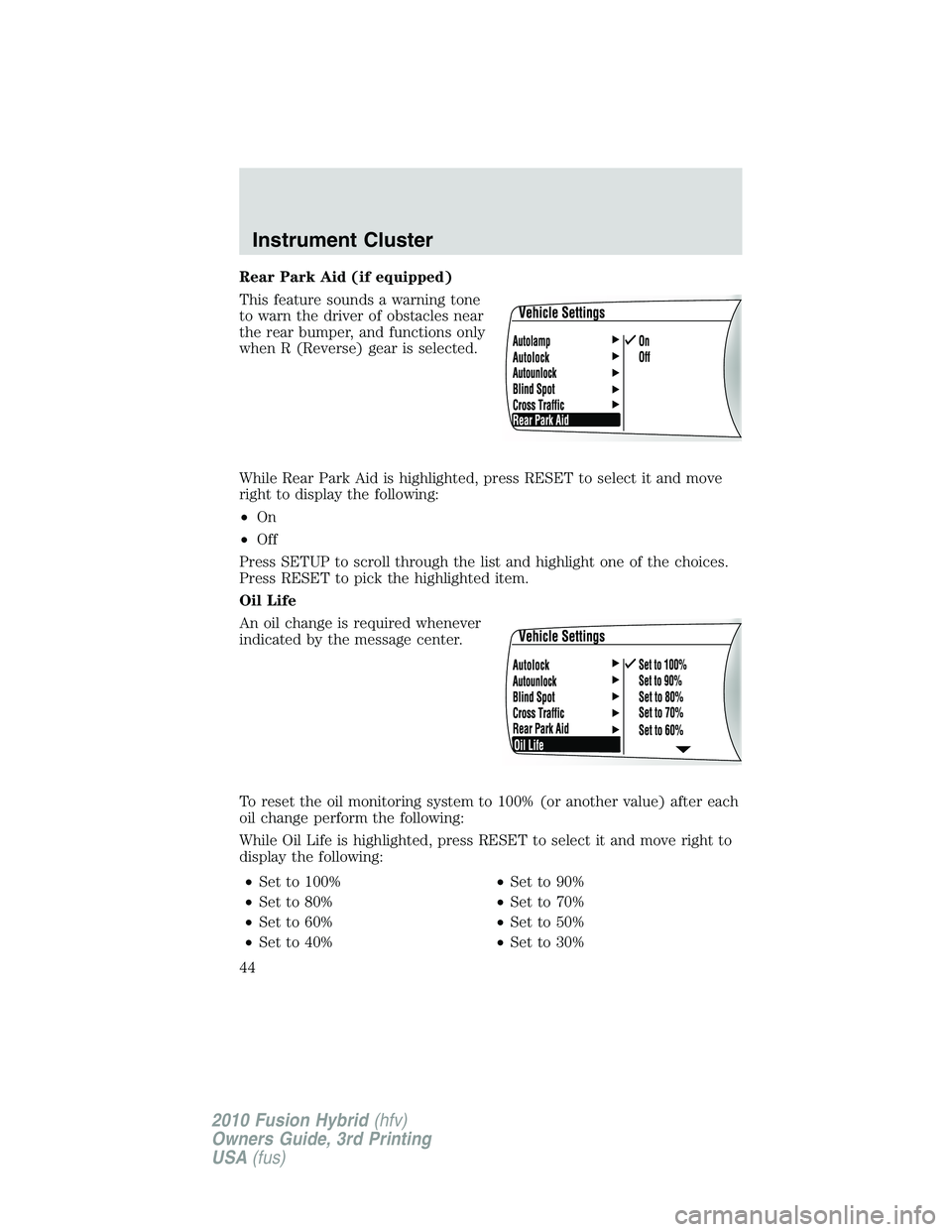
Rear Park Aid (if equipped)
This feature sounds a warning tone
to warn the driver of obstacles near
the rear bumper, and functions only
when R (Reverse) gear is selected.
While Rear Park Aid is highlighted, press RESET to select it and move
right to display the following:
•On
•Off
Press SETUP to scroll through the list and highlight one of the choices.
Press RESET to pick the highlighted item.
Oil Life
An oil change is required whenever
indicated by the message center.
To reset the oil monitoring system to 100% (or another value) after each
oil change perform the following:
While Oil Life is highlighted, press RESET to select it and move right to
display the following:
•Set to 100%•Set to 90%
•Set to 80%•Set to 70%
•Set to 60%•Set to 50%
•Set to 40%•Set to 30%
Instrument Cluster
44
2010 Fusion Hybrid(hfv)
Owners Guide, 3rd Printing
USA(fus)
Page 45 of 329

•Set to 100%•Set to 90%
•Set to 20%•Set to 10%
Press SETUP to scroll through the list and highlight one of the choices.
Press RESET to pick the highlighted item.
Note:Oil life of 100% equals 10,000 miles (16,000 km) or 12 months.
For example, setting oil life to 60% sets the oil life value to 6,000 miles
(10,000 km) and 219 days.
See theMaintenance and Specificationschapter regarding engine oil
and change intervals.
System Check
Press SETUP to reach System
Check.
While System Check is highlighted,
press RESET to cycle the message
center through each of the systems
being monitored:
1. OIL LIFE 2. ELECTRIC DRIVE
3. CHARGING SYSTEM 4. DOORS CLOSED
5. TRUNK CLOSED 6. BLINDSPOT (if equipped)
7. CROSS TRAFFIC (if equipped) 8. BRAKE SYSTEM
9. FUEL LEVEL XXX mi (km)
Demo
The demo briefly displays each of
the gauge displays available.
Press SETUP to reach Demo.
While Demo is highlighted, press
RESET to start the demo. Pressing
INFO, SETUP or RESET will exit
the demo.
Instrument Cluster
45
2010 Fusion Hybrid(hfv)
Owners Guide, 3rd Printing
USA(fus)
Page 46 of 329
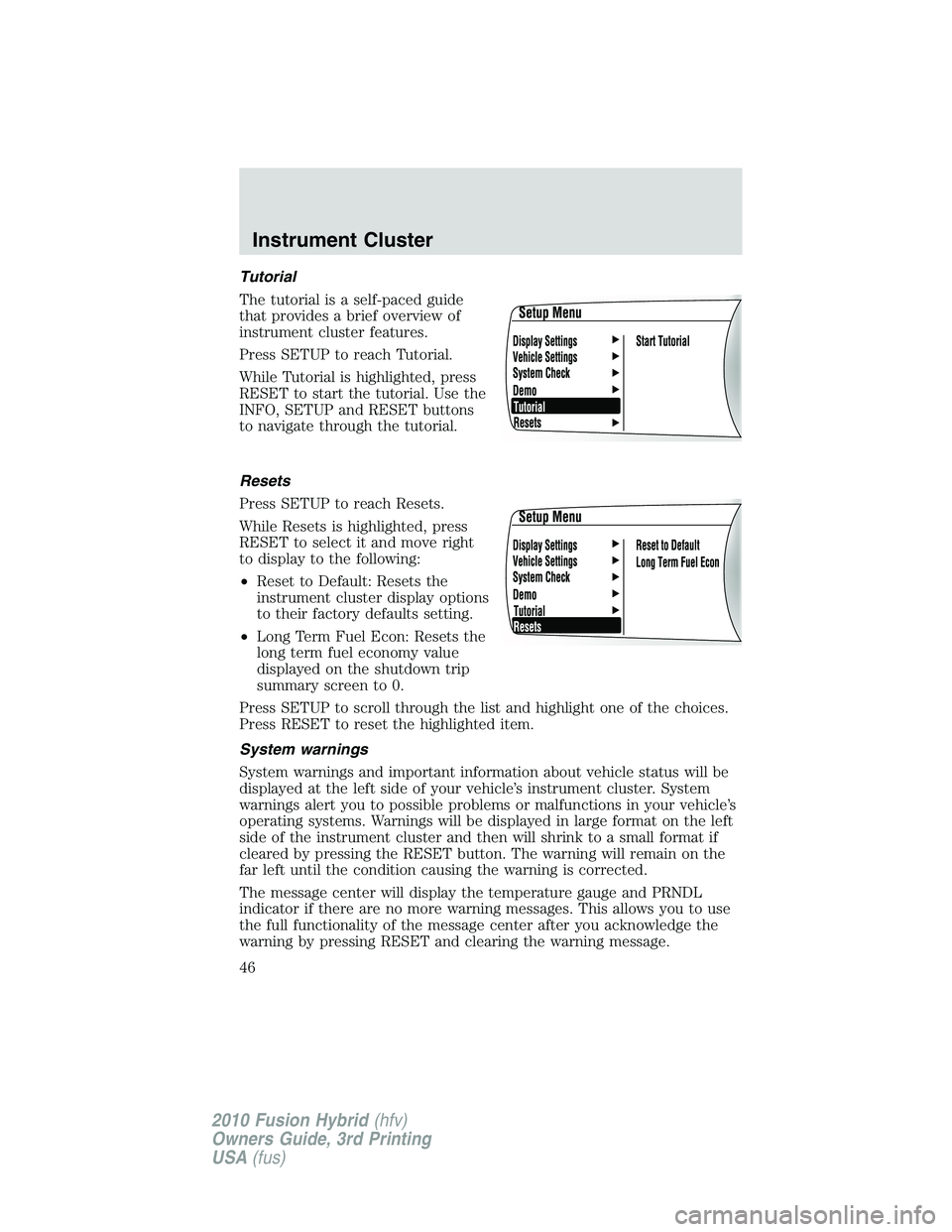
Tutorial
The tutorial is a self-paced guide
that provides a brief overview of
instrument cluster features.
Press SETUP to reach Tutorial.
While Tutorial is highlighted, press
RESET to start the tutorial. Use the
INFO, SETUP and RESET buttons
to navigate through the tutorial.
Resets
Press SETUP to reach Resets.
While Resets is highlighted, press
RESET to select it and move right
to display to the following:
•Reset to Default: Resets the
instrument cluster display options
to their factory defaults setting.
•Long Term Fuel Econ: Resets the
long term fuel economy value
displayed on the shutdown trip
summary screen to 0.
Press SETUP to scroll through the list and highlight one of the choices.
Press RESET to reset the highlighted item.
System warnings
System warnings and important information about vehicle status will be
displayed at the left side of your vehicle’s instrument cluster. System
warnings alert you to possible problems or malfunctions in your vehicle’s
operating systems. Warnings will be displayed in large format on the left
side of the instrument cluster and then will shrink to a small format if
cleared by pressing the RESET button. The warning will remain on the
far left until the condition causing the warning is corrected.
The message center will display the temperature gauge and PRNDL
indicator if there are no more warning messages. This allows you to use
the full functionality of the message center after you acknowledge the
warning by pressing RESET and clearing the warning message.
Instrument Cluster
46
2010 Fusion Hybrid(hfv)
Owners Guide, 3rd Printing
USA(fus)
Page 58 of 329
when the system accepts your entry it will display ENTER NEW PIN.
Enter your new four-digit PIN and the system will save the new PIN
and PIN SAVED will display.
c. UNLOCK ALL CHANNELS:Press OK when UNLOCK ALL
CHANNELS is displayed and the display will read ENTER PIN. Enter
your four-digit PIN and the system will unlock all channels and the
display will read CHANNEL UNLOCKED.
d. RESET PIN:Press OK when RESET PIN is displayed. The display
will read ARE YOUR SURE. Press OK again to automatically reset the
PIN to its initial password setting (1234). PIN RESET TO DEFAULT
PIN will be displayed.
e. RETURN:Press OK when RETURN is displayed and the system
will exit back to the satellite radio menu.
Sound Adjustments
Press SOUND repeatedly to cycle through the following features:
BASS:Press
SEEK/TRACKto adjust the level of bass.
TREBLE:Press
SEEK/TRACKto adjust the level of treble.
BALANCE:Press
SEEK/TRACKto adjust the audio between
the left (L) and right (R) speakers.
FADE:Press
SEEK/TRACKto adjust the audio between the
back (B) and front (F) speakers.
SPEED COMPENSATED VOLUME:With this feature on, radio volume
automatically gets louder with increasing vehicle speed to compensate
for road and wind noise.
The default setting isoff.
Use
SEEK/TRACKto adjust between SPEED OFF and levels
1–7:Increasing the level from 1 (lowest setting) to 7 (highest setting)
allows the radio volume to automatically change slightly with vehicle
speed to compensate for road and wind noise.
Recommended level is1–3;SPEED OFF turns the feature off and level 7
is the maximum setting.
ALL SEATS (Occupancy mode, if equipped):Press SOUND
repeatedly to reach the Occupancy mode setting. Press
SEEK/TRACKto select and optimize sound for ALL SEATS,
DRIVERS SEAT or REAR SEATS.
Entertainment Systems
58
2010 Fusion Hybrid(hfv)
Owners Guide, 3rd Printing
USA(fus)
Page 62 of 329
•Terrain: Hills, mountains, tall buildings, power lines, electric fences,
traffic lights and thunderstorms can interfere with your reception.
•Station overload: When you pass a broadcast tower, a stronger signal
may overtake a weaker one and play while the weak station frequency
is displayed.
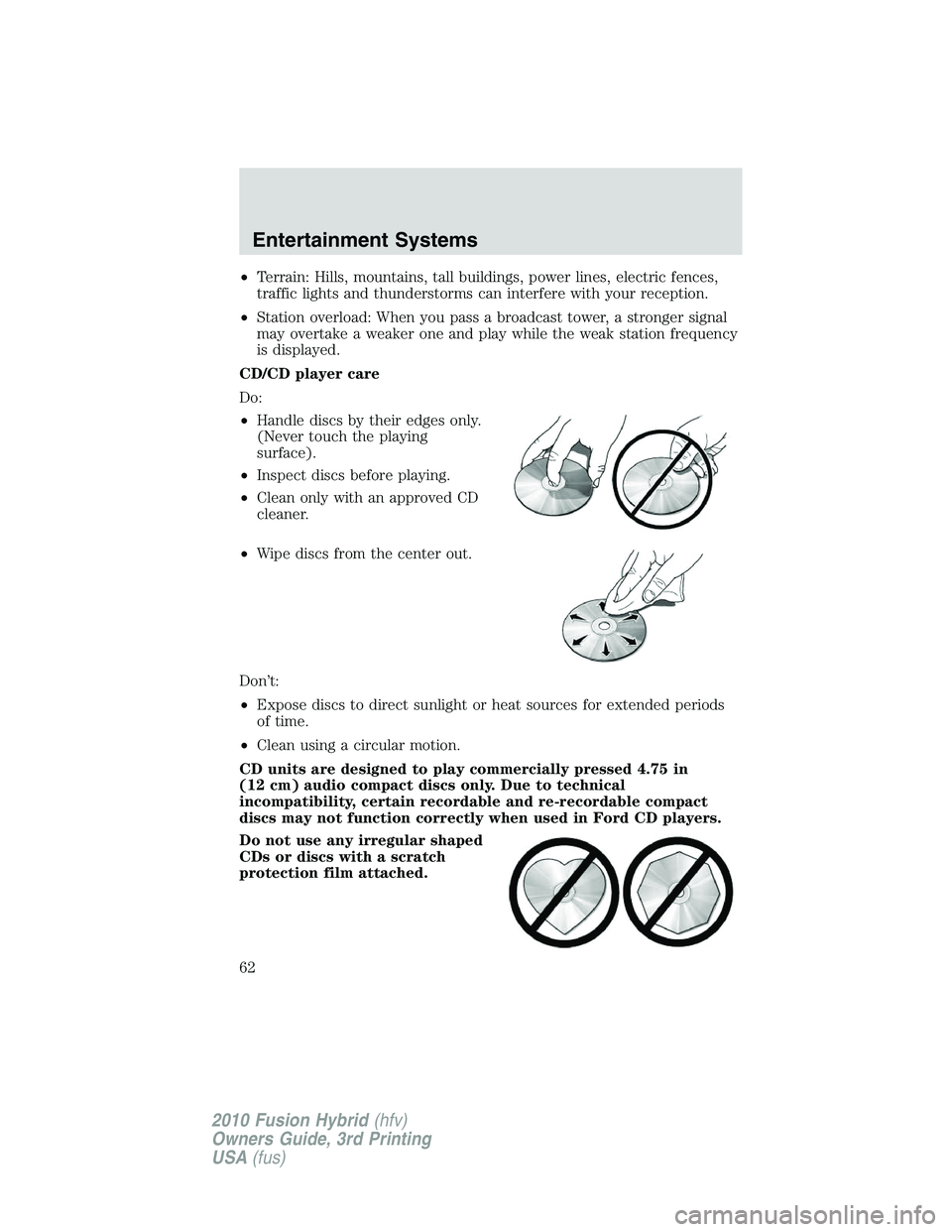
CD/CD player care
Do:
•Handle discs by their edges only.
(Never touch the playing
surface).
•Inspect discs before playing.
•Clean only with an approved CD
cleaner.
•Wipe discs from the center out.
Don’t:
•Expose discs to direct sunlight or heat sources for extended periods
of time.
•Clean using a circular motion.
CD units are designed to play commercially pressed 4.75 in
(12 cm) audio compact discs only. Due to technical
incompatibility, certain recordable and re-recordable compact
discs may not function correctly when used in Ford CD players.
Do not use any irregular shaped
CDs or discs with a scratch
protection film attached.
Entertainment Systems
62
2010 Fusion Hybrid(hfv)
Owners Guide, 3rd Printing
USA(fus)
Page 74 of 329

signify that the feature has been disabled. The system will return to the
previous mode afterDualis release.
To re-enable the smart-zone feature:Press and holdDualfor more
than four seconds. The driver’s temperature display will begin flashing to
signify that the feature has been re-enabled. The system will return to
the previous mode afterDualis released.
Max A/C:Activates air conditioning and distributes recirculated,
conditioned air through the instrument panel vents to provide maximum
cooling performance. Maximum cooling performance, however, may
decrease fuel efficiency in order to fully maintain interior cabin comfort.
VOICE COMMANDS IN CLIMATE MODE
Please refer to theVoice commands in climate modesection of the
Navigation supplementfor more information on using voice commands
with the climate control system.
Operating tips
•To reduce fog build-up on the windshield during humid weather,
select
(defrost) or(floor/defrost).
•To reduce humidity build-up inside the vehicle, do not drive with the
system OFF or with
(recirculated air) engaged and A/C off.
•Do not put objects under the front seats that will interfere with the
airflow to the back seats.
•Remove any snow, ice or leaves from the air intake area at the base of
the windshield.
•To improve the A/C cool down, drive with the windows slightly open
for 2-3 minutes after start up or until the vehicle has been “aired out.”
During extreme high ambient temperatures when idling stationary for
extended periods of time in gear, it is recommended to run the A/C in
the MAX A/C position, reduce blower fan speed from the highest setting
and put the vehicle’s transmission into the P (Park) gear position (for
automatic transmissions) to continue to receive cool air from your A/C
system.
For maximum cooling performance:
•Automatic operation:
1. Press AUTO for full automatic operation.
2. Do not override A/C or
(recirculated air).
Climate Controls
74
2010 Fusion Hybrid(hfv)
Owners Guide, 3rd Printing
USA(fus)
Page 75 of 329
3. Set the temperature to 60°F (16°C).
•Manual operation:
1. Select MAX A/C.
2. Select
or.
3. Select
(recirculated air) to provide colder airflow.
4. Set the temperature to 60°F (16°C).
5. Set highest fan setting initially, then adjust to maintain comfort.
To aid in side window defogging/demisting in cold weather:
1. Select
.
2. Select A/C.
3. Adjust the temperature control to maintain comfort.
4. Set the fan speed to the highest setting.
5. Direct the outer instrument panel vents towards the side windows.
To increase airflow to the outer instrument panel vents, close the vents
located in the middle of the instrument panel.
REAR WINDOW DEFROSTER
R
The rear defroster control is located on the climate control panel and
works to clear the rear window of fog and thin ice.
The engine must be running to operate the rear window defroster.
Press
Rto turn the rear window defroster on. An indicator light on the
button will illuminate when active. The rear window defroster turns off
automatically after a predetermined amount of time, if a low battery
condition is detected or when the ignition is turned off or to the
accessory position. To manually turn off the rear window defroster at any
time, press the control again.
If your vehicle is equipped with both rear defroster and heated mirrors,
the same button will activate both. Refer toExterior mirrorsin the
Driver Controlschapter.
Do not use razor blades or other sharp objects to clean the inside
of the rear window or to remove decals from the inside or the
rear window. This may cause damage to the heated grid lines and
will not be covered by your warranty.
Climate Controls
75
2010 Fusion Hybrid(hfv)
Owners Guide, 3rd Printing
USA(fus)
Page 76 of 329

HEADLAMP CONTROL
Turns the lamps off.
Turns on the parking lamps,
instrument panel lamps, license
plate lamps and tail lamps.
Turns the low beam headlamps
on.
Autolamp control (if equipped)
The autolamp system provides light
sensitive automatic on-off control of
the exterior lights normally
controlled by the headlamp control.
•To turn autolamps on, rotate the
control to
.
•To turn autolamps off, rotate the
control from the autolamp
position.
The autolamp system also keeps the lights on for a predetermined
amount of time after the ignition switch is turned to off. You can change
the amount of time the lamps stay on by using the programming
procedure that follows:
Note:If the vehicle is equipped with autolamps, it will have the
headlamps on with windshield wipers feature.If the windshield
wipers are turned on, the exterior lamps will turn on with the headlamp
control in the autolamp position.
Autolamps - programmable exit delay
Programmable exit delay allows the length of the autolamp exit delay to
be changed.
To program the auto lamp exit time delay:
1. Start with the ignition in the off position and the headlamp control in
the autolamp position.
2. Turn the headlamp control to off.
3. Turn the ignition switch to on and then back to off.
Lights
76
2010 Fusion Hybrid(hfv)
Owners Guide, 3rd Printing
USA(fus)