Page 42 of 274

Fade:Press FADE; then press
SEL
/to shift sound to the
rear/front speakers.
9.Menu:Press to access the
following functions:
Compression:Brings soft and loud
CD passages together for a more
consistent listening level when in CD mode. Press MENU until
compression status is displayed. Press the SEL control to enable the
compression feature when COMPRESS OFF is displayed. Press the SEL
control again to disable the feature when COMPRESS ON is displayed.
Autoset:Press MENU until AUTOSET appears in the display. Press SEL
to switch between ON andOFF. Allows you to set the strongest local
radio stations without losing your original manually set preset stations
for AM/FM1/FM2. When the six strongest stations are filled, the station
stored in preset 1 will begin playing. If there are less than six strong
stations, the system will store the last one in the remaining presets.
Setting the clock:Press MENU until SELECT HOUR or SELECT
MINUTE is displayed. Use SEL to manually increase (
) or decrease
(
) the hours/minutes. Press MENU again to disengage clock mode.
Folder/Track Mode:In MP3 mode, press MENU until MODE appears in
the display. Use SEL to switch between FOLDER (only tracks within
selected folder are accessible) or TRACK (all tracks on disc are
accessible) MODE.
10.REPEAT:Press to repeat the
current CD/MP3 track. Press again
to disable.
11.SHUFFLE:Press play the
CD/MP3 tracks on the current disc
in random order. Press again to
disable.
12.FOLDER
: Press to access
the next MP3 directory.
Entertainment Systems
42
2010 F-650/750(f67)
Supplement(supplement), 1st Printing
USA(fus)
Page 43 of 274

13.FOLDER: Press to access
the previous MP3 directory
14.FF(Fast forward): In CD/MP3
mode, press until desired selection
is reached.
15.REW(Rewind): In CD/MP3
mode, press until desired selection
is reached.
16.SAT (if equipped):Your radio
comes equipped with Satellite Ready
capability. The kit to enable the
Satellite reception is available through your dealer. Detailed satellite
instructions are included with the dealer installed kit.Dealer installed
satellite kit only available in the continental United States.
17.BAND:Press to switch between
AM/FM1/FM2 frequency band.
18.Memory presets:To set a
station: Select frequency, tune to a
station, press and hold a preset
button until sound returns.
19.Power/volume:Press to turn on
and off; turn to increase or decrease
volume levels.
20.Load:Press to load a CD. Press
LOAD and a memory preset to load
to a specific disc slot. Press and
hold to load up to six discs.
21.CD:Press to enter CD mode.
CD units are designed to play commercially pressed 4.75 in
(12 cm) audio compact discs only. Due to technical
incompatibility, certain recordable and re-recordable compact
discs may not function correctly when used in Ford CD players.
Irregular shaped CDs, CDs with a scratch protection film
Entertainment Systems
43
2010 F-650/750(f67)
Supplement(supplement), 1st Printing
USA(fus)
Page 50 of 274

PANEL DIMMER CONTROL
Use to adjust the brightness of the
instrument panel and all applicable
switches in the vehicle during
headlamp and parklamp operation.
Rotate the control to the full up
position, past the detent, to turn on
the interior lamps.
Rotate the control to the full down
position, past the detent, to prevent
the interior lights from illuminating when the doors are opened.
AIMING THE HEADLAMPS
The headlamps on your vehicle are properly aimed at the assembly plant.
If your vehicle has been in an accident the alignment of your headlamps
should be checked by a qualified service technician.
TURN SIGNAL CONTROL
•Push down to activate the left
turn signal.
•Push up to activate the right turn
signal.
If your vehicle is a tractor, the turn signals may not shut off when a turn
is completed; this is normal. Please see your dealer if there are any
questions on the options your vehicle has been equipped with.
Lights
50
2010 F-650/750(f67)
Supplement(supplement), 1st Printing
USA(fus)
Page 56 of 274
Improper use of the lighter can cause damage not covered by your
warranty.
POWER WINDOWS (IF EQUIPPED)
WARNING:Do not leave children unattended in the vehicle and
do not let children play with the power windows. They may
seriously injure themselves.
WARNING:When closing the power windows, you should verify
they are free of obstructions and ensure that children and/or
pets are not in the proximity of the window openings.
Press and hold the rocker switches to open and close windows.
•Press the top portion of the
rocker switch to close.
•Press the bottom portion of the
rocker switch to open.
AUTO
AUTO
Driver Controls
56
2010 F-650/750(f67)
Supplement(supplement), 1st Printing
USA(fus)
Page 59 of 274

The mirror heating elements are designed to operate regardless of the
geographic location of the vehicle. There is no switch to turn on, or
other operator involvement required other than to start the vehicle.
The spotter mirror (if equipped) is not heated.
Foldaway mirrors
The mirrors can be manually folded
forward or backwards for narrow
spaces like driving through an
automatic car wash or backing out
of a garage with the trailer tow
mirror.
The telescoping feature (if
equipped) allows the mirror to
extend approximately three inches
(76 mm). This feature is especially
useful to the driver when towing a
trailer.
SPEED CONTROL (IF EQUIPPED)
To turn speed control on
Press CRUISE RPM. If the vehicle is
moving, speed control will be
enabled; if the vehicle is stationary,
engine RPM can be controlled.
WARNING:Do not use the speed control in heavy traffic or on
roads that are winding, slippery, or unpaved.
Do not shift the gearshift lever into N (Neutral) with the speed
control on.
CRUISE
RPM
OFF
Driver Controls
59
2010 F-650/750(f67)
Supplement(supplement), 1st Printing
USA(fus)
Page 60 of 274

To turn speed control off
Press OFF or turn off the ignition.
Once speed control is switched off,
the previously programmed engine
RPM will be erased.
WARNING:Do not use the speed control in heavy traffic or on
roads that are winding, slippery, or unpaved.
To set a speed
Press SET –. If the vehicle is
moving, this will set the vehicle
speed. If the vehicle is stationary,
this will set the vehicle idle RPM.
If you drive up or down a steep hill, your vehicle speed may vary
momentarily slower or faster than the set speed; this is normal.
Speed control cannot reduce the vehicle speed if it increases above the
set speed on a downhill. If your vehicle speed is faster than the set
speed while driving on a downhill, you may want to shift to the next
lower gear or apply the brakes to reduce your vehicle speed.
If the vehicle speed falls below 30 mph (48 km/h) or engine RPM falls
below 1,000 RPM, your speed control will disengage; this is normal.
Pressing RESUME + will re-engage it.
WARNING:Do not use the speed control in heavy traffic or on
roads that are winding, slippery, or unpaved.
CRUISE
RPM
OFF
SET RESUME
Driver Controls
60
2010 F-650/750(f67)
Supplement(supplement), 1st Printing
USA(fus)
Page 75 of 274
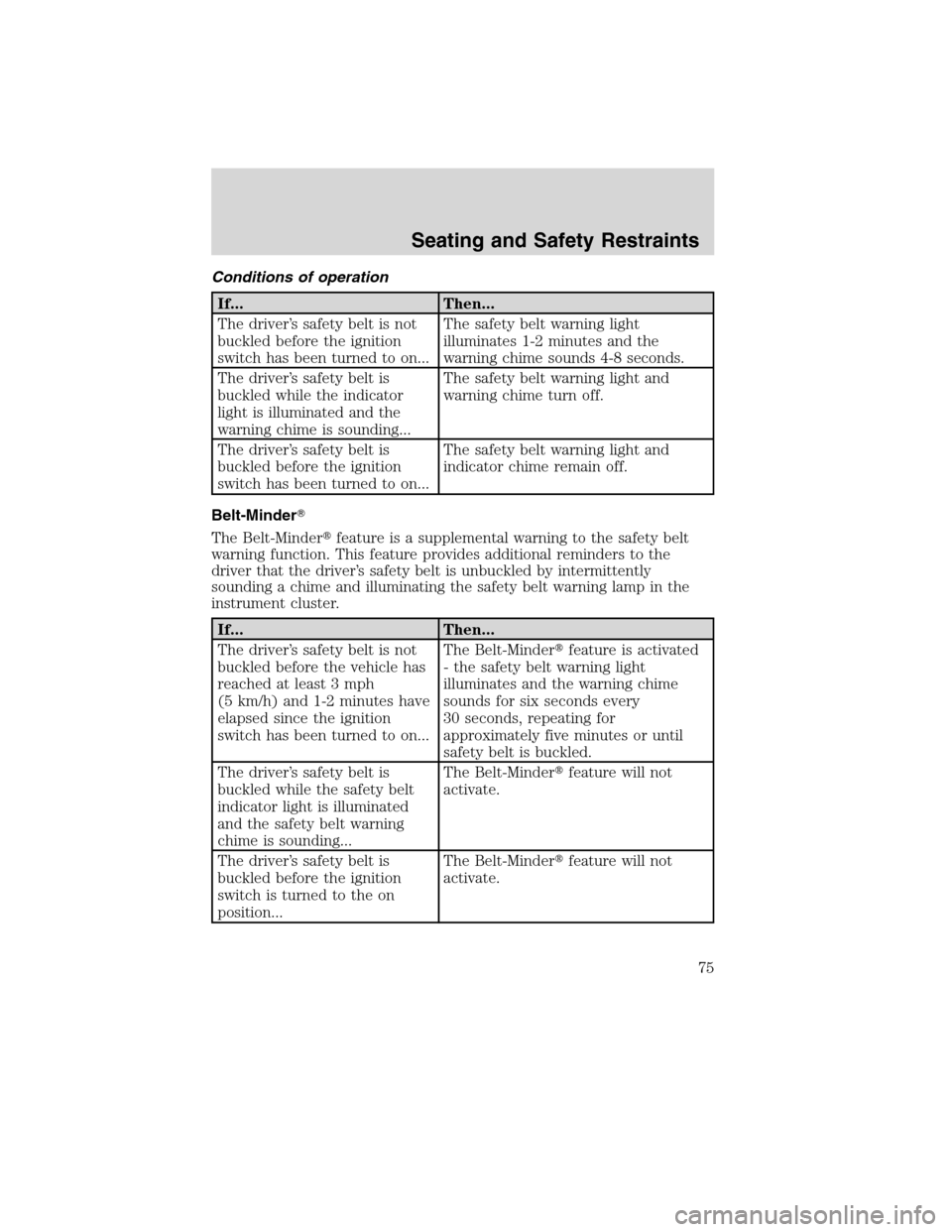
Conditions of operation
If... Then...
The driver’s safety belt is not
buckled before the ignition
switch has been turned to on...The safety belt warning light
illuminates 1-2 minutes and the
warning chime sounds 4-8 seconds.
The driver’s safety belt is
buckled while the indicator
light is illuminated and the
warning chime is sounding...The safety belt warning light and
warning chime turn off.
The driver’s safety belt is
buckled before the ignition
switch has been turned to on...The safety belt warning light and
indicator chime remain off.
Belt-Minder�
The Belt-Minder�feature is a supplemental warning to the safety belt
warning function. This feature provides additional reminders to the
driver that the driver’s safety belt is unbuckled by intermittently
sounding a chime and illuminating the safety belt warning lamp in the
instrument cluster.
If... Then...
The driver’s safety belt is not
buckled before the vehicle has
reached at least 3 mph
(5 km/h) and 1-2 minutes have
elapsed since the ignition
switch has been turned to on...The Belt-Minder�feature is activated
- the safety belt warning light
illuminates and the warning chime
sounds for six seconds every
30 seconds, repeating for
approximately five minutes or until
safety belt is buckled.
The driver’s safety belt is
buckled while the safety belt
indicator light is illuminated
and the safety belt warning
chime is sounding...The Belt-Minder�feature will not
activate.
The driver’s safety belt is
buckled before the ignition
switch is turned to the on
position...The Belt-Minder�feature will not
activate.
Seating and Safety Restraints
75
2010 F-650/750(f67)
Supplement(supplement), 1st Printing
USA(fus)
Page 77 of 274

Reasons given... Consider...
“I have an air bag” Air bags offer greater protection when
used with safety belts. Frontal air
bags are not designed to inflate in
rear and side crashes or rollovers.
“I’d rather be thrown clear” Not a good idea.Peoplewho are
ejected are 40 times more likely
to DIE.Safety belts help prevent
ejection, WE CAN’T “PICK OUR
CRASH”.
WARNING:Do not sit on top of a buckled safety belt or insert a
latchplate into the buckle to avoid the Belt-Minder�chime. To
do so may adversely affect the performance of the vehicle’s air bag
system
One-time disable
Any time the safety belt is buckled and then unbuckled during an
ignition ON cycle, Belt-Minder�will be disabled for that ignition cycle
only.
Deactivating/Activating the Belt-Minder�feature
Read Steps1-9thoroughly before proceeding with the
deactivation/activation programming procedure.
The Belt-Minder�feature can be deactivated/activated by performing the
following procedure:
Before following the procedure, make sure that:
•The parking brake is set.
•The gearshift is in P (Park) (if equipped) or N (Neutral) (automatic
transmissions) or the neutral position (manual transmission).
•The ignition switch is in the off position.
•All vehicle doors are closed.
•The driver’s safety belt is unbuckled.
•The headlamp control is in the
position.
Seating and Safety Restraints
77
2010 F-650/750(f67)
Supplement(supplement), 1st Printing
USA(fus)
