2010 FORD EXPEDITION brake
[x] Cancel search: brakePage 31 of 420

System check and vehicle feature customization
Press the SETUP button repeatedly
to cycle the message center through
the following features:
RESET FOR SYSTEM CHECK
When this message appears, press the RESET button and the message
center will begin to cycle through the following systems and provide a
status of the item if needed.
Note:Some systems show a message only if a condition is present.
1. OIL LIFE
2. CHARGING SYSTEM
3. WASHER FLUID LEVEL
4. DOOR STATUS
5. LIFTGATE/GLASS
6. BRAKE SYSTEM
7. TIRE PRESSURE
8. AIR SUSPENSION SYSTEM (if equipped)
9. FUEL LEVEL
10. MYKEY MILES (if programmed)
11. MYKEY(S) PROGRAMMED
12. ADMIN KEYS PROGRAMMED
OIL LIFE
This displays the remaining oil life.
An oil change is required whenever indicated by the message center and
according to the recommended maintenance schedule. USE ONLY
RECOMMENDED ENGINE OILS.
To reset the oil monitoring system to 100% after each oil change
(approximately 7,500 miles [12,000 km] or 12 months) perform the
following:
1. Press and release the SETUP button to display “OIL LIFE XXX%
HOLD RESET = NEW”.
2. Press and hold the RESET button for two seconds and release to reset
the oil life to 100%.
Instrument Cluster
31
2010 Expedition(exd)
Owners Guide(own2002), 1st Printing
USA(fus)
Page 36 of 420

CHECK CHARGING SYSTEM— Displayed when the electrical system
is not maintaining proper voltage when the engine is running. If you are
operating electrical accessories when the engine is idling at a low speed,
turn off as many of the electrical loads as soon as possible. If the
warning stays on or comes on when the engine is operating at normal
speeds, contact your authorized dealer as soon as possible.
CHECK FUEL FILL INLET— Displayed when the fuel fill inlet may
not be properly closed. Refer toEasy Fuel™ “no cap” fuel systemin
theMaintenance and Specificationschapter.
TIRE PRESSURE SENSOR FAULT— Displayed when a tire pressure
sensor is malfunctioning, or your spare tire is in use. For more
information on how the system operates under these conditions, refer to
Understanding Your Tire Pressure Monitoring System (TPMS)in the
Tires, Wheels and Loadingchapter. If the warning stays on or
continues to come on, contact your authorized dealer as soon as
possible.
LOW TIRE PRESSURE— Displayed when one or more tires on your
vehicle have low tire pressure. Refer toInflating your tiresin theTires,
Wheels and Loadingchapter.
TIRE PRESSURE MONITOR FAULT— Displayed when the Tire
Pressure Monitoring System is malfunctioning. If the warning stays on or
continues to come on, contact your authorized dealer as soon as
possible.
AIR SUSPENSION OFF (if equipped)— Displayed when the air
suspension is off. For more information, refer toAir suspension system
in theDrivingchapter.
BRAKE FLUID LEVEL LOW— Indicates the brake fluid level is low
and the brake system should be inspected immediately. Refer toBrake
fluidin theMaintenance and Specificationschapter.
WASHER FLUID LEVEL LOW— Indicates the washer fluid reservoir
is less than one quarter full. Check the washer fluid level. Refer to
Windshield washer fluidin theMaintenance and Specifications
chapter.
OIL LIFE CHANGE SOON— Displayed when the engine oil life
remaining is 10% or less.
OIL CHANGE REQUIRED— Displayed when the oil life left reaches
0%.
Instrument Cluster
36
2010 Expedition(exd)
Owners Guide(own2002), 1st Printing
USA(fus)
Page 37 of 420

CHECK AIR SUSPENSION (if equipped)— Displayed when the air
suspension system is not operating properly. If this message is displayed
while driving, pull off the road as soon as safely possible. For more
information, refer toAir suspension systemin theDrivingchapter.
CHECK PARK AID (if equipped)— Displayed when the transmission
is in R (Reverse). Refer toReverse sensing systemin theDriving
chapter.
CHECK BRAKE SYSTEM— Displayed when the braking system is not
operating properly. If the warning stays on or continues to come on,
contact your authorized dealer as soon as possible.
XXX MILES TO E FUEL LEVEL LOW— Displayed as an early
reminder of a low fuel condition.
PARK BRAKE ENGAGED— Displayed when the parking brake is set,
the engine is running and the vehicle is driven more than 3 mph
(5 km/h). If the warning stays on after the parking brake is released,
contact your authorized dealer as soon as possible.
TRAILER SWAY REDUCE SPEED (if equipped)— Displayed when
the trailer sway control has detected trailer sway. For more information,
refer to theDrivingchapter for more information.
4X4 SHIFT IN PROGRESS (if equipped)— Displayed when the 4X4
system is making a shift. For more information, refer toControl trac
four-wheel drive (4X4) operationin theDrivingchapter.
FOR 4X4 LOW SLOW TO 3 MPH (if equipped)— Displayed when
4X4 LOW is selected while the vehicle is moving. For more information,
refer toControl trac four-wheel drive (4X4) operationin theDriving
chapter.
FOR 4X4 LOW SHIFT TO N (if equipped)— Displayed when 4X4
LOW is selected and the vehicle is stopped. For more information, refer
toControl trac four-wheel drive (4X4) operationin theDriving
chapter.
TO EXIT 4X4 LOW SLOW TO 3 MPH (if equipped)— Displayed
when 2WD is selected while the vehicle is operating in 4X4 LOW. For
more information, refer toControl trac four-wheel drive (4X4)
operationin theDrivingchapter.
TO EXIT 4X4 LOW SHIFT TO N (if equipped)— Displayed when
2WD is selected while the vehicle has been stopped in 4X4 LOW. For
more information, refer toControl trac four-wheel drive (4X4)
operationin theDrivingchapter.
SHIFT DELAYED PULL FORWARD (if equipped)— May display
when shifting to or from 4X4 LOW. For more information, refer to
Control trac four-wheel drive (4X4) operationin theDrivingchapter.
Instrument Cluster
37
2010 Expedition(exd)
Owners Guide(own2002), 1st Printing
USA(fus)
Page 121 of 420
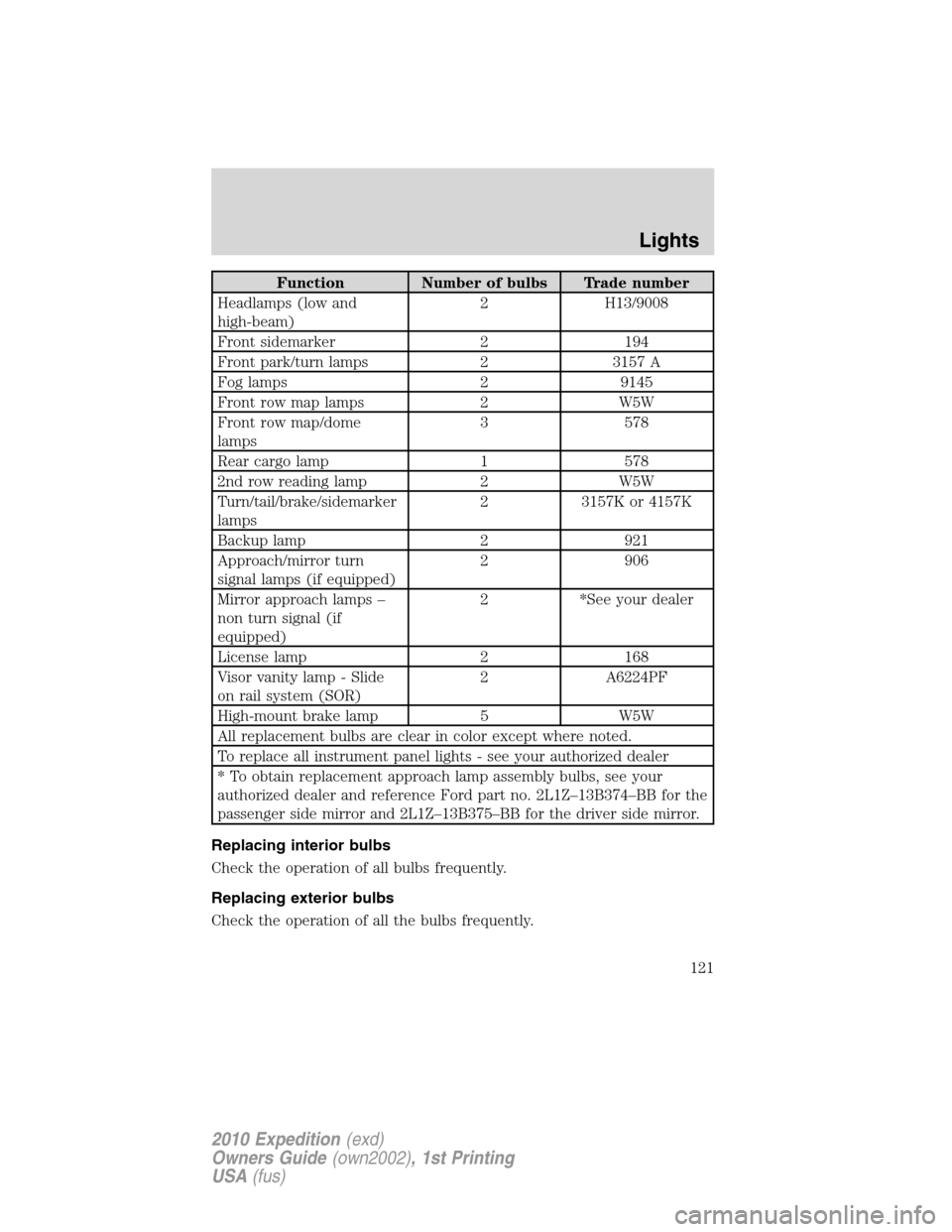
Function Number of bulbs Trade number
Headlamps (low and
high-beam)2 H13/9008
Front sidemarker 2 194
Front park/turn lamps 2 3157 A
Fog lamps 2 9145
Front row map lamps 2 W5W
Front row map/dome
lamps3 578
Rear cargo lamp 1 578
2nd row reading lamp 2 W5W
Turn/tail/brake/sidemarker
lamps2 3157K or 4157K
Backup lamp 2 921
Approach/mirror turn
signal lamps (if equipped)2 906
Mirror approach lamps –
non turn signal (if
equipped)2 *See your dealer
License lamp 2 168
Visor vanity lamp - Slide
on rail system (SOR)2 A6224PF
High-mount brake lamp 5 W5W
All replacement bulbs are clear in color except where noted.
To replace all instrument panel lights - see your authorized dealer
* To obtain replacement approach lamp assembly bulbs, see your
authorized dealer and reference Ford part no. 2L1Z–13B374–BB for the
passenger side mirror and 2L1Z–13B375–BB for the driver side mirror.
Replacing interior bulbs
Check the operation of all bulbs frequently.
Replacing exterior bulbs
Check the operation of all the bulbs frequently.
Lights
121
2010 Expedition(exd)
Owners Guide(own2002), 1st Printing
USA(fus)
Page 124 of 420
4. Rotate the bulb socket counterclockwise and remove from lamp
assembly.
5. Pull bulb straight out of socket and snap in the new bulb.
6. Install the bulb socket into the lamp assembly and rotate clockwise.
7. Carefully install the tail lamp assembly on the vehicle by securing the
lamp assembly with two torx screws.
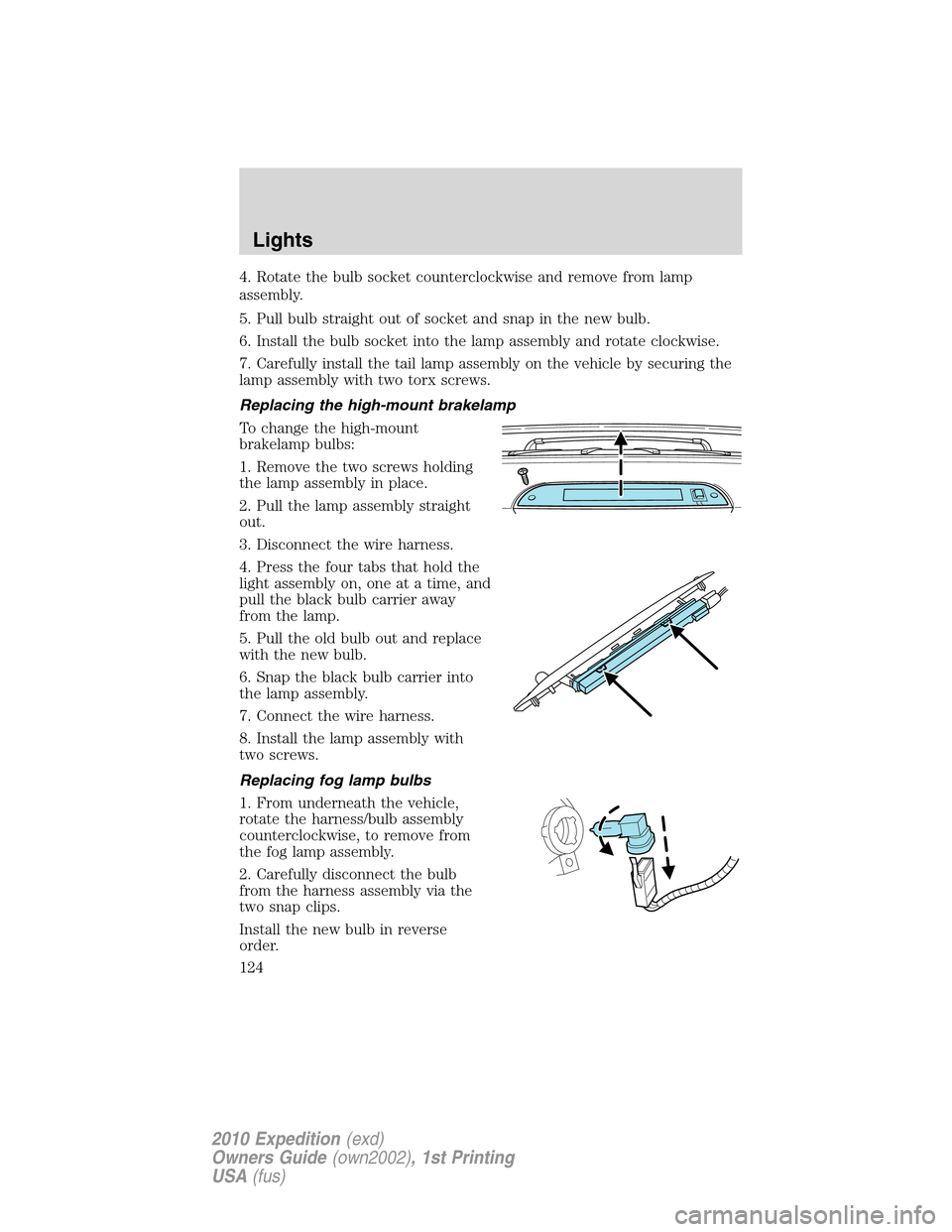
Replacing the high-mount brakelamp
To change the high-mount
brakelamp bulbs:
1. Remove the two screws holding
the lamp assembly in place.
2. Pull the lamp assembly straight
out.
3. Disconnect the wire harness.
4. Press the four tabs that hold the
light assembly on, one at a time, and
pull the black bulb carrier away
from the lamp.
5. Pull the old bulb out and replace
with the new bulb.
6. Snap the black bulb carrier into
the lamp assembly.
7. Connect the wire harness.
8. Install the lamp assembly with
two screws.
Replacing fog lamp bulbs
1. From underneath the vehicle,
rotate the harness/bulb assembly
counterclockwise, to remove from
the fog lamp assembly.
2. Carefully disconnect the bulb
from the harness assembly via the
two snap clips.
Install the new bulb in reverse
order.
Lights
124
2010 Expedition(exd)
Owners Guide(own2002), 1st Printing
USA(fus)
Page 136 of 420

Note:10 or more switch activations within one minute, or repeated
folding/unfolding of the mirrors while holding the switch rearward during
full travel, may cause the system to disable the fold/unfold function to
protect motors from overheating. Should this occur, wait approximately
three minutes with the vehicle running and up to 10 minutes with the
vehicle off, for the system to reset and for function to return to normal.
Heated outside mirrors
Both mirrors are heated automatically to remove ice, mist and fog when
the rear window defrost is activated.
Do not remove ice from the mirrors with a scraper or attempt to
readjust the mirror glass if it is frozen in place. These actions
could cause damage to the glass and mirrors.
Do not clean the housing or glass of any mirror with harsh
abrasives, fuel or other petroleum-based cleaning products.
Signal indicator mirrors (if equipped)
When the turn signal is activated,
the lower portion of the mirror
housing will blink.
POWER ADJUSTABLE FOOT PEDALS (IF EQUIPPED)
The accelerator and brake pedal
should only be adjusted when the
vehicle is stopped and the gearshift
lever is in the P (Park) position.
Press and hold the rocker control to
adjust accelerator and brake pedal.
•Press the top of the control to
adjust the pedals toward you.
•Press the bottom of the control to adjust the pedals away from you.
Driver Controls
136
2010 Expedition(exd)
Owners Guide(own2002), 1st Printing
USA(fus)
Page 137 of 420
WARNING:Never adjust the accelerator and brake pedal with
feet on the pedals while the vehicle is moving.
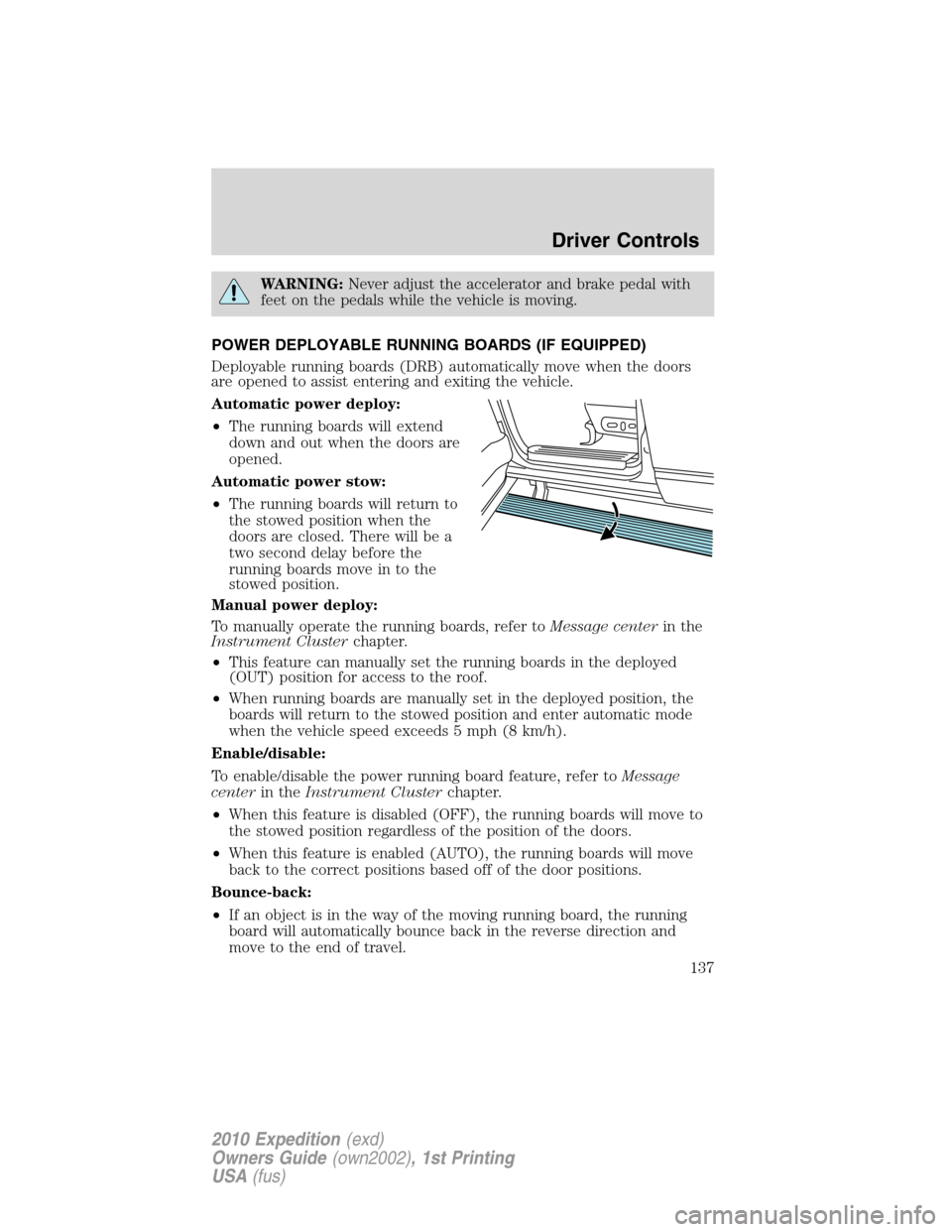
POWER DEPLOYABLE RUNNING BOARDS (IF EQUIPPED)
Deployable running boards (DRB) automatically move when the doors
are opened to assist entering and exiting the vehicle.
Automatic power deploy:
•The running boards will extend
down and out when the doors are
opened.
Automatic power stow:
•The running boards will return to
the stowed position when the
doors are closed. There will be a
two second delay before the
running boards move in to the
stowed position.
Manual power deploy:
To manually operate the running boards, refer toMessage centerin the
Instrument Clusterchapter.
•This feature can manually set the running boards in the deployed
(OUT) position for access to the roof.
•When running boards are manually set in the deployed position, the
boards will return to the stowed position and enter automatic mode
when the vehicle speed exceeds 5 mph (8 km/h).
Enable/disable:
To enable/disable the power running board feature, refer toMessage
centerin theInstrument Clusterchapter.
•When this feature is disabled (OFF), the running boards will move to
the stowed position regardless of the position of the doors.
•When this feature is enabled (AUTO), the running boards will move
back to the correct positions based off of the door positions.
Bounce-back:
•If an object is in the way of the moving running board, the running
board will automatically bounce back in the reverse direction and
move to the end of travel.
Driver Controls
137
2010 Expedition(exd)
Owners Guide(own2002), 1st Printing
USA(fus)
Page 139 of 420
Setting speed control
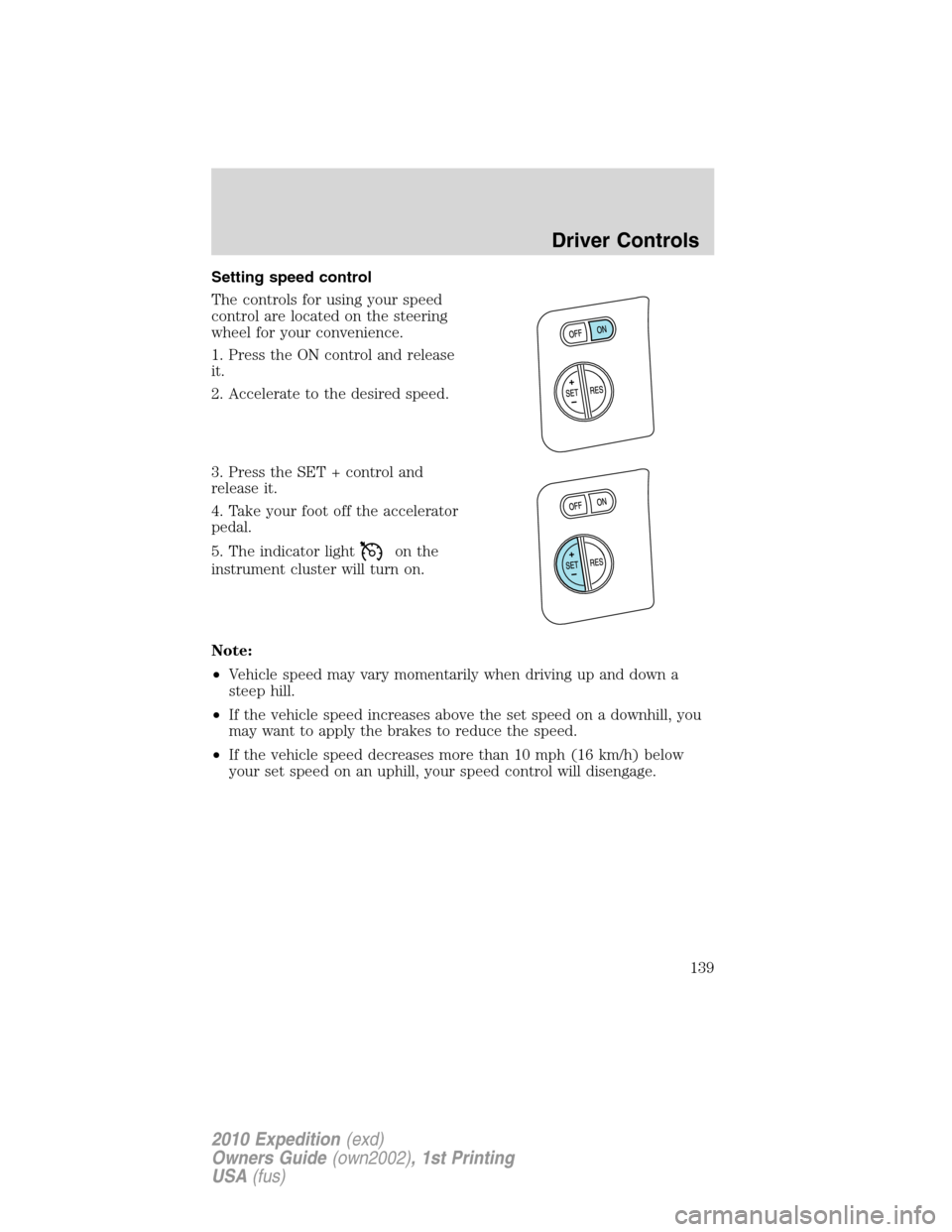
The controls for using your speed
control are located on the steering
wheel for your convenience.
1. Press the ON control and release
it.
2. Accelerate to the desired speed.
3. Press the SET + control and
release it.
4. Take your foot off the accelerator
pedal.
5. The indicator light
on the
instrument cluster will turn on.
Note:
•Vehicle speed may vary momentarily when driving up and down a
steep hill.
•If the vehicle speed increases above the set speed on a downhill, you
may want to apply the brakes to reduce the speed.
•If the vehicle speed decreases more than 10 mph (16 km/h) below
your set speed on an uphill, your speed control will disengage.
Driver Controls
139
2010 Expedition(exd)
Owners Guide(own2002), 1st Printing
USA(fus)