2010 FIAT PUNTO EVO Tom tom
[x] Cancel search: Tom tomPage 2 of 270

Dear Customer,
Thank you for selecting Fiat and congratulations on your choice of a Fiat Punto.
We have written this handbook to help you get to know all the features of your car and use it in the best possible way.
You should read it right through before taking to the road for the first time.
You will find information, tips and important warnings regarding the driving of your car to help you get the most from the tech-
nological features of your Fiat.
Carefully read the warnings and indications marked with the following symbols:
personal safety;
the car’s wellbeing;
environmental protection.
The enclosed Warranty Booklet lists the services that Fiat offers to its customers:
❒the Warranty Certificate with terms and conditions for maintaining its validity
❒the range of additional services available to Fiat customers.
Enjoy the read. Happy motoring!
This Owner Handbook describes all versions of the Fiat Punto;
please consider only the information relevant to your version, engine and configuration.
001-036 PUNTO FL EN 4ed 18-01-2010 12:21 Pagina 1
Page 13 of 270

Never extract the key while the vehicle is
moving. The steering wheel would lock au-
tomatically as soon as it is turned. This is always
the case, even when the vehicle is being towed.
WARNING
It is absolutely forbidden to carry out any
after-sales operation involving steering sys-
tem or steering column modifications (e.g. in-
stalling an anti-theft device) that could badly af-
fect performance and safety, invalidate the war-
ranty and also result in the car failing to comply
with regulations.
WARNINGSTEERING LOCK
Engagement
When the key is at STOP, remove the key and turn the
steering wheel until it locks.
Disengagement
Move the steering wheel slightly as you turn the ignition
key to MAR.
CONTENTS TECHNICAL
SPECIFICATIONSSERVICING
AND CAREIN AN
EMERGENCY WARNING LIGHTS
AND MESSAGESSTARTING
AND DRIVINGSAFETY
KNOWING
YOUR
VEHICLE
12
001-036 PUNTO FL EN 4ed 18-01-2010 12:21 Pagina 12
Page 19 of 270
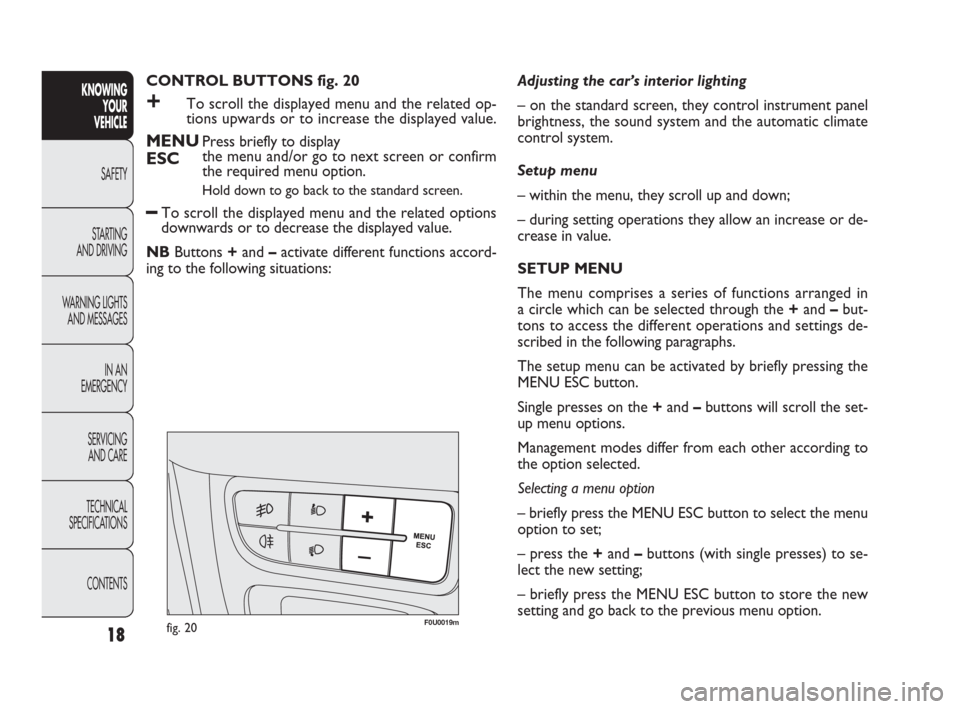
CONTROL BUTTONS fig. 20
+To scroll the displayed menu and the related op-
tions upwards or to increase the displayed value.
MENUPress briefly to display
ESCthe menu and/or go to next screen or confirm
the required menu option.
Hold down to go back to the standard screen.
–To scroll the displayed menu and the related options
downwards or to decrease the displayed value.
NBButtons +and –activate different functions accord-
ing to the following situations:Adjusting the car’s interior lighting
– on the standard screen, they control instrument panel
brightness, the sound system and the automatic climate
control system.
Setup menu
– within the menu, they scroll up and down;
– during setting operations they allow an increase or de-
crease in value.
SETUP MENU
The menu comprises a series of functions arranged in
a circle which can be selected through the +and –but-
tons to access the different operations and settings de-
scribed in the following paragraphs.
The setup menu can be activated by briefly pressing the
MENU ESC button.
Single presses on the +and –buttons will scroll the set-
up menu options.
Management modes differ from each other according to
the option selected.
Selecting a menu option
– briefly press the MENU ESC button to select the menu
option to set;
– press the +and –buttons (with single presses) to se-
lect the new setting;
– briefly press the MENU ESC button to store the new
setting and go back to the previous menu option.
CONTENTS TECHNICAL
SPECIFICATIONSSERVICING
AND CAREIN AN
EMERGENCY WARNING LIGHTS
AND MESSAGESSTARTING
AND DRIVINGSAFETY
KNOWING
YOUR
VEHICLE
18
F0U0019mfig. 20
001-036 PUNTO FL EN 4ed 18-01-2010 12:21 Pagina 18
Page 26 of 270

25
KNOWING
YOUR
VEHICLE
SAFETY
STARTING
AND DRIVING
WARNING LIGHTS
AND MESSAGES
IN AN
EMERGENCY
SERVICING
AND CARE
TECHNICAL
SPECIFICATIONS
CONTENTS
CONTROL BUTTONS MULTIFUNCTION
DISPLAY/RECONFIGURABLE
MULTIFUNCTION DISPLAY fig. 23
+To scroll the displayed menu and the related op-
tions upwards or to increase the displayed value.
MENUPress briefly to access the menu and/or
ESCgo to the next screen or confirm your choice.
Hold down to go back to the standard screen.
–To scroll the displayed menu and the related options
downwards or to decrease the displayed value.
NBButtons +and –activate different functions accord-
ing to the following situations:
Adjusting the car’s interior lighting
– on the standard screen, they control instrument panel
brightness, the sound system and the automatic climate
control system.Setup menu
– within the menu, they scroll up and down;
– during setting operations they allow an increase or de-
crease in value.
F0U0019mfig. 23
001-036 PUNTO FL EN 4ed 18-01-2010 12:21 Pagina 25
Page 33 of 270

32
KNOWING
YOUR
VEHICLE
SAFETY
STARTING
AND DRIVING
WARNING LIGHTS
AND MESSAGES
IN AN
EMERGENCY
SERVICING
AND CARE
TECHNICAL
SPECIFICATIONS
CONTENTS
AUTOCLOSE
(Automatic central locking with car moving)
When activated (On), this function automatically locks the
doors when the car speed exceeds 20 km/h.
To activate (On) or deactivate (Off) this function, proceed
as follows:
– press the MENU ESC button briefly: the display will show
a submenu;
– briefly press MENU ESC: On or Off will flash on the dis-
play (depending on previous setting);
– press +or –to make your choice;
– briefly press the MENU ESC button to go back to the
submenu screen or hold the button down to go back to
the main menu screen without saving;
– hold down MENU ESC again to go back to the standard
screen or main menu, depending on which point in the
menu you have reached. – briefly press the MENU ESC button to go back to the
menu screen or hold the button down to go back to the
standard screen without saving.
When the key is turned to MAR and the initial check stage
is over, the display will show the information selected via
the “First page” menu function.
SEE RADIO
(Relaying audio information)
With this function the display shows information relevant
to the sound system.
– Radio: selected radio station frequency or RDS message,
automatic tuning activation or AutoSTore;
– CD, MP3: track number;
– CD Changer: CD number and track number;
To show the sound system information in the display (On)
or clear it (Off), proceed as follows:
– briefly press MENU ESC: On or Off will flash on the dis-
play (depending on previous setting);
– press +or –to make your choice;
– briefly press the MENU ESC button to go back to the
menu screen or hold the button down to go back to the
standard screen without saving.
001-036 PUNTO FL EN 4ed 18-01-2010 12:22 Pagina 32
Page 36 of 270

35
KNOWING
YOUR
VEHICLE
SAFETY
STARTING
AND DRIVING
WARNING LIGHTS
AND MESSAGES
IN AN
EMERGENCY
SERVICING
AND CARE
TECHNICAL
SPECIFICATIONS
CONTENTS
BUTTON VOLUME
(Adjusting the button volume)
This function may be used to adjust (over 8 levels) the vol-
ume of the noise made when the MENU ESC, +e –but-
tons are pressed.
To set the desired volume, proceed as follows:
– briefly press MENU ESC: the previously set volume lev-
el will flash on the display;
– press +or –to set the value;
– briefly press the MENU ESC button to go back to the
menu screen or hold the button down to go back to the
standard screen without saving.
SEAT BELT BUZZ
(SBR buzzer reactivation
(for versions/markets where provided)
This function can be displayed only after a Fiat Dealer-
ship has deactivated the SBR system (see “SBR system”
in the “Safety” section).SERVICE
(Scheduled servicing)
Through this function it is possible to display information
related to regular scheduling intervals.
This information can be consulted as follows:
– briefly press MENU ESC: service intervals in km or mi,
depending on the previous setting, will be displayed (see
“Measurement units”);
– press the MENU ESC button briefly to return to the
menu screen or hold the button down to return to the
standard screen.
NBThe “Scheduled Servicing Plan” requires the vehicle
to be serviced every 30,000 km (or 18,000 mi). This indi-
cation will appear automatically, with the key at MAR, start-
ing from 2,000 km (or 1,240 mi) and will be displayed every
200 km (or 124 mi). Below 200 km the signals become
more frequent. The indication will appear in kilometres or
miles depending on the unit of measurement settings.
When the next scheduled service is approaching, the mes-
sage “Service” will appear on the display, followed by the
number of kilometres or miles left, when the key is turned
to MAR. Go to a Fiat Dealership, where the “Scheduled
Servicing Plan” operations will be performed and the mes-
sage will be reset.
001-036 PUNTO FL EN 4ed 18-01-2010 12:22 Pagina 35
Page 39 of 270

38
F0U0022mfig. 28
New journey
The new journey begins after:
– “manual” resetting by the user, by pressing the relevant
button;
– “automatic” resetting, when the distance travelled reach-
es 99,999.9 km or when the journey time reaches 99.59
(99 hours and 59 minutes);
– disconnection and subsequent reconnection of the bat-
tery.
IMPORTANT The reset operation when “Trip A” details
are being displayed resets only the information associat-
ed with this function.
IMPORTANT The reset operation when “Trip B” details
are being displayed resets only the information associat-
ed with this function.
Start trip procedure
With the ignition key in the MAR position, reset by press-
ing the TRIP button and keeping it pressed for more than
2 seconds.
Trip Exit
To quit the Trip function: keep MENU ESC pressed for
over 2 seconds. Journey time
This value shows the time elapsed since the start of the
new journey.
IMPORTANT If information is not available, the message
“----” will appear instead of the Trip Computer values.
Counting of the different values will resume regularly when
normal operation is restored. This will not reset any of the
values displayed before the failure nor start a new jour-
ney.
TRIP control button fig. 28
The TRIP button, located on the top of the right steering
column stalk, is used (with ignition at MAR) to display and
reset the previous values to start a new journey:
– press briefly to display the different values;
– hold down to reset and then start a new journey.KNOWING
YOUR
VEHICLE
SAFETY
STARTING
AND DRIVING
WARNING LIGHTS
AND MESSAGES
IN AN
EMERGENCY
SERVICING
AND CARE
TECHNICAL
SPECIFICATIONS
CONTENTS
037-081 PUNTO FL EN 4ed 18-01-2010 12:23 Pagina 38
Page 43 of 270
Head restraints must be adjusted so that
the head, rather than the neck, rests on
them. Only then can they protect your head cor-
rectly.
WARNING
To make the best use of the head restraint protection, ad-
just the backrest to keep a straight back, with the head
as close as possible to its restraint. HEAD RESTRAINTS
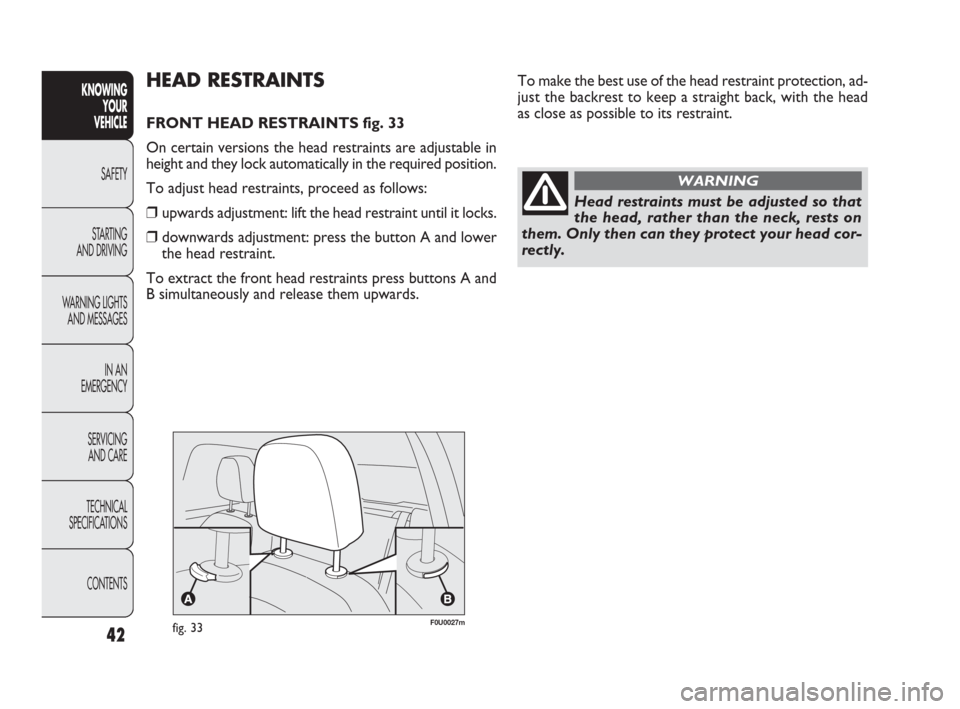
FRONT HEAD RESTRAINTS fig. 33
On certain versions the head restraints are adjustable in
height and they lock automatically in the required position.
To adjust head restraints, proceed as follows:
❒upwards adjustment: lift the head restraint until it locks.
❒downwards adjustment: press the button A and lower
the head restraint.
To extract the front head restraints press buttons A and
B simultaneously and release them upwards.
fig. 33F0U0027m
42
KNOWING
YOUR
VEHICLE
SAFETY
STARTING
AND DRIVING
WARNING LIGHTS
AND MESSAGES
IN AN
EMERGENCY
SERVICING
AND CARE
TECHNICAL
SPECIFICATIONS
CONTENTS
037-081 PUNTO FL EN 4ed 18-01-2010 12:23 Pagina 42