2010 FIAT PUNTO EVO Lock
[x] Cancel search: LockPage 20 of 270

Selecting “Set Clock”
– briefly press the MENU ESC button to select the first
value to change (hours);
– press the +and –buttons (with single presses) to se-
lect the new setting;
– briefly press the MENU ESC button to store the new
setting and go to the next setup menu option (minutes);
– after setting the values with the same procedure, go back
to the previous menu item.
Hold down the MENU ESC button:
– to quit the setup menu if you are in the menu;
– to quit to the menu if you are setting an option;
– to save only the settings already stored (and confirmed
by pressing the MENU ESC button).
The setup menu environment is timed; when quitting the
menu due to timing expiry, only the settings stored by the
user are saved (having been confirmed by briefly pressing
button MENU ESC).
CONTENTS TECHNICAL
SPECIFICATIONS SERVICING
AND CARE IN AN
EMERGENCY WARNING LIGHTS
AND MESSAGES STARTING
AND DRIVING SAFETY
KNOWING
YOUR
VEHICLE
19
Briefly press button MENU ESC to start browsing from
the standard screen. Press +or –to browse within the
menu.
NBFor safety reasons, only the short menu may be ac-
cessed while the car is moving (“SPEEd” setting). Stop the
car to access the full menu.
The menu includes the following items:
– SPEEd
– CornEr (for versions/markets where provided)
– Hour
–bUZZ
– Unit
– BAG P
– drl (for versions/markets where provided)
001-036 PUNTO FL EN 4ed 18-01-2010 12:21 Pagina 19
Page 22 of 270

Hour
(Setting the clock)
With this function, it is possible to set the time.
To do so, proceed as follows:
– briefly press MENU ESC: the “hours” will flash on the
display;
– press +or –to set the value;
– briefly press MENU ESC: the “minutes” will flash on the
display;
– press +or –to set the value;
– briefly press the MENU ESC button to go back to the
menu screen or hold the button down to go back to the
standard screen without saving.
bUZZ
(Adjusting the buzzer volume)
This function is used to adjust the volume of the audible
signal (buzzer) that sounds in the event of failure/warning
indications and when the MENU ESC, +and –buttons are
pressed.
To set the desired volume, proceed as follows:
– briefly press MENU ESC: the display will show the word-
ing (bUZZ);
– press +or –to select the required volume (adjustable
over 8 levels).
– briefly press the MENU ESC button to go back to the
menu screen or hold the button down to go back to the
standard screen without saving.Unit
(Setting the distance unit)
With this function, it is possible to set the distance unit.
To do so, proceed as follows:
– briefly press MENU ESC: the display will show the word-
ing (Unit) and the previously set unit (km or mi);
– press +or –to select the required distance unit.
– briefly press the MENU ESC button to go back to the
menu screen or hold the button down to go back to the
standard screen without saving.
CONTENTS TECHNICAL
SPECIFICATIONS SERVICING
AND CARE IN AN
EMERGENCY WARNING LIGHTS
AND MESSAGES STARTING
AND DRIVING SAFETY
KNOWING
YOUR
VEHICLE
21
001-036 PUNTO FL EN 4ed 18-01-2010 12:21 Pagina 21
Page 27 of 270

CONTENTS TECHNICAL
SPECIFICATIONSSERVICING
AND CAREIN AN
EMERGENCY WARNING LIGHTS
AND MESSAGESSTARTING
AND DRIVINGSAFETY
KNOWING
YOUR
VEHICLE
26
SETUP MENU
(multifunction display/
reconfigurable multifunction display)
The menu comprises a series of functions arranged in a
circle which can be selected through the +and –buttons
to access the different operations and settings described
in the following paragraphs. A submenu is provided for
some items (clock and unit setting).
The setup menu can be activated by pressing the MENU
ESC button briefly.
Press buttons +and – to scroll the setup menu options.
Management modes differ from each other according to
the option selected.
Selecting an option from the main menu without a submenu
– Briefly press MENU ESC to select the main menu option
you wish to set;
– Press +or –(with single presses) to select the new set-
ting;
– briefly press the MENU ESC button to store the new
setting and to go back to the main menu option selected
previously.Selecting an option from the main menu with a submenu:
– Briefly press the MENU ESC button to display the first
submenu option;
– Press +or –(with single presses) to scroll all the sub-
menu options;
– Briefly press the MENU ESC button to select the dis-
played submenu option and to open the relevant setup
menu;
– Press +or –(with single presses) to select the new set-
ting for this submenu option;
– Briefly press the MENU ESC button to store the new
setting and go back to the previous menu option.
Selecting “Date” and “Set time”:
– Briefly press MENU ESC to select the first value to
change (e.g. hours/minutes or year/month/day);
– Press +or –(with single presses) to select the new set-
ting;
– Briefly press MENU ESC to store the new setting and
go to the next setup menu option; if this is the last one
you will go back to the previous menu option.
001-036 PUNTO FL EN 4ed 18-01-2010 12:21 Pagina 26
Page 31 of 270

30
KNOWING
YOUR
VEHICLE
SAFETY
STARTING
AND DRIVING
WARNING LIGHTS
AND MESSAGES
IN AN
EMERGENCY
SERVICING
AND CARE
TECHNICAL
SPECIFICATIONS
CONTENTS
TRIP B ACTIVATION/DATA
(Trip B enablement)
This function may be used to activate (On) or deactivate
(Off) the Trip B display (partial trip).
For more information see the “Trip computer” section.
For activation/deactivation, proceed as follows:
– briefly press MENU ESC: On or Off will flash on the dis-
play (depending on previous setting);
– press +or –to make your choice;
– briefly press the MENU ESC button to go back to the
menu screen or hold the button down to go back to the
standard screen without saving.SET TIME
(Setting the clock)
This function allows you to set the clock through two sub-
menus: “Time” and “Mode”.
To carry out the adjustment, proceed as follows:
– briefly press MENU ESC: the display will show the two
submenus “Time” and “Mode”;
– press +or –to switch between the two sub-menus;
– once you have selected a submenu, press MENU ESC
briefly;
– if selecting “Time”, briefly press MENU ESC – the “hours”
will flash on the display;
– press +or –to set the value;
– briefly press MENU ESC: the “minutes” will flash on the
display;
– press +or –to set the value;
– if selecting “Mode”,briefly press MENU ESC: the mode
will flash on the display;
– press +or –to select “24h” or “12h”.
001-036 PUNTO FL EN 4ed 18-01-2010 12:22 Pagina 30
Page 33 of 270

32
KNOWING
YOUR
VEHICLE
SAFETY
STARTING
AND DRIVING
WARNING LIGHTS
AND MESSAGES
IN AN
EMERGENCY
SERVICING
AND CARE
TECHNICAL
SPECIFICATIONS
CONTENTS
AUTOCLOSE
(Automatic central locking with car moving)
When activated (On), this function automatically locks the
doors when the car speed exceeds 20 km/h.
To activate (On) or deactivate (Off) this function, proceed
as follows:
– press the MENU ESC button briefly: the display will show
a submenu;
– briefly press MENU ESC: On or Off will flash on the dis-
play (depending on previous setting);
– press +or –to make your choice;
– briefly press the MENU ESC button to go back to the
submenu screen or hold the button down to go back to
the main menu screen without saving;
– hold down MENU ESC again to go back to the standard
screen or main menu, depending on which point in the
menu you have reached. – briefly press the MENU ESC button to go back to the
menu screen or hold the button down to go back to the
standard screen without saving.
When the key is turned to MAR and the initial check stage
is over, the display will show the information selected via
the “First page” menu function.
SEE RADIO
(Relaying audio information)
With this function the display shows information relevant
to the sound system.
– Radio: selected radio station frequency or RDS message,
automatic tuning activation or AutoSTore;
– CD, MP3: track number;
– CD Changer: CD number and track number;
To show the sound system information in the display (On)
or clear it (Off), proceed as follows:
– briefly press MENU ESC: On or Off will flash on the dis-
play (depending on previous setting);
– press +or –to make your choice;
– briefly press the MENU ESC button to go back to the
menu screen or hold the button down to go back to the
standard screen without saving.
001-036 PUNTO FL EN 4ed 18-01-2010 12:22 Pagina 32
Page 40 of 270

39
F0U0023mfig. 29
Horiziontal adjustment fig. 29
Lift the lever A and push the seat forwards or backwards:
in the driving position your arms should rest on the rim
of the steering wheel.
Any adjustments should be carried out on-
ly when the vehicle is stationary.
WARNING
After releasing the adjustment lever, al-
ways check that the seat is locked on the
guides by trying to move it back and forth. If it is
not locked, the seat may move unexpectedly and
make you lose control of the car.
WARNING
The fabric covers on your vehicle have been
designed to resist normal wear and tear.
Some precautions are however needed.
Avoid prolonged rubbing against clothing acces-
sories, such as metal buckles, bosses, Velcro strips
and the like, which by applying a high pressure on
the fabric in a small area could cause the break-
age of some threads and damage the upholstery.
FRONTSEATS
Height adjustment fig. 29
(for versions/markets where provided)
Move lever B upwards or downwards to achieve the re-
quired height.
IMPORTANT Adjustment must be carried out only when
seated in the relevant seat.
Backrest angle adjustment fig. 29
Turn knob C.
KNOWING
YOUR
VEHICLE
SAFETY
STARTING
AND DRIVING
WARNING LIGHTS
AND MESSAGES
IN AN
EMERGENCY
SERVICING
AND CARE
TECHNICAL
SPECIFICATIONS
CONTENTS
037-081 PUNTO FL EN 4ed 18-01-2010 12:23 Pagina 39
Page 41 of 270

For maximum protection, keep the back
of your seat upright, lean back into it and
make sure the seat belt fits closely across your
chest and hips.
WARNING
Always check that the seat is properly
locked on the guides by trying to push it
backwards and forwards.
WARNING
Folding down the backrest (3-door versions)
fig. 30
To access the rear seats, pull handle A upwards: the back-
rest will fold forwards and the seat will slide forwards when
you push the backrest.
When you put the backrest back up, the seat will return
to its original position (mechanical memory).Electric lumbar support adjustment fig. 31
(for versions/markets where available)
To adjust the support for your back, use controls E.
fig. 31F0U0025mfig. 30F0U0024m
40
KNOWING
YOUR
VEHICLE
SAFETY
STARTING
AND DRIVING
WARNING LIGHTS
AND MESSAGES
IN AN
EMERGENCY
SERVICING
AND CARE
TECHNICAL
SPECIFICATIONS
CONTENTS
037-081 PUNTO FL EN 4ed 18-01-2010 12:23 Pagina 40
Page 43 of 270
Head restraints must be adjusted so that
the head, rather than the neck, rests on
them. Only then can they protect your head cor-
rectly.
WARNING
To make the best use of the head restraint protection, ad-
just the backrest to keep a straight back, with the head
as close as possible to its restraint. HEAD RESTRAINTS
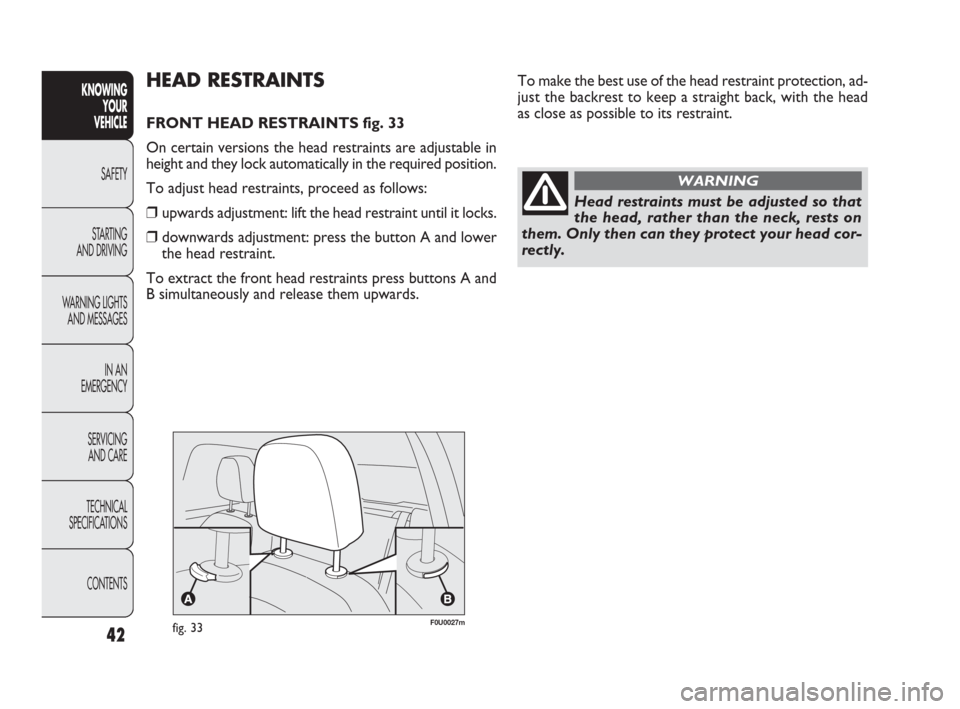
FRONT HEAD RESTRAINTS fig. 33
On certain versions the head restraints are adjustable in
height and they lock automatically in the required position.
To adjust head restraints, proceed as follows:
❒upwards adjustment: lift the head restraint until it locks.
❒downwards adjustment: press the button A and lower
the head restraint.
To extract the front head restraints press buttons A and
B simultaneously and release them upwards.
fig. 33F0U0027m
42
KNOWING
YOUR
VEHICLE
SAFETY
STARTING
AND DRIVING
WARNING LIGHTS
AND MESSAGES
IN AN
EMERGENCY
SERVICING
AND CARE
TECHNICAL
SPECIFICATIONS
CONTENTS
037-081 PUNTO FL EN 4ed 18-01-2010 12:23 Pagina 42