Page 146 of 512

successfully accepted the frequency signal. The indica-
tor light will flash slowly and then rapidly when fully
trained.
If you unplugged the device for training, plug it back in
at this time.
Then proceed with Step 4 under “Programming
HomeLink�” earlier in this section.
Using HomeLink�
To operate, press and release the programmed
HomeLink�button. Activation will now occur for the
trained device (i.e., garage door opener, gate operator,
Security system, entry door lock, home/office lighting,
etc.,). The handheld transmitter of the device may also be
used at any time.
Reprogramming A Single HomeLink� Button
To reprogram a channel that has been previously trained,
follow these steps: 1. Turn the ignition switch to the ON/RUN position.
2. Press and hold the desired HomeLink�
button until
the indicator light begins to flash after 20 seconds. Do not
release the button.
3. Without releasing the button, proceed with Program-
ming HomeLink� Step 2 and follow all remaining steps.
Security
It is advised to erase all channels before you sell or turn
in your vehicle.
To do this, press and hold the two outside buttons for
20 seconds until the red indicator flashes. Note that all
channels will be erased. Individual channels cannot be
erased.
The HomeLink�Universal Transceiver is disabled when
the Vehicle Security Alarm is active.
3
UNDERSTANDING THE FEATURES OF YOUR VEHICLE 145
Page 151 of 512

Ignition Off Operation
For vehicles not equipped with the Electronic Vehicle
Information Center (EVIC), the power sunroof switch
will remain active for 45 seconds after the ignition switch
is turned to the LOCK position. Opening either front
door will cancel this feature.
For vehicles equipped with the EVIC, the power sunroof
switch will remain active for up to 10 minutes after the
ignition switch is turned to the LOCK position. Opening
either front door will cancel this feature. The time is
programmable. Refer to “Electronic Vehicle Information
Center (EVIC)/Personal Settings (Customer-
Programmable Features)” in “Understanding Your In-
strument Panel” for further information.
Sunroof Fully Closed
Press the switch forward and release to ensure that the
sunroof is fully closed.
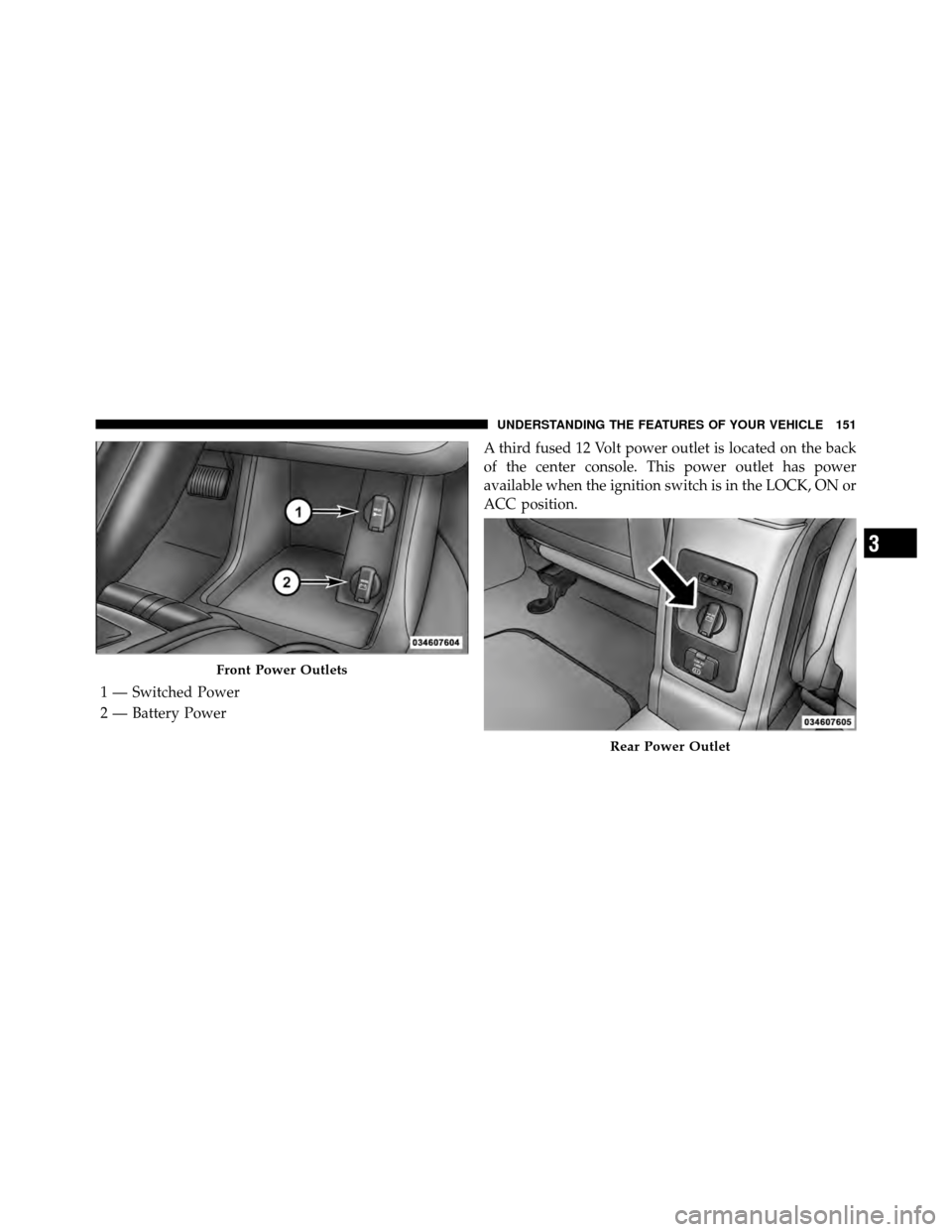
ELECTRICAL POWER OUTLETS
There are two fused 12 Volt (13 Amp) power outlets
located in the center console below the radio. The power
outlet on the top has power available when the ignition
switch in the ON or ACC position. The power outlet on
the bottom has power available when the ignition switch
is in the LOCK, ON, or ACC position.
This power outlet will also operate a conventional cigar
lighter unit.To preserve the heating element, do not
hold the lighter in the heating position.
150 UNDERSTANDING THE FEATURES OF YOUR VEHICLE
Page 152 of 512
A third fused 12 Volt power outlet is located on the back
of the center console. This power outlet has power
available when the ignition switch is in the LOCK, ON or
ACC position.
Front Power Outlets
1 — Switched Power
2 — Battery Power
Rear Power Outlet
3
UNDERSTANDING THE FEATURES OF YOUR VEHICLE 151
Page 161 of 512
Flip ’n Stow™ Front Passenger Seat Storage — If
Equipped
The seat latch release-loop is located in the center of the
seat cushion between the seat cushion and the seatback.
Pull the loop upward to release the latch and then
forward to open the seat to the detent position.NOTE:
Make sure that objects inside the bin do not
interfere with the latch before closing the seat. Push the
seat cushion downward after closing it to make sure it
latches to the base.
WARNING!
Be certain that the seat cushion is locked securely
into position before using the seat. Otherwise, the
seat will not provide the proper stability for passen-
gers. An improperly latched seat cushion could cause
serious injury.
Front Passenger Seat Storage Compartment
160 UNDERSTANDING THE FEATURES OF YOUR VEHICLE
Page 172 of 512
REAR WINDOW FEATURES
Rear Window Wiper/Washer
The rear window wiper/washer control is located on the
right side of the steering column.Rotate the switch upward to the “On” position will
activate the rear wiper.
Rotate the switch upward to the “washer” position
will activate that rear washer. The washer pump
will continue to operate as long as the lever or ring
is engaged. Upon release, the wipers will cycle three
times before returning to the set position.
If the rear wiper is operating when the ignition is turned
to the LOCK position, the wiper will automatically return
to the “Park” position. When the vehicle is restarted, the
wiper will resume function at whichever position the
switch is set at.
Rear Window Wiper/Washer Control
3
UNDERSTANDING THE FEATURES OF YOUR VEHICLE 171
Page 175 of 512
To Move the Cross Rails
1. Loosen the knobs on top of each cross rail approxi-
mately six turns to disengage the clamp tooth from the
side rail.2. Relocate the cross rails, aligning the cross rail stan-
chions (end pieces) with one of the vertical marks on the
outboard surface of the side rail for proper positioning.
There are four frontward marks for the front cross rail
and four rearward marks for the rear cross rail. Make
sure the cross rails remain equally spaced or parallel at
any position for proper function.
3. Tighten the knobs on each cross rail to lock it in
position. As you tighten the knob, make sure the clamp
tooth engages completely into the side rail slot.
4. Attempt to move the cross rail to ensure that it is
locked in position.
NOTE:
•To help control wind noise when installing the cross
rails, make sure the arrows marked on the underside
of the cross rails face the front of the vehicle.
Roof Luggage Rack
174 UNDERSTANDING THE FEATURES OF YOUR VEHICLE
Page 180 of 512

▫Operating Instructions —
Uconnect™ Phone .................... 252
▫ Clock Setting Procedure ............... 252
� Uconnect™ Multimedia (Satellite Radio) —
If Equipped (REN/REQ/RER/RES/REU/RBZ
Radios Only) ......................... 256
▫ System Activation .................... 256
▫ Electronic Serial Number/Sirius
Identification Number (ESN/SID) ......... 256
▫ Selecting Uconnect™ Multimedia (Satellite)
Mode ............................. 257
▫ Satellite Antenna ..................... 257
▫ Reception Quality .................... 257
▫ Operating Instructions — Uconnect™
Multimedia (Satellite) Mode ............. 258▫
Operating Instructions — Uconnect™ Phone
(If Equipped) ....................... 261
▫ Operating Instructions — Video
Entertainment System (VES)™
(If Equipped) ....................... 261
� Uconnect™ Multimedia
(Sirius Backseat TV™) — If Equipped ........ 261
� Video Entertainment System (VES)™ —
If Equipped .......................... 261
� Universal Consumer Interface (UCI) 0.5 —
If Equipped .......................... 263
▫ Connecting The iPod� Device........... 263
▫ Controlling The iPod� Using
Radio Buttons ....................... 263
▫ Play Mode ......................... 264
4
UNDERSTANDING YOUR INSTRUMENT PANEL 179
Page 190 of 512

1. Turn the ignition switch to the ON position. (Do not
start the engine).
2. Fully depress the accelerator pedal slowly three
times within 10 seconds.
3. Turn the ignition switch to the LOCK position.
NOTE: If the indicator message illuminates when you
start the vehicle, the oil change indicator system did not
reset. If necessary, repeat this procedure.
16. Electronic Throttle Control (ETC) Warning Light —
If Equipped This light will turn on briefly as a bulb check
when the ignition switch is turned ON. This
light will also turn on while the engine is
running if there is a problem with the Elec-
tronic Throttle Control (ETC) system.
If the light turns on while the engine is running, safely
bring the vehicle to a complete stop as soon as possible, place the shift lever in PARK, and cycle the ignition key.
The light should turn off. If the light remains lit with the
engine running, your vehicle will usually be drivable.
However, see your authorized dealer for service as soon
as possible.
If the light is flashing when the engine is running,
immediate service is required. In this case, you may
experience reduced performance, an elevated/rough idle
or engine stall, and your vehicle may require towing.
Also, have the system checked by an authorized dealer if
the light does not turn on during starting.
17. Oil Pressure Warning Light
This light shows low engine oil pressure. The light
will turn on and remain on when the ignition
switch is turned from the LOCK or ACC position to the
ON position. The light will turn off after the engine is
started.
4
UNDERSTANDING YOUR INSTRUMENT PANEL 189