Page 151 of 512

Ignition Off Operation
For vehicles not equipped with the Electronic Vehicle
Information Center (EVIC), the power sunroof switch
will remain active for 45 seconds after the ignition switch
is turned to the LOCK position. Opening either front
door will cancel this feature.
For vehicles equipped with the EVIC, the power sunroof
switch will remain active for up to 10 minutes after the
ignition switch is turned to the LOCK position. Opening
either front door will cancel this feature. The time is
programmable. Refer to “Electronic Vehicle Information
Center (EVIC)/Personal Settings (Customer-
Programmable Features)” in “Understanding Your In-
strument Panel” for further information.
Sunroof Fully Closed
Press the switch forward and release to ensure that the
sunroof is fully closed.
ELECTRICAL POWER OUTLETS
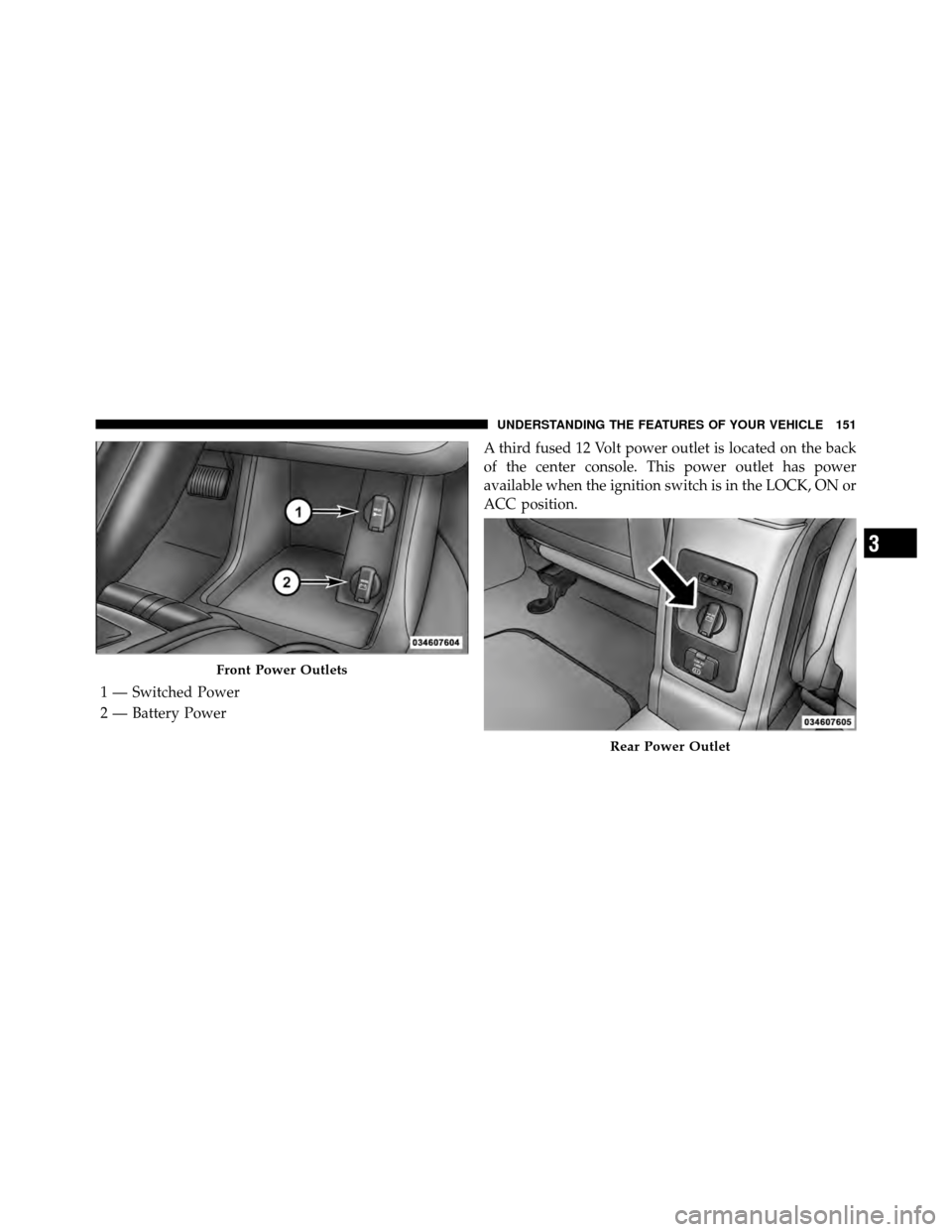
There are two fused 12 Volt (13 Amp) power outlets
located in the center console below the radio. The power
outlet on the top has power available when the ignition
switch in the ON or ACC position. The power outlet on
the bottom has power available when the ignition switch
is in the LOCK, ON, or ACC position.
This power outlet will also operate a conventional cigar
lighter unit.To preserve the heating element, do not
hold the lighter in the heating position.
150 UNDERSTANDING THE FEATURES OF YOUR VEHICLE
Page 152 of 512
A third fused 12 Volt power outlet is located on the back
of the center console. This power outlet has power
available when the ignition switch is in the LOCK, ON or
ACC position.
Front Power Outlets
1 — Switched Power
2 — Battery Power
Rear Power Outlet
3
UNDERSTANDING THE FEATURES OF YOUR VEHICLE 151
Page 153 of 512
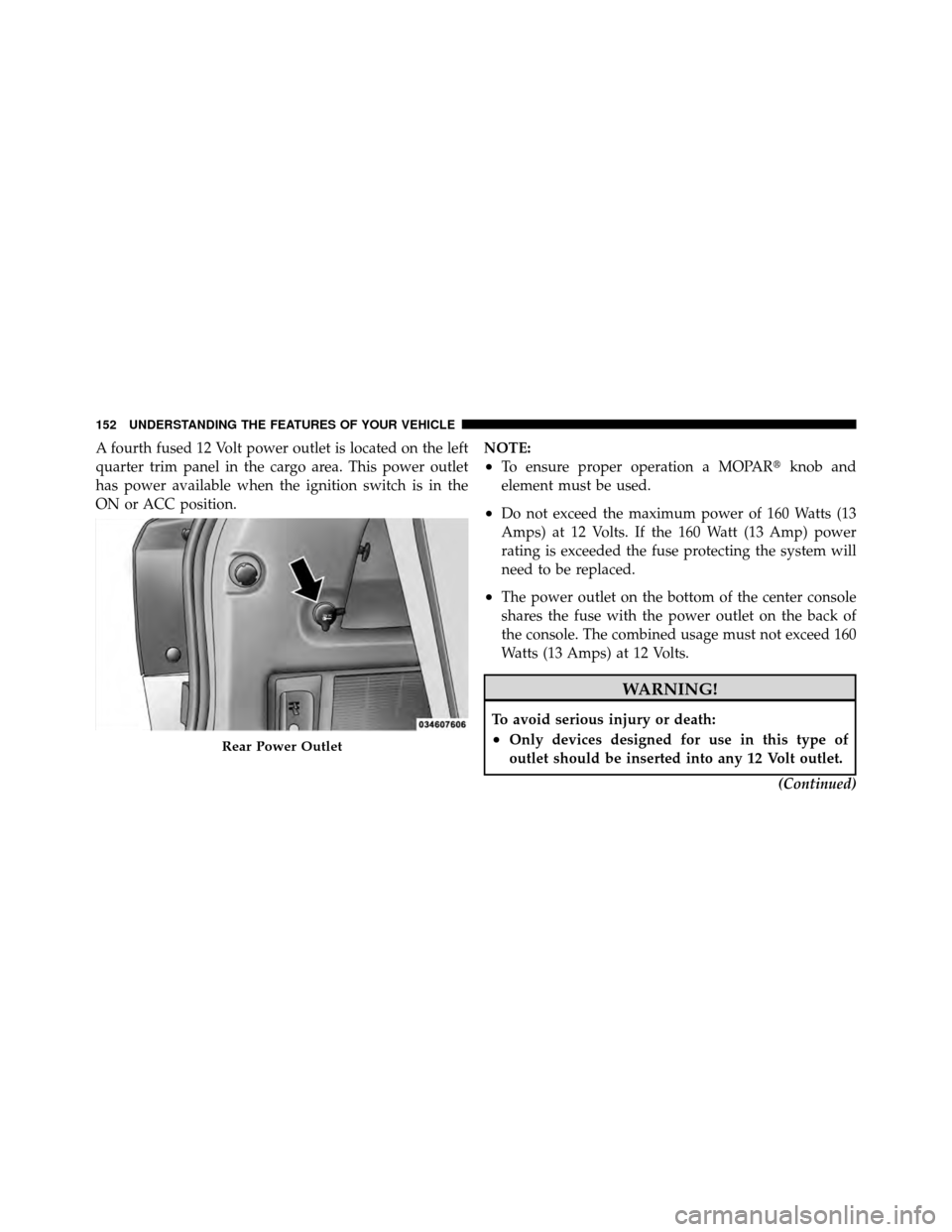
A fourth fused 12 Volt power outlet is located on the left
quarter trim panel in the cargo area. This power outlet
has power available when the ignition switch is in the
ON or ACC position.NOTE:
•To ensure proper operation a MOPAR�
knob and
element must be used.
•Do not exceed the maximum power of 160 Watts (13
Amps) at 12 Volts. If the 160 Watt (13 Amp) power
rating is exceeded the fuse protecting the system will
need to be replaced.
•The power outlet on the bottom of the center console
shares the fuse with the power outlet on the back of
the console. The combined usage must not exceed 160
Watts (13 Amps) at 12 Volts.
WARNING!
To avoid serious injury or death:
•Only devices designed for use in this type of
outlet should be inserted into any 12 Volt outlet.
(Continued)Rear Power Outlet
152 UNDERSTANDING THE FEATURES OF YOUR VEHICLE
Page 172 of 512
REAR WINDOW FEATURES
Rear Window Wiper/Washer
The rear window wiper/washer control is located on the
right side of the steering column.Rotate the switch upward to the “On” position will
activate the rear wiper.
Rotate the switch upward to the “washer” position
will activate that rear washer. The washer pump
will continue to operate as long as the lever or ring
is engaged. Upon release, the wipers will cycle three
times before returning to the set position.
If the rear wiper is operating when the ignition is turned
to the LOCK position, the wiper will automatically return
to the “Park” position. When the vehicle is restarted, the
wiper will resume function at whichever position the
switch is set at.
Rear Window Wiper/Washer Control
3
UNDERSTANDING THE FEATURES OF YOUR VEHICLE 171
Page 182 of 512
INSTRUMENT PANEL FEATURES
1 — Side Window Demist Outlet5 — Hazard Switch9 — Climate Control
2 — Air Outlet 6 — Switch Bank10 — Radio
3 — Instrument Cluster 7 — Beverage Cooler/Storage Compartment* 11 — Ignition Switch
4 — Storage Compartment or Remote Display
Panel* 8 — Glove Box
* If Equipped
4
UNDERSTANDING YOUR INSTRUMENT PANEL 181
Page 184 of 512

INSTRUMENT CLUSTER DESCRIPTIONS
1. Coolant Temperature Gauge
The temperature gauge indicates engine coolant tem-
perature. Any reading within the normal range indicates
that the cooling system is operating satisfactorily. The
gauge pointer will likely indicate a high temperature
when driving in hot weather, up mountain grades, in
heavy traffic, or when towing a trailer. If the pointer rises
to the “H” mark, safely pull over and stop the vehicle. If
the Air Conditioning A/C system is on, turn it off. Also,
shift the transmission into NEUTRAL and idle the ve-
hicle. If the needle remains on the “H” mark, turn the
engine OFF immediately and call for service.
NOTE:The gauge pointer will remain near its last
reading when the engine is turned off. It will return to a
true reading when the engine is restarted.
CAUTION!
Do not leave your vehicle unattended with the en-
gine running, as you would not be able to react to the
temperature indicator light if the engine overheats.
2. Fuel Gauge
The fuel gauge shows the level of fuel in the tank when
ignition switch is in the ON position.
3. Fuel Cap Indicator This symbol indicates the side of the vehicle
where the fuel filler cap is located.
4. Coolant Temperature Warning Light This light warns of an overheated engine condi-
tion. If the light turns on while driving, safely pull
over and stop the vehicle. If the A/C system is on,
turn it off. Also, shift the transmission into NEUTRAL
4
UNDERSTANDING YOUR INSTRUMENT PANEL 183
Page 186 of 512

7. Turn Signal Indicator LightThe left or right arrow will flash in unison with the
corresponding front and rear turn signal lights when
the turn signal switch is operated.
NOTE:
•A chime will sound if the vehicle is driven more than
1 mi (1.6 km) with either turn signal on.
•Check for an inoperative outside light bulb if either
indicator flashes at a rapid rate.
8. High Beam Indicator This light shows that the high beam headlights are
on. Pull the multifunction lever on the left side of
the steering column toward you to switch to low beam.
9. Speedometer
Shows the vehicle speed. 10. Vehicle Security Light — If Equipped
This light will flash rapidly for approximately
16 seconds when the vehicle Security system is
arming and then flash slowly when the system
is armed. The light will also turn on for about
three seconds when the ignition switch is first turned
ON.
11. All-Wheel Drive (AWD) Failure Indicator Light —
If Equipped This light monitors the All-Wheel-Drive
(AWD) system. The light will turn on for a bulb
check when the ignition switch is turned to the
ON position and may stay on for as long as
three seconds.
When lit solid: There is an AWD system fault. AWD
performance will be at a reduced level. Service the AWD
system soon.4
UNDERSTANDING YOUR INSTRUMENT PANEL 185
Page 187 of 512

When blinking:The AWD system is temporarily dis-
abled due to overload condition.
12. Tachometer
This gauge measures engine revolutions per minute
(RPM x 1000). Before the pointer reaches the red area,
ease up on the accelerator to prevent engine damage.
13. Shift Lever Indicator
The Shift Lever Indicator is self-contained within the
instrument cluster. It displays the gear position of the
automatic transmission.
14. Seat Belt Reminder Light This light will turn on for several seconds after the
ignition switch is turned ON as a reminder to
“buckle up.” This light will remain on as long as
the driver’s seat belt remains unbuckled. Refer to “Occu-
pant Restraints” in “Things To Know Before Starting
Your Vehicle” for further information. 15. Odometer/Trip Odometer Display Area
The odometer shows the total distance the vehicle has
been driven. The trip odometer shows individual trip
mileage. Refer to “Trip Odometer button” for additional
information.
NOTE:
U.S. Federal regulations require that upon trans-
fer of vehicle ownership, the seller certify to the pur-
chaser the correct mileage that the vehicle has been
driven. If your odometer needs to be repaired or serviced,
the repair technician should leave the odometer reading
the same as it was before the repair or service. If s/he
cannot do so, then the odometer must be set at zero, and
a sticker must be placed in the door jamb stating what the
mileage was before the repair or service. It is a good idea
for you to make a record of the odometer reading before
the repair/service, so that you can be sure that it is
properly reset, or that the door jamb sticker is accurate if
the odometer must be reset at zero.
186 UNDERSTANDING YOUR INSTRUMENT PANEL