Page 7 of 450
WARNINGS AND CAUTIONS
This Owner’s Manual containsWARNINGSagainst op-
erating procedures that could result in an accident or
bodily injury. It also contains CAUTIONSagainst proce-
dures that could result in damage to your vehicle. If you
do not read this entire manual, you may miss important
information. Observe all Warnings and Cautions.
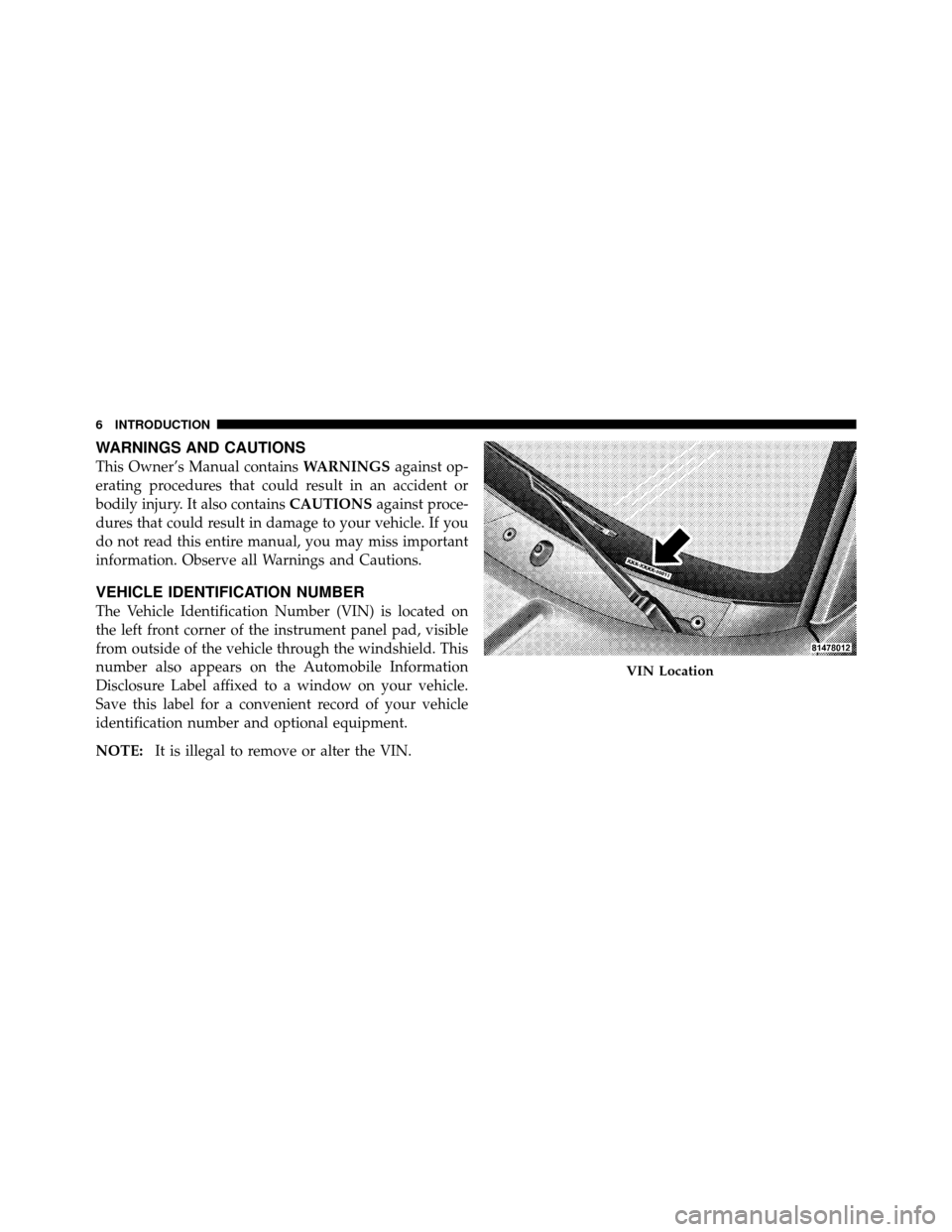
VEHICLE IDENTIFICATION NUMBER
The Vehicle Identification Number (VIN) is located on
the left front corner of the instrument panel pad, visible
from outside of the vehicle through the windshield. This
number also appears on the Automobile Information
Disclosure Label affixed to a window on your vehicle.
Save this label for a convenient record of your vehicle
identification number and optional equipment.
NOTE: It is illegal to remove or alter the VIN.
VIN Location
6 INTRODUCTION
Page 14 of 450
3. Remove the key from the ignition lock cylinder.NOTE:If you try to remove the key before you place the
shift lever in PARK, the key may become temporarily
trapped in the ignition cylinder. If this occurs, rotate the
key to the right slightly, then remove the key as de-
scribed. If a malfunction occurs, the system will trap the
key in the ignition cylinder to warn you that this safety
feature is inoperable. The engine can be started and
stopped, but the key cannot be removed until you obtain
service.
WARNING!
Never leave children alone in a vehicle. Leaving
unattended children in a vehicle is dangerous for a
number of reasons. A child or others could be seri-
ously or fatally injured. Don’t leave the key in the
ignition. A child could operate power windows,
other controls, or move the vehicle.
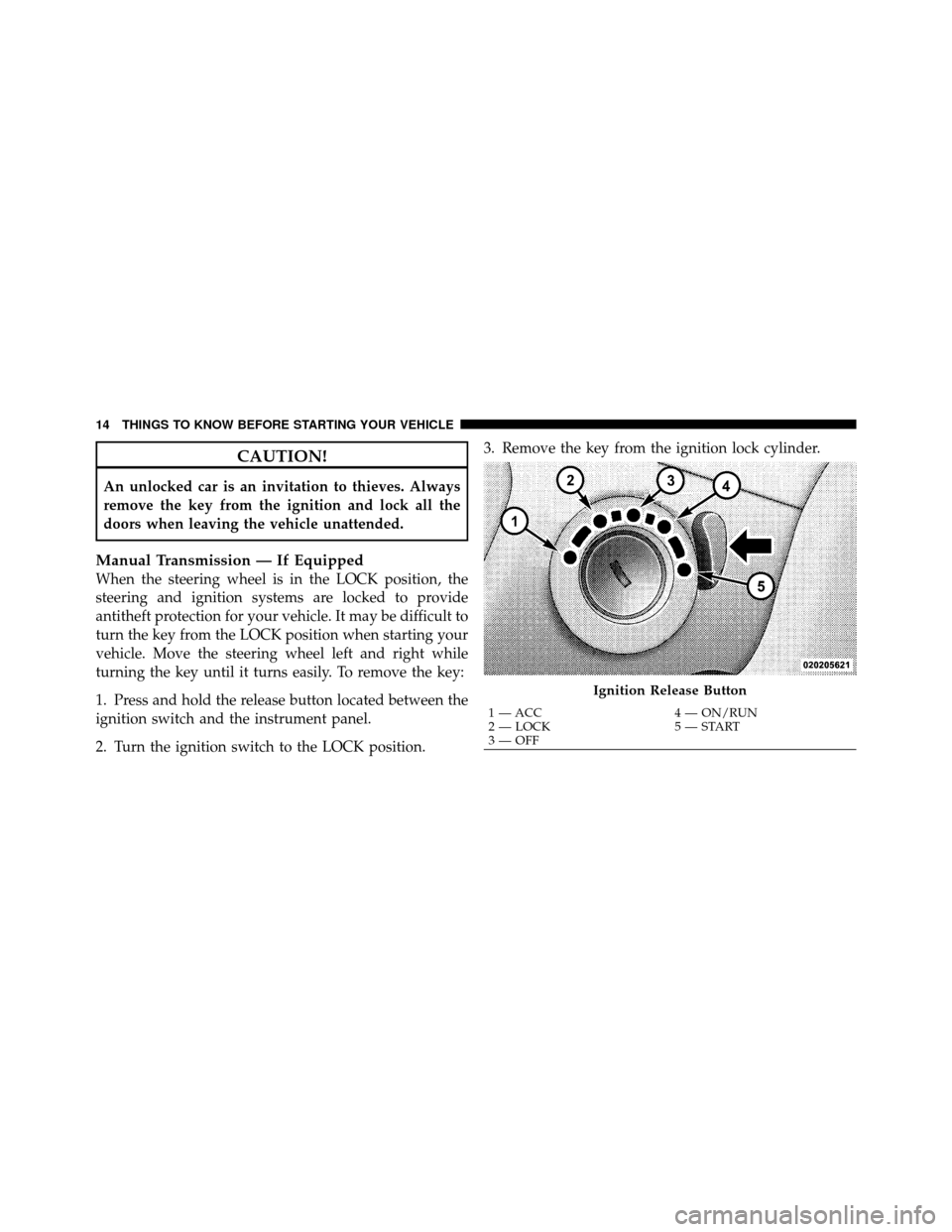
Ignition Switch Positions
1 — ACC 4 — ON/RUN
2 — LOCK 5 — START
3 — OFF
2
THINGS TO KNOW BEFORE STARTING YOUR VEHICLE 13
Page 15 of 450
CAUTION!
An unlocked car is an invitation to thieves. Always
remove the key from the ignition and lock all the
doors when leaving the vehicle unattended.
Manual Transmission — If Equipped
When the steering wheel is in the LOCK position, the
steering and ignition systems are locked to provide
antitheft protection for your vehicle. It may be difficult to
turn the key from the LOCK position when starting your
vehicle. Move the steering wheel left and right while
turning the key until it turns easily. To remove the key:
1. Press and hold the release button located between the
ignition switch and the instrument panel.
2. Turn the ignition switch to the LOCK position.3. Remove the key from the ignition lock cylinder.
Ignition Release Button
1 — ACC
4 — ON/RUN
2 — LOCK 5 — START
3 — OFF
14 THINGS TO KNOW BEFORE STARTING YOUR VEHICLE
Page 16 of 450
Locking Doors With A Key
You can insert the key into the door lock cylinder with
either side up. To lock the driver’s door, turn the key
rearward. To unlock the driver’s door, turn the key
forward. For external door lock lubrication, refer to
“Maintenance Procedures” in “Maintaining Your
Vehicle”.
STEERING WHEEL LOCK — IF EQUIPPED
Your vehicle may be equipped with a passive steering
wheel lock. This lock prevents steering the vehicle with-
out the ignition key. If the steering wheel is moved
approximately a half turn in either direction, and the key
is not in the ignition switch, the steering wheel will lock.
To Manually Lock the Steering Wheel
With the engine running, turn the steering wheel upside
down, turn off the engine and remove the key. Turn the
steering wheel slightly in either direction until the lock
engages.
To Release the Steering Wheel Lock
Insert the key in the ignition switch and start the engine.
If the key is difficult to turn, move the wheel slightly to
the right or left to disengage the lock.
NOTE:If you turned the wheel to the right to engage
the lock, you must turn the wheel slightly to the right to
disengage it. If you turned the wheel to the left to engage
the lock, turn the wheel slightly to the left to disengage it.
Automatic Transmission Ignition Interlock System
This system prevents the key from being removed unless
the shift lever is in PARK. It also prevents shifting out of
PARK unless the key is in the ACC, or ON position, and
the brake pedal is pressed.
2
THINGS TO KNOW BEFORE STARTING YOUR VEHICLE 15
Page 18 of 450
Replacement Keys
NOTE:Only keys that are programmed to the vehicle
electronics can be used to start and operate the vehicle.
Once a Sentry Key� is programmed to a vehicle, it cannot
be programmed to any other vehicle.
CAUTION!
Always remove the Sentry Keys� from the vehicle
and lock all doors when leaving the vehicle unat-
tended.
At the time of purchase, the original owner is provided
with a four-digit Personal Identification Number (PIN).
Keep the PIN in a secure location. This number is
required for authorized dealer replacement of keys. Du-
plication of keys may be performed at an authorized
dealer or by following the customer key programming procedure. This procedure consists of programming a
blank key to the vehicle electronics. A blank key is one
that has never been programmed.
NOTE:
When having the Sentry Key� Immobilizer
System serviced, bring all vehicle keys with you to an
authorized dealer.
Customer Key Programming
If you have two valid Sentry Keys�, you can program
new Sentry Keys� to the system by performing the
following steps:
1. Cut the additional Sentry Key� Transponder blank(s)
to match the ignition switch lock cylinder key code.
2. Insert the first valid key into the ignition switch. Turn
the ignition switch to the ON position for at least three
seconds, but no longer than 15 seconds. Then, turn the
ignition switch to the LOCK position and remove the first
key.
2
THINGS TO KNOW BEFORE STARTING YOUR VEHICLE 17
Page 19 of 450

3. Insert the second valid key into the ignition switch.
Turn the ignition switch to the ON position within
15 seconds. After 10 seconds, a chime will sound. In
addition, the Vehicle Security Light will begin to flash.
Turn the ignition switch to the LOCK position and
remove the second key.
4. Insert a blank Sentry Key�into the ignition switch.
Turn the ignition switch to the ON position within
60 seconds. After 10 seconds, a single chime will sound.
In addition, the Vehicle Security Light will stop flashing.
To indicate that programming is complete, the Vehicle
Security Light will turn on again for three seconds and
then turn off. The new Sentry Key�
is programmed.The Remote
Keyless Entry (RKE) transmitter will also be pro-
grammed during this procedure.
Repeat this procedure to program up to eight keys. If you
do not have a programmed Sentry Key�, contact your
authorized dealer for details.
NOTE: If a programmed key is lost, see your authorized
dealer to have all remaining keys erased from the sys-
tem’s memory. This will prevent the lost key from
starting your vehicle. The remaining keys must then be
reprogrammed. All vehicle keys must be taken to an
authorized dealer at the time of service to be
reprogrammed.
18 THINGS TO KNOW BEFORE STARTING YOUR VEHICLE
Page 24 of 450
Horn Chirp Programming
The horn chirp feature is shipped from the assembly
plant activated. If desired, this feature can be disabled by
using the following procedure:
1. Press and hold the LOCK button on the RKE trans-
mitter.
2. After holding the LOCK button for four seconds, also
press the PANIC button within six seconds. A single
chime will sound to indicate that this feature has
changed.
3. Release both buttons at the same time.
4. To reactivate this feature, repeat the above steps.
5. Test the horn chirp feature while outside of the vehicle
by pressing the LOCK button on the RKE transmitter
with the ignition in the OFF position and the key
removed.NOTE:
Pressing the LOCK button on the RKE transmit-
ter while you are inside the vehicle will activate the
Vehicle Security Alarm. Opening a door with the Vehicle
Security Alarm activated will cause the alarm to sound.
Press the UNLOCK button to deactivate the Vehicle
Security Alarm System.
6. If the desired programming was not achieved, or to
reactivate this feature, repeat the above steps.
Flash Lamps With Lock Programming
1. Press and hold the UNLOCK button on the RKE
transmitter.
2. After holding the UNLOCK button for four seconds,
also press the LOCK button within six seconds. A single
chime will sound to indicate that this feature has
changed.
3. Release both buttons at the same time.
2
THINGS TO KNOW BEFORE STARTING YOUR VEHICLE 23
Page 25 of 450
4. Test the Flash Lamps With Lock feature while outside
of the vehicle by pressing the LOCK button on the RKE
transmitter with the ignition in the OFF position and the
key removed.
NOTE:Pressing the LOCK button on the RKE transmit-
ter while you are in the vehicle will activate the Vehicle
Security Alarm. Opening a door with the Vehicle Security
Alarm activated will cause the alarm to sound. Press the
UNLOCK button to deactivate the Vehicle Security
Alarm System.
5. If the desired programming was not achieved, or to
reactivate this feature, repeat the above steps.
Using The Panic Alarm
To activate the Panic mode while the ignition is OFF,
press and release the PANIC button on the RKE trans-
mitter once. When the Panic mode is activated, the
interior lights will illuminate, the headlights and parking
lights will flash, and the horn will sound. To cancel the Panic mode, press and release the PANIC
button on the RKE transmitter a second time. Panic mode
will automatically cancel after three minutes, or if the
vehicle is started or exceeds 15 mph (24 km/h). During
the Panic Mode, the door locks and RKE systems will
function normally. Panic mode will not disarm the Ve-
hicle Security Alarm System, on vehicles so equipped.
General Information
This device complies with part 15 of FCC rules and with
RS-210 of Industry Canada. Operation is subject to the
following conditions:
1. This device may not cause harmful interference.
2. This device must accept any interference that may be
received including interference that may cause undesired
operation.
NOTE:
Changes or modifications not expressly ap-
proved by the party responsible for compliance could
void the user’s authority to operate the equipment.
24 THINGS TO KNOW BEFORE STARTING YOUR VEHICLE