Page 351 of 450
Two-Wheel Drive Vehicles
Provided that the transmission is operable, tow with the
transmission in NEUTRAL and the ignition key in the
OFF position, along with the front wheels raised and the
rear wheels on the ground. The speed must not exceed
30 mph (50 km/h), and the distance must not exceed
15 miles (25 km).
If the vehicle is to be towed more than 15 miles (25 km)
or faster than 30 mph (50 km/h), it must be towed on a
flatbed, or with the rear wheels raised and the front
wheels on the ground, or with the front end raised and
the rear wheels on a towing dolly.
CAUTION!
Towing the vehicle with the rear wheels on the
ground at more than 30 mph (50 km/h) or for more
than 15 miles (25 km), can cause severe transmission
damage. Such damage is not covered by the New
Vehicle Limited Warranty.
350 WHAT TO DO IN EMERGENCIES
Page 356 of 450
ONBOARD DIAGNOSTIC SYSTEM — OBD II
Your vehicle is equipped with a sophisticated onboard
diagnostic system called OBD II. This system monitors
the performance of the emissions, engine, and automatic
transmission control systems. When these systems are
operating properly, your vehicle will provide excellent
performance and fuel economy, as well as engine emis-
sions well within current government regulations.
If any of these systems require service, the OBD II system
will turn on the Malfunction Indicator Light (MIL). It will
also store diagnostic codes and other information to
assist your service technician in making repairs. Al-
though your vehicle will usually be drivable and not
need towing, see your authorized dealer for service as
soon as possible.CAUTION!
•Prolonged driving with the MIL on could cause
further damage to the emission control system. It
could also affect fuel economy and driveability.
The vehicle must be serviced before any emissions
tests can be performed.
•If the MIL is flashing while the engine is running,
severe catalytic converter damage and power loss
will soon occur. Immediate service is required.
Loose Fuel Filler Cap Message
After fuel is added, the vehicle diagnostic system can
determine if the fuel filler cap is possibly loose, improp-
erly installed, or damaged. A “gASCAP” message will be
displayed in the odometer. Tighten the gas cap until a
�clicking�sound is heard. This is an indication that the
gas cap is properly tightened. Press the odometer reset
button to turn the message off. If the problem persists,
7
MAINTAINING YOUR VEHICLE 355
Page 369 of 450
WARNING!
A hot exhaust system can start a fire if you park over
materials that can burn. Such materials might be
grass or leaves coming into contact with your exhaust
system. Do not park or operate your vehicle in areas
where your exhaust system can contact anything that
can burn.
In unusual situations involving grossly malfunctioning
engine operation, a scorching odor may indicate severe
and abnormal catalyst overheating. If this occurs, the
vehicle should be stopped, the engine shut off and the
vehicle allowed to cool. Thereafter, service, including a
tune-up to manufacturer’s specifications, should be ob-
tained immediately. To minimize the possibility of catalyst damage:•Do not shut off the engine or interrupt the ignition
when the transmission is in gear and the vehicle is in
motion.
•Do not try to start the engine by pushing or towing the
vehicle.
•Do not idle the engine with any spark plug wires
disconnected or removed, such as when diagnostic
testing, or for prolonged periods during very rough
idling or malfunctioning operating conditions.
368 MAINTAINING YOUR VEHICLE
Page 383 of 450
•If your vehicle is damaged due to an accident or
similar cause, which destroys the paint and protective
coating, have your vehicle repaired as soon as pos-
sible. The cost of such repairs is considered the respon-
sibility of the owner.
•If you carry special cargo such as chemicals, fertilizers,
de-icer salt, etc., be sure that such materials are well
packaged and sealed.
•If a lot of driving is done on gravel roads, consider
mud or stone shields behind each wheel.
•Use MOPAR�Touch Up Paint or equivalent on
scratches as soon as possible. Your authorized dealer
has touch up-paint to match the color of your vehicle.
Wheel and Wheel Trim Care
All wheels and wheel trim, especially aluminum and
chrome-plated wheels, should be cleaned regularly with
a mild soap and water to prevent corrosion. To remove heavy soil, use MOPAR�
Wheel Cleaner or equivalent, or
select a nonabrasive, non-acidic cleaner. Do not use
scouring pads, steel wool, a bristle brush or metal pol-
ishes. Only MOPAR� cleaners or equivalent are recom-
mended. Do not use oven cleaner. Avoid automatic car
washes that use acidic solutions or harsh brushes that
may damage the wheels’ protective finish.
Stain Repel Fabric Cleaning Procedure – If Equipped
Stain Repel seats may be cleaned in the following man-
ner:
•Remove as much of the stain as possible by blotting
with a clean, dry towel.
•Blot any remaining stain with a clean, damp towel.
•For tough stains, apply MOPAR� Total Clean or
equivalent or a mild soap solution to a clean, damp
cloth and remove the stain. Use a fresh, damp towel to
remove soap residue.
382 MAINTAINING YOUR VEHICLE
Page 384 of 450
•For grease stains, apply MOPAR�Multi-Purpose
Cleaner or equivalent to a clean, damp cloth and
remove the stain. Use a fresh, damp towel to remove
soap residue.
•Do not use any harsh solvents or any other form of
protectants on Stain Repel products.
Interior Care
Use MOPAR� Total Clean or equivalent to clean fabric
upholstery and carpeting.
Interior trim should be cleaned starting with a damp
cloth, a damp cloth with MOPAR� Total Clean or equiva-
lent, then MOPAR� Spot & Stain Remover or equivalent,
if absolutely necessary. Do not use harsh cleaners or
Armor All�. Use MOPAR� Total Clean or equivalent to
clean vinyl upholstery.
Use MOPAR� Vinyl Cleaner or equivalent to clean vinyl
upholstery and trim.
Leather Seat Care and Cleaning
MOPAR� Total Clean or equivalent is specifically recom-
mended for leather upholstery.
Your leather upholstery can be best preserved by regular
cleaning with a damp soft cloth. Small particles of dirt
can act as an abrasive and damage the leather upholstery
and should be removed promptly with a damp cloth.
Stubborn soils can be removed easily with a soft cloth
and MOPAR� Total Clean or equivalent. Care should be
taken to avoid soaking your leather upholstery with any
liquid. Please do not use polishes, oils, cleaning fluids,
solvents, detergents, or ammonia-based cleaners to clean
your leather upholstery. Application of a leather condi-
tioner is not required to maintain the original condition.
7
MAINTAINING YOUR VEHICLE 383
Page 385 of 450
WARNING!
Do not use volatile solvents for cleaning purposes.
Many are potentially flammable, and if used in
closed areas they may cause respiratory harm.
Glass Surfaces
All glass surfaces should be cleaned on a regular basis
with any commercial household-type glass cleaner.
Never use an abrasive type cleaner. Use caution when
cleaning inside rear windows equipped with electric
defrosters, or windshields equipped with a windshield
wiper de-icer. Do not use scrapers or other sharp instru-
ments, which may scratch the elements.
When cleaning the rearview mirror, spray cleaner on the
towel or rag that you are using. Do not spray cleaner
directly on the mirror.
Cleaning Plastic Instrument Cluster Lenses
The lenses in front of the instruments in this vehicle are
molded in clear plastic. When cleaning the lenses, care
must be taken to avoid scratching the plastic.
1.
Clean with a wet soft rag. A mild soap solution may be
used, but do not use high alcohol content or abrasive
cleaners. If soap is used, wipe clean with a clean damp rag.
2. Dry with a soft tissue.
Seat Belt Maintenance
Do not bleach, dye or clean the belts with chemical
solvents or abrasive cleaners. This will weaken the fabric.
Sun damage will also weaken the fabric.
If the belts need cleaning, use a mild soap solution or
lukewarm water. Do not remove the belts from the car to
wash them.
Replace the belts if they appear frayed or worn, or if the
buckles do not work properly.
384 MAINTAINING YOUR VEHICLE
Page 387 of 450
corresponds to the following chart. These fuses and
relays can be obtained from your authorized dealer.
CavityCartridge
Fuse Mini-
Fuse Description
1 Spare
2 Spare
3 30 Amp Pink Electric Brake
4 50 Amp Red Power Seat
5 Spare
6 20 Amp
YellowIgnition Off Draw
(IOD) Cabin Com-
partment Node
(CCN), Radio
7 10 Amp
RedPowertrain Control
Module (PCM)/Fuel/
RAD/AC Coils
Cavity
Cartridge
Fuse Mini-
Fuse Description
8 10 Amp
RedCabin Compartment
Node (CCN)/Mirror/
4x4
9 Spare
10 2 Amp
GrayRun/Start Ignition
Switch
11 10 Amp
RedAC Clutch
12 15 Amp
BlueTrailer Tow Lt Stop/
Turn
13 15 Amp
BlueTrailer Tow Rt Stop/
Turn
14 20 Amp
YellowIgnition Off Draw
(IOD) #2
15 25 Amp
NaturalTrans/Powertrain
Control Module
(PCM)
386 MAINTAINING YOUR VEHICLE
Page 389 of 450
CavityCartridge
Fuse Mini-
Fuse Description
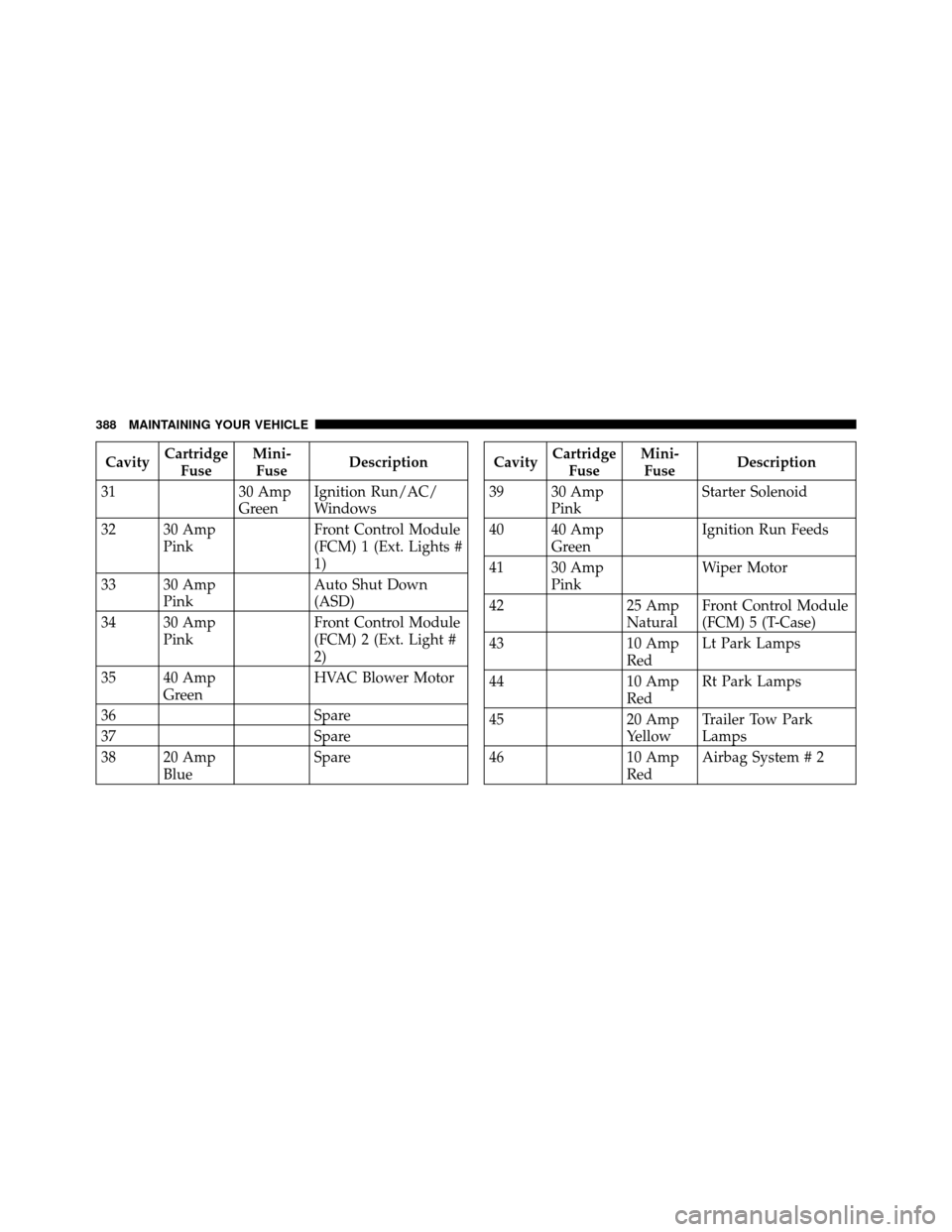
31 30 Amp
GreenIgnition Run/AC/
Windows
32 30 Amp Pink Front Control Module
(FCM) 1 (Ext. Lights #
1)
33 30 Amp Pink Auto Shut Down
(ASD)
34 30 Amp Pink Front Control Module
(FCM) 2 (Ext. Light #
2)
35 40 Amp Green HVAC Blower Motor
36 Spare
37 Spare
38 20 Amp Blue SpareCavity
Cartridge
Fuse Mini-
Fuse Description
39 30 Amp Pink Starter Solenoid
40 40 Amp Green Ignition Run Feeds
41 30 Amp Pink Wiper Motor
42 25 Amp
NaturalFront Control Module
(FCM) 5 (T-Case)
43 10 Amp
RedLt Park Lamps
44 10 Amp
RedRt Park Lamps
45 20 Amp
YellowTrailer Tow Park
Lamps
46 10 Amp
RedAirbag System # 2
388 MAINTAINING YOUR VEHICLE