2010 DODGE DAKOTA ESP
[x] Cancel search: ESPPage 127 of 450
Extended Cab/Crew Cab Rear Seat
More cargo space is available by lifting up on the rear
seat cushion.
The Crew Cab Rear Seat is a 60/40 split cushion and full
back. Either cushion can be raised, independently.
Heated Seats — If Equipped
The heated seat switches are located on the center of the
instrument panel.
After turning the ignition ON, you can choose from High,
Low or Off heat settings. Amber indicator lights in each
switch indicate the level of heat in use. Two indicator
lights will illuminate for High, one for Low and none for
Off.Press the switch once to select High-level heat-
ing. Press the switch a second time to select
Low-level heating. Press the switch a third time
to shut the heating elements Off. If the High-level heating is selected, the system will
automatically switch to Low-level heating after approxi-
mately 30 minutes of continuous operation. At that time,
the number of indicators illuminated changes from two
to one, indicating the change. Operation on the Low-level
setting also turns Off automatically after approximately
30 minutes.
WARNING!
•Persons who are unable to feel pain to the skin
because of advanced age, chronic illness, diabetes,
spinal cord injury, medication, alcohol use, ex-
haustion or other physical condition must exercise
care when using the seat heater. It may cause burns
even at low temperatures, especially if used for
long periods of time.
(Continued)
126 UNDERSTANDING THE FEATURES OF YOUR VEHICLE
Page 141 of 450
Tapping the ACCEL button once will result in a speed
increase of 1 mph (2 km/h). Each time the button is
tapped, speed increases so that tapping the button three
times will increase speed by 3 mph (4.8 km/h).
Tapping the DECEL button once will result in a speed
decrease of 1 mph (2 km/h). Each time the button is
tapped, speed will decrease. For example, tapping the
button three times will decrease the speed by 3 mph
(4.8 km/h).
To decrease the speed while the Electronic Speed Control
is on, press and hold the DECEL button. Release the
button when the desired speed is reached, and the new
speed will be set.To Accelerate for Passing
Press the accelerator as you would normally. When the
pedal is released, the vehicle will return to the set speed.
NOTE:When driving uphill, at elevations above 2,000 ft
(610 m), or when the vehicle is heavily loaded (especially
when towing) the vehicle may slow below the SET speed.
If the vehicle speed drops below 25 mph (40 km/h), the
Electronic Speed Control will automatically disengage. If
this happens, you can push down on the accelerator
pedal to maintain the desired speed.
Vehicles equipped with an automatic transmission may
exhibit several downshifts under the above conditions.
To reduce the frequency of the downshifts and to im-
prove vehicle performance, it is advisable to lock out
OVERDRIVE by pressing the TOW/HAUL button lo-
cated at the end of the shift lever.
140 UNDERSTANDING THE FEATURES OF YOUR VEHICLE
Page 143 of 450
Courtesy/Reading Lights
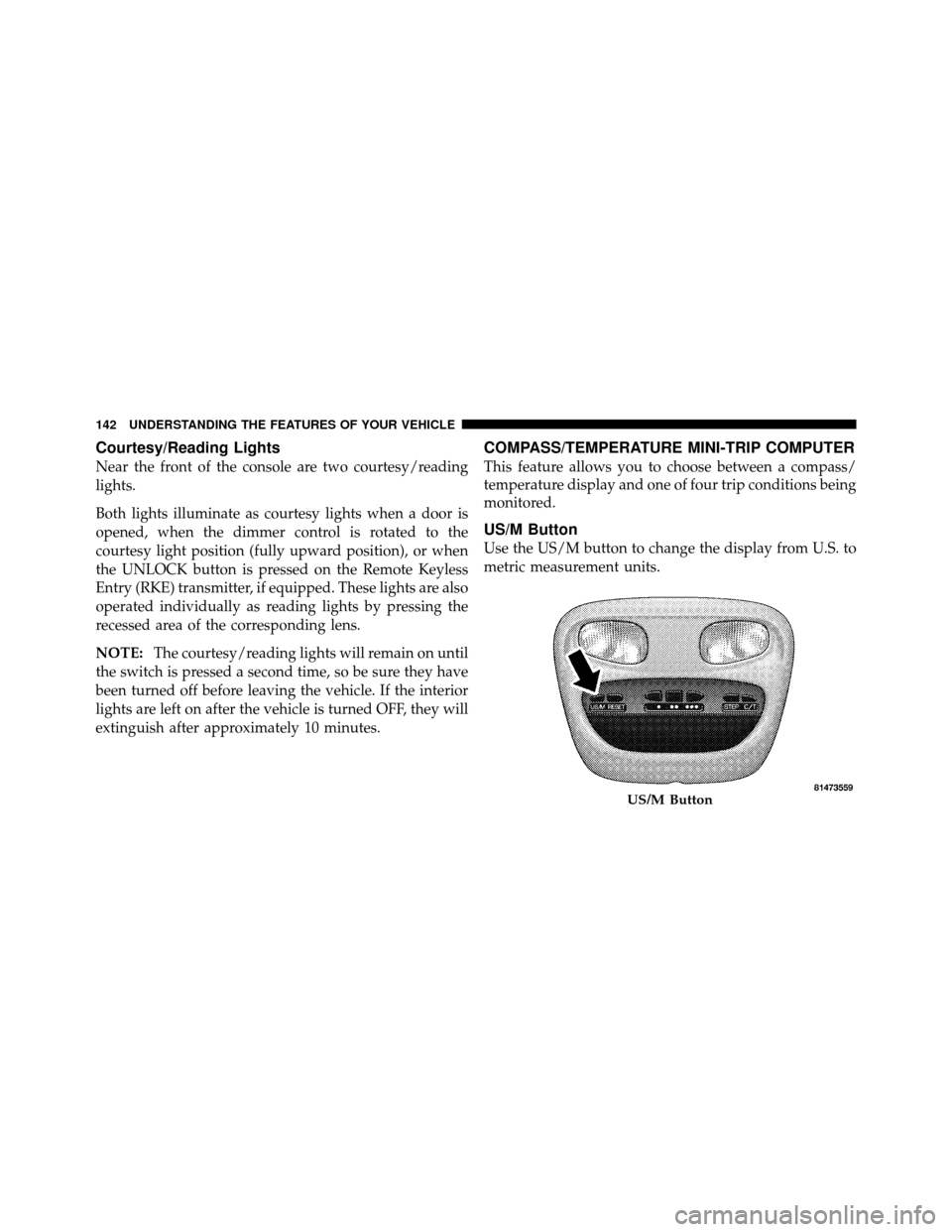
Near the front of the console are two courtesy/reading
lights.
Both lights illuminate as courtesy lights when a door is
opened, when the dimmer control is rotated to the
courtesy light position (fully upward position), or when
the UNLOCK button is pressed on the Remote Keyless
Entry (RKE) transmitter, if equipped. These lights are also
operated individually as reading lights by pressing the
recessed area of the corresponding lens.
NOTE:The courtesy/reading lights will remain on until
the switch is pressed a second time, so be sure they have
been turned off before leaving the vehicle. If the interior
lights are left on after the vehicle is turned OFF, they will
extinguish after approximately 10 minutes.
COMPASS/TEMPERATURE MINI-TRIP COMPUTER
This feature allows you to choose between a compass/
temperature display and one of four trip conditions being
monitored.
US/M Button
Use the US/M button to change the display from U.S. to
metric measurement units.
US/M Button
142 UNDERSTANDING THE FEATURES OF YOUR VEHICLE
Page 145 of 450
Average Fuel Economy (AVG ECO)
Displays the average fuel economy since the last reset.
Average fuel economy is a running average of the
amount of fuel used and the distance the vehicle has
traveled. When the fuel economy is reset, the display will
momentarily blank, the history will be erased, and the
AVERAGE WILL CONTINUE FROM WHERE IT WAS
BEFORE THE RESET. The reset value is based on a
minimal amount of fuel used and the distance traveled
from the previous drive cycle. The display may take
several miles/kilometers for this value to change, de-
pending upon driving habits.
Distance To Empty (DTE)
Shows the estimated distance that can be traveled with
the fuel remaining in the tank. The estimated distance is
determined by a weighted average of the instantaneous
and average fuel economy, according to the current fuel
tank level.NOTE:
The DTE is not resettable.
When Distance To Empty = LOW FUEL, the fuel gauge
pointer will initially be on the red “E” marker. At this
point (fuel gauge pointer on the red “E” marker), there is
reserve fuel capacity, which corresponds to approxi-
mately 8% of tank volume. This reserve capacity was put
in place to prevent the likelihood of customers running
out of fuel when operating at maximum load conditions
in areas where there aren’t many gas stations.
NOTE: The Distance To Empty will remain equal to zero
until the vehicle runs out of fuel or is refueled.
144 UNDERSTANDING THE FEATURES OF YOUR VEHICLE
Page 155 of 450
General Information
This device complies with FCC rules part 15 and Industry
Canada RSS-210. Operation is subject to the following
two conditions:
1. This device may not cause harmful interference.
2. This device must accept any interference that may be
received including interference that may cause undesired
operation.
NOTE:The transmitter has been tested and it complies
with FCC and IC rules. Changes or modifications not
expressly approved by the party responsible for compli-
ance could void the user ’s authority to operate the
device.
The term “IC” before the certification/registration num-
ber only signifies that Industry Canada technical specifi-
cations were met.
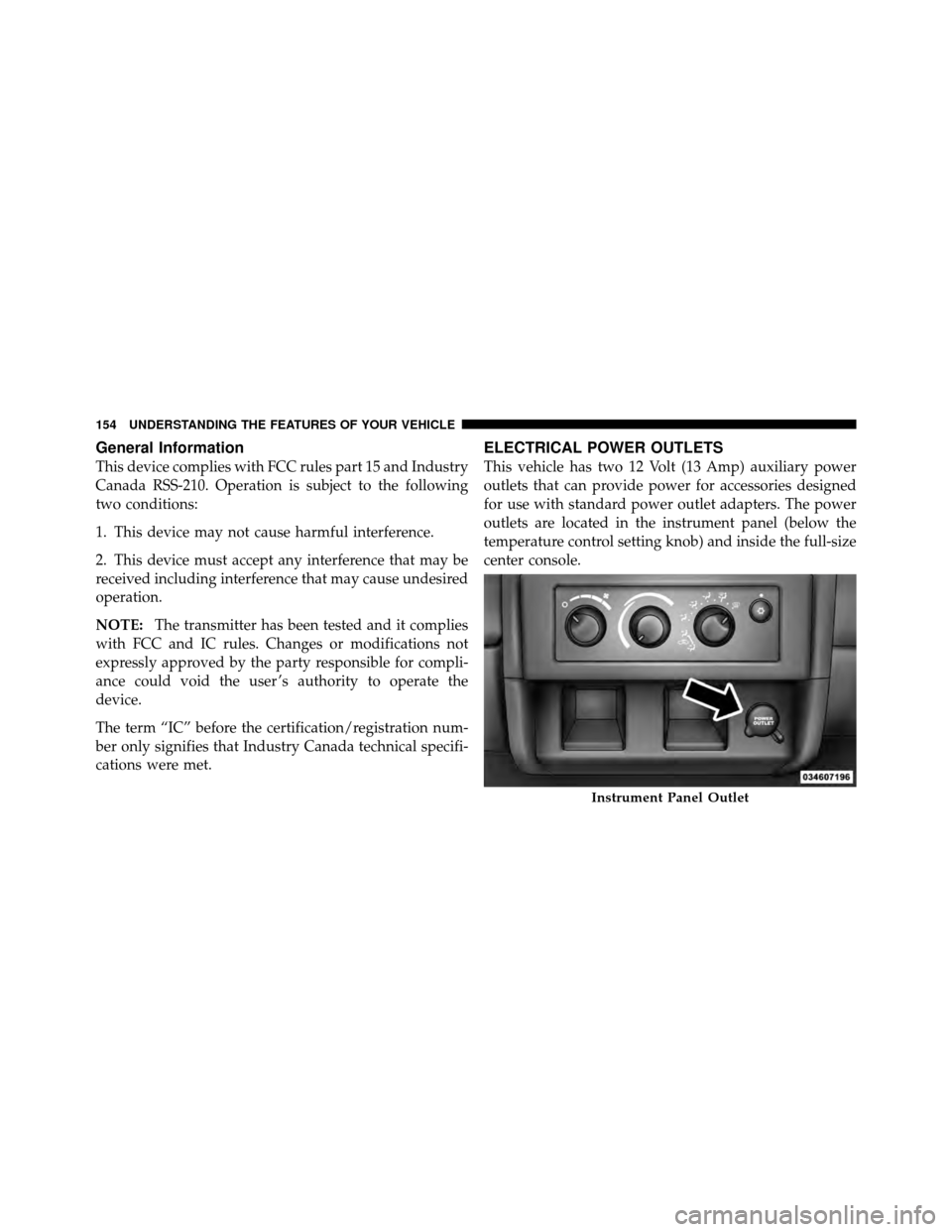
ELECTRICAL POWER OUTLETS
This vehicle has two 12 Volt (13 Amp) auxiliary power
outlets that can provide power for accessories designed
for use with standard power outlet adapters. The power
outlets are located in the instrument panel (below the
temperature control setting knob) and inside the full-size
center console.
Instrument Panel Outlet
154 UNDERSTANDING THE FEATURES OF YOUR VEHICLE
Page 182 of 450

19. Electronic Throttle Control (ETC) – If EquippedThe Electronic Throttle Control (ETC) light
informs you of a problem with the ETC system.
If a problem is detected, the light will come on
while the engine is running. If the light remains
lit with the engine running, your vehicle will usually be
drivable; however, see an authorized dealer for service as
soon as possible. If the light is flashing when the engine
is running, immediate service is required and you may
experience reduced performance, an elevated/rough idle
or engine stall, and your vehicle may require towing. The
light will come on when the ignition is first turned ON
and remain on for 15 seconds as a bulb check. If the light
does not come on during starting, have the system
checked by an authorized dealer. 20. Brake Warning Light
This light monitors various brake functions,
including brake fluid level and parking brake
application. If the brake light turns on, it may
indicate that the parking brake is applied, that
the brake fluid level is low, or that there is a problem with
the anti-lock brake system reservoir.
If the light remains on when the parking brake has been
disengaged, and the fluid level is at the full mark on the
master cylinder reservoir, it indicates a possible brake
hydraulic system malfunction or that a problem with the
Brake Booster has been detected by the Anti-Lock Brake
System (ABS) / Electronic Stability Program (ESP) sys-
tem. In this case, the light will remain on until the
condition has been corrected. If the problem is related to
the brake booster, the ABS pump will run when applying
the brake and a brake pedal pulsation may be felt during
each stop.
4
UNDERSTANDING YOUR INSTRUMENT PANEL 181
Page 185 of 450
WARNING!
A malfunctioning catalytic converter, as referenced
above, can reach higher temperatures than in normal
operating conditions. This can cause a fire if you
drive slowly or park over flammable substances such
as dry plants or wood or cardboard, etc. This could
result in death or serious injury to the driver, occu-
pants or others.
22. Tire Pressure Monitoring Telltale Light Each tire, including the spare (if provided),
should be checked monthly, when cold and
inflated to the inflation pressure recommended
by the vehicle manufacturer on the vehicle
placard or tire inflation pressure label. (If your vehicle
has tires of a different size than the size indicated on the vehicle placard or tire inflation pressure label, you should
determine the proper tire inflation pressure for those
tires.)
As an added safety feature, your vehicle has been
equipped with a Tire Pressure Monitoring System
(TPMS) that illuminates a low tire pressure telltale when
one or more of your tires is significantly under-inflated.
Accordingly, when the low tire pressure telltale illumi-
nates, you should stop and check your tires as soon as
possible, and inflate them to the proper pressure. Driving
on a significantly under-inflated tire causes the tire to
overheat and can lead to tire failure. Under-inflation also
reduces fuel efficiency and tire tread life, and may affect
the vehicle’s handling and stopping ability.
Please note that the TPMS is not a substitute for proper
tire maintenance, and it is the driver ’s responsibility to
184 UNDERSTANDING YOUR INSTRUMENT PANEL
Page 197 of 450
You may add a second station to each pushbutton by
repeating the above procedure with this exception: Press
the SET button twice and SET 2 will show in the display
window. Each button can be set for SET 1 and SET 2 in
both AM and FM. This allows a total of 12 AM, 12 FM,
and 12 Satellite (if equipped) stations to be stored into
pushbutton memory. The stations stored in SET 2
memory can be selected by pressing the pushbutton
twice.
Every time a preset button is used, a corresponding
button number will display.
Buttons1-6
These buttons tune the radio to the stations that you
commit to pushbutton memory {12 AM, 12 FM, and 12
Satellite (if equipped) stations}.
DISC Button
Pressing the DISC button will allow you to switch from
AM/FM modes to Disc modes.
Operation Instructions - (DISC MODE for CD and
MP3/WMA Audio Play, DVD-VIDEO)
The radio DVD player and many DVD discs are coded by
geographic region. These region codes must match in
order for the disc to play. If the region code for the DVD
disc does not match the region code for the radio DVD
player, it will not play the disc. Customers may take their
vehicle to an authorized dealer to change the region code
of the player a maximum of five times.
CAUTION!
The radio may shut down during extremely hot
conditions. When this occurs, the radio will indicate
“Disc Hot” and shut off until a safe temperature is
reached. This shutdown is necessary to protect the
optics of the DVD player and other radio internal
components.
196 UNDERSTANDING YOUR INSTRUMENT PANEL