2010 DODGE CHALLENGER SRT brake light
[x] Cancel search: brake lightPage 185 of 436

Flash Lights with Remote Key Lock
When ON is selected, the front and rear turn signals will
flash when the doors are locked or unlocked with the
RKE transmitter. This feature may be selected with or
without the sound horn on lock feature selected. To make
your selection, press and release the FUNCTION SE-
LECT button until “ON” or “OFF” appears.
Headlamps On with Wipers
(Available with Auto Headlights Only)
When ON is selected, and the headlight switch is in the
AUTO (A) position, the headlights will turn on approxi-
mately 10 seconds after the wipers are turned on. The
headlights will also turn off when the wipers are turned
off if they were turned on by this feature. To make your
selection, press and release the FUNCTION SELECT
button until “ON” or “OFF” appears.NOTE:
Turning the headlights on during the daytime
causes the instrument panel lights to dim. To increase the
brightness, refer to “Lights” in “Understanding The
Features Of Your Vehicle”.
Delay Turning Headlights Off
When this feature is selected, the driver can choose to
have the headlights remain on for 0, 30, 60, or 90 seconds
when exiting the vehicle. To make your selection, press
and release the FUNCTION SELECT button until “0,”
“30,” “60,” or “90” appears.
Hill Start Assist (HSA) — If Equipped
When on is selected, the HSA system is active. Refer to
“Electronic Brake Control System” in “Starting And
Operating” for system function and operating informa-
tion. To make your selection, press and release the
FUNCTION SELECT button until “ON” or “OFF”
appears.
184 UNDERSTANDING YOUR INSTRUMENT PANEL
Page 253 of 436

Over-Temperature Mode
The transmission electronics constantly monitor the trans-
mission oil temperature. If the transmission exceeds nor-
mal operating temperature, the transmission will change
the way it shifts to help control the condition. This may
result in a slightly different feeling or response during
normal operation in DRIVE position. After the transmis-
sion cools down, it will return to normal operation.
Key Ignition Park Interlock
This vehicle is equipped with a Key Ignition Park Inter-
lock which requires the shift lever to be placed in PARK
prior to rotating the key fob to the LOCK position. The
key fob can only be removed from the ignition when the
ignition is in the LOCK position and once removed the
shift lever is locked in PARK.
Brake/Transmission Shift Interlock System
This vehicle is equipped with a Brake Transmission Shift
Interlock (BTSI) system that holds the shift lever in thePARK position when the ignition switch is in the LOCK
position (OFF position with Keyless Go™). To move the
shift lever out of the PARK position, the ignition switch
must be turned to any other ignition position (ACC,
ON/RUN or START) whether the engine is running or
not, and the brake pedal must be pressed.
Brake/Transmission Interlock Manual Override
There is an override for the BTSI that allows you to move
the shift lever out of the PARK position if an electrical
system malfunction occurs (i.e., dead battery). To access
the override (using a flat-bladed screwdriver), carefully
remove the override cover which is located on the right
of the shift lever.
1. Turn the ignition switch to the ACC or ON position
(RUN position with Keyless Go™) without starting the
engine.
2. Firmly set the parking brake.
252 STARTING AND OPERATING
Page 263 of 436

CAUTION!
•Driving through standing water may cause dam-
age to your vehicle’s drivetrain components. Al-
ways inspect your vehicle’s fluids (i.e., engine oil,
transmission, axle, etc.) for signs of contamination
(i.e., fluid that is milky or foamy in appearance)
after driving through standing water. Do not con-
tinue to operate the vehicle if any fluid appears
contaminated, as this may result in further dam-
age. Such damage is not covered by the New
Vehicle Limited Warranty.
•Getting water inside your vehicle’s engine can
cause it to lock up and stall out, and cause serious
internal damage to the engine. Such damage is not
covered by the New Vehicle Limited Warranty.
WARNING!
•Driving through standing water limits your vehi-
cle’s traction capabilities. Do not exceed 5 mph
(8 km/h) when driving through standing water.
•Driving through standing water limits your vehi-
cle’s braking capabilities, which increases stop-
ping distances. Therefore, after driving through
standing water, drive slowly and lightly press on
the brake pedal several times to dry the brakes.
•Getting water inside your vehicle’s engine can
cause it to lock up and stall out, and leave you
stranded.
•Failure to follow these warnings may result in
injuries that are serious or fatal to you, your
passengers, and others around you.
262 STARTING AND OPERATING
Page 265 of 436

checked if a leak is suspected, abnormal noises are
apparent, and/or the system is not functioning as antici-
pated. Coordinate inspection efforts through an autho-
rized dealer.
CAUTION!
Do not use chemical flushes in your power steering
system as the chemicals can damage your power
steering components. Such damage is not covered by
the New Vehicle Limited Warranty.
WARNING!
Fluid level should be checked on a level surface and
with the engine off to prevent injury from moving
parts and to ensure accurate fluid level reading. Do
not overfill. Use only manufacturer’s recommended
power steering fluid.If necessary, add fluid to restore to the proper indicated
level. With a clean cloth, wipe any spilled fluid from all
surfaces. Refer to “Fluids, Lubricants, and Genuine
Parts” in “Maintaining Your Vehicle” for further
information.
PARKING BRAKE
Before leaving the vehicle, make sure that the parking
brake is fully applied and place the shift lever in the
PARK or REVERSE (manual transmission only) position.
When the parking brake is applied and the ignition
switch is in the ON position (RUN position with Keyless
Go™), the “Brake Warning Light” in the instrument
cluster will illuminate.
264 STARTING AND OPERATING
Page 266 of 436
NOTE:
•When the parking brake is applied and the transmis-
sion is placed in gear, the “Brake Warning Light” will
flash. If vehicle speed is detected, a chime will sound
to alert the driver. Fully release the parking brake
before attempting to move the vehicle.
•This light only shows that the parking brake is ap-
plied. It does not show the degree of brake application.
When parking on a hill, it is important to turn the front
wheels toward the curb on a downhill grade and away
from the curb on an uphill grade. For vehicles equipped
with an automatic transmission, apply the parking brake
before placing the shift lever in PARK, otherwise the load
on the transmission locking mechanism may make it
difficult to move the shift lever out of PARK. The parking
brake should always be applied whenever the driver is
not in the vehicle.
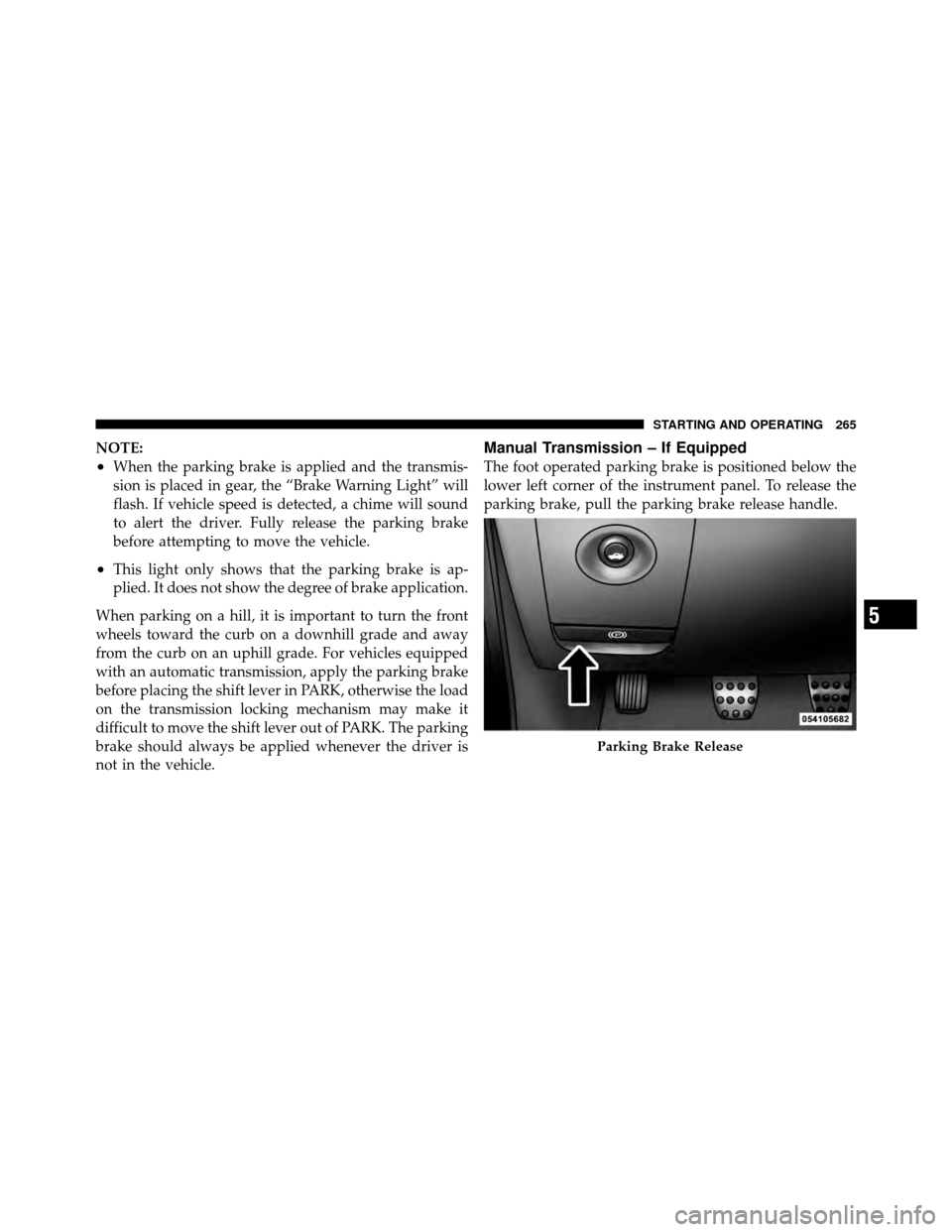
Manual Transmission – If Equipped
The foot operated parking brake is positioned below the
lower left corner of the instrument panel. To release the
parking brake, pull the parking brake release handle.
Parking Brake Release
5
STARTING AND OPERATING 265
Page 268 of 436

WARNING! (Continued)
•Always fully apply the parking brake when leav-
ing your vehicle, or it may roll and cause damage
or injury. Also be certain to leave the transmission
in PARK. Failure to do so may allow the vehicle to
roll and cause damage or injury.
CAUTION!
If the “Brake Warning Light” remains on with the
parking brake released, a brake system malfunction
is indicated. Have the brake system serviced by an
authorized dealer immediately.
BRAKE SYSTEM
Your vehicle is equipped with dual hydraulic
brake systems. If either of the two hydraulic
systems loses normal capability, the remainingsystem will still function. There will be some loss of
overall braking effectiveness. This may be evident by
increased pedal travel during application, greater pedal
force required to slow or stop, and potential activation of
the “Brake Warning Light.”
In the event power assist is lost for any reason (for
example, repeated brake applications with the engine
OFF) the brakes will still function. The effort required to
brake the vehicle will be much greater than that required
with the power system operating.
Anti-Lock Brake System (ABS)
The Anti-Lock Brake System (ABS) provides increased
vehicle stability and brake performance under most
braking conditions. The system automatically “pumps”
the brakes during severe braking conditions to prevent
wheel lock-up.
5
STARTING AND OPERATING 267
Page 269 of 436

The Electronic Brake Force Distribution (EBD) prevents
the rear wheels from over-braking and provides greater
control of available braking forces applied to the rear
axle.
When the vehicle is driven over 7 mph (11 km/h), you
may also hear a slight clicking sound as well as some
related motor noises. These noises are the system per-
forming its self check cycle to ensure that the ABS system
is working properly. This self check occurs each time the
vehicle is started and accelerated past 7 mph (11 km/h).
ABS is activated during braking under certain road or
stopping conditions. ABS-inducing conditions can in-
clude ice, snow, gravel, bumps, railroad tracks, loose
debris, or panic stops.You also may experience the following when the brake
system goes into Anti-Lock:
•The ABS motor running (it may continue to run for a
short time after the stop),
•The clicking sound of solenoid valves,
•Brake pedal pulsations, and
•A slight drop or fall away of the brake pedal at the end
of the stop.
These are all normal characteristics of ABS.
268 STARTING AND OPERATING
Page 271 of 436

All vehicle wheels and tires must be the same size and
type and tires must be properly inflated to produce
accurate signals for the computer.
Anti-Lock Brake Warning Light
The “Anti-Lock Brake System (ABS) Warning
Light” monitors the anti-lock brake system. The
light will come on when the ignition switch is turned to
the ON position and may stay on for as long as four
seconds.
If the “ABS Warning Light” remains on or comes on
while driving, it indicates that the anti-lock portion of the
brake system is not functioning and that service is
required. However, the conventional brake system will
continue to operate normally if the “Brake Warning
Light” is not on. If the “ABS Warning Light” is on, the brake system
should be serviced as soon as possible to restore the
benefits of anti-lock brakes. If the “ABS Warning Light”
does not come on when the ignition switch is turned to
the ON position, have the bulb repaired as soon as
possible.
If both the “Brake Warning Light” and the “ABS Warning
Light” remain on, the ABS and EBD systems are not
functioning. Immediate repair to the ABS system is
required.
ELECTRONIC BRAKE CONTROL SYSTEM
Your vehicle is equipped with an advanced electronic
brake control system commonly referred to as ESP. This
system includes the Anti-Lock Brake System (ABS), the
Traction Control System (TCS), the Brake Assist System
(BAS), and the Electronic Stability Program (ESP). These
systems work together to enhance both vehicle stability
and control in various driving conditions.
270 STARTING AND OPERATING