Page 157 of 477
CUPHOLDERS
Front Cupholders
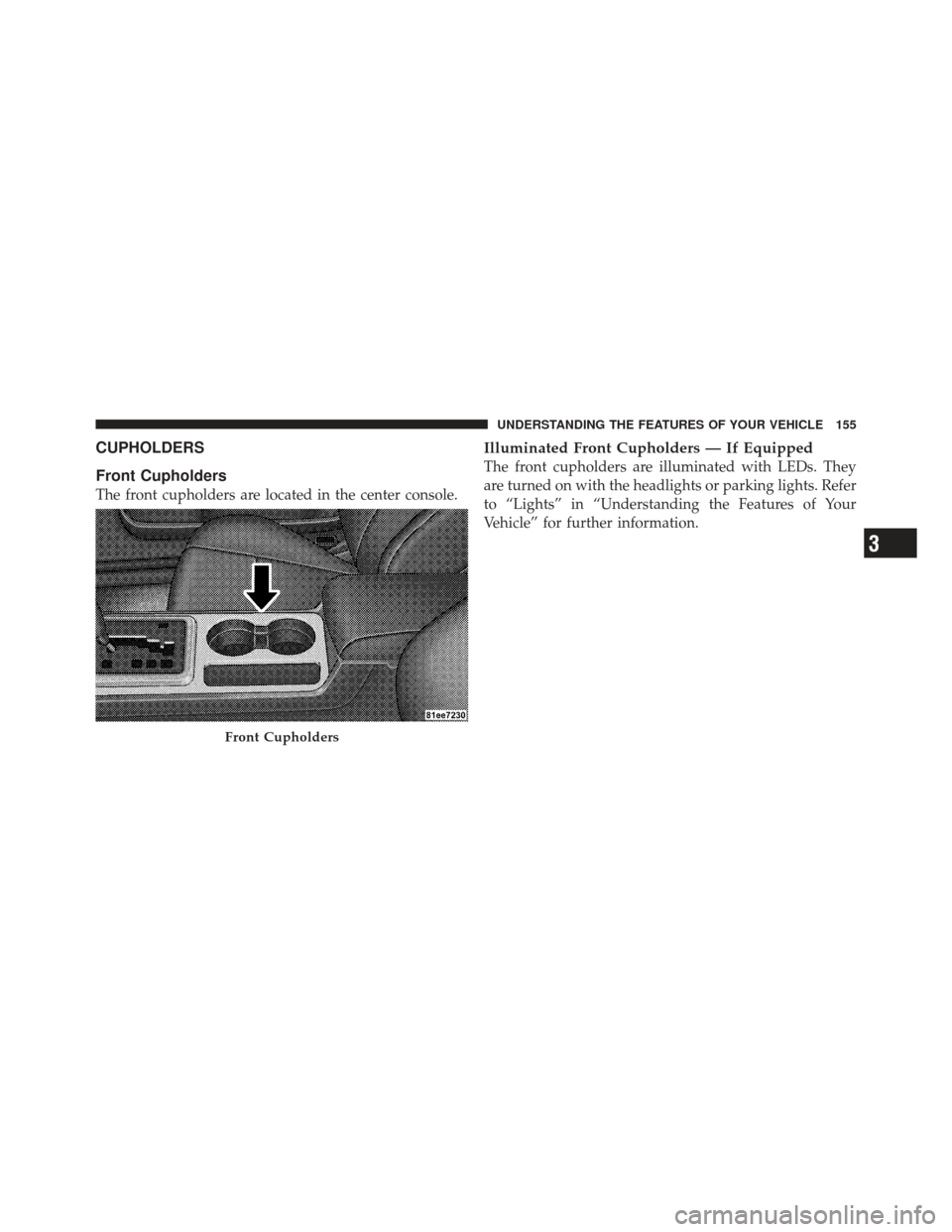
The front cupholders are located in the center console.
Illuminated Front Cupholders — If Equipped
The front cupholders are illuminated with LEDs. They
are turned on with the headlights or parking lights. Refer
to “Lights” in “Understanding the Features of Your
Vehicle” for further information.
Front Cupholders
3
UNDERSTANDING THE FEATURES OF YOUR VEHICLE 155
Page 171 of 477

miles (kilometers) at speeds greater than 30 mph
(48 km/h), see an authorized dealer as soon as possible.
WARNING!
If the warning light remains on, the system may not
be working and you will not have the benefit of ESP
or BAS. You should adjust your speed and stopping
distance to account for this lack of the feature or you
could be in an accident and be seriously injured. You
should take your vehicle to an authorized dealer.
14. Oil Pressure Warning Light This light indicates low engine oil pressure. The
light should turn on momentarily when the engine
is started. If the light turns on while driving, stop the
vehicle and shut off the engine as soon as possible. A
chime will sound for four minutes when this light turns
on. Do not operate the vehicle until the cause is corrected.
This light does not indicate how much oil is in the engine.
The engine oil level must be checked under the hood.
15. High Beam Indicator
This indicator will turn on when the high beam
headlights are on. Push the multifunction lever
away from the steering wheel to switch the headlights to
high beam.
16. Seat Belt Reminder Light This light will turn on for four to eight seconds as
a bulb check when the ignition switch is first
placed in ON/RUN. A chime will sound if the
driver’s seat belt is unbuckled during the bulb check. The
Seat Belt Warning Light will flash or remain on continu-
ously if the driver’s seat belt remains unbuckled after the
bulb check or when driving. Refer to “Occupant Re-
straints” in “Things To Know Before Starting Your Ve-
hicle” for further information.
4
UNDERSTANDING YOUR INSTRUMENT PANEL 169
Page 172 of 477

17. Shift Lever Indicator — Automatic Transmission
Only
The Shift Lever Indicator is self-contained within the
instrument cluster. It displays the gear position of the
automatic transmission.
18. Front Fog Light Indicator — If EquippedThis indicator will illuminate when the front fog
lights are on.
19. Odometer / Electronic Vehicle Information Center
(EVIC) Display Area
The odometer shows the total distance the vehicle has
been driven. The trip odometer shows individual trip
mileage. Refer to “Trip Odometer Button” for additional
information.
NOTE: U.S. Federal regulations require that upon trans-
fer of vehicle ownership, the seller certify to the pur-
chaser the correct mileage that the vehicle has been
driven. If your odometer needs to be repaired or serviced, the repair technician should leave the odometer reading
the same as it was before the repair or service. If s/he
cannot do so, then the odometer must be set at zero, and
a sticker must be placed in the door jamb stating what the
mileage was before the repair or service. It is a good idea
for you to make a record of the odometer reading before
the repair/service, so that you can be sure that it is
properly reset, or that the door jamb sticker is accurate if
the odometer must be reset at zero.
Vehicle Odometer Messages
When the appropriate conditions exist, the following
messages will display in the odometer:
ECO
...................... Fuel Saver Indicator
gASCAP ............ Loose Fuel Filler Cap Message
Lo tirE ...................... LowTirePr essure
noFUSE .......................... Fuse Fault
CHAngE OIL ............... Oil Change Required
170 UNDERSTANDING YOUR INSTRUMENT PANEL
Page 192 of 477

Remote Key Unlock
WhenDriver Door 1st Press is selected, only the driver’s
door will unlock on the first press of the Remote Keyless
Entry (RKE) transmitter UNLOCK button. When Driver
Door 1st Press is selected, you must press the RKE
transmitter UNLOCK button twice to unlock the passen-
ger door. When All Doors 1st Press is selected, both of
the doors will unlock on the first press of the RKE
transmitter UNLOCK button. To make your selection,
press and release the FUNCTION SELECT button until
“Driver Door 1st Press” or “All Doors 1st Press” appears.
Sound Horn with Remote Key Lock
When ON is selected, a short horn sound will occur when
the RKE transmitter LOCK button is pressed. This feature
may be selected with or without the Flash Lights with
Remote Key Lock feature. To make your selection, press
and release the FUNCTION SELECT button until “ON”
or “OFF” appears.
Flash Lights with Remote Key Lock
When ON is selected, the front and rear turn signals will
flash when the doors are locked or unlocked with the
RKE transmitter. This feature may be selected with or
without the sound horn on lock feature selected. To make
your selection, press and release the FUNCTION SE-
LECT button until “ON” or “OFF” appears.
Headlamps On with Wipers (Available with Auto
Headlamps Only)
When ON is selected, and the headlight switch is in the
AUTO (A) position, the headlamps will turn on approxi-
mately 10 seconds after the wipers are turned on. The
headlamps will also turn off when the wipers are turned
off if they were turned on by this feature. To make your
selection, press and release the FUNCTION SELECT
button until “ON” or “OFF” appears.
190 UNDERSTANDING YOUR INSTRUMENT PANEL
Page 193 of 477

NOTE:Turning the headlights on during the daytime
causes the instrument panel lights to dim. To increase the
brightness, refer to “Lights” in “Understanding The
Features Of Your Vehicle”.
Delay Turning Headlights Off
When this feature is selected, the driver can choose to
have the headlights remain on for 0, 30, 60, or 90 seconds
when exiting the vehicle. To make your selection, press
and release the FUNCTION SELECT button until “0,”
“30,” “60,” or “90” appears.
Hill Start Assist (HSA) — If Equipped
When on is selected, the HSA system is active. Refer to
“Electronic Brake Control System” in “Starting And
Operating” for system function and operating informa-
tion. To make your selection, press and release the
FUNCTION SELECT button until “ON” or “OFF”
appears.
Turn Headlights On with Remote Key Unlock
When this feature is selected, the headlights will activate
and remain on for up to 90 seconds when the doors are
unlocked with the RKE transmitter. To make your selec-
tion, press and release the FUNCTION SELECT button
until “OFF,” “30 sec.,” “60 sec.,” or “90 sec.” appears.
Delay Power Off to Accessories Until Exit
When this feature is selected, the power window
switches, radio, Uconnect™ Phone (if equipped), power
sunroof (if equipped), and ignition-powered power out-
lets will remain active for up to 60 minutes after the
ignition switch is turned OFF. Opening a vehicle door
will cancel this feature. To make your selection, press and
release the FUNCTION SELECT button until “Off,”
“45 sec.,” “5 min.,” “10 min.,” “30 min.,” or “60 min.”
appears.4
UNDERSTANDING YOUR INSTRUMENT PANEL 191
Page 335 of 477
Towing Requirements – Trailer Lights and Wiring
Whenever you pull a trailer, regardless of the trailer size,
stoplights and turn signals on the trailer are required for
motoring safety.
The Trailer Tow Package may include a four- and seven-
pin wiring harness. Use a factory approved trailer har-
ness and connector.
NOTE:Do not cut or splice wiring into the vehicles
wiring harness.
The electrical connections are all complete to the vehicle
but you must mate the harness to a trailer connector.
Refer to the following illustrations.
Four-Pin Connector
1 — Female Pins 4 — Park
2 — Male Pin 5 — Left Stop/Turn
3 — Ground 6 — Right Stop/Turn
5
STARTING AND OPERATING 333
Page 407 of 477

solvents, detergents, or ammonia-based cleaners to clean
your leather upholstery. Application of a leather condi-
tioner is not required to maintain the original condition.
WARNING!
Do not use volatile solvents for cleaning purposes.
Many are potentially flammable, and if used in
closed areas they may cause respiratory harm.
Cleaning Headlights
Your vehicle has plastic headlights that are lighter and
less susceptible to stone breakage than glass headlights.
Plastic is not as scratch resistant as glass and therefore
different lens cleaning procedures must be followed.
To minimize the possibility of scratching the lenses and
reducing light output, avoid wiping with a dry cloth. To
remove road dirt, wash with a mild soap solution fol-
lowed by rinsing.Do not use abrasive cleaning components, solvents, steel
wool or other aggressive material to clean the lenses.
Glass Surfaces
All glass surfaces should be cleaned on a regular basis
with MOPAR�
Glass Cleaner or equivalent, or any com-
mercial household-type glass cleaner. Never use an abra-
sive type cleaner. Use caution when cleaning the inside
rear window equipped with electric defrosters or the
right rear quarter window equipped with the radio
antenna. Do not use scrapers or other sharp instrument
that may scratch the elements.
When cleaning the rear view mirror, spray cleaner on the
towel or rag that you are using. Do not spray cleaner
directly on the mirror.
7
MAINTAINING YOUR VEHICLE 405
Page 414 of 477
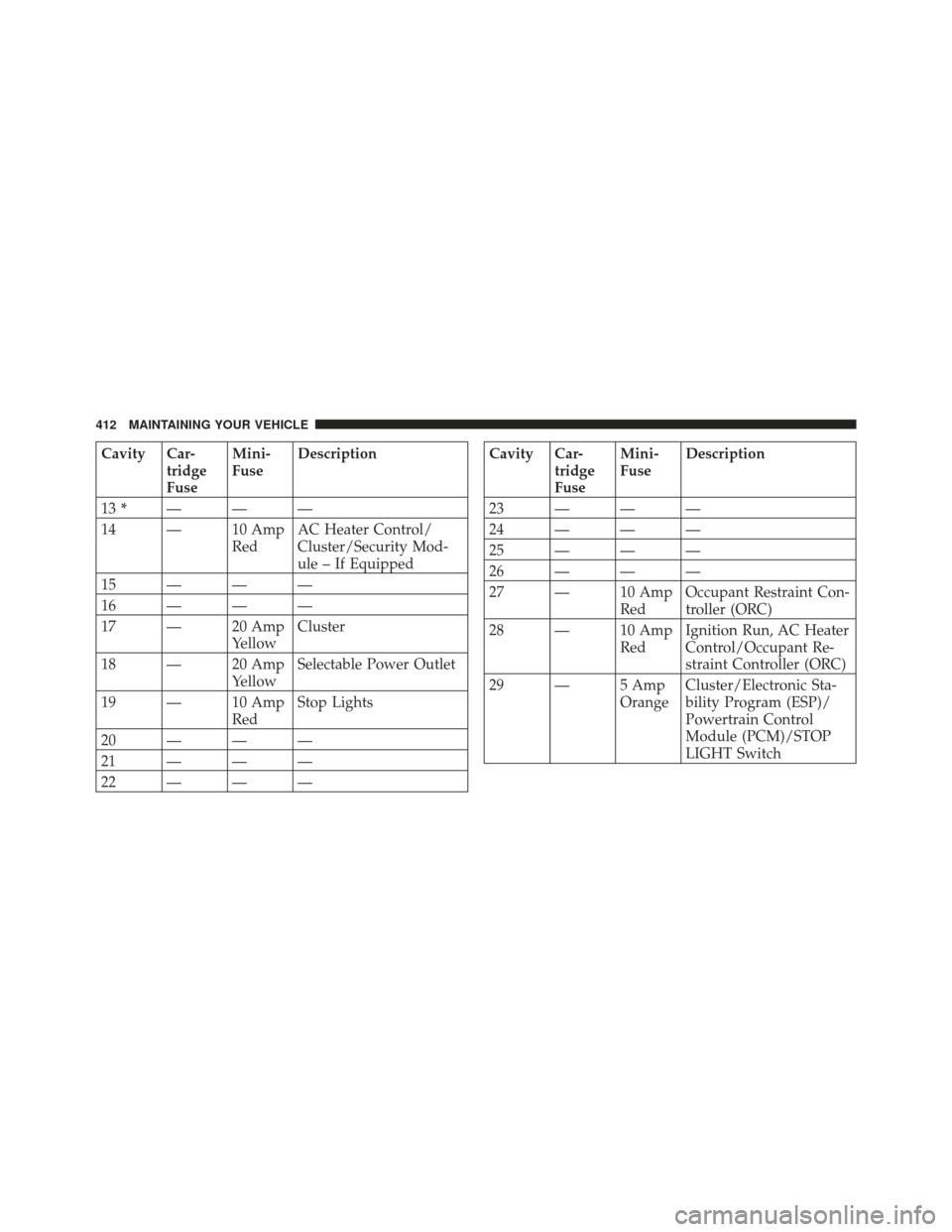
Cavity Car-tridge
FuseMini-
Fuse
Description
13 * ———
14 — 10 Amp RedAC Heater Control/
Cluster/Security Mod-
ule – If Equipped
15———
16———
17 — 20 Amp YellowCluster
18 — 20 Amp YellowSelectable Power Outlet
19 — 10 Amp RedStop Lights
20———
21———
22———Cavity Car- tridge
FuseMini-
Fuse
Description
23———
24———
25———
26———
27 — 10 Amp RedOccupant Restraint Con-
troller (ORC)
28 — 10 Amp RedIgnition Run, AC Heater
Control/Occupant Re-
straint Controller (ORC)
29 — 5 Amp OrangeCluster/Electronic Sta-
bility Program (ESP)/
Powertrain Control
Module (PCM)/STOP
LIGHT Switch
412 MAINTAINING YOUR VEHICLE