Page 59 of 477

Front and Side Impact Sensors
In front and side impacts, impact sensors can aid the
ORC in determining appropriate response to impact
events. Additional sensors in the ORC determine the
level of airbag deployment and provide verification.
Enhanced Accident Response System
In the event of an impact causing airbag deployment, if
the communication network remains intact, and the
power remains intact, depending on the nature of the
event the ORC will determine whether to have the
Enhanced Accident Response System perform the follow-
ing functions:
•Cut off fuel to the engine.
•Flash hazard lights as long as the battery has power or
until the ignition key is turned off.
•Turn on the interior lights, which remain on as long as
the battery has power or until the ignition key is
removed.
•Unlock the doors automatically.
If a Deployment Occurs
The front airbags are designed to deflate immediately
after deployment.
NOTE:Front and/or side airbags will not deploy in all
collisions. This does not mean something is wrong with
the airbag system.
If you do have a collision which deploys the airbags, any
or all of the following may occur:
•The nylon airbag material may sometimes cause abra-
sions and/or skin reddening to the driver and front
passenger as the airbags deploy and unfold. The
abrasions are similar to friction rope burns or those
you might get sliding along a carpet or gymnasium
2
THINGS TO KNOW BEFORE STARTING YOUR VEHICLE 57
Page 77 of 477
Periodic Safety Checks You Should Make Outside
the Vehicle
Tires
Examine tires for excessive tread wear and uneven wear
patterns. Check for stones, nails, glass, or other objects
lodged in the tread. Inspect the tread and sidewall for
cuts and cracks. Check the wheel nuts for tightness.
Check the tires (including spare) for proper pressure.
Lights
Have someone observe the operation of exterior lights
while you work the controls. Check turn signal and high
beam indicator lights on the instrument panel.
Door Latches
Check for positive closing, latching, and locking.
Fluid Leaks
Check area under vehicle after overnight parking for fuel,
engine coolant, oil, or other fluid leaks. Also, if gasoline
fumes are detected or if fuel, power steering fluid, or
brake fluid leaks are suspected, the cause should be
located and corrected immediately.2
THINGS TO KNOW BEFORE STARTING YOUR VEHICLE 75
Page 80 of 477

�Voice Command — If Equipped ........... 113
▫ Voice Command System Operation ........ 113
▫ Commands ........................ 115
▫ Voice Training ...................... 118
� Seats .............................. 118
▫ Power Seats ........................ 118
▫ Manual Front Seatback Recline ........... 120
▫ Lumbar Support ..................... 121
▫ Head Restraints ..................... 121
▫ Heated Seats ....................... 122
▫ Easy Entry Seats ..................... 124
▫ Folding Rear Seat .................... 124
� To Open And Close The Hood ............ 126�
Lights ............................. 127
▫ Headlights And Parking Lights .......... 127
▫ Automatic Headlights — If Equipped ...... 128
▫ Headlights On With Wipers (Available With
Automatic Headlights Only) ............ 128
▫ Headlight Time Delay ................. 128
▫ Daytime Running Lights — If Equipped .... 129
▫ Lights-On Reminder .................. 129
▫ Fog Lights — If Equipped .............. 129
▫ Multifunction Lever .................. 130
▫ Turn Signals ........................ 130
▫ Lane Change Assist ................... 131
▫ High/Low Beam Switch ............... 131
78 UNDERSTANDING THE FEATURES OF YOUR VEHICLE
Page 81 of 477

▫Flash-To-Pass ....................... 131
▫ Overhead Console Map/Reading Lights .... 132
▫ Interior Lights ...................... 133
� Windshield Wipers And Washers .......... 134
▫ Intermittent Wiper System .............. 134
▫ Mist Feature ........................ 135
▫ Windshield Washers .................. 135
▫ Headlights On With Wipers (Available With
Automatic Headlights Only) ............ 135
� Tilt/Telescoping Steering Column .......... 136
� Electronic Speed Control ................ 137
▫ To Activate ......................... 138
▫ To Set A Desired Speed ................ 138 ▫
To Deactivate ....................... 138
▫ To Resume Speed .................... 139
▫ To Vary The Speed Setting .............. 139
▫ To Accelerate For Passing .............. 140
� Overhead Console ..................... 141
▫ Courtesy/Reading Lights .............. 141
▫ Sunglasses Storage ................... 141
� Garage Door Opener — If Equipped ........ 142
▫ Programming HomeLink� .............. 143
▫ Gate Operator/Canadian Programming .... 146
▫ Using HomeLink� ................... 147
▫ Reprogramming A Single HomeLink�
Button ............................ 147
3
UNDERSTANDING THE FEATURES OF YOUR VEHICLE 79
Page 124 of 477
WARNING!
Driving a vehicle with the head restraints removed or
improperly adjusted could cause serious injury or
death in the event of a collision. The head restraints
should always be checked prior to operating the
vehicle and never adjusted while the vehicle is in
motion. Always adjust the head restraints when the
vehicle is in PARK.
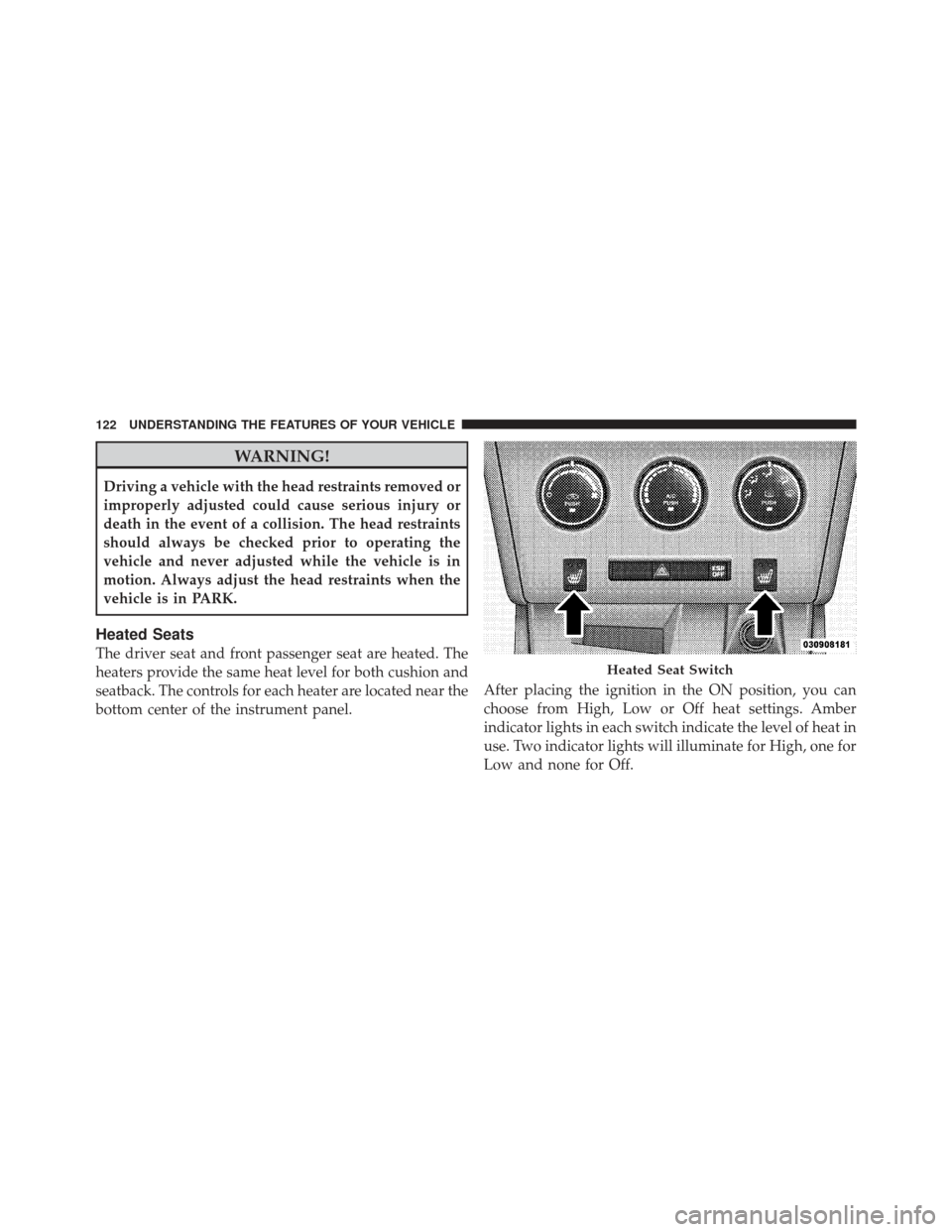
Heated Seats
The driver seat and front passenger seat are heated. The
heaters provide the same heat level for both cushion and
seatback. The controls for each heater are located near the
bottom center of the instrument panel.After placing the ignition in the ON position, you can
choose from High, Low or Off heat settings. Amber
indicator lights in each switch indicate the level of heat in
use. Two indicator lights will illuminate for High, one for
Low and none for Off.
Heated Seat Switch
122 UNDERSTANDING THE FEATURES OF YOUR VEHICLE
Page 129 of 477
CAUTION!
To prevent possible damage, do not slam the hood to
close it. Lower the hood until it is open approxi-
mately 6 in (15 cm), and then drop it. This should
secure both latches. Never drive your vehicle unless
the hood is fully closed, with both latches engaged.
WARNING!
Be sure the hood is fully latched before driving your
vehicle. If the hood is not fully latched, it could open
when the vehicle is in motion and block your vision.
Failure to follow this warning could result in serious
injury or death.
LIGHTS
Headlights and Parking Lights
The headlight switch is located on the left side of the
instrument panel. This switch controls the operation of the
headlights, parking lights, instrument panel lights, instru-
ment panel light dimming, interior lights and fog lights.
Headlight Switch
3
UNDERSTANDING THE FEATURES OF YOUR VEHICLE 127
Page 130 of 477

Rotate the headlight switch clockwise to the first detent
for parking light and instrument panel light operation.
Turn it to the second detent for headlight, parking light
and instrument panel light operation.
Automatic Headlights — If Equipped
This system automatically turns the headlights on or off
according to ambient light levels. To turn the system on,
rotate the headlight switch counterclockwise to the A
(AUTO) position. When the system is on, the headlight
time delay feature is also on. This means the headlights
will stay on for up to 90 seconds after you place the
ignition in the OFF position. To turn the automatic
system off, move the headlight switch out of the AUTO
position.
NOTE:The engine must be running before the head-
lights will come on in the automatic mode.
Headlights On with Wipers (Available with
Automatic Headlights Only)
When this feature is active, the headlights will turn on
approximately 10 seconds after the wipers are turned on
if the headlight switch is placed in the AUTO position. In
addition, the headlights will turn off when the wipers are
turned off if they were turned on by this feature.
The Headlights On with Wipers feature can be enabled or
disabled. Refer to “Electronic Vehicle Information Center
(EVIC)/Customer-Programmable Features” in “Under-
standing Your Instrument Panel” for further information.
Headlight Time Delay
This feature provides the safety of headlight illumination
for up to 90 seconds when leaving your vehicle in an
unlit area.
128 UNDERSTANDING THE FEATURES OF YOUR VEHICLE
Page 131 of 477

To activate the delay feature, place the ignition in the OFF
position while the headlights are still on. Then, turn off
the headlights within 45 seconds. The delay interval
begins when the headlight switch is turned off.
If you turn the headlights or parking lights on, or place
the ignition in the RUN position again, the system will
cancel the delay.
If you turn the headlights off before the ignition, they will
turn off in the normal manner.
NOTE:The lights must be turned off within 45 seconds
of placing the ignition in the OFF position to activate this
feature.
The Headlight delay time is programmable. Refer to
“Electronic Vehicle Information Center (EVIC)/
Customer-Programmable Features” in “Understanding
Your Instrument Panel” for further information.Daytime Running Lights — If Equipped
The high beam headlights will come on as Daytime
Running Lights whenever the ignition is placed in the
RUN position, the headlights are off and the parking
brake is released. The headlight switch must be used for
normal nighttime driving.
Lights-On Reminder
If the headlights or parking lights are on after the ignition
is in the OFF position, a chime will sound to alert the
driver when the driver’s door is opened.
Fog Lights — If Equipped
The front fog light switch is built into the head-
light switch. To activate the front fog lights, turn
on the parking lights or the low beam headlights
and press the headlight switch. To turn off the front fog
lights, either press the headlight switch again or turn off
the headlight switch.
3
UNDERSTANDING THE FEATURES OF YOUR VEHICLE 129