Page 135 of 477

Interior Lights
The interior lights come on when a door is opened.
To protect the battery, the interior lights will turn off
automatically 10 minutes after the ignition is placed in
the OFF position. This will occur if the interior lights
were switched on manually or are on because a door is
open. This includes the glove box light, but not the trunk
light. To restore interior light operation, either place the
ignition in the RUN position or cycle the light switch.
Dimmer Control
The dimmer control is part of the
headlight switch and is located on the
left side of the instrument panel. With
the parking lights or headlights on,
rotating the dimmer control upwardwill increase the brightness of the instrument panel lights
and, if equipped, the lighting in the door map pockets,
door handles and cupholders.
Dome Light Position
Rotate the dimmer control completely upward to the
second detent to turn on the interior lights. The interior
lights will remain on when the dimmer control is in this
position.
Interior Light Defeat (OFF)
Rotate the dimmer control to the extreme bottom off
position. The interior lights will remain off when the
doors are open.
Parade Mode (Daytime Brightness Feature)
Rotate the dimmer control upward to the first detent.
This feature brightens all text displays such as the
odometer, Electronic Vehicle Information Center (EVIC),
and radio when the parking lights or headlights are on.
3
UNDERSTANDING THE FEATURES OF YOUR VEHICLE 133
Page 145 of 477

WARNING!
•Your motorized door or gate will open and close
while you are training the Universal Transceiver.
Do not train the transceiver if people, pets, or
other objects are in the path of the door or gate.
•Do not run your vehicle in the garage while
training the transceiver. Exhaust gas from your
vehicle contains Carbon Monoxide (CO) which is
odorless and colorless. Carbon Monoxide is poi-
sonous when inhaled and cause you and others to
be severely injured or killed.
NOTE: Only use this transceiver with a garage door
opener that has a “stop and reverse” feature as required
by federal safety standards. This includes most garage
door opener models manufactured after 1982. Do not use
a garage door opener without these safety features. Call toll-free 1–800–355–3515 or, on the Internet at
www.HomeLink.com for safety information or assis-
tance.
Programming HomeLink
�
Before You Begin
If you have not trained any of the HomeLink �buttons,
erase all channels before you begin training.
To do this, press and hold the two outside buttons for up
to 20 seconds. The EVIC will display “CLEARING
CHANNELS.” Release the buttons when the EVIC mes-
sage states “CHANNELS CLEARED.”
It is recommended that a new battery be placed in the
handheld transmitter of the device that is being copied to
HomeLink� for more efficient training and accurate
transmission of the radio-frequency signal.3
UNDERSTANDING THE FEATURES OF YOUR VEHICLE 143
Page 148 of 477

2. Return to the vehicle and press the programmed
HomeLink�button twice (holding the button for two
seconds each time). If the device is plugged in and
activates, programming is complete.
If the device does not activate, press the button a third
time (for two seconds) to complete the training.
If you have any problems, or require assistance, please
call toll-free 1–800–355–3515 or, on the Internet at
www.HomeLink.com for information or assistance.
To program the remaining two HomeLink� buttons,
repeat each step for each remaining button. DO NOT
erase the channels.
Gate Operator/Canadian Programming
Canadian radio-frequency laws require transmitter sig-
nals to “time-out” (or quit) after several seconds of
transmission – which may not be long enough for
HomeLink� to pick up the signal during programming. Similar to this Canadian law, some U.S. gate operators are
designed to “time-out” in the same manner.
It may be helpful to unplug the device during the cycling
process to prevent possible overheating of the garage
door or gate motor.
If you are having difficulties programming a garage door
opener or a gate operator, replace “Programming
HomeLink” Step 3 with the following:
3. Continue to press and hold the HomeLink�
button,
while you press and release (“cycle”), your handheld
transmitter every two seconds until HomeLink� has
successfully accepted the frequency signal. The EVIC
display will change from “CHANNEL # TRAINING” to
“CHANNEL # TRAINED.”
If you unplugged the device for training, plug it back in
at this time.
146 UNDERSTANDING THE FEATURES OF YOUR VEHICLE
Page 162 of 477

�Media Center 730N/430 (RER/RBZ) —
AM/FM Stereo Radio And CD/DVD/HDD/
NAV — If Equipped .................... 192
▫ Operating Instructions — Voice Command
System (VR) — If Equipped ............. 192
▫ Operating Instructions — Uconnect™ Phone
— If Equipped ...................... 193
▫ Clock Setting Procedure — RBZ Radio ..... 193
▫ Clock Setting Procedure — RER Radio ..... 194
� Media Center 130 (Sales Code RES) ......... 197
▫ Operating Instructions — Radio Mode ..... 197
▫ Operation Instructions — CD Mode For CD
And MP3 Audio Play ................. 200
▫ Notes On Playing MP3 Files ............ 202
▫ Operation Instructions - Auxiliary Mode .... 205�
Media Center 130 (RES/RSC) — AM/FM
Stereo Radio With CD Player (MP3 AUX Jack)
And Sirius Radio ...................... 206
▫ Operating Instructions — Radio Mode ..... 206
▫ Operation Instructions — CD Mode For CD
And MP3 Audio Play ................. 212
▫ Notes On Playing MP3 Files ............ 214
▫ List Button (CD Mode For MP3 Play) ...... 217
▫ Info Button (CD Mode For MP3 Play) ...... 217
� Universal Consumer Interface (UCI) 0.5 —
If Equipped .......................... 218
▫ Connecting The iPod� ................. 219
▫ Using This Feature ................... 220
▫ Controlling The iPod� Using Radio
Buttons ........................... 220
160 UNDERSTANDING YOUR INSTRUMENT PANEL
Page 163 of 477

▫Play Mode ......................... 220
▫ List Or Browse Mode ................. 222
� Uconnect™ Multimedia (Satellite Radio) — If
Equipped (REN/REQ/RER/RES
Radios Only) ......................... 224
▫ System Activation .................... 224
▫ Electronic Serial Number/Sirius
Identification Number (ESN/SID) ......... 224
▫ Selecting Uconnect™ Multimedia (Satellite)
Mode ............................. 225
▫ Satellite Antenna ..................... 225
▫ Reception Quality .................... 225
▫ Operating Instructions - Uconnect™
Multimedia (Satellite) Mode ............. 226▫
Operating Instructions - Uconnect™ Phone
(If Equipped) ....................... 228
� Kicker� High Performance Sound System With
Driver-Selectable Surround (DSS) –
If Equipped .......................... 228
� Remote Sound System Controls —
If Equipped .......................... 230
� CD/DVD Disc Maintenance .............. 231
� Radio Operation And Mobile Phones ....... 232
� Climate Controls ...................... 232
▫ Manual Air Conditioning And
Heating System ..................... 232
▫ Operating Tips ...................... 237
4
UNDERSTANDING YOUR INSTRUMENT PANEL 161
Page 164 of 477
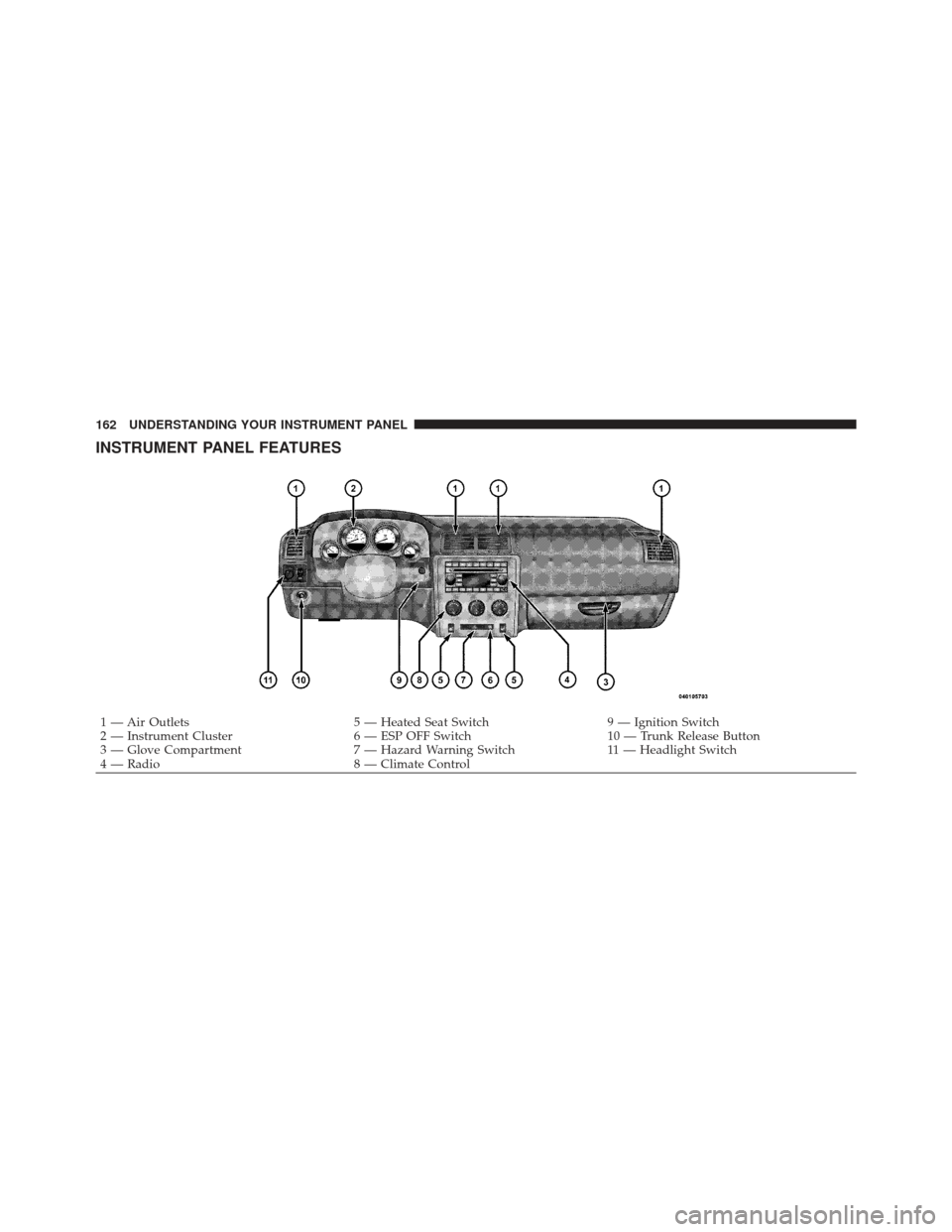
INSTRUMENT PANEL FEATURES
1 — Air Outlets5 — Heated Seat Switch9 — Ignition Switch
2 — Instrument Cluster 6 — ESP OFF Switch10 — Trunk Release Button
3 — Glove Compartment 7 — Hazard Warning Switch11 — Headlight Switch
4 — Radio 8 — Climate Control
162 UNDERSTANDING YOUR INSTRUMENT PANEL
Page 168 of 477

ignition switch is placed in the ON/RUN position and
remain on briefly as a bulb check. If the light stays on or
turns on while driving, turn off some of the vehicle’s
non-essential electrical devices (i.e., radio) or slightly
increase engine speed (if at idle). If the light remains on,
it means that the charging system is experiencing a
problem. See your local authorized dealer to obtain
service immediately.
If jump starting is required, refer to “Jump Starting
Procedures” in “What To Do In Emergencies”.
7. Electronic Throttle Control (ETC) Warning LightThis light will turn on briefly as a bulb check
when the ignition switch is placed in the ON/
RUN position. This light will also turn on while
the engine is running if there is a problem with
the Electronic Throttle Control (ETC) system.
If the light comes on while the engine is running, safely
bring the vehicle to a complete stop as soon as possible, place the shift lever in PARK, and cycle the ignition key.
The light should turn off. If the light remains lit with the
engine running, your vehicle will usually be drivable.
However, see an authorized dealer for service as soon as
possible.
If the light is flashing when the engine is running,
immediate service is required. In this case, you may
experience reduced performance, an elevated/rough idle
or engine stall, and your vehicle may require towing.
Also, have the system checked by an authorized dealer if
the light does not come on during starting.
8. Temperature Gauge
The temperature gauge shows engine coolant tempera-
ture. Any reading within the normal range indicates that
the engine cooling system is operating satisfactorily.
The gauge pointer will likely indicate a higher tempera-
ture when driving in hot weather, up mountain grades,
166 UNDERSTANDING YOUR INSTRUMENT PANEL
Page 181 of 477
![DODGE CHALLENGER 2010 3.G Owners Manual •Surround Sound modes (if equipped with Driver-
Selectable Surround [DSS])
The system allows the driver to select information by
pressing the following buttons mounted on the steering
wheel.
MENU Bu](/manual-img/12/5536/w960_5536-180.png "DODGE CHALLENGER 2010 3.G Owners Manual •Surround Sound modes (if equipped with Driver-
Selectable Surround [DSS])
The system allows the driver to select information by
pressing the following buttons mounted on the steering
wheel.
MENU Bu")
•Surround Sound modes (if equipped with Driver-
Selectable Surround [DSS])
The system allows the driver to select information by
pressing the following buttons mounted on the steering
wheel.
MENU Button Press and release the MENU button and the
mode displayed will change between Trip
Functions, Performance Pages, Uconnect™ gps
(If Equipped), System Warnings, System Sta-
tus, and Personal Settings.
FUNCTION SELECT Button Press the FUNCTION SELECT button to accept
a selection. The FUNCTION SELECT button
also functions as a remote sound system con-
trol. Refer to “Remote Sound System Controls”. SCROLL Button
Press the SCROLL button to scroll through Trip
Functions, Performance Pages, Uconnect™ gps
(If Equipped), System Status Messages, and
Personal Settings (Customer-Programmable
Features). The SCROLL button also functions as a remote
sound system control. Refer to “Remote Sound System
Controls”.
AUDIO MODE Button Press the AUDIO MODE button to select the
Compass/Temp/Audio screen. Along with
compass reading and outside temperature, this
screen will display radio and media mode
information depending on which radio is in the vehicle.
Refer to “Remote Sound System Controls”.
4
UNDERSTANDING YOUR INSTRUMENT PANEL 179