Page 24 of 484

The Panic Alarm will stay on for three minutes unless
you turn it off by pressing the PANIC button a second
time or if the vehicle speed is 5 mph (8 km/h) or greater.
NOTE:When you turn off the Panic Alarm by pressing
the PANIC button a second time, you may have to be
closer to the vehicle due to the radio frequency noises of
the system.
Programming Additional Transmitters
Refer to Sentry Key� “Customer Key Programming.”
If you do not have a programmed RKE transmitter,
contact your authorized dealer for details.
General Information
This device complies with Part 15 of FCC rules and with
RS-210 of Industry Canada. Operation is subject to the
following conditions:
1. This device may not cause harmful interference. 2. This device must accept any interference that may be
received including interference that may cause undesired
operation.
NOTE:
Changes or modifications not expressly ap-
proved by the party responsible for compliance could
void the user’s authority to operate the equipment.
If your RKE transmitter fails to operate from a normal
distance, check for these two conditions:
1. Weak battery in the RKE transmitter. The expected life
of battery is five years.
2. Closeness to a radio transmitter such as a radio station
tower, airport transmitter, military base, and some mobile
or CB radios.
2
THINGS TO KNOW BEFORE STARTING YOUR VEHICLE 23
Page 88 of 484
Safety Checks You Should Make Inside the
Vehicle
Seat Belts
Inspect the belt system periodically, checking for cuts,
frays, and loose parts. Damaged parts must be replaced
immediately. Do not disassemble or modify the system.
Front seat belt assemblies must be replaced after a
collision. Rear seat belt assemblies must be replaced after
a collision if they have been damaged (i.e., bent retractor,
torn webbing, etc.). If there is any question regarding belt
or retractor condition, replace the belt.
Airbag Warning Light
The light should come on and remain on for four to eight
seconds as a bulb check when the ignition switch is first
turned ON. If the light is not lit during starting, see your
authorized dealer. If the light stays on, flickers, or comes
on while driving, have the system checked by an autho-
rized dealer.
Defroster
Check operation by selecting the defrost mode and place
the blower control on high speed. You should be able to
feel the air directed against the windshield. See your
authorized dealer for service if your defroster is
inoperable.
Floor Mat Safety Information
Always use floor mats designed to fit the foot well of
your vehicle. Use only floor mats that leave the pedal
area unobstructed and that are firmly secured so that
they cannot slip out of position and interfere with the
pedals or impair safe operation of your vehicle in other
ways.
2
THINGS TO KNOW BEFORE STARTING YOUR VEHICLE 87
Page 101 of 484

system. Only one linked (or paired) cellular phone can be
used with the system at a time. The system is available in
English, Spanish, or French languages.
WARNING!
Any voice commanded system should be used only
in safe driving conditions following local laws and
phone use. All attention should be kept on the
roadway ahead. Failure to do so may result in an
accident causing serious injury or death.
Uconnect™ Phone Button Depending on the vehicle options, either the
radio or the mirror will contain the two control
buttons
(Uconnect™ Phone button) and
(Voice Command button) that will en-
able you to access the system. Voice Command Button
Actual button location may vary with the ra-
dio. The individual buttons are described in the
“Operation” section.
The Uconnect™ Phone can be used with any Hands-Free
Profile certified Bluetooth� cellular phone. See the
Uconnect™ website for supported phones. If your cellu-
lar phone supports a different profile (e.g., Headset
Profile) you may not be able to use any Uconnect™
Phone features. Refer to your cellular service provider or
the phone manufacturer for details.
The Uconnect™ Phone is fully integrated with the vehi-
cle’s audio system. The volume of the Uconnect™ Phone
can be adjusted either from the radio volume control
knob or from the steering wheel radio control (right
switch), if so equipped.
100 UNDERSTANDING THE FEATURES OF YOUR VEHICLE
Page 129 of 484
NOTE:If you do not say a command within a few
seconds, the system will present you with a list of
options.
If you ever wish to interrupt the system while it lists
options, press the Voice Command
button, listen
for the beep, and say your command.
Pressing the Voice Command
button while the
system is speaking is known as “barging in.” The system
will be interrupted, and after the beep, you can add or
change commands. This will become helpful once you
start to learn the options.
NOTE: At any time, you can say the words “Cancel”,
“Help” or “Main Menu”.
These commands are universal and can be used from any
menu. All other commands can be used depending upon
the active application. For example, if you are in the disc menu and you are
listening to FM radio, you can speak commands from the
disc menu or from the FM radio menu.
When using this system, you should speak clearly and at
a normal speaking volume.
The system will best recognize your speech if the win-
dows are closed, and the heater/air conditioning fan is
set to low.
At any point, if the system does not recognize one of your
commands, you will be prompted to repeat it.
To hear the first available Menu, press the Voice
Command
button and say “Help” or “Main
Menu”.
128 UNDERSTANDING THE FEATURES OF YOUR VEHICLE
Page 176 of 484
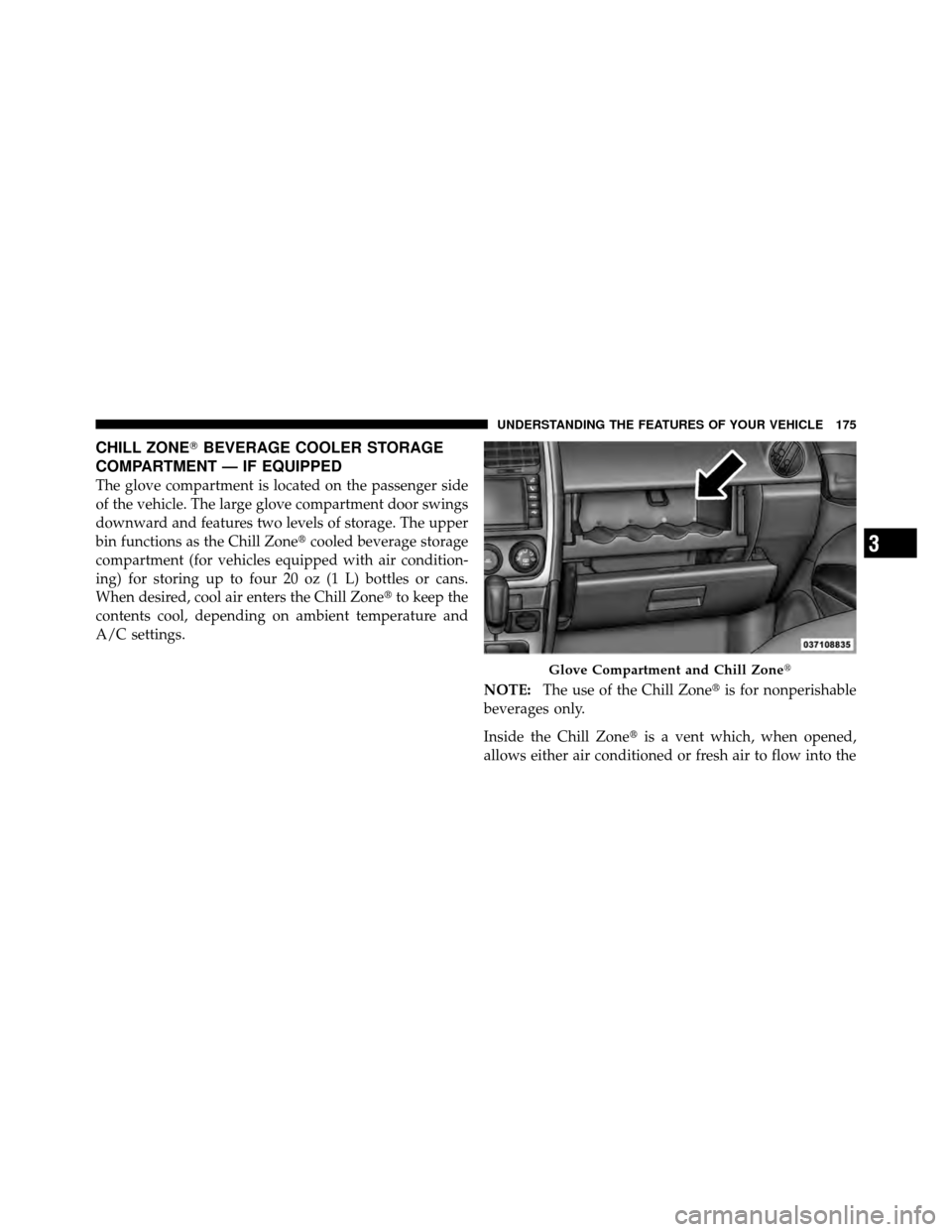
CHILL ZONE�BEVERAGE COOLER STORAGE
COMPARTMENT — IF EQUIPPED
The glove compartment is located on the passenger side
of the vehicle. The large glove compartment door swings
downward and features two levels of storage. The upper
bin functions as the Chill Zone� cooled beverage storage
compartment (for vehicles equipped with air condition-
ing) for storing up to four 20 oz (1 L) bottles or cans.
When desired, cool air enters the Chill Zone� to keep the
contents cool, depending on ambient temperature and
A/C settings.
NOTE:The use of the Chill Zone� is for nonperishable
beverages only.
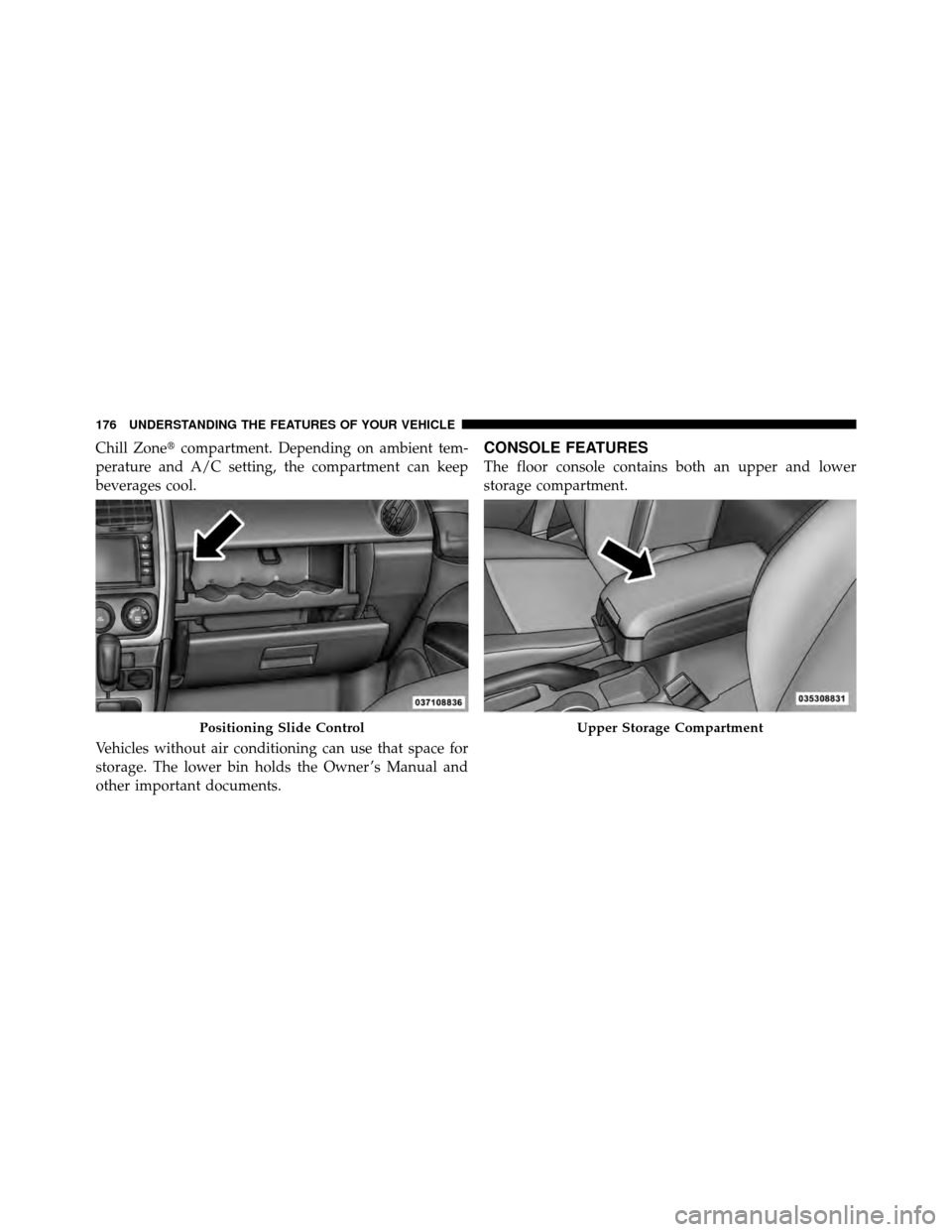
Inside the Chill Zone� is a vent which, when opened,
allows either air conditioned or fresh air to flow into the
Glove Compartment and Chill Zone�
3
UNDERSTANDING THE FEATURES OF YOUR VEHICLE 175
Page 177 of 484
Chill Zone�compartment. Depending on ambient tem-
perature and A/C setting, the compartment can keep
beverages cool.
Vehicles without air conditioning can use that space for
storage. The lower bin holds the Owner ’s Manual and
other important documents.CONSOLE FEATURES
The floor console contains both an upper and lower
storage compartment.
Positioning Slide ControlUpper Storage Compartment
176 UNDERSTANDING THE FEATURES OF YOUR VEHICLE
Page 189 of 484
▫Operating Instructions — Video
Entertainment System (VES)™
(If Equipped) ....................... 273
� Remote Sound System Controls —
If Equipped .......................... 273
▫ Radio Operation ..................... 274
▫ CD Player ......................... 274
� CD/DVD Disc Maintenance .............. 274�
Radio Operation And Cellular Phones ....... 275
� Climate Controls ...................... 275
▫ Manual Heating And Air Conditioning ..... 276
▫ Automatic Temperature Control (ATC) —
If Equipped ........................ 280
▫ Operating Tips ...................... 285
188 UNDERSTANDING YOUR INSTRUMENT PANEL
Page 193 of 484
INSTRUMENT CLUSTER DESCRIPTIONS
1. Temperature Gauge
The temperature gauge shows engine coolant tempera-
ture. Any reading within the normal range indicates that
the engine cooling system is operating satisfactorily.
The gauge pointer will likely indicate a higher tempera-
ture when driving in hot weather, up mountain grades,
or when towing a trailer. It should not be allowed to
exceed the upper limits of the normal operating range.
CAUTION!
Driving with a hot engine cooling system could
damage your vehicle. If temperature gauge reads “H”
pull over and stop the vehicle. Idle the vehicle with
the air conditioner turned off until the pointer drops
back into the normal range. If the pointer remains on
the “H” and you hear continuous chimes, turn the
engine off immediately, and call an authorized deal-
ership for service.
192 UNDERSTANDING YOUR INSTRUMENT PANEL