Page 98 of 484
Power Mirrors — If Equipped
The control for the power mirrors is located on the
driver’s door trim panel.
To adjust a mirror, turn the control wand toward the left
or right mirror positions indicated. Tilt the control wand
in the direction you want the mirror to move. Whenfinished adjusting the mirror, turn the control to the
center position to prevent accidentally moving a mirror.
Power Mirror Control
Mirror Directions
3
UNDERSTANDING THE FEATURES OF YOUR VEHICLE 97
Page 100 of 484

Uconnect™ Phone — IF EQUIPPED
Uconnect™ Phone is a voice-activated, hands-free, in-
vehicle communications system. Uconnect™ Phone al-
lows you to dial a phone number with your cellular
phone using simple voice commands (e.g.,�Call”\b
“Mike” \b”Work� or�Dial” \b“248-555-1212�). Your cellular
phone’s audio is transmitted through your vehicle’s
audio system; the system will automatically mute your
radio when using the Uconnect™ Phone.
NOTE: The Uconnect™ Phone requires a cellular phone
equipped with the Bluetooth�� Hands-Free Profile,�Ve r -
sion 0.96 or higher. See the Uconnect™ website for
supported phones.
For Uconnect™ customer support, visit the following
websites:
•www.chrysler.com/uconnect
•www.dodge.com/uconnect
•www.jeep.com/uconnect
•or call 1–877–855–8400
Uconnect™ Phone allows you to transfer calls between
the system and your cellular phone as you enter or exit
your vehicle and enables you to mute the system’s
microphone for private conversation.
The Uconnect™ Phone is driven through your
Bluetooth� “Hands-Free Profile” cellular phone.
Uconnect™ features Bluetooth� technology - the global
standard that enables different electronic devices to con-
nect to each other without wires or a docking station, so
Uconnect™ Phone works no matter where you stow your
cellular phone (be it your purse, pocket, or briefcase), as
long as your phone is turned on and has been paired to
the vehicle’s Uconnect™ Phone. The Uconnect™ Phone
allows up to seven cellular phones to be linked to the
3
UNDERSTANDING THE FEATURES OF YOUR VEHICLE 99
Page 114 of 484
Canada and 060 for Mexico). The number dialed may
not be applicable with the available cellular service
and area.
•If supported, this number may be programmable on
some systems. To do this, press the
button and
say ‘Setup’, followed by ‘Emergency’.
•The Uconnect™ Phone does slightly lower your
chances of successfully making a phone call as to that
for the cellular phone directly.
WARNING!
Your phone must be turned on and paired to the
Uconnect™ Phone System to allow use of this vehicle
feature in emergency situations, when the cellular
phone has network coverage and stays paired to the
Uconnect™ Phone System.
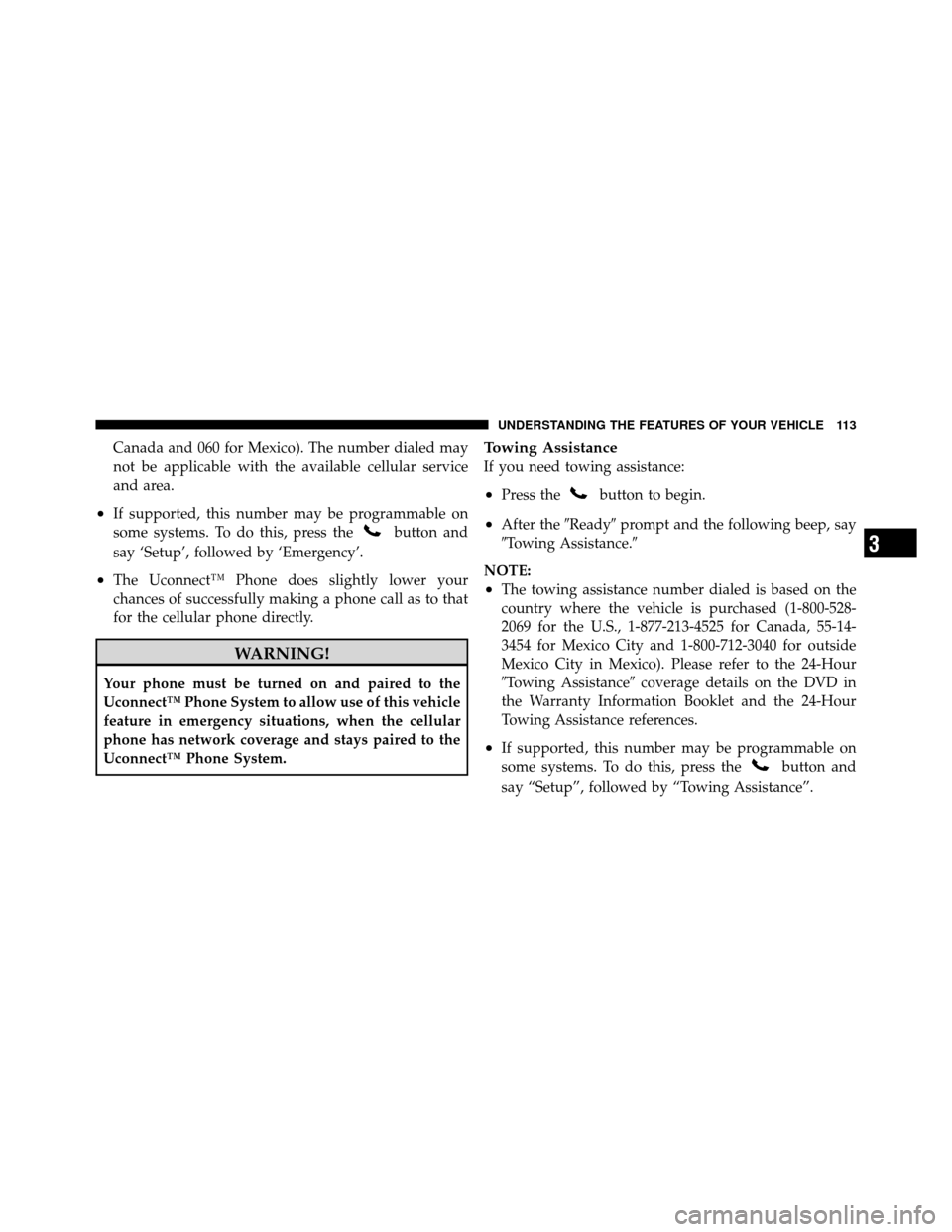
Towing Assistance
If you need towing assistance:
•Press thebutton to begin.
•After the �Ready�prompt and the following beep, say
�Towing Assistance.�
NOTE:
•The towing assistance number dialed is based on the
country where the vehicle is purchased (1-800-528-
2069 for the U.S., 1-877-213-4525 for Canada, 55-14-
3454 for Mexico City and 1-800-712-3040 for outside
Mexico City in Mexico). Please refer to the 24-Hour
�Towing Assistance� coverage details on the DVD in
the Warranty Information Booklet and the 24-Hour
Towing Assistance references.
•If supported, this number may be programmable on
some systems. To do this, press the
button and
say “Setup”, followed by “Towing Assistance”.
3
UNDERSTANDING THE FEATURES OF YOUR VEHICLE 113
Page 127 of 484
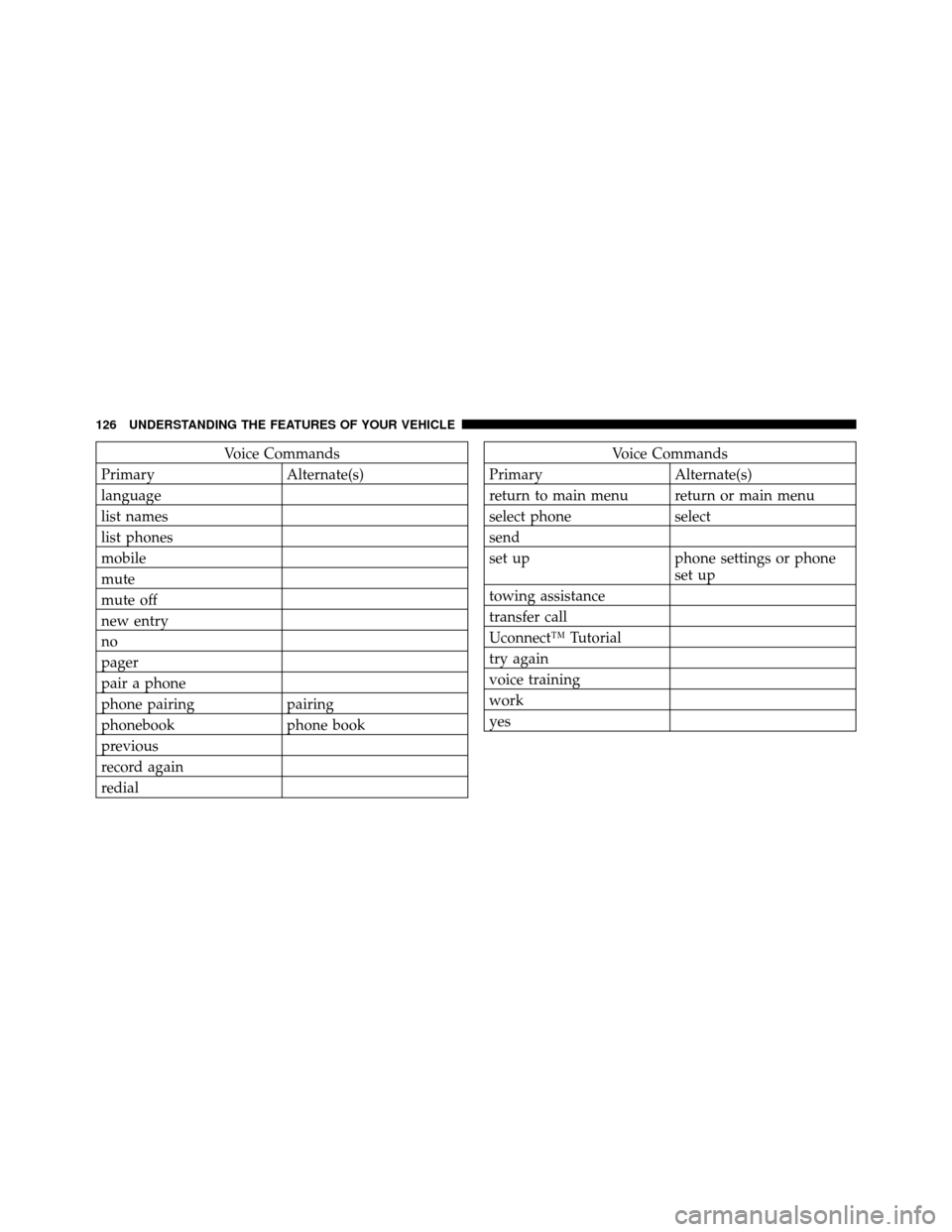
Voice Commands
Primary Alternate(s)
language
list names
list phones
mobile
mute
mute off
new entry
no
pager
pair a phone
phone pairing pairing
phonebook phone book
previous
record again
redialVoice Commands
Primary Alternate(s)
return to main menu return or main menu
select phone select
send
set up phone settings or phone set up
towing assistance
transfer call
Uconnect™ Tutorial
try again
voice training
work
yes
126 UNDERSTANDING THE FEATURES OF YOUR VEHICLE
Page 149 of 484

Turn Signals
Move the multifunction lever up or down and the arrows
on each side of the instrument cluster flash to show
proper operation of the front and rear turn signal lights.
NOTE:If either light remains on and does not flash, or
there is a very fast flash rate, check for a defective outside light bulb. If an indicator fails to light when the lever is
moved, it would suggest that the indicator bulb is
defective.
High/Low Beam Switch
Push the multifunction lever away from you to switch
the headlights to high beam. Pull the multifunction lever
toward you to switch the headlights back to low beam.
Flash-to-Pass
You can signal another vehicle with your headlights by
lightly pulling the multifunction lever toward you. This
turn on the high beam headlights until the multifunction
lever is released.
NOTE:
If the multifunction lever is held in the flash-to-
pass position for more than 30 seconds, the high beams
will shut off. If this occurs, wait 30 seconds for the next
flash-to-pass operation.
Turn Signal Control
148 UNDERSTANDING THE FEATURES OF YOUR VEHICLE
Page 153 of 484
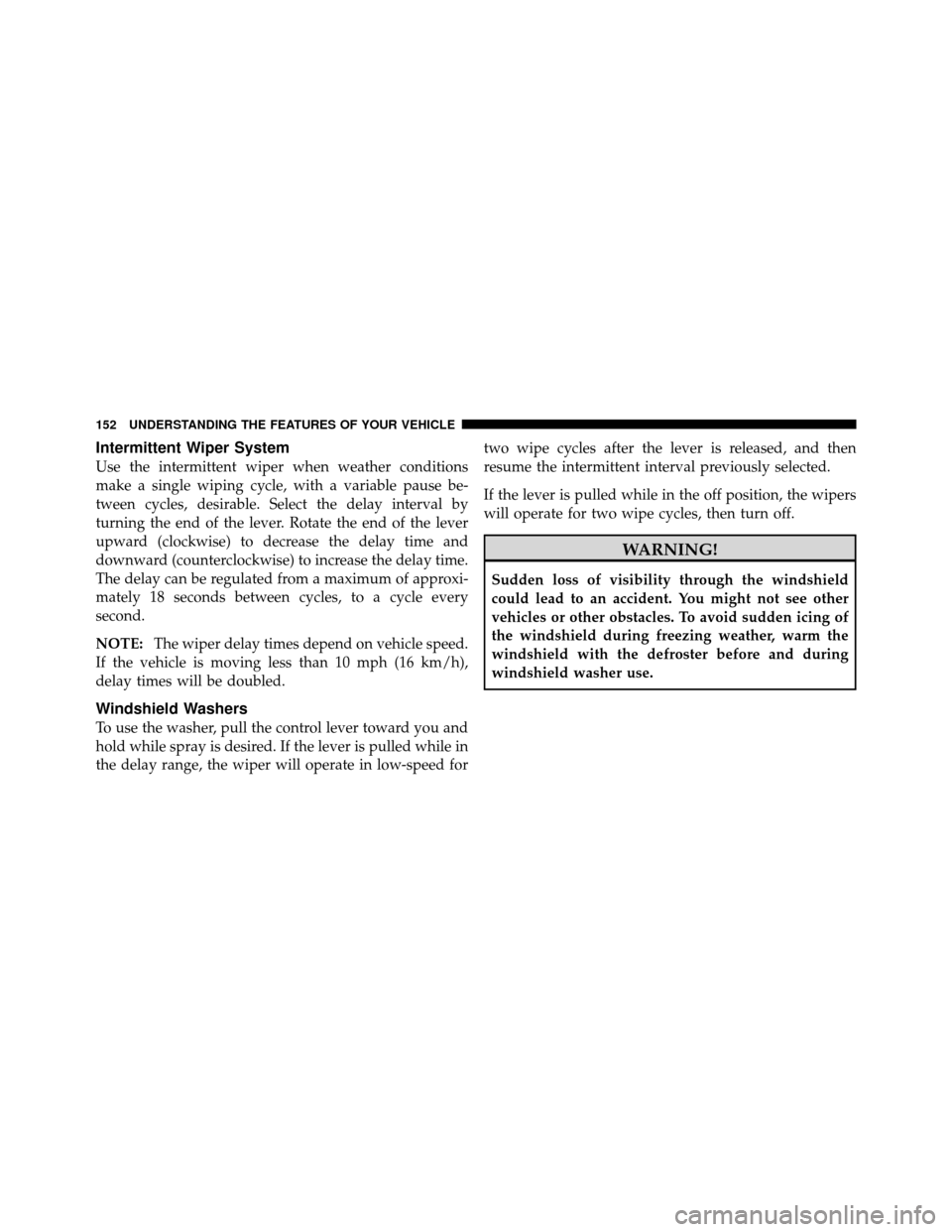
Intermittent Wiper System
Use the intermittent wiper when weather conditions
make a single wiping cycle, with a variable pause be-
tween cycles, desirable. Select the delay interval by
turning the end of the lever. Rotate the end of the lever
upward (clockwise) to decrease the delay time and
downward (counterclockwise) to increase the delay time.
The delay can be regulated from a maximum of approxi-
mately 18 seconds between cycles, to a cycle every
second.
NOTE:The wiper delay times depend on vehicle speed.
If the vehicle is moving less than 10 mph (16 km/h),
delay times will be doubled.
Windshield Washers
To use the washer, pull the control lever toward you and
hold while spray is desired. If the lever is pulled while in
the delay range, the wiper will operate in low-speed for two wipe cycles after the lever is released, and then
resume the intermittent interval previously selected.
If the lever is pulled while in the off position, the wipers
will operate for two wipe cycles, then turn off.
WARNING!
Sudden loss of visibility through the windshield
could lead to an accident. You might not see other
vehicles or other obstacles. To avoid sudden icing of
the windshield during freezing weather, warm the
windshield with the defroster before and during
windshield washer use.
152 UNDERSTANDING THE FEATURES OF YOUR VEHICLE
Page 157 of 484

WARNING!
Leaving the Electronic Speed Control system on
when not in use is dangerous. You could accidentally
set the system or cause it to go faster than you want.
You could lose control and have an accident. Always
leave the Electronic Speed Control system off when
you are not using it.
To Set a Desired Speed
Turn the Electronic Speed Control ON. When the vehicle
has reached the desired speed, press down on the Elec-
tronic Speed Control lever and release. Release the accel-
erator and the vehicle will operate at the selected speed.
NOTE:The vehicle should be traveling at a steady
speed and on level ground before pressing the SET lever.
To Deactivate
A soft tap on the brake pedal, pulling the Electronic
Speed Control lever toward you CANCEL, normal brak-
ing or pressing the clutch pedal while slowing the vehicle
will deactivate Electronic Speed Control without erasing
the set speed memory. Pressing the ON/OFF button or
turning the ignition switch OFF erases the set speed
memory.
To Resume Speed
To resume a previously set speed, push the RESUME
ACCEL lever up and release. Resume can be used at any
speed above 20 mph (32 km/h).
To Vary the Speed Setting
When the Electronic Speed Control is set, you can in-
crease speed by pushing up and holding the RESUME
ACCEL lever. If the lever is continually held in the
156 UNDERSTANDING THE FEATURES OF YOUR VEHICLE
Page 168 of 484
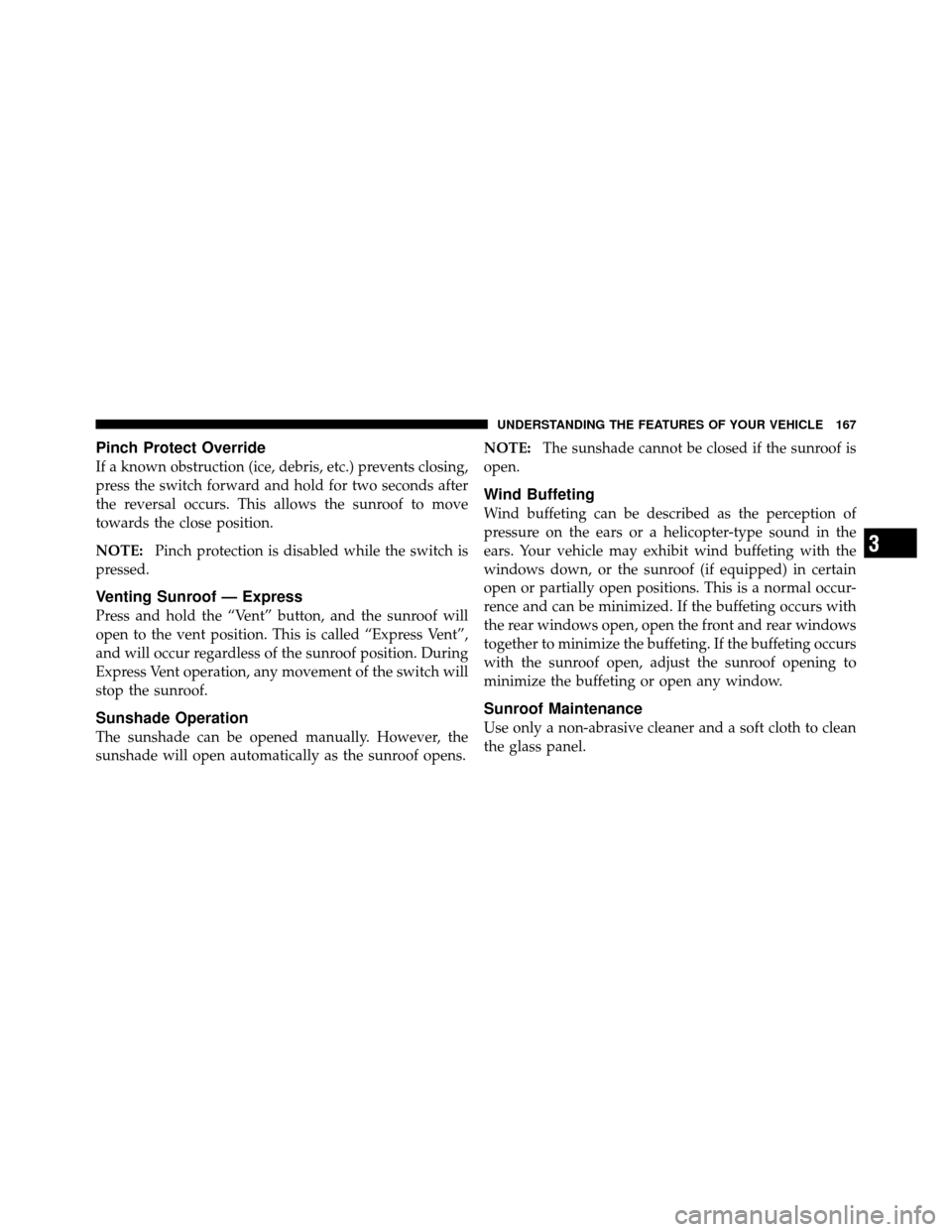
Pinch Protect Override
If a known obstruction (ice, debris, etc.) prevents closing,
press the switch forward and hold for two seconds after
the reversal occurs. This allows the sunroof to move
towards the close position.
NOTE:Pinch protection is disabled while the switch is
pressed.
Venting Sunroof — Express
Press and hold the “Vent” button, and the sunroof will
open to the vent position. This is called “Express Vent”,
and will occur regardless of the sunroof position. During
Express Vent operation, any movement of the switch will
stop the sunroof.
Sunshade Operation
The sunshade can be opened manually. However, the
sunshade will open automatically as the sunroof opens. NOTE:
The sunshade cannot be closed if the sunroof is
open.
Wind Buffeting
Wind buffeting can be described as the perception of
pressure on the ears or a helicopter-type sound in the
ears. Your vehicle may exhibit wind buffeting with the
windows down, or the sunroof (if equipped) in certain
open or partially open positions. This is a normal occur-
rence and can be minimized. If the buffeting occurs with
the rear windows open, open the front and rear windows
together to minimize the buffeting. If the buffeting occurs
with the sunroof open, adjust the sunroof opening to
minimize the buffeting or open any window.
Sunroof Maintenance
Use only a non-abrasive cleaner and a soft cloth to clean
the glass panel.
3
UNDERSTANDING THE FEATURES OF YOUR VEHICLE 167