Page 186 of 484
UNDERSTANDING YOUR INSTRUMENT PANEL
CONTENTS
�Instrument Panel Features ............... 189
� Instrument Cluster – Base ............... 190
� Instrument Cluster – Premium ............ 191
� Instrument Cluster Descriptions ........... 192
� Electronic Vehicle Information Center (EVIC) —
If Equipped .......................... 206
▫ Oil Change Required — If Equipped ...... 208
▫ EVIC Functions ..................... 209
▫ Compass/Temperature/Audio ........... 210▫
Average Fuel Economy ................ 210
▫ Distance To Empty (DTE) .............. 210
▫ Elapsed Time ....................... 211
▫ Tire Pressure Monitor (TPM) ............ 211
▫ Personal Settings (Customer-Programmable
Features) .......................... 211
� Media Center 230 (REQ) — AM/FM Stereo
Radio And 6–Disc CD/DVD Changer
(MP3/WMA AUX Jack) .................. 217
▫ Operating Instructions - Radio Mode ...... 217
4
Page 187 of 484

▫Operation Instructions - (Disc Mode For CD
And MP3/WMA Audio Play, DVD-Video) . . . 225
▫ Notes On Playing MP3/WMA Files ....... 227
▫ List Button (Disc Mode For
MP3/WMA Play) .................... 230
▫ Info Button (Disc Mode For MP3/WMA
Play) ............................. 230
� Media Center 730N/430 (RER/REN/RBZ) —
AM/FM Stereo Radio And CD/DVD/HDD/
NAV — If Equipped .................... 232
▫ Operating Instructions — Voice Command
System — If Equipped ................. 233
▫ Operating Instructions — Uconnect™ Phone
— If Equipped ...................... 233
▫ Clock Setting Procedure — RBZ Radio ..... 233▫
Clock Setting Procedure —
RER/REN Radio ..................... 235
� Media Center 130 (RES) — AM/FM Stereo
Radio With CD Player (MP3 AUX Jack) ....... 237
▫ Operating Instructions — Radio Mode ..... 237
▫ Operation Instructions — CD Mode For CD
And MP3 Audio Play ................. 240
▫ Notes On Playing MP3 Files ............ 242
▫ Operation Instructions - Auxiliary Mode .... 245
� Media Center 130 (RES/RSC) — AM/FM
Stereo Radio With CD Player (MP3 AUX Jack)
And Sirius Radio ...................... 246
▫ Operating Instructions — Radio Mode ..... 246
▫ Operation Instructions — CD Mode For CD
And MP3 Audio Play ................. 252
186 UNDERSTANDING YOUR INSTRUMENT PANEL
Page 208 of 484

•Compass heading
•Outside temperature display
•Trip computer functions
•Uconnect™ Phone displays — If equipped
•Audio mode display
•Tire Pressure Monitor (TPM)
When the appropriate conditions exist, the EVIC displays
the following messages.
•Turn Signal On (with a continuous warning chime
after 1 mile (1.6 km) of distance travelled)
•Left Front Turn Signal Light Out (with a single chime)
•Left Rear Turn Signal Light Out (with a single chime)
•Right Front Turn Signal Light Out (with a single
chime)
•Right Rear Turn Signal Light Out (with a single chime)
•RKE Battery Low (with a single chime)
•Personal Settings Not Available – vehicle not in park
(automatic transmission) or vehicle is in motion
(manual transmission).
•Left/Right Front Door Ajar (one or more, with a single
chime if speed is above 1 mph/1 km/h)
•Left/Right Rear Door Ajar (one or more, with a single
chime if speed is above 1 mph/1 km/h)
•Door(s) Ajar (with a single chime if vehicle is in
motion)
•Gate Ajar (with a single chime)
•Headlamps or Park Lamps On
•Key In Ignition
•Check TPM System
4
UNDERSTANDING YOUR INSTRUMENT PANEL 207
Page 210 of 484
EVIC Functions
Press the EVIC button until one of the following func-
tions are displayed on the EVIC:
•Compass/Temperature/Audio
•Average Fuel Economy
•Distance To Empty (DTE)
•Elapsed Time
•Tire Pressure Monitor (TPM)
•Personal Settings
To Reset The Display
Pressing and holding the EVIC button once will clear the
function currently being displayed. Reset will only occur
if a resettable function is currently being displayed. To
reset all resettable functions, press and release the EVIC
button a second time within three seconds of resetting the
currently displayed function (reset ALL will be displayed
during this three-second window).
EVIC Button
4
UNDERSTANDING YOUR INSTRUMENT PANEL 209
Page 211 of 484

Compass/Temperature/Audio
Press and release the EVIC button to display one of eight
compass headings to indicate the direction the vehicle is
facing, the outside temperature, and the current radio
station.
For additional information regarding the compass, refer
to “Personal Settings (Customer-Programmable
Features)”.
Average Fuel Economy
Shows the average fuel economy since the last reset.
When the fuel economy is reset, the display will read
“RESET” or show dashes for two seconds. Then, the
history information will be erased, and the averaging will
continue from the last fuel reading before the reset.
Distance To Empty (DTE)
Shows the estimated distance that can be travelled with
the fuel remaining in the tank. This estimated distance is
determined by a weighted average of the instantaneous
and average fuel economy, according to the current fuel
tank level. This is not resettable.
NOTE:Significant changes in driving style or vehicle
loading will greatly affect the actual drivable distance of
the vehicle, regardless of the DTE displayed value.
When the DTE value is less than 30 miles (48 km)
estimated driving distance, the DTE display will change
to a text display of �LOW FUEL�. This display will
continue until the vehicle runs out of fuel. Adding a
significant amount of fuel to the vehicle will turn off the
�LOW FUEL� text and a new DTE value will be dis-
played, based on the current values in the DTE calcula-
tion and the current fuel tank level.
210 UNDERSTANDING YOUR INSTRUMENT PANEL
Page 218 of 484
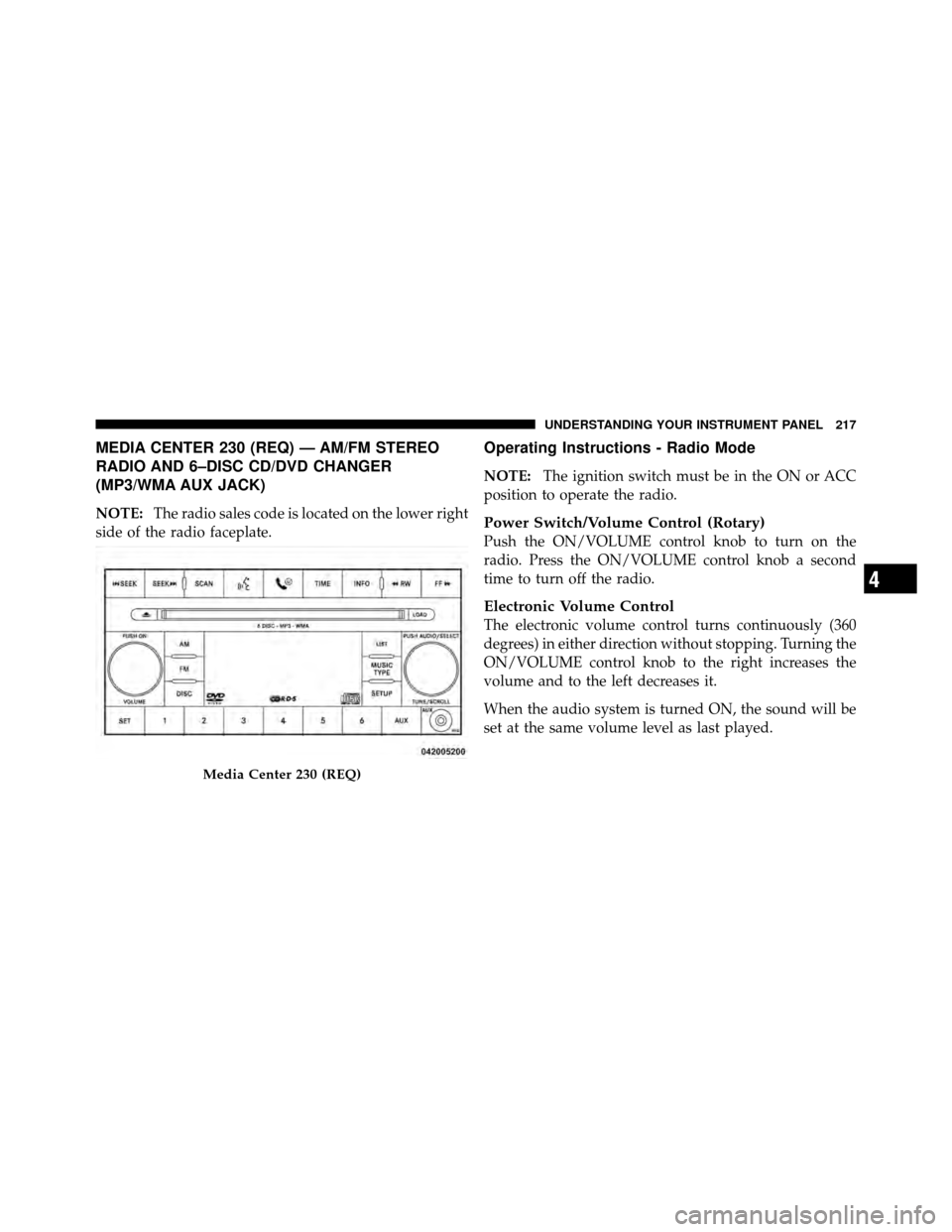
MEDIA CENTER 230 (REQ) — AM/FM STEREO
RADIO AND 6–DISC CD/DVD CHANGER
(MP3/WMA AUX JACK)
NOTE:The radio sales code is located on the lower right
side of the radio faceplate.
Operating Instructions - Radio Mode
NOTE: The ignition switch must be in the ON or ACC
position to operate the radio.
Power Switch/Volume Control (Rotary)
Push the ON/VOLUME control knob to turn on the
radio. Press the ON/VOLUME control knob a second
time to turn off the radio.
Electronic Volume Control
The electronic volume control turns continuously (360
degrees) in either direction without stopping. Turning the
ON/VOLUME control knob to the right increases the
volume and to the left decreases it.
When the audio system is turned ON, the sound will be
set at the same volume level as last played.
Media Center 230 (REQ)
4
UNDERSTANDING YOUR INSTRUMENT PANEL 217
Page 223 of 484

NOTE:Turn the TUNE/SCROLL control knob to scroll
through the entries. Push the AUDIO/SELECT button to
select an entry and make changes.
•DVD Enter - When the disc is in DVD Menu mode,
selecting DVD Enter will allow you to play the current
highlighted selection. Use the remote control to scroll
up and down the menu (if equipped).
•DISC Play/Pause - You can toggle between
playing the DVD and pausing the DVD by
pushing the SELECT button (if equipped).
•DVD Play Options - Selecting the DVD Play Options
will display the following:
•Subtitle – Repeatedly pressing SELECT will switch
subtitles to different subtitle languages that are
available on the disc (if equipped).
•Audio Stream – Repeatedly pressing SELECT will
switch to different audio languages (if supported on
the disc) (if equipped).
•Angle – Repeatedly pressing SELECT will change
the viewing angle if supported by the DVD disc (if
equipped).
NOTE:
•The available selections for each of the above entries
varies depending upon the disc.
•These selections can only be made while playing a
DVD.
•VES™ Power - Allows you to turn VES™ ON and
OFF (if equipped).
•VES™ Lock - Locks out rear VES™ remote controls (if
equipped).
222 UNDERSTANDING YOUR INSTRUMENT PANEL
Page 224 of 484

•VES™ CH1/CH2 -Allows the user to change the
mode of either the IR1 or IR2 wireless headphones by
pressing the AUDIO/SELECT button (if equipped).
•Set Home Clock - Pressing the SELECT button allows
you to set the clock. Turn the TUNE/SCROLL control
knob to adjust the hours and then press and turn the
TUNE/SCROLL control knob to adjust the minutes.
Press the TUNE/SCROLL control knob again to save
changes.
•Player Defaults - Selecting this item will allow the
user to scroll through the following items and set
defaults according to customer preference.
Menu Language — If Equipped
Selecting this item will allow the user to choose the
default startup DVD menu language (effective only if
language supported by disc). If you want to select a
language not listed, then scroll down and select �other.�Enter the four-digit country code using the TUNE/
SCROLL control knob to scroll up and down to select the
number and then push to select.
Audio Language — If Equipped
Selecting this item allows you to choose a default audio
language (effective only if the language is supported by
the disc). You can select a language not listed by scrolling
down and selecting
�other.�Enter the country code using
the TUNE/SCROLL control knob to scroll up and down
to select the number and then push to select.
Subtitle Language — If Equipped
Selecting this item allows you to choose a default subtitle
language (effective only if the language is supported by
the disc). You can select a language not listed by scrolling
down and selecting �other.�Enter the country code using
the TUNE/SCROLL control knob to scroll up and down
to select the number and then push to select.
4
UNDERSTANDING YOUR INSTRUMENT PANEL 223