Page 156 of 448

Vehicle Odometer Messages
When the appropriate conditions exist, the odometer will
display the following messages:
door............................. Door Ajar
deck ............................. T runk Ajar
LoW TirE .................... LowTirePr essure
CHAngE OIL ............... Oil Change Required
gASCAP ....................... Fuel Cap Fault
HOTOIL ............ Tr ansmission Oil Temperature
Exceeds Safe Threshold
NOTE: If the instrument cluster is equipped with the
optional Electronic Vehicle Information Center (EVIC),
then all warnings including ”Low Tire,” “Door Ajar” and
“Trunk Ajar” will only display in the EVIC. (Refer to
“Electronic Vehicle Information Center (EVIC)” for spe-
cific messages). LoW TirE
When the appropriate condition exists, the odometer
display will toggle between LoW and TirE for three
cycles.
HOTOIL
When this message is displayed there is a transmission
over-temperature condition. When this condition occurs,
the “HOTOIL” message will be displayed in the odom-
eter along with a chime.
NOTE:
When this message is displayed, bring the
vehicle to a stop and idle the engine in park until the
message clears. Raising the idle of the engine slightly will
help speed up the cooling.
gASCAP
If the vehicle diagnostic system detects a leak or change
in the evaporative system, or the fuel filler cap is loose,
improperly installed, or damaged, the words “gASCAP”
will display in the odometer display area. If this occurs,
4
UNDERSTANDING YOUR INSTRUMENT PANEL 155
Page 162 of 448

tires or wheels on your vehicle, to ensure that the
replacement or alternate tires and wheels allow the TPMS
to continue to function properly.
CAUTION!
The TPMS has been optimized for the original
equipment tires and wheels. TPMS pressures and
warning have been established for the tire size
equipped on your vehicle. Undesirable system opera-
tion or sensor damage may result when using re-
placement equipment that is not of the same size,
type, and/or style. Aftermarket wheels can cause
sensor damage. Do not use tire sealant from a can, or
balance beads if your vehicle is equipped with a
TPMS, as damage to the sensors may result.25. Malfunction Indicator Light (MIL)
The Malfunction Indicator Light (MIL) is part of
an onboard diagnostic system called OBD that
monitors emissions, engine, and automatic trans-
mission control systems. The light will illuminate when
the key is in the ON position before engine start. If the
bulb does not come on when turning the key from LOCK
to ON, have the condition checked promptly.
Certain conditions such as a loose or missing gas cap,
poor fuel quality, etc., may illuminate the light after
engine start. The vehicle should be serviced if the light
stays on through several of your typical driving cycles. In
most situations, the vehicle will drive normally and will
not require towing.
4
UNDERSTANDING YOUR INSTRUMENT PANEL 161
Page 163 of 448

CAUTION!
Prolonged driving with the MIL on could cause
damage to the engine control system. It also could
affect fuel economy and drivability. If the MIL is
flashing, severe catalytic converter damage and
power loss will soon occur. Immediate service is
required.
WARNING!
A malfunctioning catalytic converter, as referenced
above, can reach higher temperatures than in normal
operating conditions. This can cause a fire if you
drive slowly or park over flammable substances such
as dry plants or wood or cardboard, etc. This could
result in death or serious injury to the driver, occu-
pants or others.26. Anti-Lock Brake (ABS) Light — If Equipped
This light monitors the ABS. This light will
come on when the ignition key is turned to the
ON position and may stay on for approxi-
mately three seconds.
If the ABS light remains on or comes on during driving,
it indicates that the Anti-Lock portion of the brake system
is not functioning and that service is required, however,
the conventional brake system will continue to operate
normally provided that the BRAKE warning light is not
on.
If the ABS light is on, the brake system should be serviced
as soon as possible to restore the benefit of Anti-Lock
Brakes.
The ABS warning light should be checked frequently to
assure that it is operating properly. Turn the ignition key
to the on position, but do not start the vehicle. The light
162 UNDERSTANDING YOUR INSTRUMENT PANEL
Page 164 of 448

should come on. If the light does not come on, have the
system inspected by an authorized dealer.
27. Transmission Temperature Warning Light —
If EquippedThis light indicates that the transmission fluid
temperature is running hot. This may occur
with severe usage, such as trailer towing. If this
light turns on, safely pull over and stop the
vehicle. Then, shift the transmission into NEUTRAL and
run the engine at idle or faster until the light turns off.
CAUTION!
Continuous driving with the Transmission Tempera-
ture Warning Light illuminated will eventually cause
severe transmission damage or transmission failure.
WARNING!
Continued operation with the Transmission Tem-
perature Warning Light illuminated could cause the
fluid to boil over, come in contact with hot engine or
exhaust components causing a fire that may result in
personal injury.
28. High Beam Indicator This light indicates that the headlights are on high
beam. Pull the turn signal lever toward the steer-
ing wheel to switch the headlights to low beam.
29. Electronic Vehicle Information Center (EVIC)
Display — If Equipped
This display shows the EVIC messages when the appro-
priate conditions exist. Refer to “Electronic Vehicle Infor-
mation Center (EVIC)” for further information.
4
UNDERSTANDING YOUR INSTRUMENT PANEL 163
Page 165 of 448
ELECTRONIC VEHICLE INFORMATION CENTER
(EVIC) – IF EQUIPPED
The Electronic Vehicle Information Center (EVIC) fea-
tures a driver-interactive display that is located in the
instrument cluster.The EVIC consists of the following:•System status
•Vehicle information warning message displays
•Personal Settings (Customer-Programmable Features)
•Compass heading display (N, S, E, W, NE, NW, SE,
SW)
•Outside temperature display (°F or °C)
•Trip computer functions
•Audio mode displays – 12 preset Radio Stations or CD
Title and Track number when playing
•Tire Pressure Monitor System (TPMS) displays (if
equipped)
Electronic Vehicle Information Center (EVIC)
164 UNDERSTANDING YOUR INSTRUMENT PANEL
Page 166 of 448

The system allows the driver to select information by
pressing the following buttons on the instrument panel
switch bank located below the climate controls:Press and release the MENU button to advance
the display to Trip Functions or Personal set-
tings or to return to the default System status
display.
Press and release the STEP button to advance
the display through the various Trip Functions
or Personal settings. Press and release the COMPASS button to
display the compass heading and the out-
side temperature.
Press and release the RESET button to accept a
selection. The RESET button also resets various
Trip Functions.
Electronic Vehicle Information Center (EVIC)
Displays
When the appropriate conditions exist, the EVIC displays
the following messages.
•Turn Signal On (with a continuous warning chime
after one mile traveled)
•Left Front Turn Signal Light Out (with a single chime)
MENU Button
STEP
Button
COMPASS Button
RESETButton
4
UNDERSTANDING YOUR INSTRUMENT PANEL 165
Page 242 of 448
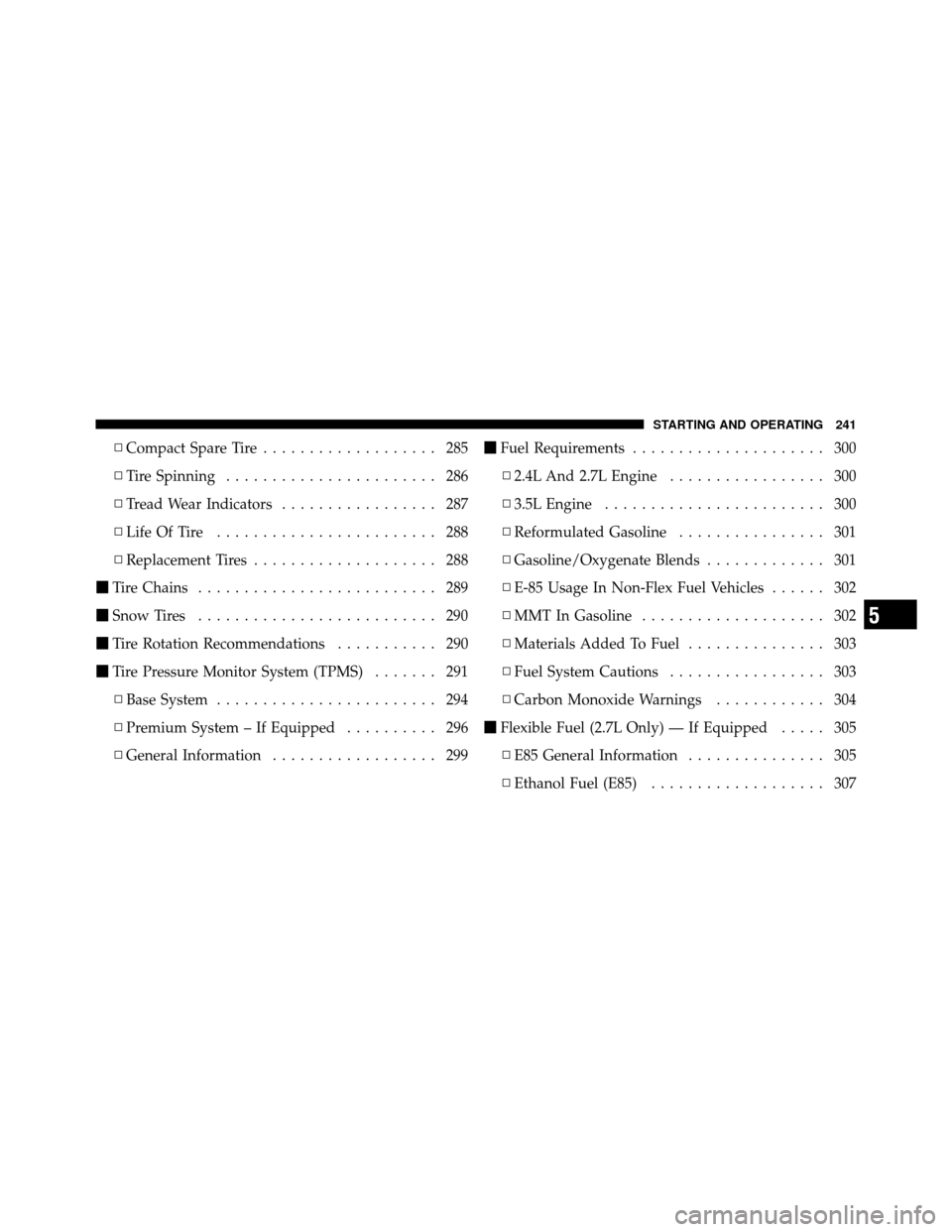
▫Compact Spare Tire ................... 285
▫ Tire Spinning ....................... 286
▫ Tread Wear Indicators ................. 287
▫ Life Of Tire ........................ 288
▫ Replacement Tires .................... 288
� Tire Chains .......................... 289
� Snow Tires .......................... 290
� Tire Rotation Recommendations ........... 290
� Tire Pressure Monitor System (TPMS) ....... 291
▫ Base System ........................ 294
▫ Premium System – If Equipped .......... 296
▫ General Information .................. 299 �
Fuel Requirements ..................... 300
▫ 2.4L And 2.7L Engine ................. 300
▫ 3.5L Engine ........................ 300
▫ Reformulated Gasoline ................ 301
▫ Gasoline/Oxygenate Blends ............. 301
▫ E-85 Usage In Non-Flex Fuel Vehicles ...... 302
▫ MMT In Gasoline .................... 302
▫ Materials Added To Fuel ............... 303
▫ Fuel System Cautions ................. 303
▫ Carbon Monoxide Warnings ............ 304
� Flexible Fuel (2.7L Only) — If Equipped ..... 305
▫ E85 General Information ............... 305
▫ Ethanol Fuel (E85) ................... 307
5
STARTING AND OPERATING 241
Page 244 of 448
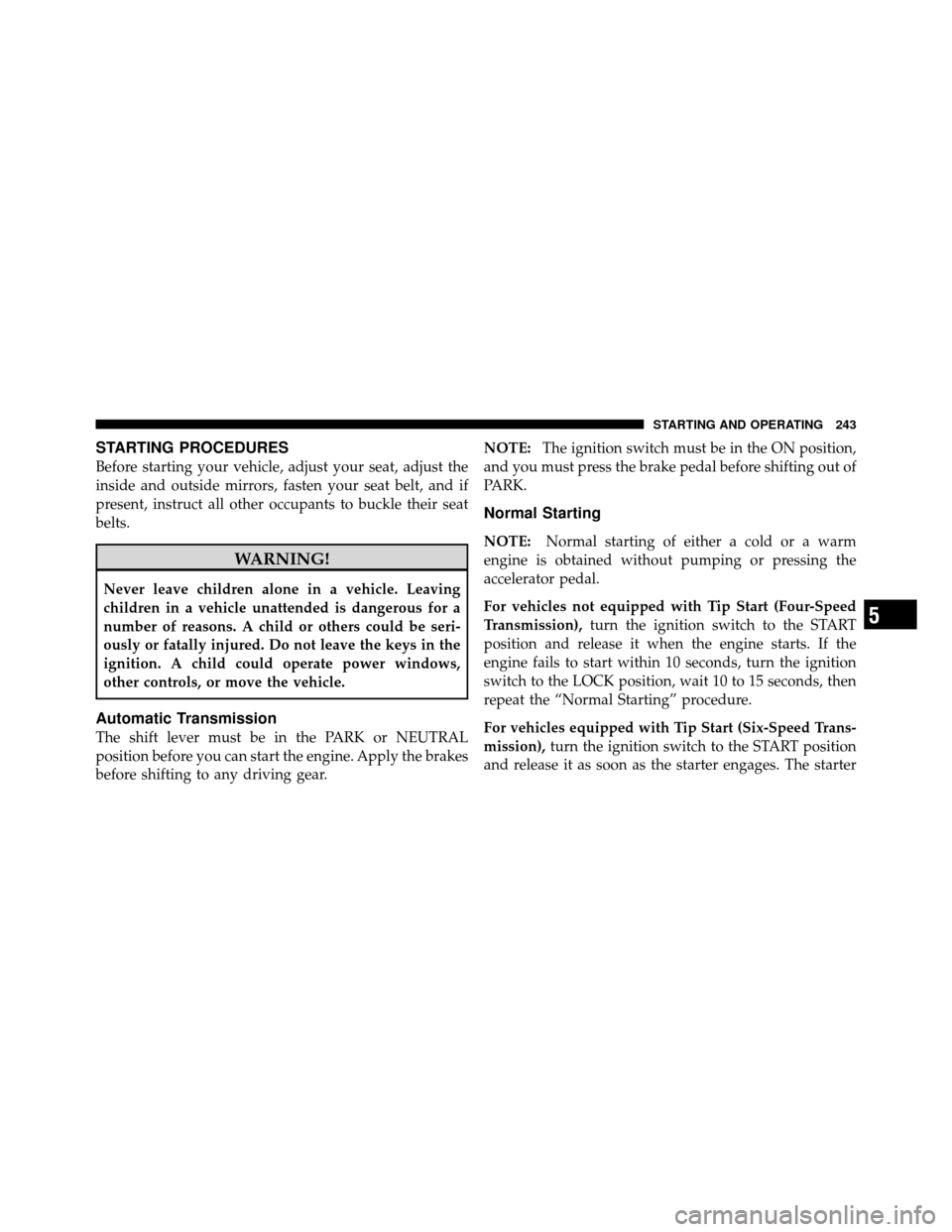
STARTING PROCEDURES
Before starting your vehicle, adjust your seat, adjust the
inside and outside mirrors, fasten your seat belt, and if
present, instruct all other occupants to buckle their seat
belts.
WARNING!
Never leave children alone in a vehicle. Leaving
children in a vehicle unattended is dangerous for a
number of reasons. A child or others could be seri-
ously or fatally injured. Do not leave the keys in the
ignition. A child could operate power windows,
other controls, or move the vehicle.
Automatic Transmission
The shift lever must be in the PARK or NEUTRAL
position before you can start the engine. Apply the brakes
before shifting to any driving gear.NOTE:
The ignition switch must be in the ON position,
and you must press the brake pedal before shifting out of
PARK.
Normal Starting
NOTE: Normal starting of either a cold or a warm
engine is obtained without pumping or pressing the
accelerator pedal.
For vehicles not equipped with Tip Start (Four-Speed
Transmission), turn the ignition switch to the START
position and release it when the engine starts. If the
engine fails to start within 10 seconds, turn the ignition
switch to the LOCK position, wait 10 to 15 seconds, then
repeat the “Normal Starting” procedure.
For vehicles equipped with Tip Start (Six-Speed Trans-
mission), turn the ignition switch to the START position
and release it as soon as the starter engages. The starter
5
STARTING AND OPERATING 243
