Page 253 of 448
DRIVE 3— Four-Speed Transmission
This range eliminates shifts into fourth gear. The trans-
mission will operate normally in first and second gear.
Shifts into third may be delayed to provide second gear
operation at higher speeds. The�3�range should also be
used when descending steep grades to prevent brake
system distress.
NOTE: Using the �3�range while operating the vehicle
under heavy operating conditions will improve perfor-
mance and extend transmission life by reducing exces-
sive shifting and heat build-up.
LOW — Four-Speed Transmission
This range should be used for engine braking when
descending very steep grades. In this range, upshifts will
occur only to prevent engine overspeed while downshifts
occur earlier than other gear range selections.
CAUTION!
If the transmission operating temperature exceeds
acceptable limits, the vehicle computer will override
OVERDRIVE and “3” DRIVE range by changing
shift points. This is done to prevent transmission
damage due to overheating.
Reset Mode - Electronic Transmission
The transmission is monitored electronically for abnor-
mal conditions. If a condition is detected that could cause
damage, the transmission automatically shifts into sec-
ond gear. The transmission remains in second gear (third
gear with a six-speed automatic) despite the forward gear
selected. PARK, REVERSE, and NEUTRAL will continue
to operate. This Reset feature allows the vehicle to be
driven to a dealer for service without damaging the
transmission.
252 STARTING AND OPERATING
Page 254 of 448

In the event that the problem has been momentary, the
transmission can be reset to regain all forward gears.
1. Stop the vehicle.
2. Shift into PARK.
3. Turn the ignition OFF, and restart the engine.
4. Shift into the desired gear range and resume driving.
NOTE:Even if the transmission can be reset, it is
recommended that you visit a dealer at your earliest
possible convenience. Your dealer has diagnostic equip-
ment to determine if the problem could recur.
If the transmission cannot be reset, dealer service is
required.
AUTOSTICK� — IF EQUIPPED
AutoStick�is a driver-interactive transmission that offers
six manual ratio changes to provide you with more control. AutoStick�
allows you to maximize engine brak-
ing, eliminate undesirable upshifts and downshifts, and
improve overall vehicle performance. This system can
also provide you with more control during passing, city
driving, cold slippery conditions, mountain driving,
trailer towing, and many other situations.
Operation
By placing the shift lever one shift-level below the DRIVE
position, it can be moved from side to side. This allows
the driver to select a higher or lower range of gears.
Moving the shift lever to the left (-) triggers a downshift
and to the right (+) an upshift. The gear position will
display in the instrument cluster on the transmission
range indicator.
NOTE: In AutoStick� mode, the transmission will only
shift up or down when the driver moves the shift lever to
the right (+) or left (-).
5
STARTING AND OPERATING 253
Page 255 of 448

AutoStick�is deactivated when the shift lever is shifted
from the AutoStick (+/-) position into the DRIVE
position.
General Information
•
You can start out, from a stop, in any gear except sixth.
The system will ignore attempts to upshift at too low
of a vehicle speed.
•If a ratio other than first gear is selected, and the
vehicle is brought to a stop, the transmission control
logic will automatically select the first gear ratio.
•Starting out in second gear is helpful in snowy or icy
conditions.
•Avoid using speed control when AutoStick� is en-
gaged.
•The transmission will automatically shift up when
maximum engine speed is reached while AutoStick� is
engaged.
•Transmission shifting will be more noticeable when
AutoStick� is engaged.
•If a downshift would cause the engine to over-speed,
that shift will not occur until it is safe for the engine.
The transmission will stay in the manually selected
ratio.
•If the system detects powertrain overheating, the
transmission will revert to the automatic shift mode
and remain in that mode until the powertrain cools off.
•If the system detects a problem, it will disable the
AutoStick� mode and the transmission will return to
the automatic mode until the problem is corrected.
254 STARTING AND OPERATING
Page 258 of 448
CAUTION! (Continued)
•Driving through standing water may cause dam-
age to your vehicle’s drivetrain components. Al-
ways inspect your vehicle’s fluids (i.e., engine oil,
transmission, axle, etc.) for signs of contamination
(i.e., fluid that is milky or foamy in appearance)
after driving through standing water. Do not con-
tinue to operate the vehicle if any fluid appears
contaminated, as this may result in further dam-
age. Such damage is not covered by the New
Vehicle Limited Warranty.
•Getting water inside your vehicle’s engine can
cause it to lock up and stall out, and cause serious
internal damage to the engine. Such damage is not
covered by the New Vehicle Limited Warranty.
WARNING!
•Driving through standing water limits your vehi-
cle’s traction capabilities. Do not exceed 5 mph
(8 km/h) when driving through standing water.
•Driving through standing water limits your vehi-
cle’s braking capabilities, which increases stop-
ping distances. Therefore, after driving through
standing water, drive slowly and lightly press on
the brake pedal several times to dry the brakes.
•Getting water inside your vehicle’s engine can
cause it to lock up and stall out, and leave you
stranded.
•Failure to follow these warnings may result in
injuries that are serious or fatal to you, your
passengers, and others around you.
5
STARTING AND OPERATING 257
Page 260 of 448
Power Steering Fluid Check
Checking the power steering fluid level at a defined
service interval is not required. The fluid should only be
checked if a leak is suspected, abnormal noises are
apparent, and/or the system is not functioning as antici-
pated. Coordinate inspection efforts through an autho-
rized dealer.
CAUTION!
Do not use chemical flushes in your power steering
system as the chemicals can damage your power
steering components. Such damage is not covered by
the New Vehicle Limited Warranty.
WARNING!
Fluid level should be checked on a level surface and
with the engine off to prevent injury from moving
parts and to ensure accurate fluid level reading. Do
not overfill. Use only manufacturer’s recommended
power steering fluid.
If necessary, add fluid to restore to the proper indicated
level. With a clean cloth, wipe any spilled fluid from all
surfaces. Refer to “Fluids, Lubricants, and Genuine
Parts” in “Maintaining Your Vehicle” for further
information.
PARKING BRAKE
Before leaving the vehicle, make sure that the parking
brake is fully applied. Also, be certain to leave the
transmission in PARK.
5
STARTING AND OPERATING 259
Page 261 of 448
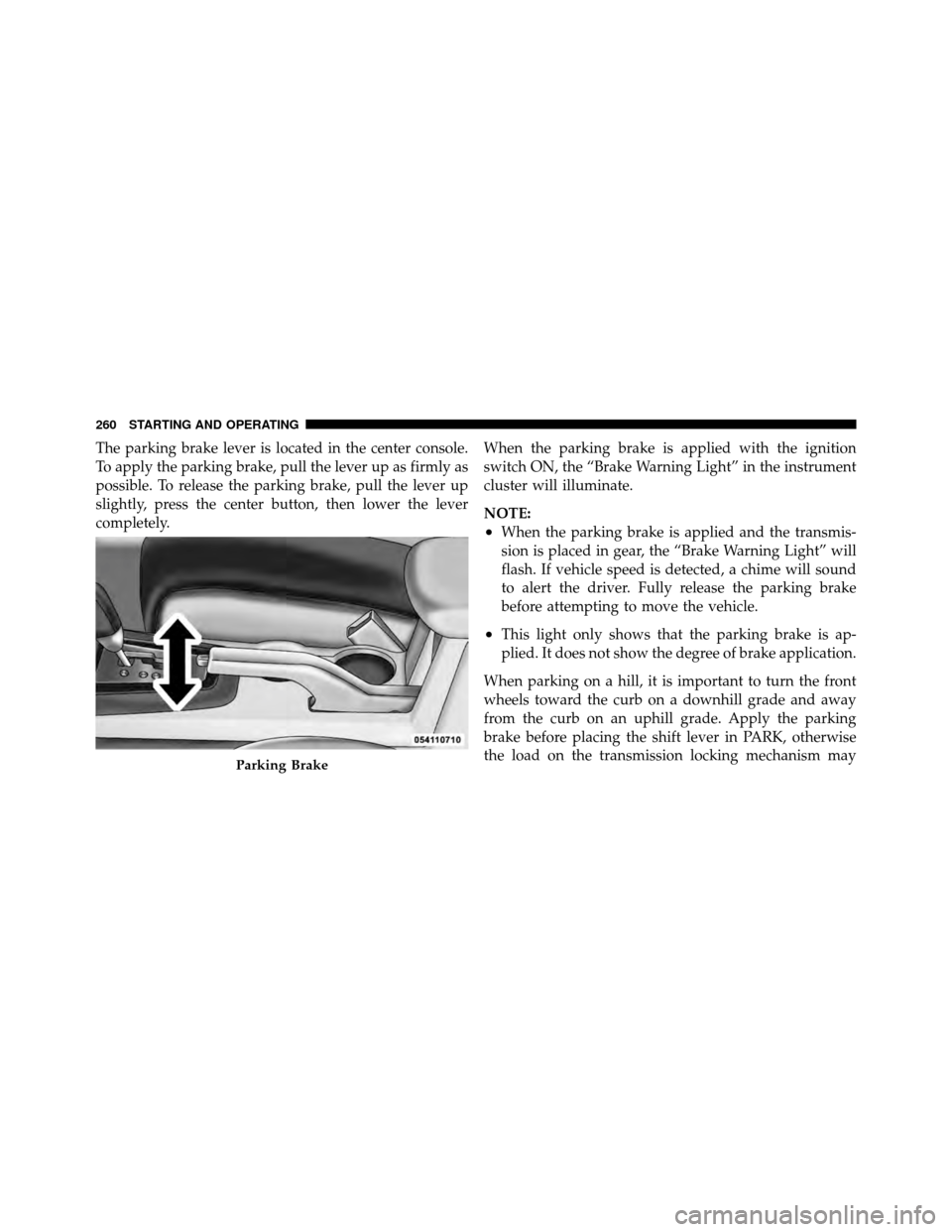
The parking brake lever is located in the center console.
To apply the parking brake, pull the lever up as firmly as
possible. To release the parking brake, pull the lever up
slightly, press the center button, then lower the lever
completely.When the parking brake is applied with the ignition
switch ON, the “Brake Warning Light” in the instrument
cluster will illuminate.
NOTE:
•When the parking brake is applied and the transmis-
sion is placed in gear, the “Brake Warning Light” will
flash. If vehicle speed is detected, a chime will sound
to alert the driver. Fully release the parking brake
before attempting to move the vehicle.
•This light only shows that the parking brake is ap-
plied. It does not show the degree of brake application.
When parking on a hill, it is important to turn the front
wheels toward the curb on a downhill grade and away
from the curb on an uphill grade. Apply the parking
brake before placing the shift lever in PARK, otherwise
the load on the transmission locking mechanism may
Parking Brake
260 STARTING AND OPERATING
Page 262 of 448
make it difficult to move the shift lever out of PARK. The
parking brake should always be applied whenever the
driver is not in the vehicle.
WARNING!
•Never use the PARK position as a substitute for
the parking brake. Always apply the parking
brake fully when parked to guard against vehicle
movement and possible injury or damage.
•Never leave children alone in a vehicle. Leaving
unattended children in a vehicle is dangerous for a
number of reasons. A child or others could be
seriously or fatally injured.
•Do not leave the key in the ignition. A child could
operate power windows, other controls, or move
the vehicle.(Continued)
WARNING! (Continued)
•Be sure the parking brake is fully disengaged
before driving; failure to do so can lead to brake
failure and an accident.
•Always fully apply the parking brake when leav-
ing your vehicle or it may roll and cause damage or
injury. Also, be certain to leave the transmission in
PARK. Failure to do so may cause the vehicle to
roll and cause damage or injury.
CAUTION!
If the “Brake Warning Light” remains on with the
parking brake released, a brake system malfunction
is indicated. Have the brake system serviced by an
authorized dealer immediately.
5
STARTING AND OPERATING 261
Page 269 of 448

1. Center the steering wheel (front wheels pointing
straight forward).
2. Shift the transmission into NEUTRAL.
3. Apply the parking brake.
4. Start the engine.
5. Release the clutch pedal.
6. Rotate the steering wheel one-half turn to the left.
7. Press the “ESC Off” switch four times within 20 sec-
onds. The “ESC Off Indicator Light” should turn on and
turn off two times.
8. Rotate the steering wheel back to center and then an
additional half-turn to the right.9. Turn the ignition switch to the OFF position and then
back to the ON position. If the sequence was completed
properly, the “ESC Off Indicator Light” will blink several
times to confirm HSA is disabled.
10. Repeat these steps if you want to return this feature
to it’s previous setting.
EVIC Equipped Vehicles
HSA is a Customer Programmable Feature on a EVIC
equipped vehicle. If you wish to turn off the HSA feature,
refer to “Electronic Vehicle Information Center (EVIC)/
Customer Programmable Features” in “Understanding
Your Instrument Panel” for further information.
268 STARTING AND OPERATING