Page 84 of 436

Defroster
Check operation by selecting the defrost mode and place
the blower control on high speed. You should be able to
feel the air directed against the windshield. See your
authorized dealer for service if your defroster is
inoperable.
Periodic Safety Checks You Should Make Outside
the Vehicle
Tires
Examine tires for excessive tread wear and uneven wear
patterns. Check for stones, nails, glass, or other objects
lodged in the tread. Inspect the tread and sidewall for
cuts and cracks. Check the wheel nuts for tightness.
Check the tires (including spare) for proper pressure.
Lights
Have someone observe the operation of exterior lights
while you work the controls. Check turn signal and high
beam indicator lights on the instrument panel.
Door Latches
Check for positive closing, latching, and locking.
Fluid Leaks
Check area under vehicle after overnight parking for fuel,
engine coolant, oil, or other fluid leaks. Also, if gasoline
fumes are detected or if fuel, power steering fluid, or
brake fluid leaks are suspected, the cause should be
located and corrected immediately.
84 THINGS TO KNOW BEFORE STARTING YOUR VEHICLE
Page 103 of 436
Folding Rear Seat
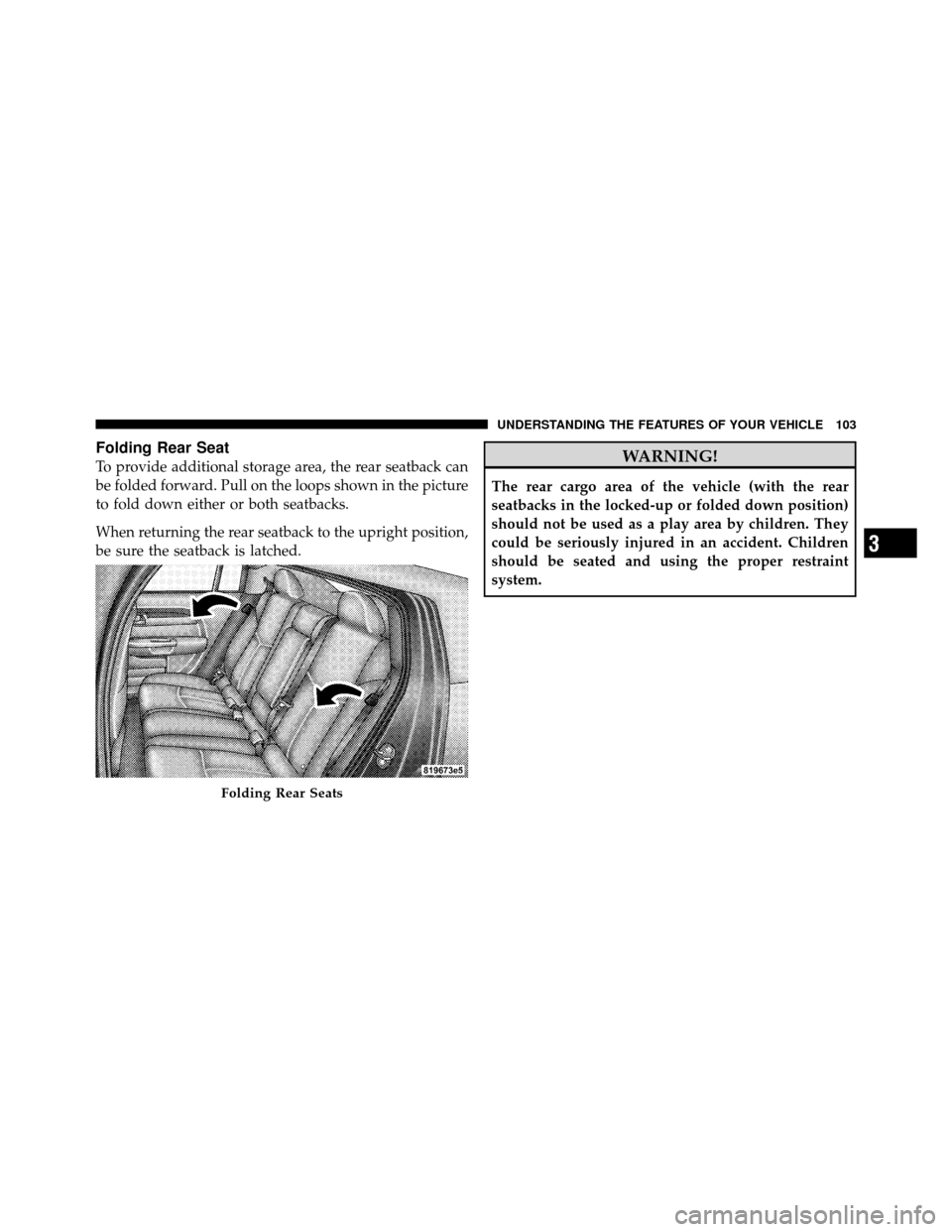
To provide additional storage area, the rear seatback can
be folded forward. Pull on the loops shown in the picture
to fold down either or both seatbacks.
When returning the rear seatback to the upright position,
be sure the seatback is latched.WARNING!
The rear cargo area of the vehicle (with the rear
seatbacks in the locked-up or folded down position)
should not be used as a play area by children. They
could be seriously injured in an accident. Children
should be seated and using the proper restraint
system.
Folding Rear Seats
3
UNDERSTANDING THE FEATURES OF YOUR VEHICLE 103
Page 106 of 436
CAUTION!
To prevent possible damage, do not slam the hood to
close it. Use a firm downward push at the center of
the hood to ensure that both latches engage.
WARNING!
If the hood is not fully latched it could fly up when
the vehicle is moving and block your forward vision.
You could have a collision. Be sure all hood latches
are fully latched before driving.
LIGHTS
Multifunction Lever
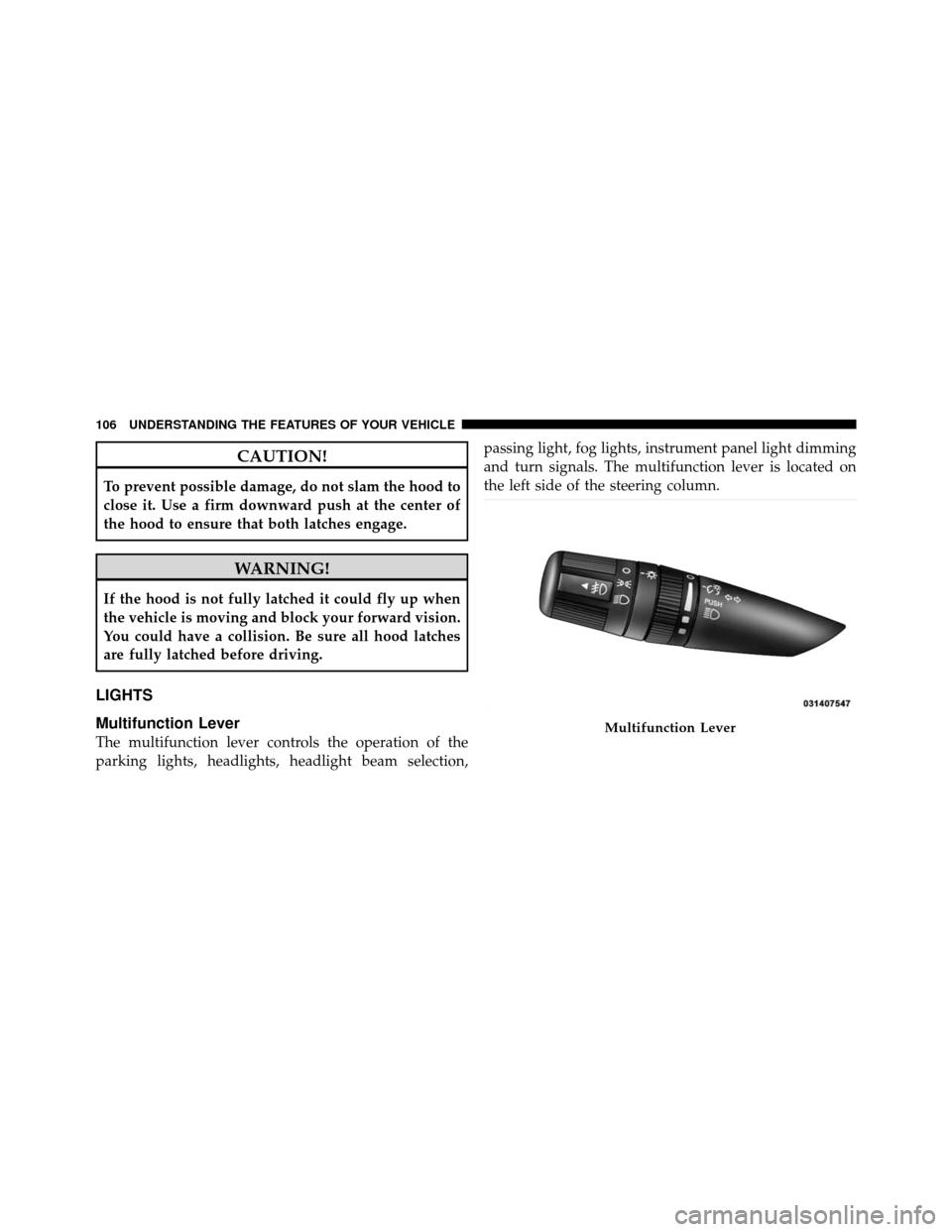
The multifunction lever controls the operation of the
parking lights, headlights, headlight beam selection,passing light, fog lights, instrument panel light dimming
and turn signals. The multifunction lever is located on
the left side of the steering column.Multifunction Lever
106 UNDERSTANDING THE FEATURES OF YOUR VEHICLE
Page 112 of 436
There is a second light located midway back in the
headliner.
To protect the battery, the interior lights will turn off
automatically 10 minutes after the ignition switch is
moved to the LOCK position. This will occur if the
interior lights were switched on manually or are on
because a door is open. To restore interior light operation,
either turn the ignition switch ON or cycle the light
switch.
WINDSHIELD WIPERS AND WASHERS
The wipers and washers are operated by a switch
on the control lever. The lever is located on the
right side of the steering column.Rotate the end of the lever to the first detent past the
intermittent settings for low-speed wiper operation, or to
the second detent past the intermittent settings for high-
speed wiper operation.Windshield Wiper/Washer Lever
112 UNDERSTANDING THE FEATURES OF YOUR VEHICLE
Page 116 of 436
TILT/TELESCOPING STEERING COLUMN
This feature allows you to tilt the steering column
upward or downward. It also allows you to lengthen or
shorten the steering column. The tilt/telescoping control
handle is located below the steering wheel at the end of
the steering column.To unlock the steering column, pull the control handle
outward. To tilt the steering column, move the steering
wheel upward or downward as desired. To lengthen or
shorten the steering column, pull the steering wheel
outward or push it inward as desired. To lock the steering
column in position, push the control handle inward until
fully engaged.
WARNING!
Do not adjust the steering wheel while driving. The
telescoping adjustment must be locked while driv-
ing. Adjusting the steering wheel while driving or
driving without the telescoping adjustment locked
could cause the driver to lose control of the vehicle.
Tilt/Telescoping Steering Wheel Lock
116 UNDERSTANDING THE FEATURES OF YOUR VEHICLE
Page 124 of 436
Using HomeLink�
To operate, press and release the programmed
HomeLink�button. Activation will now occur for the
trained device (i.e., garage door opener, gate operator,
security system, entry door lock, home/office lighting,
etc.,). The handheld transmitter of the device may also be
used at any time.
Reprogramming a Single HomeLink� Button
To reprogram a channel that has been previously trained,
follow these steps:
1. Turn the ignition switch to the ON/RUN position.
2. Press and hold the desired HomeLink� button until
the indicator light begins to flash after 20 seconds. Do not
release the button.
3. Without releasing the button, proceed with Program-
ming HomeLink� Step 2 and follow all remaining steps.
Gate Operator/Canadian Programming
Canadian radio frequency laws require transmitter sig-
nals to time-out (or quit) after several seconds of trans-
mission – which may not be long enough for HomeLink�
to pick up the signal during programming. Similar to this
Canadian law, some U.S. gate operators are designed to
time-out in the same manner.
It may be helpful to unplug the device during the cycling
process to prevent possible overheating of the garage
door or gate motor.
If you are having difficulties programming a garage door
opener or a gate operator, replace “Programming
HomeLink�” Step 3, with the following:
3. Continue to press and hold the HomeLink� button,
while you press and release (“cycle”), your handheld
transmitter every two seconds until HomeLink� has
124 UNDERSTANDING THE FEATURES OF YOUR VEHICLE
Page 135 of 436

When the seatback is folded to the upright position, make
sure it is latched by strongly pulling on the top of the
seatback above the seat strap.
WARNING!
•Be certain that the seatback is securely locked into
position. If the seatback in not securely locked
into position, the seat will not provide the proper
stability for child seats and/or passengers. An
improperly latched seat could cause serious injury.
•The cargo area in the rear of the vehicle (with the
rear seatbacks in the locked-up or folded down
position) should not be used as a play area by
children when the vehicle is in motion. They could
be seriously injured in an accident. Children
should be seated and using the proper restraint
system.(Continued)
WARNING! (Continued)
•To help protect against personal injury, passengers
should not be seated in the rear cargo area. The
rear cargo space is intended for load carrying
purposes only, not for passengers, who should sit
in seats and use seat belts.
•The weight and position of cargo and passengers
can change the vehicle center of gravity and ve-
hicle handling. To avoid loss of control resulting
in personal injury, follow these guidelines for
loading your vehicle:
Always place cargo evenly on the cargo floor. Put heavier
objects as low and as far forward as possible.
Place as much cargo as possible in front of the rear axle.
Too much weight or improperly placed weight over or
behind the rear axle can cause the rear of the vehicle to
sway.
3
UNDERSTANDING THE FEATURES OF YOUR VEHICLE 135
Page 141 of 436
UNDERSTANDING YOUR INSTRUMENT PANEL
CONTENTS
�Instrument Panel Features ............... 144
� Instrument Cluster .................... 145
� Instrument Cluster Descriptions ........... 146
� Electronic Vehicle Information Center (EVIC) –
If Equipped .......................... 159
▫ Electronic Vehicle Information Center (EVIC)
Displays ........................... 161
▫ Oil Change Required .................. 162
▫ Trip Functions ...................... 162
▫ Compass Display .................... 164 ▫
Personal Settings
(Customer-Programmable Features) ....... 167
� Setting The Analog Clock ................ 169
� Sales Code REQ — AM/FM Stereo Radio And
6–Disc CD/DVD Changer
(MP3/WMA AUX Jack) .................. 170
▫ Operating Instructions - Radio Mode ...... 170
▫ Operation Instructions - (Disc Mode For CD
And MP3/WMA Audio Play, DVD-Video) . . . 178
▫ Notes On Playing MP3/WMA Files ....... 180
4