Page 120 of 368

Using HomeLink�
To operate, press and release the programmed
HomeLink�button. Activation will now occur for the
trained device (i.e., garage door opener, gate operator,
security system, entry door lock, home/office lighting,
etc.,). The handheld transmitter of the device may also be
used at any time.
Reprogramming a Single HomeLink �Button
To reprogram a channel that has been previously trained,
follow these steps:
1. Turn the ignition switch to the ON/RUN position.
2. Press and hold the desired HomeLink� button until
the indicator light begins to flash after 20 seconds. Do not
release the button.
3. Without releasing the button, proceed with Program-
ming HomeLink� Step 2 and follow all remaining steps.
Gate Operator/Canadian Programming
Canadian radio frequency laws require transmitter sig-
nals to time-out (or quit) after several seconds of trans-
mission – which may not be long enough for HomeLink �
to pick up the signal during programming. Similar to this
Canadian law, some U.S. gate operators are designed to
time-out in the same manner.
It may be helpful to unplug the device during the cycling
process to prevent possible overheating of the garage
door or gate motor.
If you are having difficulties programming a garage door
opener or a gate operator, replace “Programming
HomeLink�” Step 3, with the following:
3. Continue to press and hold the HomeLink� button,
while you press and release (“cycle”), your handheld
transmitter every two seconds until HomeLink� has
3
UNDERSTANDING THE FEATURES OF YOUR VEHICLE 119
Page 130 of 368

CAUTION! (Continued)
•Accessories that draw higher power (i.e., coolers,
vacuum cleaners, lights, etc.), will discharge the
battery even more quickly. Only use these inter-
mittently and with greater caution.
•After the use of high-power draw accessories, or
long periods of the vehicle not being started (with
accessories still plugged in), the vehicle must be
driven a sufficient length of time to allow the
generator to recharge the vehicle’s battery.
REAR SHELF PANEL — IF EQUIPPED
The Rear Shelf Panel attaches to guides in the rear cargo
area. The rear shelf panel may be installed in one of five
different positions.NOTE:
The liftgate may be opened or closed with the
rear cargo shelf panel in position 1, position 2, position 3
or position 4.
WARNING!
•To avoid tipping, lock the shelf securely in all
positions.
•Do not drive this vehicle with the liftgate open, or
use the shelf as a seat.
•Failure to follow these warnings could result in
serious or fatal injury.
3
UNDERSTANDING THE FEATURES OF YOUR VEHICLE 129
Page 131 of 368
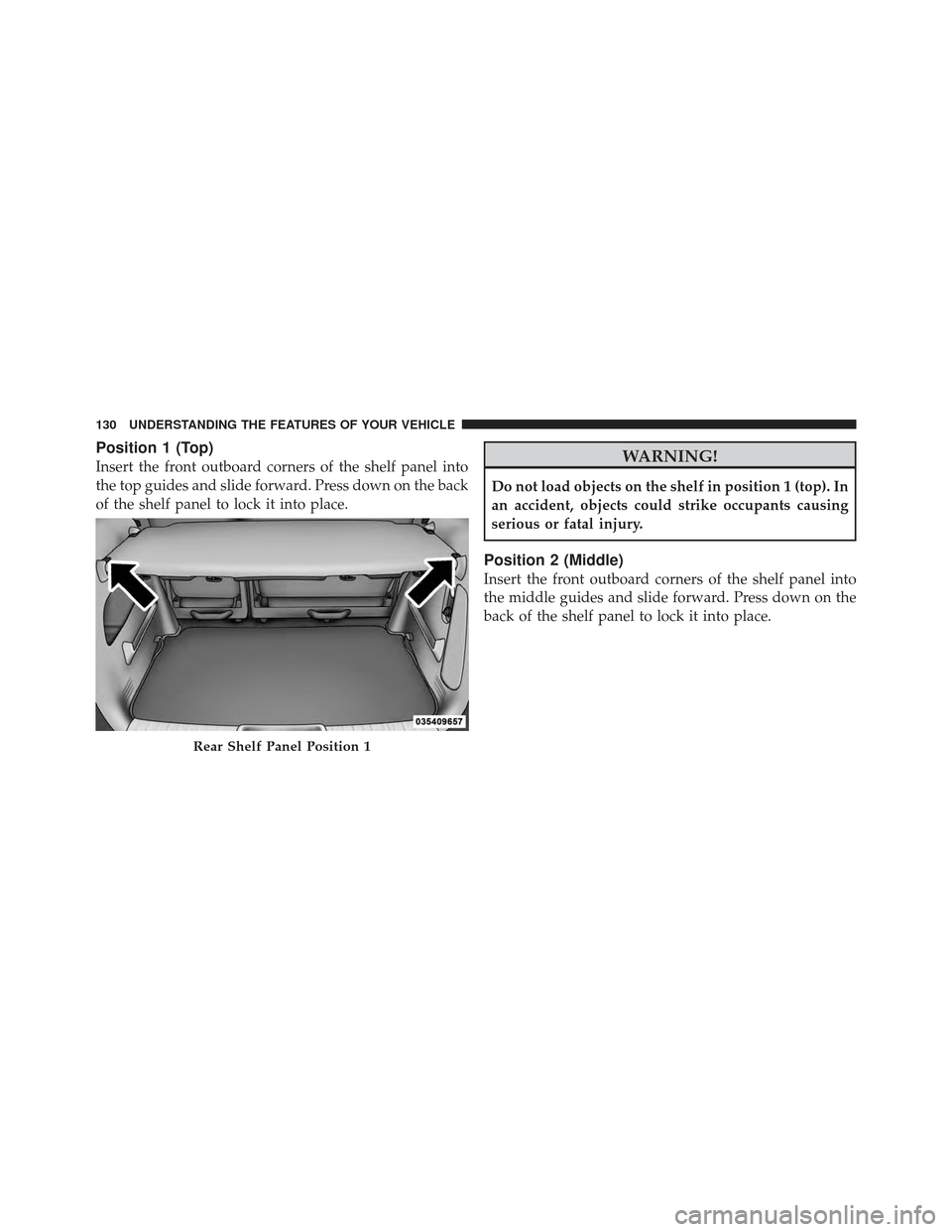
Position 1 (Top)
Insert the front outboard corners of the shelf panel into
the top guides and slide forward. Press down on the back
of the shelf panel to lock it into place.WARNING!
Do not load objects on the shelf in position 1 (top). In
an accident, objects could strike occupants causing
serious or fatal injury.
Position 2 (Middle)
Insert the front outboard corners of the shelf panel into
the middle guides and slide forward. Press down on the
back of the shelf panel to lock it into place.
Rear Shelf Panel Position 1
130 UNDERSTANDING THE FEATURES OF YOUR VEHICLE
Page 133 of 368
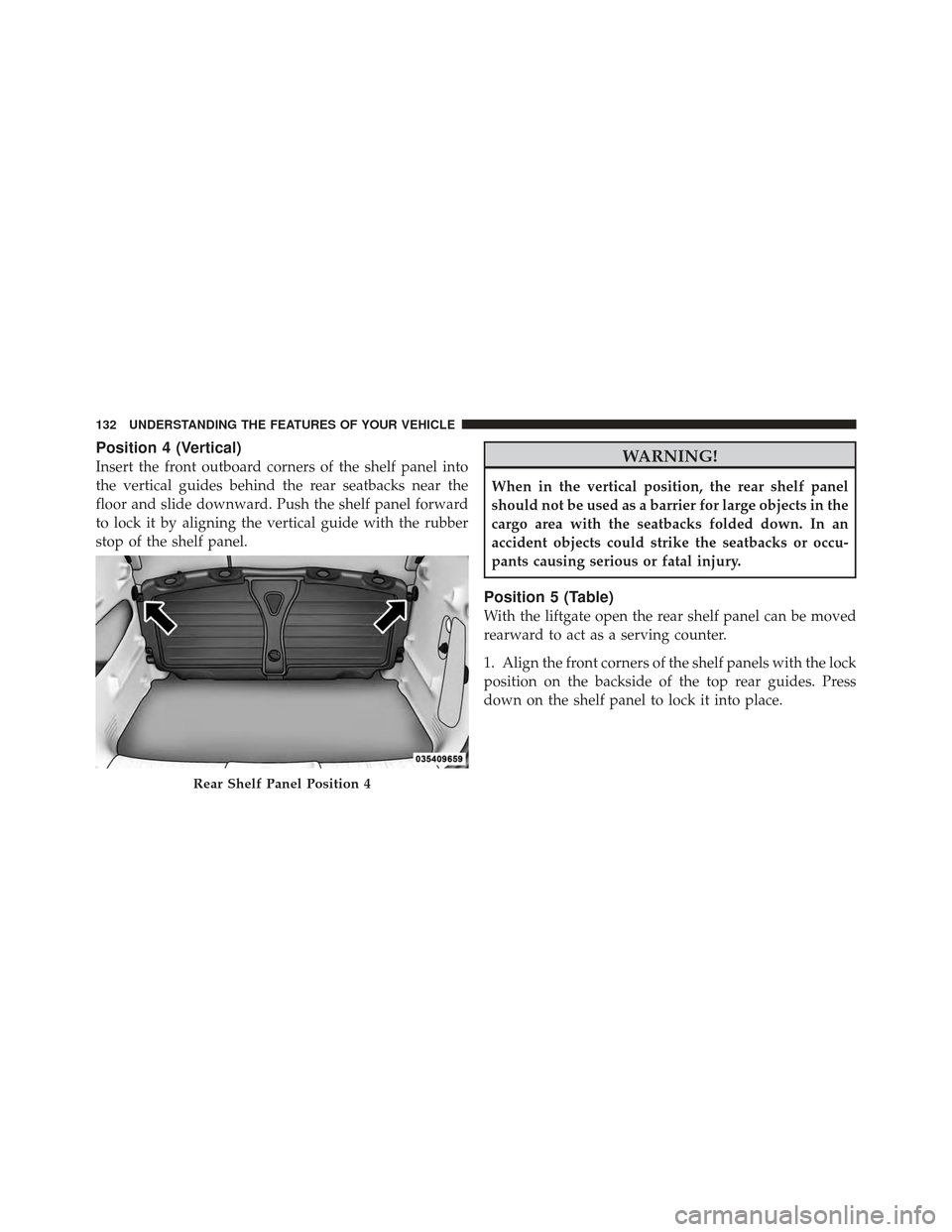
Position 4 (Vertical)
Insert the front outboard corners of the shelf panel into
the vertical guides behind the rear seatbacks near the
floor and slide downward. Push the shelf panel forward
to lock it by aligning the vertical guide with the rubber
stop of the shelf panel.WARNING!
When in the vertical position, the rear shelf panel
should not be used as a barrier for large objects in the
cargo area with the seatbacks folded down. In an
accident objects could strike the seatbacks or occu-
pants causing serious or fatal injury.
Position 5 (Table)
With the liftgate open the rear shelf panel can be moved
rearward to act as a serving counter.
1. Align the front corners of the shelf panels with the lock
position on the backside of the top rear guides. Press
down on the shelf panel to lock it into place.
Rear Shelf Panel Position 4
132 UNDERSTANDING THE FEATURES OF YOUR VEHICLE
Page 135 of 368
REAR WINDOW FEATURES
Rear Window Wiper/Washer
The rear window wiper/washer control is located on the
right side of the steering column.Rotate the switch upward to the “on” position will
activate the rear wiper.
Rotate the switch upward to the “washer” position
will activate that rear washer. The washer pump
will continue to operate as long as the lever or ring
is engaged. Upon release, the wipers will cycle three
times before returning to the set position.
If the rear wiper is operating when the ignition is turned
to the LOCK position, the wiper will automatically return
to the “Park” position. When the vehicle is restarted, the
wiper will resume function at whichever position the
switch is set at.
Rear Window Wiper/Washer Control
134 UNDERSTANDING THE FEATURES OF YOUR VEHICLE
Page 139 of 368

▫Compass Variance .................... 162
▫ Tire Pressure Monitor (TPM) ............ 163
▫ Personal Settings (Customer-Programmable
Features) .......................... 164
▫ Automatic Compass Calibration .......... 166
▫ Manual Compass Calibration ............ 167
� Setting The Analog Clock ................ 168
� Sales Code REF — AM/FM/CD (Single-Disc)
Radio With Optional Uconnect™ Multimedia
(Satellite Radio) And Uconnect™ Phone
Capability ........................... 168
▫ Operating Instructions — Radio Mode ..... 169
▫ Operating Instructions — CD Mode ....... 172
▫ Operating Instructions — Auxiliary Mode . . . 174 ▫
Operating Instructions — Uconnect™ Phone
— If Equipped ...................... 175
▫ Operating Instructions — Uconnect™
Multimedia (Satellite Radio) — If Equipped . . 175
� Uconnect™ Multimedia (Satellite Radio) — If
Equipped ............................ 176
▫ System Activation .................... 176
▫ Electronic Serial Number/Sirius
Identification Number (ESN/SID) ......... 176
▫ Selecting Uconnect™ Multimedia (Satellite)
Mode In REF, And RAQ, Radios .......... 177
▫ Selecting a Channel ................... 177
▫ Storing And Selecting Pre-Set Channels ..... 178
▫ Using The PTY (Program Type) Button (If
Equipped) ......................... 178
138 UNDERSTANDING YOUR INSTRUMENT PANEL
Page 141 of 368
INSTRUMENT PANEL FEATURES
1 — Air Vent5 — Glove Compartment9 — Storage Cubby
2 — Instrument Cluster 6 — Power Windows10 — Lower Switch Bank
3 — Analog Clock 7 — Radio11 — Side Mirror Control *
4 — Assist Handle 8 — Climate Controls* If Equipped
140 UNDERSTANDING YOUR INSTRUMENT PANEL
Page 151 of 368

14. Electronic Stability Program (ESP) Indicator Light
/ Traction Control System (TCS) Indicator LightIf this indicator light flashes during accelera-
tion, apply as little throttle as possible. While
driving, ease up on the accelerator. Adapt your
speed and driving to the prevailing road con-
ditions, and do not switch off the Electronic Stability
Program (ESP), or Traction Control System (TCS).
15. Brake Warning Light This light monitors various brake functions,
including brake fluid level and parking brake
application. If the brake light turns on, it may
indicate that the parking brake is applied, that
the brake fluid level is low, or that there is a problem with
the anti-lock brake system reservoir.
If the light remains on when the parking brake has been
disengaged, and the fluid level is at the full mark on the
master cylinder reservoir, it indicates a possible brake hydraulic system malfunction or that a problem with the
Brake Booster has been detected by the Anti-Lock Brake
System (ABS) / Electronic Stability Program (ESP) sys-
tem. In this case, the light will remain on until the
condition has been corrected. If the problem is related to
the brake booster, the ABS pump will run when applying
the brake and a brake pedal pulsation may be felt during
each stop.
The dual brake system provides a reserve braking capac-
ity in the event of a failure to a portion of the hydraulic
system. A leak in either half of the dual brake system is
indicated by the Brake Warning Light, which will turn on
when the brake fluid level in the master cylinder has
dropped below a specified level.
The light will remain on until the cause is corrected.
150 UNDERSTANDING YOUR INSTRUMENT PANEL