2010 CHRYSLER 300 turn signal
[x] Cancel search: turn signalPage 94 of 538
WARNING!
Vehicles and other objects seen in the passenger side
convex mirror will look smaller and farther away
than they really are. Relying too much on your
passenger side convex mirror could cause you to
collide with another vehicle or other object. Use your
inside mirror when judging the size or distance of a
vehicle seen in the passenger side convex mirror.
Outside Mirrors Folding Feature — If Equipped
Some models have outside mirrors that are hinged. The
hinge allows the mirror to pivot forward and rearward to
resist damage. The hinge has three detent positions: full
forward, full rearward and normal.
Driver’s Automatic Dimming Mirror — If Equipped
The driver’s outside mirror will automatically adjust for
glare from vehicles behind you. This feature is controlled
by the inside automatic dimming mirror and can beturned on or off by pressing the button at the base of the
inside mirror. The mirror will automatically adjust for
headlight glare when the inside mirror adjusts.
NOTE:
This feature is also available on the passenger’s
side when equipped with turn signal and approach
lighting.
Outside Mirrors with Turn Signal and Approach
Lighting — If Equipped
Driver and passenger outside mirrors with turn signal
and approach lighting contain four LEDs, which are
located in the upper outer corner of each mirror.
Three of the LEDs are turn signal indicators, which flash
with the corresponding turn signal lights in the front and
rear of the vehicle. Turning on the Hazard Warning
flashers will also activate these LEDs.
The fourth (uppermost) LED supplies illuminated entry
lighting, which turns on in both mirrors when you use
3
UNDERSTANDING THE FEATURES OF YOUR VEHICLE 93
Page 149 of 538
Multifunction Lever
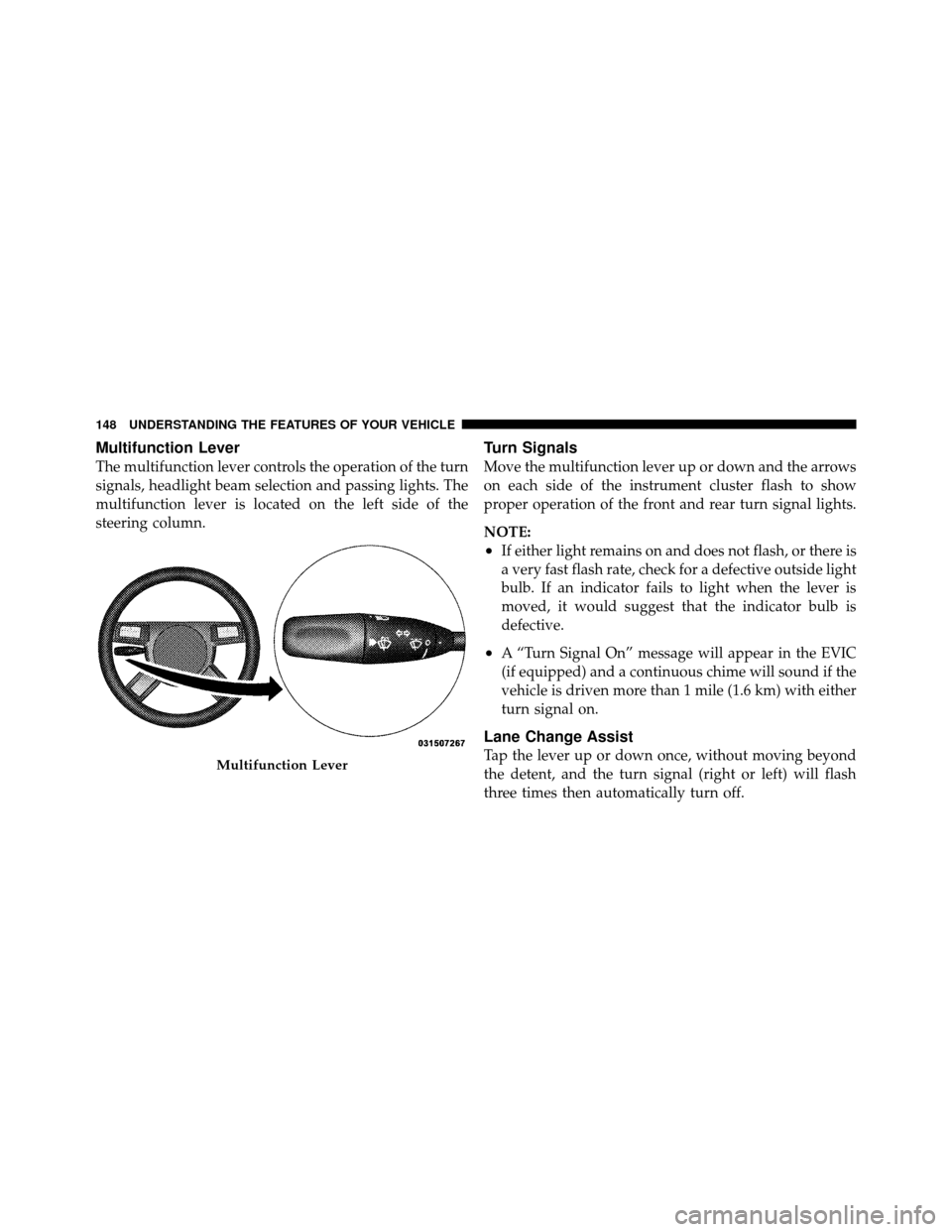
The multifunction lever controls the operation of the turn
signals, headlight beam selection and passing lights. The
multifunction lever is located on the left side of the
steering column.
Turn Signals
Move the multifunction lever up or down and the arrows
on each side of the instrument cluster flash to show
proper operation of the front and rear turn signal lights.
NOTE:
•If either light remains on and does not flash, or there is
a very fast flash rate, check for a defective outside light
bulb. If an indicator fails to light when the lever is
moved, it would suggest that the indicator bulb is
defective.
•A “Turn Signal On” message will appear in the EVIC
(if equipped) and a continuous chime will sound if the
vehicle is driven more than 1 mile (1.6 km) with either
turn signal on.
Lane Change Assist
Tap the lever up or down once, without moving beyond
the detent, and the turn signal (right or left) will flash
three times then automatically turn off.Multifunction Lever
148 UNDERSTANDING THE FEATURES OF YOUR VEHICLE
Page 150 of 538

High/Low Beam Switch
Push the multifunction lever away from you to switch
the headlights to high beam. Pull the multifunction lever
toward you to switch the headlights back to low beam.
Flash-to-Pass
You can signal another vehicle with your headlights by
lightly pulling the multifunction lever toward you. This
will turn on the high beams headlights until the lever is
released.
Overhead Console Map/Reading Lights
These lights are mounted between the sun visors on the
overhead console. Each light is turned on by pressing the
lens. Press the lens a second time to turn off the light.
These lights also turn on when a door is opened, or when
the UNLOCK button on the Remote Keyless Entry (RKE)
transmitter is pressed or when the dimmer control is
turned fully upward, past the second detent.
Interior Lights
The interior lights come on when a door is opened.
To protect the battery, the interior lights will turn off
automatically 10 minutes after the ignition is placed in
the OFF position. This will occur if the interior lights
were switched on manually or are on because a door is
Overhead Console
3
UNDERSTANDING THE FEATURES OF YOUR VEHICLE 149
Page 217 of 538

INSTRUMENT CLUSTER DESCRIPTIONS
1. Electronic Speed Control / Adaptive Cruise Control
(ACC) Indicator Light — If EquippedThis light will turn on when the electronic
speed control or Adaptive Cruise Control
(ACC) is ON.
2. Low Fuel Indicator Light This light will turn on and a single chime will
sound when the fuel level drops to 1/8 tank.
3. Front Fog Light Indicator — If Equipped This indicator will illuminate when the front fog
lights are on.
4. Turn Signal Indicators The arrow will flash with the exterior turn signal
when the turn signal lever is operated. NOTE:•A continuous chime will sound if the vehicle is driven
more than 1 mile (1.6 km) with either turn signal on.
•Check for an inoperative outside light bulb if either
indicator flashes at a rapid rate.
5. Speedometer
Indicates vehicle speed.
6. Odometer / Trip Odometer / Electronic Vehicle
Information Center (EVIC) Display Area — If Equipped
The odometer shows the total distance the vehicle has
been driven. The trip odometer shows individual trip
mileage. Refer to “Trip Odometer Button” for additional
information.
216 UNDERSTANDING YOUR INSTRUMENT PANEL
Page 233 of 538
Electronic Vehicle Information Center (EVIC)
Displays
When the appropriate conditions exist, the EVIC displays
the following messages:
•Turn Signal On (with a continuous warning chime if
the vehicle is driven more than 1 mile [1.6 km] with
either turn signal on)
•Left Front Turn Signal Light Out (with a single chime)
•Left Rear Turn Signal Light Out (with a single chime)
•Right Front Turn Signal Light Out (with a single
chime)
•Right Rear Turn Signal Light Out (with a single chime)
•Memory #1/#2 Profile Set
•Memory #1/#2 Profile Recall
•Memory System Disabled – Vehicle Not In PARK (with
a single chime)
•Memory System Disabled – Seat Belt Buckled (with a
single chime)
•Personal Settings Not Available – Vehicle Not in PARK
•Left/Right Front Door Ajar (one or more, with a single
chime if speed is above 1 mph [1.6 km/h])
•Left/Right Rear Door Ajar (one or more, with a single
chime if speed is above 1 mph [1.6 km/h])
•Door(s) Ajar (with a single chime if vehicle is in
motion)
•Trunk Ajar (with a single chime)
•Low Washer Fluid (with a single chime)
•ECO – Fuel Saver Indicator
232 UNDERSTANDING YOUR INSTRUMENT PANEL
Page 249 of 538

NOTE:The seat will return to the memorized seat
location (if Recall Memory with Remote Key Unlock is set
to ON) when the RKE transmitter is used to unlock the
door. Refer to “Driver Memory Seat” in “Understanding
The Features Of Your Vehicle” for further information.
“Flash Lights with Remote Key Lock”
When ON is selected, the front and rear turn signals will
flash when the doors are locked or unlocked with the
RKE transmitter. This feature may be selected with or
without the sound horn on lock feature selected. To make
your selection, press and release the FUNCTION SE-
LECT button until “ON” or “OFF” appears.
“Headlights On with Wipers” (Available with Auto
Headlights Only)
When ON is selected, and the HEADLIGHT switch is in
the AUTO position, the headlights will turn on approxi-
mately 10 seconds after the wipers are turned on. The
headlights will also turn off when the wipers are turned off if they were turned on by this feature. To make your
selection, press and release the FUNCTION SELECT
button until “ON” or “OFF” appears.
NOTE:
Turning the headlights on during the daytime
causes the instrument panel lights to dim. To increase the
brightness, refer to “Lights” in “Understanding The
Features Of Your Vehicle”.
“Delay Turning Headlights Off”
When this feature is selected, the driver can choose to
have the headlights remain on for 0, 30, 60, or 90 seconds
when exiting the vehicle. To make your selection, press
and release the FUNCTION SELECT button until “0,”
“30,” “60,” or “90” appears.
“Tilt Mirrors Down in Reverse” — If Equipped
When ON is selected, the outside rearview mirrors will
tilt downward when the ignition switch is in the RUN
position and the transmission is in the REVERSE posi-
tion. The mirrors will move back to their previous
248 UNDERSTANDING YOUR INSTRUMENT PANEL
Page 340 of 538

WARNING!
•The ABS contains sophisticated electronic equip-
ment that may be susceptible to interference
caused by improperly installed or high output
radio transmitting equipment. This interference
can cause possible loss of anti-lock braking capa-
bility. Installation of such equipment should be
performed by qualified professionals.
•Pumping of the Anti-Lock Brakes will diminish
their effectiveness and may lead to an accident.
Pumping makes the stopping distance longer. Just
press firmly on your brake pedal when you need
to slow down or stop.(Continued)
WARNING! (Continued)
•The ABS cannot prevent the natural laws of phys-
ics from acting on the vehicle, nor can it increase
braking or steering efficiency beyond that af-
forded by the condition of the vehicle brakes and
tires or the traction afforded.
•The ABS cannot prevent accidents, including
those resulting from excessive speed in turns,
following another vehicle too closely, or hydro-
planing. Only a safe, attentive, and skillful driver
can prevent accidents.
•The capabilities of an ABS equipped vehicle must
never be exploited in a reckless or dangerous
manner that could jeopardize the user’s safety or
the safety of others.
All vehicle wheels and tires must be the same size and
type and tires must be properly inflated to produce
accurate signals for the computer.
5
STARTING AND OPERATING 339
Page 369 of 538

TPMS will only monitor the pressure in the full size spare
when it is used in place of a road tire. Otherwise, a spare
with a pressure below the low-pressure limit will not
cause the TPM Telltale Light to illuminate or the chime to
sound.
Tire Pressure Monitoring Low Pressure Warnings
The TPM Telltale Light will illuminate in the
instrument cluster and a chime will sound when
tire pressure is low in one or more of the four
active road tires. Should this occur, you should stop as
soon as possible, check the inflation pressure of each tire
on your vehicle, and inflate each tire to the vehicle’s
recommended cold placard pressure value. Once the
system receives the updated tire pressures, the system
will automatically update and the TPM Telltale Light will
turn off. The vehicle may need to be driven for up to
20 minutes above 15 mph (25 km/h) in order for the
TPMS to receive this information.
Check TPMS Warning
If a system fault is detected, the TPM Telltale Light will
flash on and off for 75 seconds and then remain on solid.
The system fault will also sound a chime. If the ignition
switch is cycled, this sequence will repeat, providing the
system fault still exists. The TPM Telltale Light will turn
off when the fault condition no longer exists. A system
fault can occur due to any of the following:
1. Signal interference due to electronic devices or driving
next to facilities emitting the same radio frequencies as
the TPM sensors.
2. Installing aftermarket window tinting that contains
materials that may block radio wave signals.
3. Accumulation of snow or ice around the wheels or
wheel housings.
4. Using tire chains on the vehicle.
5. Using wheels/tires not equipped with TPM sensors.
368 STARTING AND OPERATING