Page 289 of 538
NOTE:Dependent on the audio source, the output may
sound better in stereo or DDS surround mode.
When in “Audio Surround” mode, balance is set auto-
matically. Fader control is available to add more sur-
round audio if desired.
VIDEO ENTERTAINMENT SYSTEM (VES)™ — IF
EQUIPPED
The optional Video Entertainment System (VES)™ in-
cludes the following components for rear seat entertain-
ment:
•A diagonal 7 in (17.8 cm) Liquid Crystal Display (LCD)
screen integrated into the center console armrest. The
screen features brightness control for optimum day-
time and nighttime viewing.
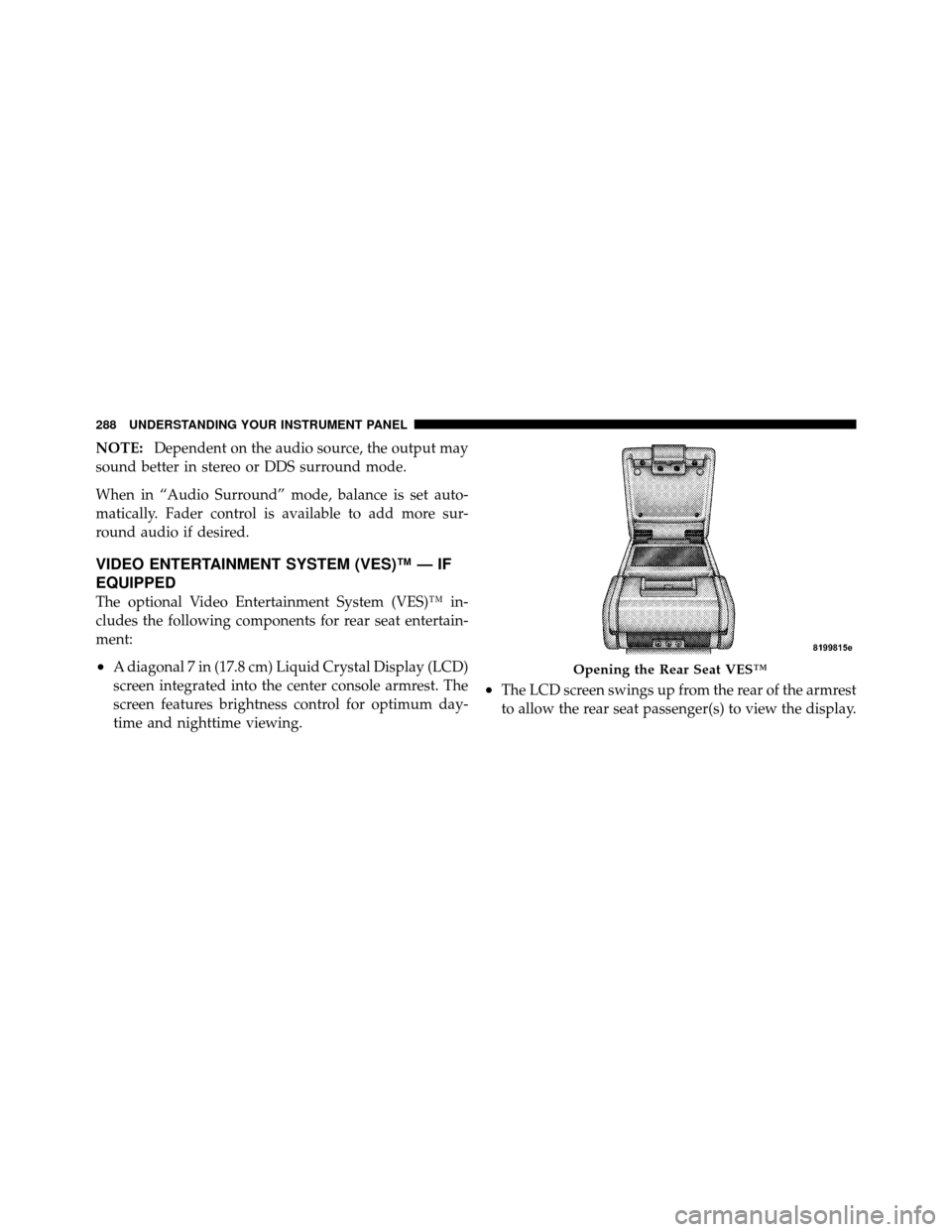
•The LCD screen swings up from the rear of the armrest
to allow the rear seat passenger(s) to view the display.
Opening the Rear Seat VES™
288 UNDERSTANDING YOUR INSTRUMENT PANEL
Page 291 of 538
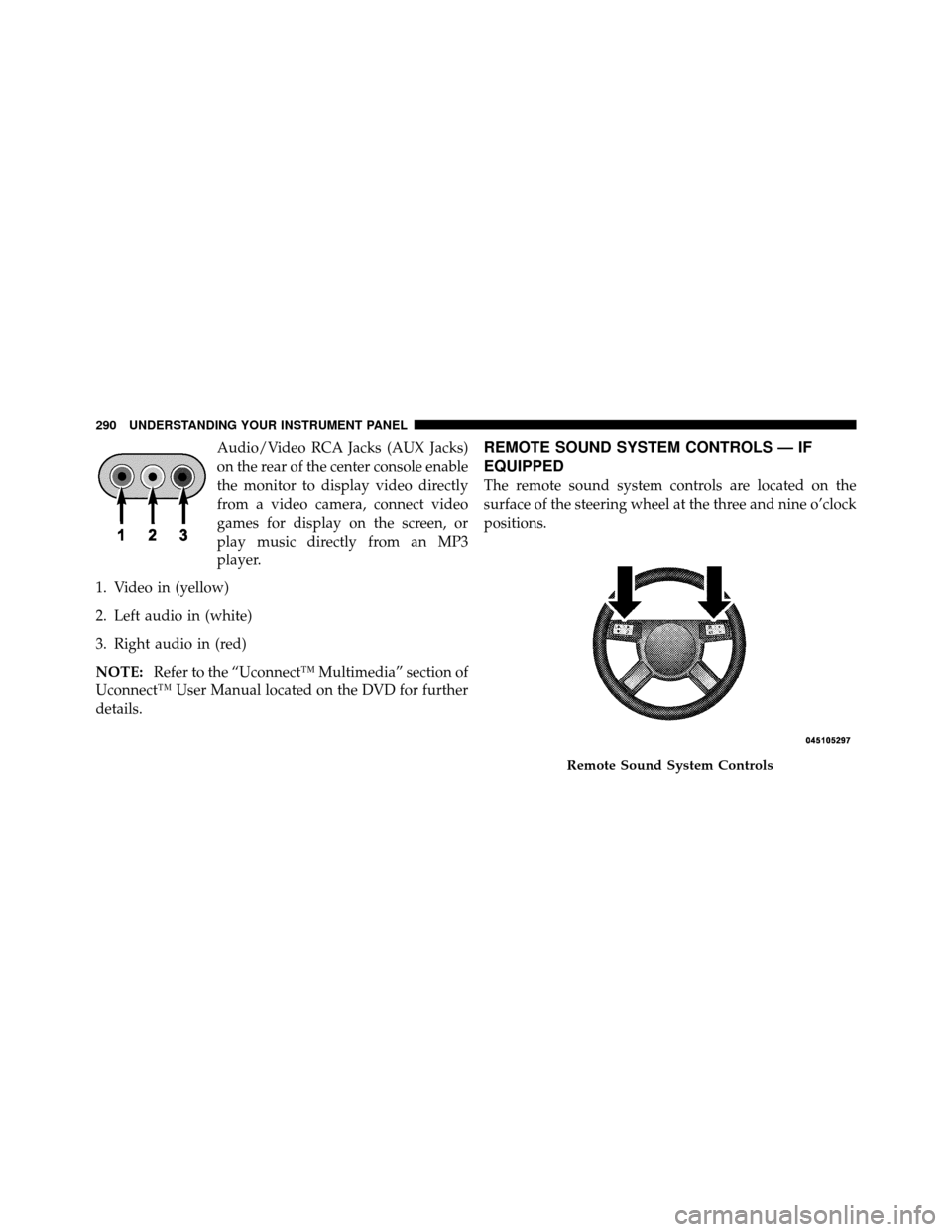
Audio/Video RCA Jacks (AUX Jacks)
on the rear of the center console enable
the monitor to display video directly
from a video camera, connect video
games for display on the screen, or
play music directly from an MP3
player.
1. Video in (yellow)
2. Left audio in (white)
3. Right audio in (red)
NOTE: Refer to the “Uconnect™ Multimedia” section of
Uconnect™ User Manual located on the DVD for further
details.REMOTE SOUND SYSTEM CONTROLS — IF
EQUIPPED
The remote sound system controls are located on the
surface of the steering wheel at the three and nine o’clock
positions.
Remote Sound System Controls
290 UNDERSTANDING YOUR INSTRUMENT PANEL
Page 292 of 538

Vehicles equipped with steering wheel-mounted buttons
are also equipped with the Electronic Vehicle Information
Center (EVIC). The EVIC features a driver-interactive
display which is located in the instrument cluster.The VOLUME button controls the sound level
of the sound system. Press the top of the
VOLUME button to increase the sound level.
Press the bottom of the VOLUME button to
decrease the sound level.
Press the AUDIO MODE button to select the
Compass/Temp/Audio screen. This screen
displays radio and media mode information
depending on which radio is in the vehicle. If the Compass/Temp/Audio screen is already displayed
when the AUDIO MODE button is pressed, then the
mode will change (i.e. from AM to FM, to Media mode,
etc., depending on which radio is in the vehicle).
When the EVIC is in the Compass/Temp/
Audio screen, press the FUNCTION SELECT
button to operate various radio, media, and
Universal Customer Interface (UCI) functions
(i.e., advance presets, select next folder, jump to
or start playing songs in playlists, etc., depend-
ing on which radio is in the vehicle and if equipped with
UCI).
When the EVIC is in the Compass/Temp/
Audio screen, press the SCROLL button to seek
up and down radio stations, tracks, chapters,
files, etc., depending on which radio is in the
vehicle.
VOLUMEButton
AUDIO
MODEButton
FUNCTION SELECTButton
SCROLL
Button
4
UNDERSTANDING YOUR INSTRUMENT PANEL 291
Page 312 of 538
NOTE:The ENGINE START/STOP button should only
be removed or inserted with the ignition in the LOCK
position (OFF position for Keyless Go™).
Normal Starting
Using the ENGINE START/STOP Button
NOTE: Normal starting of either a cold or a warm
engine is obtained without pumping or pressing the
accelerator pedal.
To start the engine, the transmission must be in PARK or
NEUTRAL. Press and hold the brake pedal while press-
ing the ENGINE START/STOP button once. The system
takes over and attempts to start the vehicle. If the vehicle
fails to start, the starter will disengage automatically after
10 seconds. If you wish to stop the cranking of the engine
prior to the engine starting, press the button again.
To Turn Off the Engine Using ENGINE
START/STOP Button
1. Place the shift lever in PARK, then press and release
the ENGINE START/STOP button.
2. The ignition switch will return to the OFF position.
3. If the shift lever is not in PARK, the ENGINE START/
STOP button must be held for two seconds and vehicle
speed must be above 5 mph (8 km/h) before the engine
will shut off. The ignition switch position will remain in
the ACC position until the shift lever is in PARK and the
button is pressed twice to the OFF position. If the shift
lever is not in PARK and the ENGINE START/STOP
button is pressed once, the EVIC (if equipped) will
display a “Vehicle Not In Park” message and the engine
will remain running. Never leave a vehicle out of the
PARK position, or it could roll.
5
STARTING AND OPERATING 311
Page 313 of 538
NOTE:If the ignition switch is left in the ACC or RUN
(engine not running) position and the transmission is in
PARK, the system will automatically time out after
60 minutes of inactivity and the ignition will switch to the
OFF position.
Keyless Go™ Functions – With Driver ’s Foot OFF
the Brake Pedal Pedal (In PARK or NEUTRAL
Position)
The Keyless Go™ feature operates similar to an ignition
switch. It has four positions, OFF, ACC, RUN and START.
To change the ignition switch positions without starting
the vehicle and use the accessories follow these steps.
•Starting with the ignition switch in the OFF position:
•Press the ENGINE START/STOP button once to
change the ignition switch to the ACC position (EVIC
displays “IGNITION MODE ACCESSORY”),
•Press the ENGINE START/STOP button a second time
to change the ignition switch to the RUN position
(EVIC displays “IGNITION MODE RUN”),
•Press the ENGINE START/STOP button a third time
to return the ignition switch to the OFF position (EVIC
displays “IGNITION MODE OFF”).
Extreme Cold Weather (Below �20°F or�29°C)
To ensure reliable starting at these temperatures, use of
an externally powered electric engine block heater (avail-
able from your authorized dealer) is recommended.
If Engine Fails To Start
WARNING!
•Never pour fuel or other flammable liquids into
the throttle body air inlet opening in an attempt to
start the vehicle. This could result in a flash fire
causing serious personal injury.
(Continued)
312 STARTING AND OPERATING
Page 321 of 538

When parking on a flat surface, place the shift lever in the
PARK position first, and then apply the parking brake.
When parking on a hill, it is important to set the parking
brake before placing the shift lever in PARK, otherwise
the load on the transmission locking mechanism may
make it difficult to move the shift lever out of park. As an
added precaution, turn the front wheels toward the curb
on a downhill grade and away from the curb on an uphill
grade.
WARNING!
Never use the PARK position as a substitute for the
parking brake. Always apply the parking brake fully
when parked to guard against vehicle movement and
possible injury or damage.
The following indicators should be used to ensure that
you have engaged the shift lever in the PARK position:
•When shifting into PARK move the shift lever all the
way forward and left until it stops and is fully seated.
•Look at the shift indicator display on the instrument
panel to ensure it is in the PARK position.
CAUTION!
Damage to the shifter could result if the shift lever is
moved out of PARK before the ignition switch is
turned from the LOCK (OFF position with Keyless
Go™) to the ON position (RUN position with Key-
less Go™).
REVERSE
This range is used for moving the vehicle rearward.
Always stop before moving the shift lever to REVERSE.
320 STARTING AND OPERATING
Page 326 of 538

When parking on a flat surface, place the shift lever in the
PARK position first, and then apply the parking brake.
When parking on a hill, it is important to set the parking
brake before placing the shift lever in PARK, otherwise
the load on the transmission locking mechanism may
make it difficult to move the shift lever out of PARK. As
an added precaution, turn the front wheels toward the
curb on a downhill grade and away from the curb on an
uphill grade.
WARNING!
Never use the PARK position as a substitute for the
parking brake. Always apply parking brake fully
when parked to guard against vehicle movement and
possible injury or damage.The following indicators should be used to ensure that
you have engaged the shift lever in the PARK position:
•When shifting into PARK, move the shift lever all the
way forward and left until it stops and is fully seated.
•Look at the shift indicator display on the instrument
panel to ensure it is in the PARK position.
CAUTION!
Damage to the shifter could result if the shift lever is
moved out of PARK before the ignition switch is
turned from the LOCK (OFF position with Keyless
Go™) to the ON position (RUN position with Key-
less Go™).
REVERSE
This range is used for moving the vehicle rearward.
Always stop before moving the shift lever to REVERSE.
5
STARTING AND OPERATING 325
Page 330 of 538
Operation
When the shift lever is in the DRIVE position, the
transmission will operate automatically, shifting between
the five available gears. To engage AutoStick�, simply
move the shift lever to the right or left (D+/D-) while in
the DRIVE position. The gear position will display in the
instrument cluster. In the AutoStick�mode, the transmis-
sion will shift up and down when left or right (D-/D+) is
manually selected by the driver. It will remain in the
selected gear until another upshift or downshift is cho-
sen. The transmission will automatically downshift as the
vehicle slows to a stop (to prevent engine lugging) and
will display the current gear. Tapping the shift lever to
the D+ position (at a stop) will allow starting in second
gear. After a stop, the driver should manually upshift
(D+) the transmission as the vehicle is accelerated. To disengage AutoStick�
mode, hold the shift lever to the
right (D+) for a few seconds. You can shift in or out of the
AutoStick� mode at any time without taking your foot off
the accelerator pedal.
WARNING!
Do not downshift for additional engine braking on a
slippery surface. The drive wheels could lose their
grip and the vehicle could skid, causing an accident
or personal injury.
ALL-WHEEL DRIVE (AWD) — IF EQUIPPED
This vehicle is equipped with an active on-demand
All-Wheel Drive (AWD) system which makes available
optimum traction for a wide variety of road surface and
driving conditions. The system minimizes wheel slip by
automatically redirecting torque to the front and rear
wheels as necessary.
5
STARTING AND OPERATING 329