2010 CHEVROLET IMPALA door lock
[x] Cancel search: door lockPage 118 of 432

To open a rear door when the security lock is on, do the
following:
1. Unlock the door using the Remote Keyless Entry
(RKE) transmitter, if the vehicle has one, the
power door lock switch, or by lifting the rear door
manual lock.
2. Open the door from the outside.
To cancel the rear door security lock:
1. Unlock the door and open it from the outside.
2. Insert the key into the security lock slot and turn it
so the slot is in the vertical position.
3. Do the same for the other rear door.Lockout ProtectionThis feature helps prevent you from locking the doors
while the key is in the ignition. Always remember to take
your key with you when exiting the vehicle.
If the lock switch is pressed on the door that is open
and the key is in the ignition, all of the doors will
lock and then the open door will unlock. A chime sounds
continuously until the driver door is closed.
Trunk
{
WARNING:
Exhaust gases can enter the vehicle if it is driven
with the liftgate, trunk/hatch open, or with any
objects that pass through the seal between the
body and the trunk/hatch or liftgate. Engine
exhaust contains Carbon Monoxide (CO) which
cannot be seen or smelled. It can cause
unconsciousness and even death.
If the vehicle must be driven with the liftgate, or
trunk/hatch open:
•
Close all of the windows.
•
Fully open the air outlets on or under the
instrument panel.
•
Adjust the Climate Control system to a setting
that brings in only outside air and set the fan
speed to the highest setting. See Climate
Control System in the Index.
•
If the vehicle is equipped with a power liftgate,
disable the power liftgate function.
For more information about carbon monoxide, see
Engine Exhaust on page 3-31.
3-12
Page 121 of 432
Power Windows
{
WARNING:
Leaving children in a vehicle with the keys is
dangerous for many reasons, children or others
could be badly injured or even killed. They could
operate the power windows or other controls or
even make the vehicle move. The windows will
function and they could be seriously injured or
killed if caught in the path of a closing window.
Do not leave keys in a vehicle with children.
When there are children in the rear seat use the
window lockout button to prevent unintentional
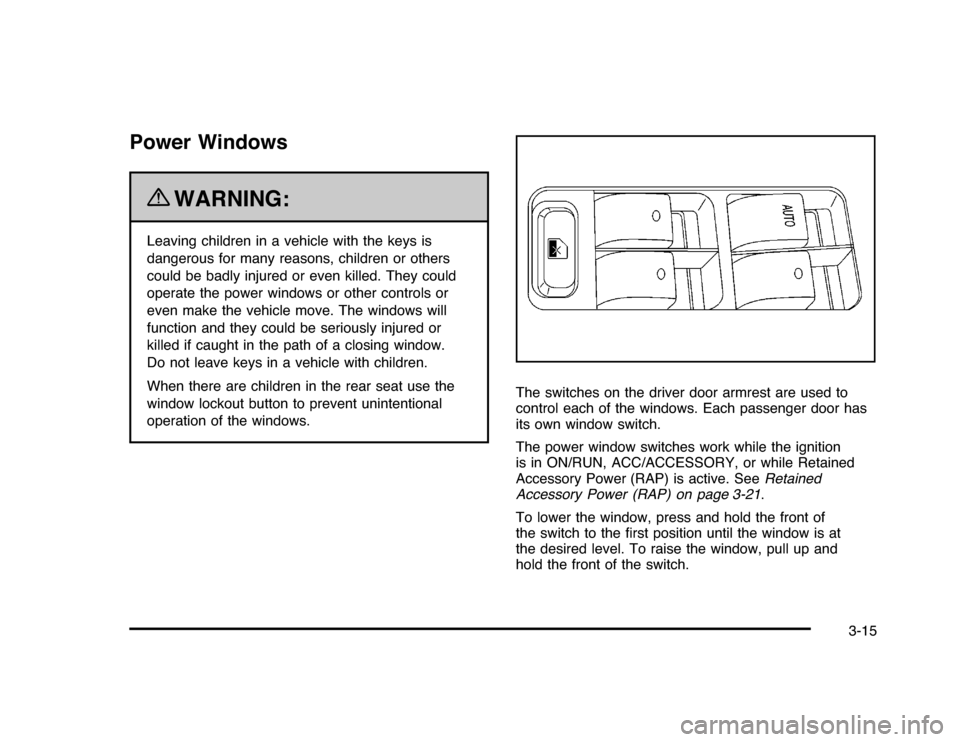
operation of the windows.The switches on the driver door armrest are used to
control each of the windows. Each passenger door has
its own window switch.
The power window switches work while the ignition
is in ON/RUN, ACC/ACCESSORY, or while Retained
Accessory Power (RAP) is active. SeeRetained
Accessory Power (RAP) on page 3-21.
To lower the window, press and hold the front of
the switch to the first position until the window is at
the desired level. To raise the window, pull up and
hold the front of the switch.
3-15
Page 123 of 432
Content Theft-DeterrentYour vehicle may have the optional content
theft-deterrent alarm system.
To activate the theft-deterrent system:
1. Open the door.
2. Lock the door with the power door lock switch
or the Remote Keyless Entry (RKE) transmitter.
If you are using the RKE transmitter, the door
does not need to be open.
3. Close all doors.
Once armed, the alarm will go off if someone tries to
enter the vehicle without using the RKE transmitter
or a key or turns the ignition on with an incorrect key.
The horn will sound and the turn signal lamps will flash
for about 30 seconds.
When the alarm is armed, the trunk may be opened
with the RKE transmitter. The power door lock switches
are disabled and the doors remain locked. You must
use your RKE transmitter or your key to unlock the doors
when the system is armed.
Arming with the Power Lock SwitchThe alarm system will arm when you use either power
lock switch to lock the doors while any door is open and
the key is removed from the ignition. The alarm system
will not arm if the truck is open when you use either power
lock switch to lock the doors.Arming with the RKE TransmitterThe alarm system will arm when you use your RKE
transmitter to lock the doors, if the key is not in
the ignition.Disarming with the RKE TransmitterThe alarm system will disarm when you use your RKE
transmitter to unlock the doors.
The first time a remote unlock command is received,
three flashes will be seen and three horn chirps heard to
indicate an alarm condition has occurred since last
arming.Disarming with Your KeyThe alarm system will disarm when you use your key to
unlock the doors or insert your key in the ignition and
turn it from the LOCK/OFF position.
3-17
Page 127 of 432

D (START):This is the position that starts the engine.
When the engine starts, release the key. The ignition
switch returns to ON/RUN for driving.
A warning chime will sound and the Driver Information
Center (DIC) will display DRIVER’S DOOR AJAR
when the driver door is opened, the ignition is in
ACC/ACCESSORY or LOCK/OFF and the key is in
the ignition. SeeDIC Warnings and Messages on
page 4-44for more information.Retained Accessory Power (RAP)These vehicle accessories can be used for up to
10 minutes after the engine turned off:•
Audio System
•
Power WindowsThe radio will work when the key is in ON/RUN or
ACC/ACCESSORY. Once the key is turned from
ON/RUN to LOCK/OFF the radio will continue to
work 10 minutes or until the driver’s door is opened.
The power windows will continue to work for up to
10 minutes or until any door is opened.
Starting the EngineMove the shift lever to P (Park) or N (Neutral).
The engine will not start in any other position.
To restart the engine when the vehicle is already
moving, use N (Neutral) only.
Notice:Do not try to shift to P (Park) if the
vehicle is moving. If you do, you could damage
the transmission. Shift to P (Park) only when the
vehicle is stopped.
3-21
Page 161 of 432
Fog Lamps#
(Fog Lamps):For vehicles with fog lamps,
the button is located on the exterior lamps control.
The exterior lamps control is located on the instrument
panel to the left of the steering column.
The ignition must be in the ON/RUN position for the fog
lamps to come on.
Press
#
to turn the fog lamps on or off. A light will
come on in the instrument panel cluster.
When the headlamps are changed to high-beam, the
fog lamps also go off.
Some localities have laws that require the headlamps to
be on along with the fog lamps.
Instrument Panel BrightnessD
(Instrument Panel Brightness):The knob with this
symbol on it is located next to the exterior lamps control
to the left of the steering wheel. Push the knob in all the
way until it extends out and then turn the knob clockwise
or counterclockwise to brighten or dim the lights. Push
the knob back in when finished.
Courtesy LampsWhen a door is opened, the courtesy lamps
automatically come on. They make it easy for you to
enter and leave your vehicle. You can also manually
turn these lamps on by fully turning the instrument
panel brightness control clockwise.
The reading lamps, located on the rearview mirror,
can be turned on or off independent of the automatic
courtesy lamps, when the doors are closed.Dome LampThe center mounted dome lamp overhead comes on
when a door is opened. This lamp can also be turned
on by turning the instrument panel brightness control
clockwise.
4-11
Page 162 of 432

Entry LightingFor vehicles with courtesy lamps, they come on and
stay on for a set time whenever the unlock symbol
is pressed on the Remote Keyless Entry (RKE)
transmitter, if the vehicle has one.
If a door is opened, the lamps stay on while it is open
and then turn off automatically about 20 seconds
after the door is closed. If the unlock symbol is pressed
and no door is opened, the lamps turn off after about
20 seconds.
Entry lighting includes a feature called theater dimming.
With theater dimming, the lamps do not turn off at
the end of the delay time. Instead, they slowly dim and
then go out. The delay time is canceled if the ignition
key is turned to ON/RUN or the power door lock switch
is pressed. The lamps will dim right away.
When the ignition is on, illuminated entry is inactive,
which means the courtesy lamps will not come on unless
a door is opened.
Delayed Entry LightingDelayed entry lighting illuminates the interior for a
period of time after all the doors have been closed.
The ignition must be off for delayed entry lighting
to work. Immediately after all the doors have been
closed, the delayed entry lighting feature continues to
work until one of the following occurs:•
The ignition is in ON/RUN.
•
The doors are locked.
•
An illumination period of about 25 seconds has
elapsed.
If during the illumination period a door is opened, the
timed illumination period is canceled and the interior
lamps remain on.
4-12
Page 163 of 432
Delayed Exit LightingThis feature illuminates the interior for a period of time
after the key is removed from the ignition.
The ignition must be off for delayed exit lighting to work.
When the key is removed, interior illumination activates
and remains on until one of the following occurs:•
The ignition is in ON/RUN.
•
The power door locks are activated.
•
An illumination period of 20 seconds has elapsed.
If during the illumination period a door is opened,
the timed illumination period will be canceled and the
interior lamps will remain on because a door is open.
Parade DimmingParade mode automatically prohibits the dimming of
the instrument panel displays during the daylight while
the headlamps are on so that the displays are still
able to be seen.Reading LampsThe vehicle has reading lamps that also act as the
dome lamp. Press the button near each lamp to turn
them on and off.
Map LampsThe vehicle has map lamps on the rearview mirror.
Press the button near each lamp on the mirror to turn
the map lamps on and off.Electric Power ManagementThe vehicle has Electric Power Management (EPM) that
estimates the battery’s temperature and state of charge.
It then adjusts the voltage for best performance and
extended life of the battery.
When the battery’s state of charge is low, the voltage is
raised slightly to quickly bring the charge back up. When
the state of charge is high, the voltage is lowered slightly
to prevent overcharging. If the vehicle has a voltmeter
gage or a voltage display on the Driver Information
Center (DIC), you may see the voltage move up or down.
This is normal. If there is a problem, an alert will be
displayed.
The battery can be discharged at idle if the electrical
loads are very high. This is true for all vehicles. This is
because the generator (alternator) may not be spinning
fast enough at idle to produce all the power that is
needed for very high electrical loads.
4-13
Page 203 of 432

AUTO DOOR UNLOCKThis feature allows you to select whether or not to
turn off the automatic door unlocking feature. It also
allows you to select which doors and when the doors will
automatically unlock. SeeProgrammable Automatic
Door Unlock on page 3-11for more information.
Press the customization button until AUTO DOOR
UNLOCK appears on the DIC display. Press the
set/reset button once to access the settings for this
feature. Then press the customization button to scroll
through the following settings:
OFF:None of the doors will automatically unlock.
DRIVER AT KEY OUT:Only the driver’s door will
unlock when the key is taken out of the ignition.
DRIVER IN PARK:Only the driver’s door will unlock
when the vehicle is shifted into P (Park).
ALL AT KEY OUT:All of the doors will unlock when
the key is taken out of the ignition.
ALL IN PARK (default):All of the doors will unlock
when the vehicle is shifted into P (Park).
NO CHANGE:No change will be made to this feature.
The current setting will remain.
To select a setting, press the set/reset button while the
desired setting is displayed on the DIC.
REMOTE DOOR LOCKThis feature allows you to select the type of feedback
you will receive when locking the vehicle with the
Remote Keyless Entry (RKE) transmitter. You will not
receive feedback when locking the vehicle with the RKE
transmitter if any of the doors are open. SeeRemote
Keyless Entry (RKE) System Operation on page 3-4
for more information.
Press the customization button until REMOTE DOOR
LOCK appears on the DIC display. Press the set/reset
button once to access the settings for this feature.
Then press the customization button to scroll through
the following settings:
HORN & LIGHTS OFF:There will be no feedback
when you press the lock button on the RKE transmitter.
LIGHTS ONLY:The exterior lamps will flash when
you press the lock button on the RKE transmitter.
HORN ONLY:The horn will sound on the second press
of the lock button on the RKE transmitter.
HORN & LIGHTS ON (default):The exterior lamps
will flash when you press the lock button on the
RKE transmitter, and the horn will sound when the lock
button is pressed again within five seconds of the
previous command.
NO CHANGE:No change will be made to this feature.
The current setting will remain.
4-53