2010 CHEVROLET HHR turn signal
[x] Cancel search: turn signalPage 9 of 480

A.Outlet Adjustment on page 4‑21.
B. Cruise Control
on page 4‑8(If Equipped).
C. Turn Signal/Multifunction Lever on page 4‑4.
D. Instrument Panel Cluster on page 4‑24.
E. Windshield Wipers
on page 4‑5and Windshield
Washer on page 4‑6.
F. Instrument Panel Storage on page 3‑47.
G. Traction Control System (TCS)
on page 5‑9(If Equipped). Electronic Stability Control (ESC).
See Electronic Stability Control (ESC)on
page 5‑6.
H. Passenger Airbag Status Indicator on page 4‑28.
I. Rear Side Cargo Door
on page 3‑12(If Equipped).
J. Hood Release on page 6‑15.
K. Driver Information Center (DIC) Buttons. See Driver Information Center (DIC)
on page 4‑46Buttons. L.
Horn on page 4‑3.
M. Audio Steering Wheel Controls
on page 4‑92(If Equipped).
N. Instrument Panel Brightness on page 4‑14.
O. Audio System(s) on page 4‑60.
P. Climate Control System on page 4‑18.
Q. Rear Window Wiper/Washer on page 4‑7.
R. Shift Lever (Manual Shown). See Manual
Transmission Operation
on page 3‑31and
Automatic Transmission Operation on page 3‑28.
S. Accessory Power Outlet(s).
on page 4‑16(If Equipped) and Cigarette Lighter (If Equipped).
See Ashtray(s) and Cigarette Lighteron
page 4‑18.
T. Fog Lamps
on page 4‑13(If Equipped).
U. Hazard Warning Flashers on page 4‑3.
V. Glove Box on page 3‑47.
1-3
Page 10 of 480
Initial Drive Information
This section provides a brief overview about some of
the important features that may or may not be on your
specific vehicle.
For more detailed information, refer to each of the
features which can be found later in this owner manual.
Remote Keyless Entry (RKE) System
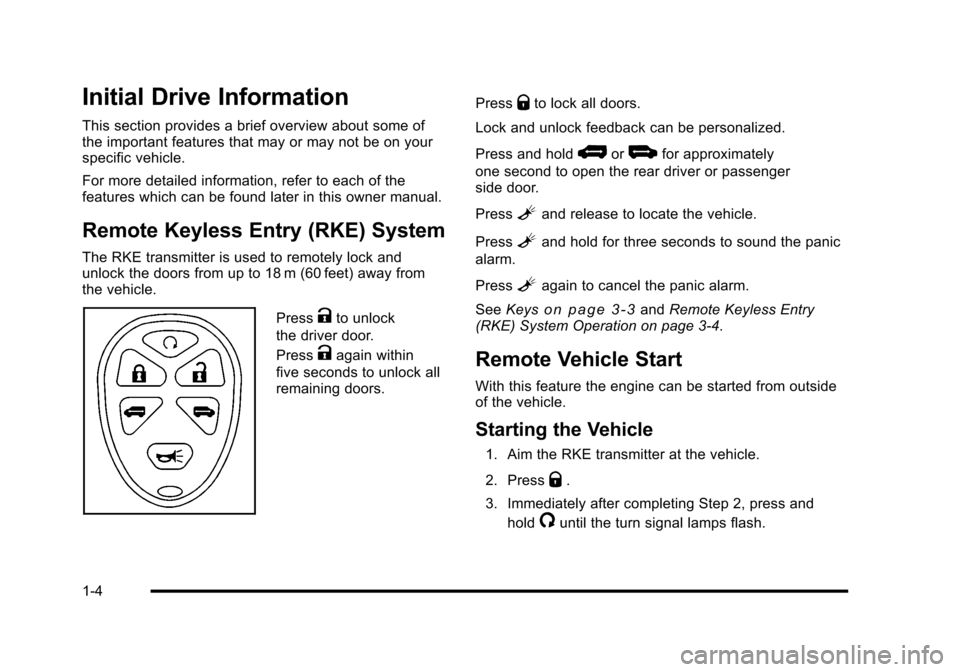
The RKE transmitter is used to remotely lock and
unlock the doors from up to 18 m (60 feet) away from
the vehicle.
PressKto unlock
the driver door.
Press
Kagain within
five seconds to unlock all
remaining doors. Press
Qto lock all doors.
Lock and unlock feedback can be personalized.
Press and hold
*or+for approximately
one second to open the rear driver or passenger
side door.
Press
Land release to locate the vehicle.
Press
Land hold for three seconds to sound the panic
alarm.
Press
Lagain to cancel the panic alarm.
See Keys
on page 3‑3andRemote Keyless Entry
(RKE) System Operation on page 3‑4.
Remote Vehicle Start
With this feature the engine can be started from outside
of the vehicle.
Starting the Vehicle
1. Aim the RKE transmitter at the vehicle.
2. Press
Q.
3. Immediately after completing Step 2, press and hold
/until the turn signal lamps flash.
1-4
Page 119 of 480
Remote Vehicle Start
Your vehicle may have a remote start feature. This
feature allows you to start the engine from outside the
vehicle. It may also start the vehicle's heating or air
conditioning systems. SeeClimate Control System
on
page 4‑18for additional information.
Laws in some local communities may restrict the use of
remote starters. For example, some laws may require a
person using remote start to have the vehicle in view
when doing so. Check local regulations for any
requirements on remote starting of vehicles.
Do not use the remote start feature if your vehicle is low
on fuel. Your vehicle may run out of fuel.
If your vehicle has the remote start feature, the RKE
transmitter functions will have an increased range of
operation. However, the range may be less while the
vehicle is running.
There are other conditions which can affect the
performance of the transmitter, see Remote Keyless
Entry (RKE) System
on page 3‑4for additional
information. /
(Remote Vehicle Start): This button will be on the
RKE transmitter if you have remote start.
To start the engine using the remote start feature:
1. Aim the RKE transmitter at the vehicle.
2. Press and release the transmitter's lock button, then immediately press and hold the remote
vehicle start button for four seconds or until the
vehicle's turn signal lamps flash.
When the vehicle's engine starts, the parking
lamps will turn on and remain on while the engine
is running. The vehicle's doors will be locked.
3. If it is the first remote start since the vehicle has been driven, repeat these steps, while the engine
is still running, to extend the engine running time
by 10 minutes. Remote start can be extended
one time.
After entering the vehicle during a remote start, insert
and turn the key to ON/RUN to drive the vehicle.
After a remote start, the engine will automatically shut
off after 10 minutes unless a time extension has been
done or the vehicle's key is inserted into the ignition
switch and turned to ON/RUN.
The maximum number of remote starts between ignition
cycles with the key is two.
3-7
Page 122 of 480
Power Door Locks
Driver's side shown,
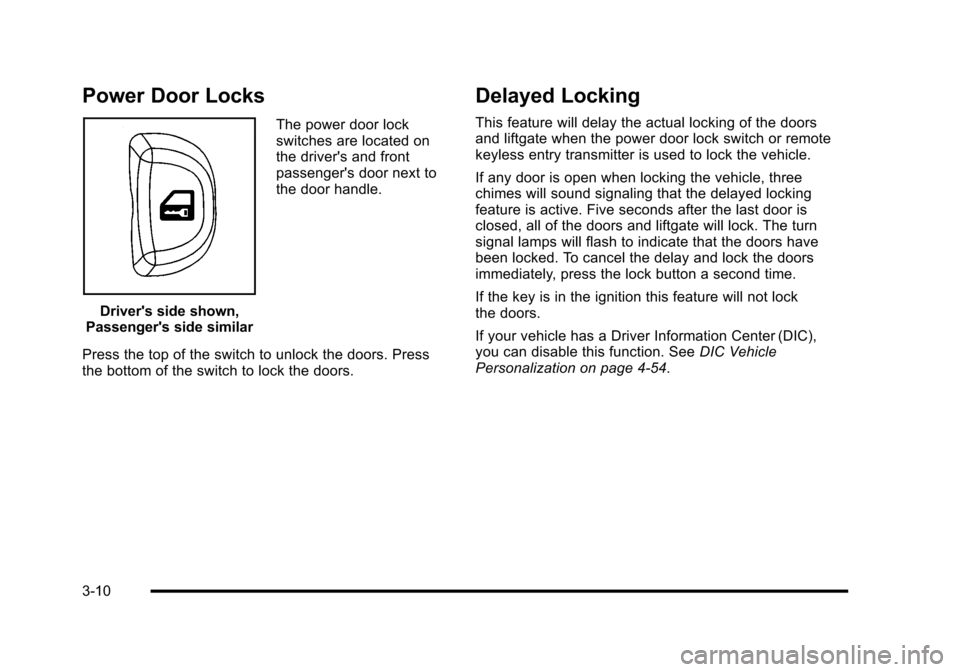
Passenger's side similar The power door lock
switches are located on
the driver's and front
passenger's door next to
the door handle.
Press the top of the switch to unlock the doors. Press
the bottom of the switch to lock the doors.
Delayed Locking
This feature will delay the actual locking of the doors
and liftgate when the power door lock switch or remote
keyless entry transmitter is used to lock the vehicle.
If any door is open when locking the vehicle, three
chimes will sound signaling that the delayed locking
feature is active. Five seconds after the last door is
closed, all of the doors and liftgate will lock. The turn
signal lamps will flash to indicate that the doors have
been locked. To cancel the delay and lock the doors
immediately, press the lock button a second time.
If the key is in the ignition this feature will not lock
the doors.
If your vehicle has a Driver Information Center (DIC),
you can disable this function. See DIC Vehicle
Personalization on page 4‑54.
3-10
Page 159 of 480
The rear vision camera system display in the rearview
mirror may turn off or not appear as expected due to
one of the following conditions. If this occurs the left
indicator light on the mirror will flash.
.A slow flash may indicate a loss of video signal,
or no video signal present during the reverse cycle.
.A fast flash may indicate that the display has
been on for the maximum allowable time during
a reverse cycle, or the display has reached an
Over Temperature limit.
The fast flash conditions are used to protect the
video device from high temperature conditions.
Once conditions return to normal the device will
reset and the green indicator will stop flashing.
During any of these fault conditions, the display will be
blank and the indicator will continue to flash as long as
the vehicle is in R (Reverse) or until the conditions
return to normal.
Pressing and holding
zwhen the left indicator light is
flashing will turn off the video display along with the left
indicator light.
Storage Areas
Glove Box
Lift up on the glove box lever to open it.
Cupholders
There are two cupholders located in the floor console
between the front seats. There is also a cupholder for
the rear seat passenger located at the rear of the floor
console.
Automatic transmission vehicles have a cupholder in
front of the shift lever.
Instrument Panel Storage
The vehicle has a storage compartment on the
instrument panel above the air vents. Push the button
on the compartment to open the cover.
Floor Console Storage Area
There are two small storage compartments on the floor
console.
3-47
Page 167 of 480
Section 4 Instrument Panel
Instrument Panel Overview. . . . . . . . . . . . . . . . . . . . . . . . 4-3
Hazard Warning Flashers . . . . . . . . . . . . . . . . . . . . . . . 4-3
Horn . . . . . . . . . . . . . . . . . . . . . . . . . . . . . . . . . . . . . . . . . . . . 4-3
Tilt Wheel . . . . . . . . . . . . . . . . . . . . . . . . . . . . . . . . . . . . . . . 4-3
Turn Signal/Multifunction Lever . . . . . . . . . . . . . . . . . . 4-4
Turn and Lane-Change Signals . . . . . . . . . . . . . . . . . 4-4
Headlamp High/Low-Beam Changer . . . . . . . . . . . . 4-5
Flash-to-Pass . . . . . . . . . . . . . . . . . . . . . . . . . . . . . . . . . . . 4-5
Windshield Wipers . . . . . . . . . . . . . . . . . . . . . . . . . . . . . . 4-5
Windshield Washer . . . . . . . . . . . . . . . . . . . . . . . . . . . . . 4-6
Rear Window Wiper/Washer . . . . . . . . . . . . . . . . . . . . 4-7
Cruise Control . . . . . . . . . . . . . . . . . . . . . . . . . . . . . . . . . . 4-8
Headlamps . . . . . . . . . . . . . . . . . . . . . . . . . . . . . . . . . . . . 4-11
Wiper Activated Headlamps . . . . . . . . . . . . . . . . . . . . 4-11
Headlamps on Reminder . . . . . . . . . . . . . . . . . . . . . . 4-12
Daytime Running Lamps (DRL) . . . . . . . . . . . . . . . . 4-12
Automatic Headlamp System . . . . . . . . . . . . . . . . . . 4-12
Fog Lamps . . . . . . . . . . . . . . . . . . . . . . . . . . . . . . . . . . . . 4-13
Instrument Panel Brightness . . . . . . . . . . . . . . . . . . . 4-14
Dome Lamp . . . . . . . . . . . . . . . . . . . . . . . . . . . . . . . . . . . 4-14
Entry/Exit Lighting . . . . . . . . . . . . . . . . . . . . . . . . . . . . . 4-14
Reading Lamps . . . . . . . . . . . . . . . . . . . . . . . . . . . . . . . . 4-14
Electric Power Management . . . . . . . . . . . . . . . . . . . 4-15
Battery Run-Down Protection . . . . . . . . . . . . . . . . . . 4-15
Accessory Power Outlet(s) . . . . . . . . . . . . . . . . . . . . . 4-16
Ashtray(s) and Cigarette Lighter . . . . . . . . . . . . . . . 4-18 Climate Controls
. . . . . . . . . . . . . . . . . . . . . . . . . . . . . . . . . . 4-18
Climate Control System . . . . . . . . . . . . . . . . . . . . . . . . 4-18
Outlet Adjustment . . . . . . . . . . . . . . . . . . . . . . . . . . . . . . 4-21
Passenger Compartment Air Filter . . . . . . . . . . . . . 4-21
Warning Lights, Gauges, and Indicators . . . . . . . . 4-23
Instrument Panel Cluster . . . . . . . . . . . . . . . . . . . . . . . 4-24
Speedometer and Odometer . . . . . . . . . . . . . . . . . . . 4-25
Tachometer . . . . . . . . . . . . . . . . . . . . . . . . . . . . . . . . . . . . 4-25
Safety Belt Reminders . . . . . . . . . . . . . . . . . . . . . . . . . 4-26
Airbag Readiness Light . . . . . . . . . . . . . . . . . . . . . . . . 4-27
Passenger Airbag Status Indicator . . . . . . . . . . . . . 4-28
Charging System Light . . . . . . . . . . . . . . . . . . . . . . . . 4-29
Up-Shift Light . . . . . . . . . . . . . . . . . . . . . . . . . . . . . . . . . . 4-29
Brake System Warning Light . . . . . . . . . . . . . . . . . . . 4-30
Antilock Brake System (ABS) Warning Light . . . 4-31
Enhanced Traction System (ETS) Indicator/Warning Light . . . . . . . . . . . . . . . . . . . . . 4-32
Electronic Stability Control (ESC)/Traction Control System
(TCS) Indicator/Warning Light . . . . . . . . . . . . . . . 4-33
Engine Coolant Temperature Warning Light . . . . 4-34
Engine Coolant Temperature Gauge . . . . . . . . . . . 4-34
Tire Pressure Light . . . . . . . . . . . . . . . . . . . . . . . . . . . . 4-35
Malfunction Indicator Lamp . . . . . . . . . . . . . . . . . . . . 4-35
Oil Pressure Light . . . . . . . . . . . . . . . . . . . . . . . . . . . . . 4-38
Security Light . . . . . . . . . . . . . . . . . . . . . . . . . . . . . . . . . . 4-39
4-1
Page 169 of 480
Instrument Panel Overview
Hazard Warning Flashers
|(Hazard Warning Flasher):Press this button
located on the instrument panel, to make the front and
rear turn signal lamps flash on and off. This warns
others that you are having trouble.
Press
|again to turn the flashers off.
Horn
To sound the horn, press the horn symbols located on
the steering wheel.
Tilt Wheel
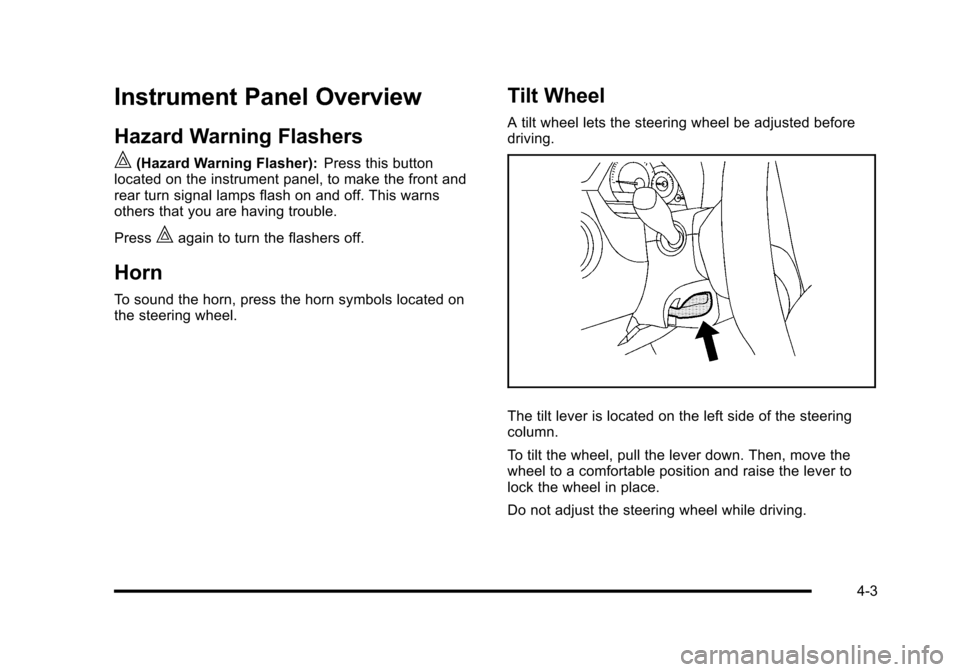
A tilt wheel lets the steering wheel be adjusted before
driving.
The tilt lever is located on the left side of the steering
column.
To tilt the wheel, pull the lever down. Then, move the
wheel to a comfortable position and raise the lever to
lock the wheel in place.
Do not adjust the steering wheel while driving.
4-3
Page 170 of 480
Turn Signal/Multifunction Lever
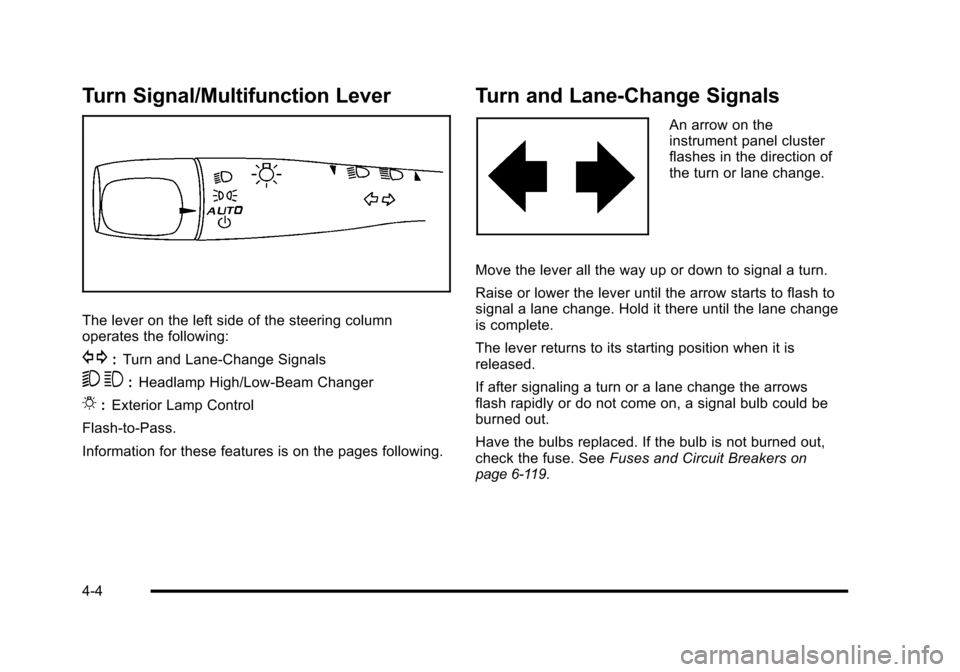
The lever on the left side of the steering column
operates the following:
G:Turn and Lane-Change Signals
5 3:Headlamp High/Low-Beam Changer
O:Exterior Lamp Control
Flash-to-Pass.
Information for these features is on the pages following.
Turn and Lane-Change Signals
An arrow on the
instrument panel cluster
flashes in the direction of
the turn or lane change.
Move the lever all the way up or down to signal a turn.
Raise or lower the lever until the arrow starts to flash to
signal a lane change. Hold it there until the lane change
is complete.
The lever returns to its starting position when it is
released.
If after signaling a turn or a lane change the arrows
flash rapidly or do not come on, a signal bulb could be
burned out.
Have the bulbs replaced. If the bulb is not burned out,
check the fuse. See Fuses and Circuit Breakers
on
page 6‑119.
4-4