2010 CHEVROLET CORVETTE key
[x] Cancel search: keyPage 184 of 472

Battery Run-Down Protection
This vehicle has a feature to help prevent the battery
from being drained in case any of the following lamps
are left on; the underhood lamp, if your vehicle has
this feature, vanity mirror lamps, cargo lamps, reading
lamps, console or glove box lamps. If any of these
lamps are left on, they will automatically time-out after
about 10 minutes. To reset it, all of the above lamps
must be turned off or the ignition key on.
Head-Up Display (HUD)
{WARNING:
If the HUD image is too bright, or too high in your
field of view, it may take you more time to see
things you need to see when it is dark outside.
Be sure to keep the HUD image dim and placed
low in your field of view.
For vehicles with the Head-Up Display (HUD), you can
see some of the driver information that appears on the
instrument panel cluster. The information may be displayed in English or metric
units and appears as an image focused out toward the
front of the vehicle. The HUD consists of the following
information:
.Speedometer
.Turn Signal Indicators
.High-Beam Indicator Symbol
.Tachometer
.Manual Paddle Shift Gear Indicator (If Equipped)
These displays on the HUD are for use when
using the manual paddle shift controls to shift
the transmission. See
“Manual Paddle Shift”in
Automatic Transmission Operation on page 3‑26.
.Shift Light
This light is used for performance driving to
indicate that the vehicle's best performance level
has been reached to shift the transmission into the
next higher gear. An arrow pointing up will light up
on the display just prior to reaching the engine fuel
cut-off mode. This cut-off is about 6,500 RPM for
the LS3 engine, 6,600 RPM for the LS9 & ZR1
engines and 7,000 RPM for the LS7 engine.
.Check Gauges Warning
.Engine Coolant Temperature Gauge
4-16
Page 211 of 472
If none of the above have made the light turn off, your
dealer/retailer can check the vehicle. The dealer/retailer
has the proper test equipment and diagnostic tools to fix
any mechanical or electrical problems that might have
developed.
Emissions Inspection and Maintenance
Programs
Some state/provincial and local governments have
or might begin programs to inspect the emission
control equipment on the vehicle. Failure to pass this
inspection could prevent getting a vehicle registration.
Here are some things to know to help the vehicle pass
an inspection:
.The vehicle will not pass this inspection if the
check engine light is on with the engine running.
To perform a check engine light bulb check with
the keyless ignition, make sure the transmitter fob
is in the passenger compartment. See Ignition
Positions
on page 3‑23. Press the bottom of the
Acc. button on the instrument panel and hold the button down for five seconds. The instrument
panel, including the check engine light, will light up
and the ignition will be on, but the engine will not
start
—press the bottom of the Acc. button only
briefly, less than five seconds, the accessory
power mode will be turned on, but not the ignition.
After the bulb check, press and release the Acc.
button again to turn the ignition off and avoid
draining the vehicle's battery.
.The vehicle will not pass this inspection if the
OBD II (on-board diagnostic) system determines
that critical emission control systems have not
been completely diagnosed by the system.
The vehicle would be considered not ready for
inspection. This can happen if the battery has
recently been replaced or if the battery has run
down. The diagnostic system is designed to
evaluate critical emission control systems during
normal driving. This can take several days of
routine driving. If this has been done and the
vehicle still does not pass the inspection for lack
of OBD II system readiness, your dealer/retailer
can prepare the vehicle for inspection.
4-43
Page 227 of 472
MAXIMUM SPEED 129 km/h (80 MPH)
This message displays when a malfunction is present in
the Selective Ride Control system. The vehicle speed
will be limited to a value determined by the vehicle
when the shock absorber system has failed and the
shocks are in their full soft mode. Have the vehicle
serviced by your dealer/retailer as soon as possible.
To acknowledge the message, press the RESET button.
The message reappears every 10 minutes until this
condition changes.
NO FOBS DETECTED
This message displays if the vehicle does not detect the
presence of a keyless access transmitter when you
have attempted to start the vehicle or a vehicle door
has just closed. The following conditions may cause this
message to appear:
.Driver-added equipment plugged into the
accessory power outlet on the center console
is causing interference. Examples of these
devices are cell phones and cell phone chargers,
two-way radios, power inverters, or similar items.
Try moving the keyless access transmitter away
from these devices when starting the vehicle.
In addition, PDA devices and remote garage and
gate openers may also generate Electromagnetic
Interference (EMI) that may interfere with the keyless access transmitter. Do not carry the
keyless access transmitter in the same pocket or
bag as these devices.
.The vehicle is experiencing Electromagnetic
Interference (EMI). Some locations, such as
airports, automatic toll booths, and some gas
stations have EMI fields which may interfere
with the keyless access transmitter.
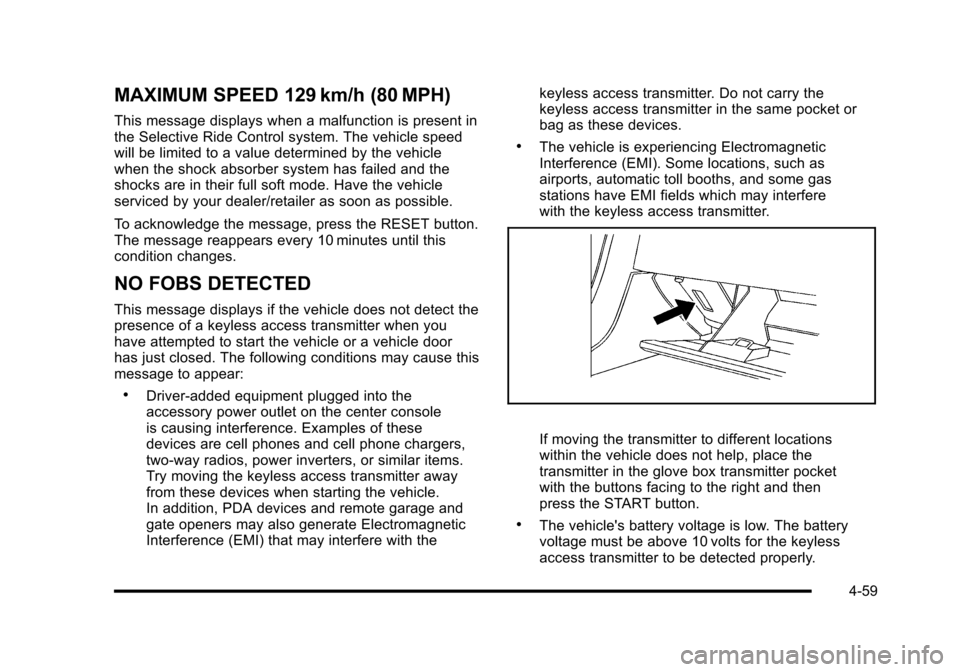
If moving the transmitter to different locations
within the vehicle does not help, place the
transmitter in the glove box transmitter pocket
with the buttons facing to the right and then
press the START button.
.The vehicle's battery voltage is low. The battery
voltage must be above 10 volts for the keyless
access transmitter to be detected properly.
4-59
Page 228 of 472
NO FOB - OFF OR RUN?
This message displays when the keyless access
transmitter is not detected inside the vehicle while you
are trying to turn the ignition off. The vehicle may be
near a strong radio antenna signal causing the keyless
access system to be jammed. The vehicle will remain
in ACCESSORY until the vehicle is turned off or is
restarted, or five minutes has expired. If you turn the
ignition off and you cannot find the keyless access
transmitter, you will not be able to restart the vehicle.
The keyless access transmitter needs to be inside of
the vehicle in order for the vehicle to start. See Starting
the Engine
on page 3‑24for more information.
OPTIONS UNAVAILABLE
This message displays for a few seconds if a keyless
access transmitter that is not labelled 1 or 2 is used and
you try to personalize the features on the vehicle by
pressing the OPTION button. The personalization
system will not recognize the transmitter and the DIC
will not display the current driver number or the menus
used to set personalizations. The personalization
features will then be set to the default states. See DIC
Vehicle Personalization
on page 4‑71for more
information.
PERF TRAC 1 –WET ACTIVE
HANDLING ON
This message displays and a sound will be heard
when this Performance Traction Management mode
is selected. The instrument panel cluster light will also
be on when this mode is selected. Launch Control is
available when this mode selected. In this mode the
Traction Control and Active Handling System are
available but intended for use on wet race track
conditions. Adjust your driving accordingly. This system
is available only on ZR1 models. See “Performance
Traction Management” and“Launch Control” under
Competitive Driving Mode
on page 5‑9and Racing or
Other Competitive Drivingon page 5‑19for more
information about the use of this mode.
PERF TRAC 2 –DRY ACTIVE
HANDLING ON
This message displays and a sound will be heard
when this Performance Traction Management mode is
selected. The instrument panel cluster light will also
be on when this mode is selected. Launch Control is
available when this mode selected. In this mode the
Traction Control and Active Handling System are
available but intended for use on dry race track
conditions. Adjust your driving accordingly.
4-60
Page 230 of 472
PERF TRAC 5–RACE ACTIVE
HANDLING OFF
This message displays and a sound will be heard
when this Performance Traction Management mode
is selected. The instrument panel cluster light will also
be on when this mode is selected. Launch Control is
available when this mode selected. In this mode the
Traction Control is available but intended for use on dry
race track conditions. The Active Handling System is
disabled when this mode is selected. This mode will
require more driver skill than modes 1-4. Adjust your
driving accordingly. This system is available only on
ZR1 models. See “Performance Traction Management”
and “Launch Control” underCompetitive Driving Mode
on page 5‑9andRacing or Other Competitive Drivingon page 5‑19for more information about the use of
this mode.
PRESS BRAKE TO START ENGINE
(Automatic Transmission Only)
This message displays if you try to start the engine by
pressing the keyless ignition start button without having
the brake pressed. The brake needs to be pressed
when starting the engine. See Ignition Positions
on
page 3‑23for more information.
REDUCED ENGINE POWER
If this message displays and the check engine light
comes on, a noticeable reduction in the vehicle's
performance may occur. If the REDUCED ENGINE
POWER message is displayed, but there is no
reduction in performance, proceed to your destination.
The performance may be reduced the next time the
vehicle is driven.
The vehicle may be driven at a reduced speed while the
REDUCED ENGINE POWER message is displayed, but
acceleration and speed may be reduced. Anytime the
check engine light stays on, the vehicle should be taken
to your dealer/retailer as soon as possible for diagnosis
and repair. See Malfunction Indicator Lamp
on
page 4‑41for more information.
Multiple chimes sound when this message is displayed.
To acknowledge the message, press the RESET button.
The message reappears every five minutes until this
condition changes.
If the REDUCED ENGINE POWER message is
displayed in combination with the COOLANT OVER
TEMPERATURE message, see Engine Overheating
on
page 6‑38.
4-62
Page 238 of 472
Other Messages
Here are more messages that you can receive on your
Driver Information Center (DIC). To acknowledge a
message and read another message that may have
come on at the same time, press the RESET button.
.ACCESSORY MODE ON
.BATTERY VOLTAGE HIGH
See Voltmeter Gauge on page 4‑35.
.BATTERY VOLTAGE LOW
See Voltmeter Gauge on page 4‑35.
.CHECK WASHER FLUID
See Windshield Washer Fluid on page 6‑42.
.CRUISE SET TO XXX MPH (XXX km/h)
See Cruise Control on page 4‑7.
.DRIVER DOOR AJAR
.FOB AUTOLEARN WAIT XX MINUTES
See “Matching Transmitter(s) to Your Vehicle”
under Keyless Access System Operation
on
page 3‑5.
.FOB BATTERY LOW
See “Battery Replacement” underKeyless Access
System Operation on page 3‑5.
.HATCH AJAR (Coupe)
.INTRUSION SENSOR OFF, if your vehicle has this
feature
.INTRUSION SENSOR ON, if your vehicle has this
feature
.KNOWN FOB
See “Matching Transmitter(s) to Your Vehicle”
under Keyless Access System Operation
on
page 3‑5.
.MAXIMUM NUMBER OF FOBS LEARNED
See “Matching Transmitter(s) to Your Vehicle”
under Keyless Access System Operation
on
page 3‑5.
.OFF–ACCESSORY TO LEARN
See “Matching Transmitter(s) to Your Vehicle”
under Keyless Access System Operation
on
page 3‑5.
.PASSENGER DOOR AJAR
.READY FOR FOB #X
See “Matching Transmitter(s) to Your Vehicle”
under Keyless Access System Operation
on
page 3‑5.
.TONNEAU AJAR (Convertible)
.TRUNK AJAR (Convertible)
.UPSHIFT NOW
See Manual Transmission Operation on page 3‑32.
4-70
Page 239 of 472
DIC Vehicle Personalization
Many features on your vehicle can be personalized.
This means that the operation of these features can be
set to operate differently depending on who is driving
the vehicle. See “Personal Options” later in this section
for the features that you can personalize.
The personalization settings for other features are
automatically updated and saved as the driver adjusts
them. These include the following settings and presets:
.The radio presets, tone, volume, fade, balance,
equalization (EQ) settings and source (radio
or CD)
.The last climate control setting
.The Head-Up Display (HUD) position and dimming
level, if your vehicle has this feature
.The instrument panel cluster dimming level and
last selected DIC display
Separate personalization settings are saved for two
different drivers. One of the keyless access transmitters
is assigned to driver 1. The other is assigned to driver 2.
The back of the keyless access transmitters are
labelled 1 or 2 to correspond to each driver. The current driver's preferences are recalled when one
of the following occurs:
.The lock or unlock button on the keyless access
transmitter, labelled 1 or 2, is pressed.
.The appropriate memory button, 1 or 2, located on
the driver's door is pressed. See
Memory Seat,
Mirrors and Steering Wheel
on page 2‑4for
more information.
.A valid keyless access transmitter is detected upon
opening the driver's door.
If more than one valid keyless access transmitter is
detected upon opening the driver's door, the driver
preferences for the lowest driver number will be
recalled.
If a keyless access transmitter that is not labelled
1 or 2 is used, the personalization system will not
recognize the transmitter. The Driver Information
Center (DIC) will not display a current driver number
and the features that are normally programmed through
the DIC will be set to the default states. Also, if the
OPTION button is pressed, the DIC does not display
the menus used to set personalizations, but instead
displays OPTIONS UNAVAILABLE for a few seconds.
4-71
Page 241 of 472
Press the OPTION button until AUTO MEMORY
RECALL appears on the display, then press the RESET
button to scroll through the following modes:
.YES
.NO (default)
If you choose YES, the driver's seat, the outside
rearview mirrors and the telescopic steering column,
if your vehicle has this feature, positions are recalled
when you turn the ignition on.
If you choose NO, this option will turn off.
When the mode you want is selected, press the
OPTION button to set your choice and advance
to the next personal option.
Auto Exit Recall : If your vehicle has the memory
package, you may have this option. This option allows
the driver's seat and telescopic steering column, if your
vehicle has this feature, to automatically move to the
current driver's exit position when one of the following
occurs:
.The vehicle is turned off or in Retained Accessory
Power (RAP) or accessory mode and the driver's
door is opened.
.The vehicle is turned off or in RAP and the unlock
button on the keyless access transmitter is
pressed. In order for the Auto Exit Recall feature to work on an
automatic transmission vehicle, the vehicle must be in
P (Park). On a manual transmission vehicle, the parking
brake must be set.
Press the OPTION button until AUTO EXIT RECALL
appears on the display, then press the RESET button to
scroll through the following modes:
.YES
.NO (default)
If you choose YES, when you turn the ignition off and
open the driver's door or press the unlock button on the
keyless access transmitter, the seat and the telescopic
steering wheel, if your vehicle has this feature, will
return to their stored exit positions for an easy exit
or an easy entrance when returning to the vehicle.
The seat and steering wheel will only return to the
stored driving position if you press the appropriate
memory button or activate the auto memory recall
feature.
If you choose NO, this option will turn off.
When the mode you want is selected, press the
OPTION button to set your choice and advance
to the next personal option.
4-73