2010 CHEVROLET CORVETTE fuel
[x] Cancel search: fuelPage 209 of 472
When the Light Flashes First and Then is
On Steady
This indicates that there may be a problem with the Tire
Pressure Monitor System. The light flashes for about a
minute and stays on steady for the remainder of the
ignition cycle. This sequence repeats with every ignition
cycle. See Tire Pressure Monitor Operation
on
page 6‑74for more information.
Malfunction Indicator Lamp
Check Engine Light
A computer system called OBD II (On-Board
Diagnostics-Second Generation) monitors operation
of the fuel, ignition, and emission control systems.
It makes sure that emissions are at acceptable levels
for the life of the vehicle, helping to produce a cleaner
environment.
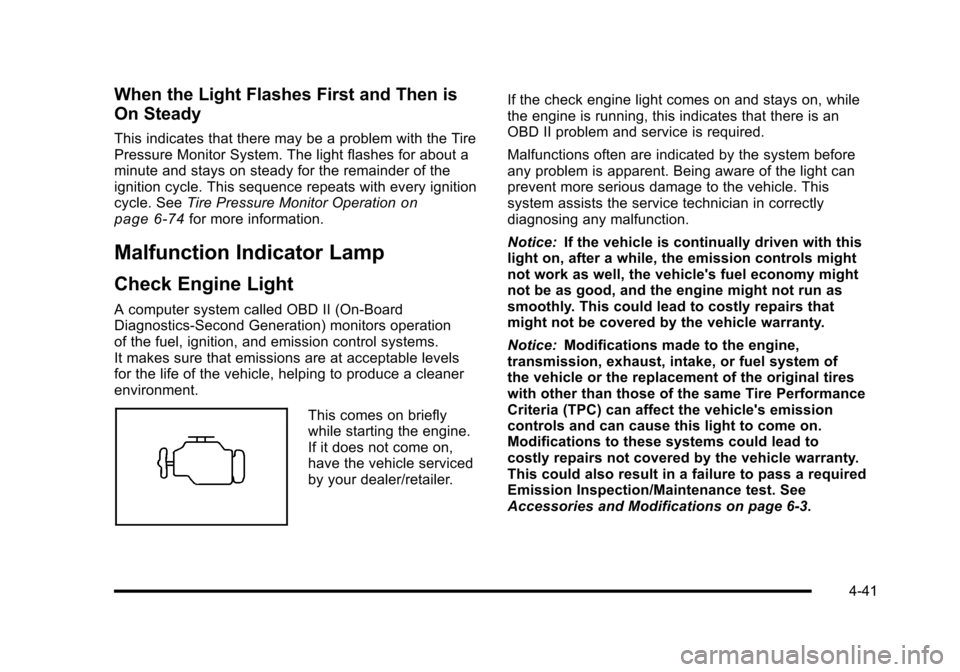
This comes on briefly
while starting the engine.
If it does not come on,
have the vehicle serviced
by your dealer/retailer. If the check engine light comes on and stays on, while
the engine is running, this indicates that there is an
OBD II problem and service is required.
Malfunctions often are indicated by the system before
any problem is apparent. Being aware of the light can
prevent more serious damage to the vehicle. This
system assists the service technician in correctly
diagnosing any malfunction.
Notice:
If the vehicle is continually driven with this
light on, after a while, the emission controls might
not work as well, the vehicle's fuel economy might
not be as good, and the engine might not run as
smoothly. This could lead to costly repairs that
might not be covered by the vehicle warranty.
Notice: Modifications made to the engine,
transmission, exhaust, intake, or fuel system of
the vehicle or the replacement of the original tires
with other than those of the same Tire Performance
Criteria (TPC) can affect the vehicle's emission
controls and can cause this light to come on.
Modifications to these systems could lead to
costly repairs not covered by the vehicle warranty.
This could also result in a failure to pass a required
Emission Inspection/Maintenance test. See
Accessories and Modifications on page 6‑3.
4-41
Page 210 of 472
This light comes on during a malfunction in one of
two ways:
Light Flashing : A misfire condition has been detected.
A misfire increases vehicle emissions and could
damage the emission control system on the vehicle.
Diagnosis and service might be required.
The following can prevent more serious damage to the
vehicle:
.Reduce vehicle speed.
.Avoid hard accelerations.
.Avoid steep uphill grades.
If the light continues to flash, when it is safe to do so,
stop the vehicle. Find a safe place to park the vehicle.
Turn off the ignition, wait at least 10 seconds, and
restart the engine. If the light is still flashing, follow the
previous steps and see your dealer/retailer for service
as soon as possible.
Light On Steady : An emission control system
malfunction has been detected on the vehicle.
Diagnosis and service might be required. An emission system malfunction might be corrected by
doing the following:
.Make sure the fuel cap is fully installed. See
Filling
the Tankon page 6‑9. The diagnostic system
can determine if the fuel cap has been left off or
improperly installed. A loose or missing fuel cap
allows fuel to evaporate into the atmosphere. A few
driving trips with the cap properly installed should
turn the light off.
.If the vehicle has been driven through a deep
puddle of water, the vehicle's electrical system
might be wet. The condition is usually corrected
when the electrical system dries out. A few driving
trips should turn the light off.
.Make sure to fuel the vehicle with quality fuel.
Poor fuel quality causes the engine not to run as
efficiently as designed and may cause: stalling
after start-up, stalling when the vehicle is changed
into gear, misfiring, hesitation on acceleration,
or stumbling on acceleration. These conditions
might go away once the engine is warmed up.
If one or more of these conditions occurs, change
the fuel brand used. It will require at least one full
tank of the proper fuel to turn the light off.
See Gasoline Octane on page 6‑7.
4-42
Page 214 of 472
Fuel Gauge
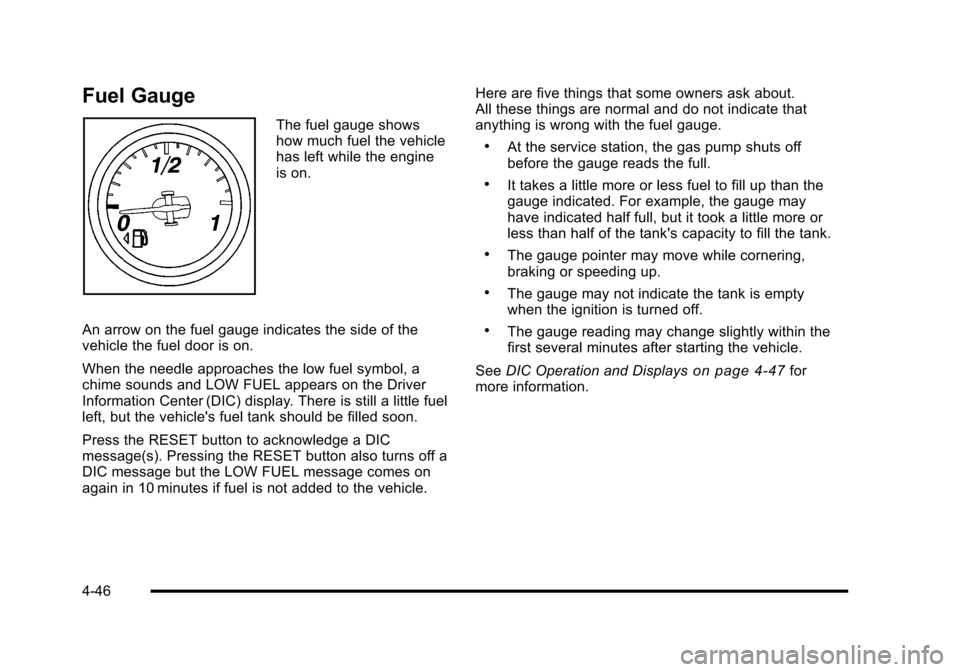
The fuel gauge shows
how much fuel the vehicle
has left while the engine
is on.
An arrow on the fuel gauge indicates the side of the
vehicle the fuel door is on.
When the needle approaches the low fuel symbol, a
chime sounds and LOW FUEL appears on the Driver
Information Center (DIC) display. There is still a little fuel
left, but the vehicle's fuel tank should be filled soon.
Press the RESET button to acknowledge a DIC
message(s). Pressing the RESET button also turns off a
DIC message but the LOW FUEL message comes on
again in 10 minutes if fuel is not added to the vehicle. Here are five things that some owners ask about.
All these things are normal and do not indicate that
anything is wrong with the fuel gauge.
.At the service station, the gas pump shuts off
before the gauge reads the full.
.It takes a little more or less fuel to fill up than the
gauge indicated. For example, the gauge may
have indicated half full, but it took a little more or
less than half of the tank's capacity to fill the tank.
.The gauge pointer may move while cornering,
braking or speeding up.
.The gauge may not indicate the tank is empty
when the ignition is turned off.
.The gauge reading may change slightly within the
first several minutes after starting the vehicle.
See DIC Operation and Displays
on page 4‑47for
more information.
4-46
Page 216 of 472
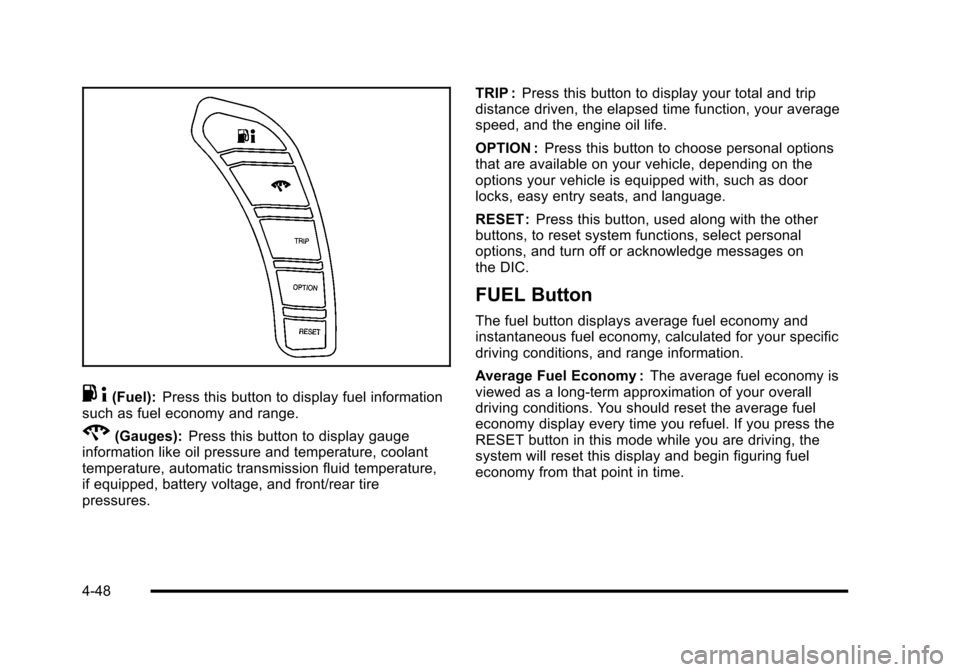
.4(Fuel): Press this button to display fuel information
such as fuel economy and range.
2(Gauges): Press this button to display gauge
information like oil pressure and temperature, coolant
temperature, automatic transmission fluid temperature,
if equipped, battery voltage, and front/rear tire
pressures. TRIP :
Press this button to display your total and trip
distance driven, the elapsed time function, your average
speed, and the engine oil life.
OPTION : Press this button to choose personal options
that are available on your vehicle, depending on the
options your vehicle is equipped with, such as door
locks, easy entry seats, and language.
RESET : Press this button, used along with the other
buttons, to reset system functions, select personal
options, and turn off or acknowledge messages on
the DIC.
FUEL Button
The fuel button displays average fuel economy and
instantaneous fuel economy, calculated for your specific
driving conditions, and range information.
Average Fuel Economy : The average fuel economy is
viewed as a long-term approximation of your overall
driving conditions. You should reset the average fuel
economy display every time you refuel. If you press the
RESET button in this mode while you are driving, the
system will reset this display and begin figuring fuel
economy from that point in time.
4-48
Page 217 of 472
Press the fuel button to display average fuel economy,
such as:
.AVERAGE FUEL ECONOMY 11.7 L/100 km or
.AVERAGE FUEL ECONOMY 20.1 MPG
Instantaneous Fuel Economy : Instantaneous fuel
economy reflects only the fuel economy that the vehicle
has right now and will change frequently as driving
conditions change. Unlike average fuel economy, this
menu item cannot be reset.
Press the fuel button again to display instantaneous fuel
economy, such as:
.INSTANT FUEL ECONOMY 11.7 L/100 km or
.INSTANT FUEL ECONOMY 20.1 MPG
Fuel Range : The range calculates the remaining
distance you can drive without refueling. It is based
on fuel economy and the fuel remaining in the tank.
Press the fuel button again to display the range,
such as:
.RANGE 48 km or
.RANGE 30 MI
If the LOW FUEL warning is displayed or if RANGE is
less than 64 km (40 miles), the display will read
RANGE LOW. The fuel economy data used to determine fuel range is
an average of recent driving conditions. As your driving
conditions change, this data is gradually updated
automatically.
If the vehicle has been idling for a long time, the
range displayed on the DIC could be abnormally low.
The vehicle must be driven 8–16 km (5–10 miles) to
get an accurate reading.
GAGES Button
The gauges button displays oil pressure, oil
temperature, coolant temperature, transmission fluid
temperature for automatic transmission vehicles only,
battery voltage, and tire pressure information.
Oil Pressure :
This display shows the oil pressure.
Press the gauges button to display the oil pressure,
such as:
.OIL PRESSURE 276 kPa or
.OIL PRESSURE 40 PSI
Oil Temperature : This display shows the oil
temperature.
Press the gauges button again to display the oil
temperature, such as:
.OIL TEMPERATURE 112°C or
.OIL TEMPERATURE 234°F
4-49
Page 223 of 472
CHECK COOLANT LEVEL
This message displays when the engine coolant level is
low. Have the cooling system serviced by your dealer/
retailer as soon as possible. See Engine Coolant
on
page 6‑34.
CHECK GAS CAP
This message displays if the fuel cap has not been fully
tightened. Check the fuel cap to make sure that it is on
properly. Once tightened, it takes at least one overnight
park to reset or clear this message. If both the CHECK
GAS CAP message and the malfunction indicator lamp
in the instrument panel cluster are on, you may need to
see your dealer/retailer for service. See Malfunction
Indicator Lamp
on page 4‑41for more information.
CHECK OIL LEVEL
On some vehicles, this message displays and two
chimes sound if the oil level in the vehicle is low. Once
the vehicle senses a change in the engine oil level, the
light remains off.
If this message appears after starting the engine, the
engine oil level may be too low. You may need to add
oil. See Engine Overheating on page 6‑38.
To acknowledge the message, press the RESET button.
The message reappears every 10 minutes until this
condition changes.
CLOSE TRUNK TO MOVE TOP
This message displays and a sound will be heard if
the trunk is open while you are trying to operate the
convertible top. Make sure the trunk is closed before
operating the convertible top. See Convertible Top
(Manual)
on page 3‑59or Convertible Top (Power)on
page 3‑66.
COMPETITIVE DRIVING MODE
This message displays and a sound will be heard
when the Competitive Driving mode is selected.
The instrument panel cluster light will be on when
the Competitive Driving mode is selected. If your
vehicle is equipped with a manual transmission,
Launch Control is available when this mode selected.
The Traction Control System (TCS) will not be operating
while in the Competitive Driving mode. Adjust your
driving accordingly. This system is available on all
models except ZR1. See Competitive Driving Mode
on
page 5‑9, including the “Launch Control” information,
and Racing or Other Competitive Drivingon page 5‑19for more information.
4-55
Page 225 of 472
Multiple chimes sound when this message is displayed.
This message remains displayed and active until the
issue is resolved.
HEADLAMPS SUGGESTED
This message displays if it is dark enough outside and
the headlamps and the Twilight Sentinel®controls are
off. This message informs the driver that turning on the
exterior lamps is recommended. It has become dark
enough outside to require the headlamps and/or other
exterior lamps.
HIGH TIRE PRESSURE
This message may be displayed when one or more of
the tires is over-inflated. This message also displays
LEFT FRONT, RIGHT FRONT, LEFT REAR, or
RIGHT REAR to indicate which tire is affected.
You can receive more than one tire pressure message
at a time. To read other messages that may have been
sent at the same time, press the RESET button . If a tire
pressure message appears on the DIC, stop as soon as
you can. Have the tire pressures checked and set to
those shown on the Tire Loading Information label. See
Run-Flat Tires
on page 6‑69, Loading the Vehicleon
page 5‑28, Inflation - Tire Pressureon page 6‑70, and
Tire Pressure Monitor Systemon page 6‑72. The DIC
also shows the tire pressure values. See DIC Operation
and Displays
on page 4‑47. To acknowledge the message, press the RESET button.
A message reappears every 10 minutes until the
condition is corrected.
HOT ENGINE AIR CONDITIONING OFF
This message displays when the engine coolant
becomes hotter than the normal operating temperature.
To avoid added strain on a hot engine, the air
conditioning compressor is automatically turned off.
When the coolant temperature returns to normal,
the A/C operation automatically resumes. You can
continue to drive the vehicle. If this message continues
to appear, have the system repaired by your dealer/
retailer as soon as possible to avoid compressor
damage.
ICE POSSIBLE
This message displays when the outside air
temperature is cold enough to create icy road
conditions. Adjust your driving accordingly.
LOW FUEL
This message displays when the fuel tank is less than
10 percent full and the display is turned off. A sound
will be heard when this message is displayed. Refill the
fuel tank as soon as possible. See
Fuel Gauge
on
page 4‑46.
4-57
Page 232 of 472
SERVICE CHARGING SYSTEM
If this message displays while you are driving, there
may be a problem with the electrical charging system.
It could mean that there is a loose or broken drive belt
or that there is another electrical problem. Have the
vehicle checked right away by your dealer/retailer.
Driving while this message is on could drain the battery.
If you must drive a short distance with the message on,
be certain to turn off the vehicle's accessories, such as
the radio and air conditioner.
Multiple chimes sound when this message is displayed.
To acknowledge the message, press the RESET button.
The message reappears every 10 minutes until this
condition changes.
SERVICE ELECTRICAL SYSTEM
This message displays if an electrical problem has
occurred within the Powertrain Control Module (PCM).
Have the vehicle serviced by your dealer/retailer.
SERVICE FUEL SYSTEM
This message displays if the Powertrain Control Module
(PCM) has detected a problem within the fuel system.
Have the vehicle serviced by your dealer/retailer. This
message also displays when the cluster is not getting
fuel information from the PCM.
SERVICE RIDE CONTROL
This message displays when the Selective Ride Control
system has detected a malfunction and the system
must be serviced. See your dealer/retailer. If a fault is
present in the Selective Ride Control system which
causes the shocks to be in their full soft condition, the
messages SERVICE RIDE CONTROL, SHOCKS
INOPERATIVE, and MAXIMUM SPEED 129 km/h
(80 MPH) will display together. See Selective Ride
Control
on page 5‑14for more information.
SERVICE TIRE MONITOR
This message displays if a part on the Tire Pressure
Monitor System (TPMS) is not working properly. The tire
pressure light also flashes and then remains on during
the same ignition cycle. See Tire Pressure Light
on
page 4‑40. Several conditions may cause this message
to appear. See Tire Pressure Monitor Operationon
page 6‑74for more information. If the warning comes
on and stays on, there may be a problem with the
TPMS. See your dealer/retailer.
4-64