2010 CHEVROLET CORVETTE buttons
[x] Cancel search: buttonsPage 144 of 472
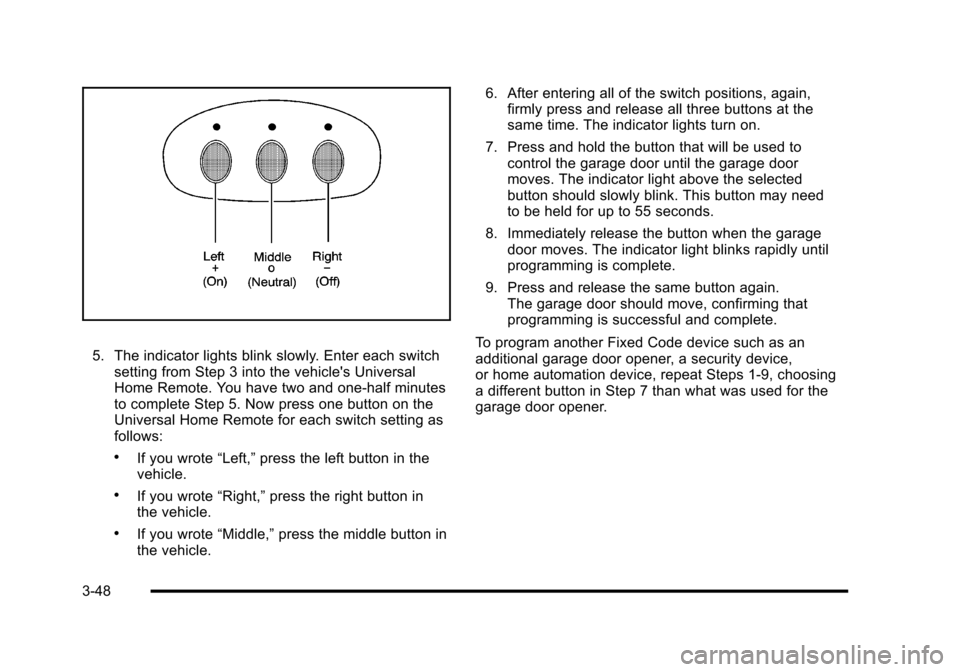
5. The indicator lights blink slowly. Enter each switch setting from Step 3 into the vehicle's Universal
Home Remote. You have two and one-half minutes
to complete Step 5. Now press one button on the
Universal Home Remote for each switch setting as
follows:
.If you wrote “Left,”press the left button in the
vehicle.
.If you wrote “Right,”press the right button in
the vehicle.
.If you wrote “Middle,”press the middle button in
the vehicle. 6. After entering all of the switch positions, again,
firmly press and release all three buttons at the
same time. The indicator lights turn on.
7. Press and hold the button that will be used to control the garage door until the garage door
moves. The indicator light above the selected
button should slowly blink. This button may need
to be held for up to 55 seconds.
8. Immediately release the button when the garage door moves. The indicator light blinks rapidly until
programming is complete.
9. Press and release the same button again. The garage door should move, confirming that
programming is successful and complete.
To program another Fixed Code device such as an
additional garage door opener, a security device,
or home automation device, repeat Steps 1-9, choosing
a different button in Step 7 than what was used for the
garage door opener.
3-48
Page 145 of 472
Using Universal Home Remote
Press and hold the appropriate button for at least
half of a second. The indicator light comes on while
the signal is being transmitted.
Operation can occur:
.If the vehicle is in accessory mode.
.If the vehicle is in running.
.If the vehicle is in Retained Accessory Mode
(RAP). See Retained Accessory Power (RAP)on
page 3‑24for more information.
.Up to an additional 10 minutes after RAP finishes.
.Up to 10 minutes after any door is opened.
Reprogramming Universal Home
Remote Buttons
Any of the three buttons can be reprogrammed by
repeating the instructions.
Erasing Universal Home Remote
Buttons
The programmed buttons should be erased when the
vehicle is sold or the lease ends.
To erase either Rolling Code or Fixed Code on the
Universal Home Remote device:
1. Press and hold the two outside buttons at the same time for approximately 20 seconds, until the
indicator lights, located directly above the buttons,
begin to blink rapidly.
2. Once the indicator lights begin to blink, release both buttons. The codes from all buttons are
erased.
For help or information on the Universal Home Remote
System, call the customer assistance phone number
under Customer Assistance Offices on page 8‑6.
3-49
Page 215 of 472
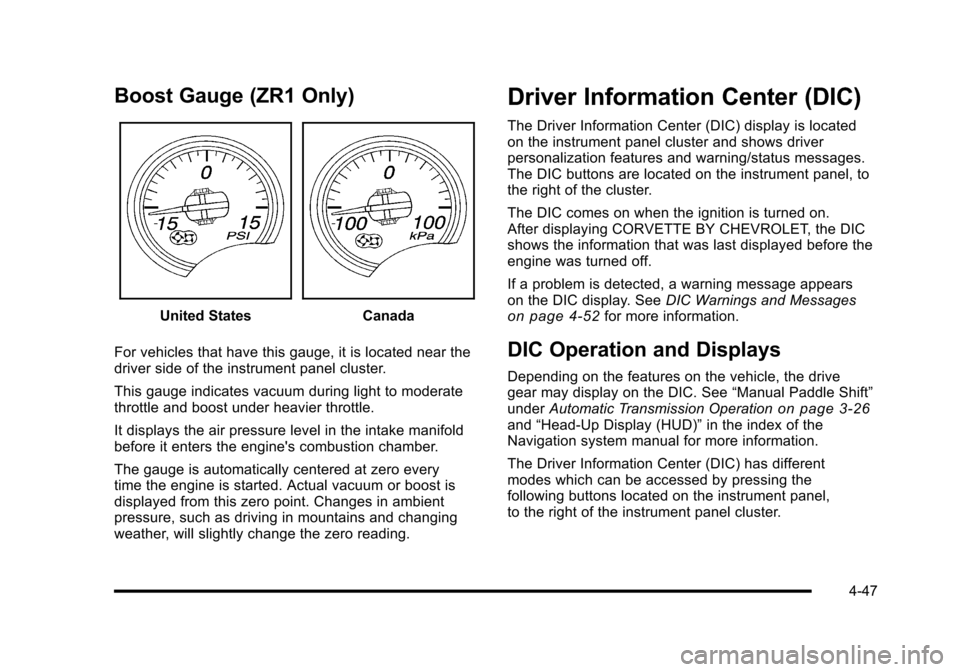
Boost Gauge (ZR1 Only)
United StatesCanada
For vehicles that have this gauge, it is located near the
driver side of the instrument panel cluster.
This gauge indicates vacuum during light to moderate
throttle and boost under heavier throttle.
It displays the air pressure level in the intake manifold
before it enters the engine's combustion chamber.
The gauge is automatically centered at zero every
time the engine is started. Actual vacuum or boost is
displayed from this zero point. Changes in ambient
pressure, such as driving in mountains and changing
weather, will slightly change the zero reading.
Driver Information Center (DIC)
The Driver Information Center (DIC) display is located
on the instrument panel cluster and shows driver
personalization features and warning/status messages.
The DIC buttons are located on the instrument panel, to
the right of the cluster.
The DIC comes on when the ignition is turned on.
After displaying CORVETTE BY CHEVROLET, the DIC
shows the information that was last displayed before the
engine was turned off.
If a problem is detected, a warning message appears
on the DIC display. See DIC Warnings and Messages
on page 4‑52for more information.
DIC Operation and Displays
Depending on the features on the vehicle, the drive
gear may display on the DIC. See “Manual Paddle Shift”
under Automatic Transmission Operation
on page 3‑26and“Head-Up Display (HUD)” in the index of the
Navigation system manual for more information.
The Driver Information Center (DIC) has different
modes which can be accessed by pressing the
following buttons located on the instrument panel,
to the right of the instrument panel cluster.
4-47
Page 216 of 472
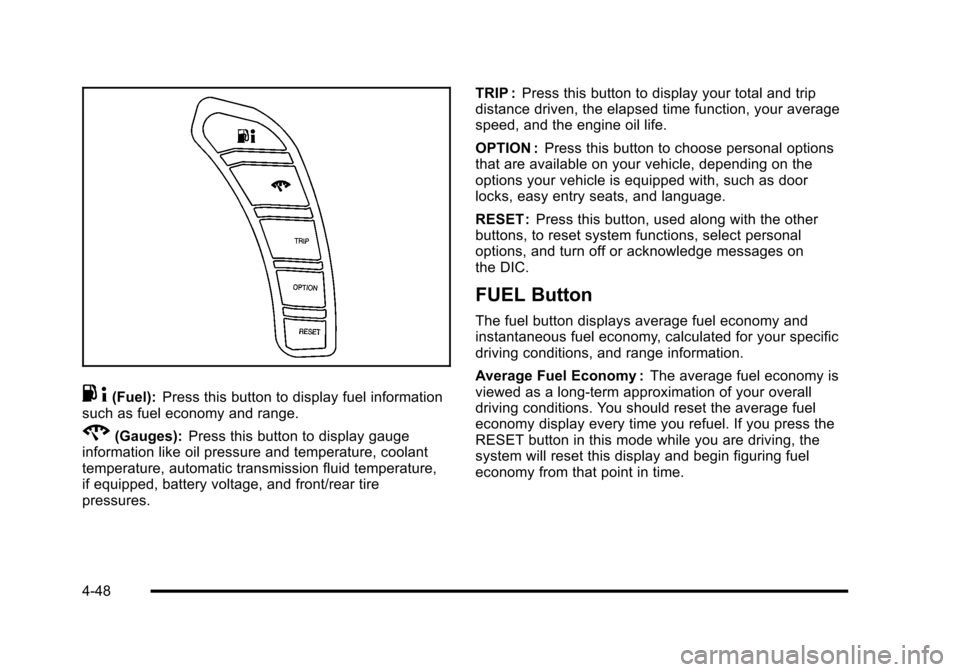
.4(Fuel): Press this button to display fuel information
such as fuel economy and range.
2(Gauges): Press this button to display gauge
information like oil pressure and temperature, coolant
temperature, automatic transmission fluid temperature,
if equipped, battery voltage, and front/rear tire
pressures. TRIP :
Press this button to display your total and trip
distance driven, the elapsed time function, your average
speed, and the engine oil life.
OPTION : Press this button to choose personal options
that are available on your vehicle, depending on the
options your vehicle is equipped with, such as door
locks, easy entry seats, and language.
RESET : Press this button, used along with the other
buttons, to reset system functions, select personal
options, and turn off or acknowledge messages on
the DIC.
FUEL Button
The fuel button displays average fuel economy and
instantaneous fuel economy, calculated for your specific
driving conditions, and range information.
Average Fuel Economy : The average fuel economy is
viewed as a long-term approximation of your overall
driving conditions. You should reset the average fuel
economy display every time you refuel. If you press the
RESET button in this mode while you are driving, the
system will reset this display and begin figuring fuel
economy from that point in time.
4-48
Page 220 of 472
Press and hold the RESET button to reset to
0.0 km/h (mph).
Engine Oil Life : Press the TRIP button until the engine
oil life is displayed, such as OIL LIFE REMAINING 89%.
This is an estimate of the engine oil's remaining useful
life. It will show 100% when the system is reset after
an oil change. It will alert you to change the oil on a
schedule consistent with your driving conditions.
When the remaining oil life is low, the system will alert
you with the message CHANGE ENGINE OIL.
Remember, you must reset the engine oil life system
yourself after each oil change. It will not reset itself.
To reset the system, see Engine Oil Life System
on
page 6‑25. Be careful not to reset the engine oil life
system accidentally at any time other than when the oil
has just been changed. It cannot be reset accurately
until the next oil change.
See Scheduled Maintenance
on page 7‑3andEngine
Oilon page 6‑19for more information.
OPTION Button
The OPTION button allows you to access the
PERSONAL OPTIONS menu and customize the
personalization settings on your vehicle. See DIC
Vehicle Personalization
on page 4‑71for more
information.
RESET Button
The RESET button, used along with other buttons, will
reset system functions and turn off or acknowledge
messages on the DIC.
DIC Warnings and Messages
Messages are displayed on the DIC to notify the driver
that the status of the vehicle has changed and that
some action may be needed by the driver to correct the
condition. Multiple messages may appear one after
another. You can scroll through the messages that
may have been sent at the same time. The DIC is
continuously updated with the vehicle performance
status.
Some messages may not require immediate action, but
you can press the RESET button to acknowledge that
you received the messages and to clear them from the
display.
Some messages cannot be cleared from the DIC
display because they are more urgent. These
messages require action before they can be cleared.
You should take any messages that appear on the
display seriously and remember that clearing the
messages will only make the messages disappear,
not correct the problem.
The following are the possible messages that can be
displayed and some information about them.
4-52
Page 227 of 472
MAXIMUM SPEED 129 km/h (80 MPH)
This message displays when a malfunction is present in
the Selective Ride Control system. The vehicle speed
will be limited to a value determined by the vehicle
when the shock absorber system has failed and the
shocks are in their full soft mode. Have the vehicle
serviced by your dealer/retailer as soon as possible.
To acknowledge the message, press the RESET button.
The message reappears every 10 minutes until this
condition changes.
NO FOBS DETECTED
This message displays if the vehicle does not detect the
presence of a keyless access transmitter when you
have attempted to start the vehicle or a vehicle door
has just closed. The following conditions may cause this
message to appear:
.Driver-added equipment plugged into the
accessory power outlet on the center console
is causing interference. Examples of these
devices are cell phones and cell phone chargers,
two-way radios, power inverters, or similar items.
Try moving the keyless access transmitter away
from these devices when starting the vehicle.
In addition, PDA devices and remote garage and
gate openers may also generate Electromagnetic
Interference (EMI) that may interfere with the keyless access transmitter. Do not carry the
keyless access transmitter in the same pocket or
bag as these devices.
.The vehicle is experiencing Electromagnetic
Interference (EMI). Some locations, such as
airports, automatic toll booths, and some gas
stations have EMI fields which may interfere
with the keyless access transmitter.
If moving the transmitter to different locations
within the vehicle does not help, place the
transmitter in the glove box transmitter pocket
with the buttons facing to the right and then
press the START button.
.The vehicle's battery voltage is low. The battery
voltage must be above 10 volts for the keyless
access transmitter to be detected properly.
4-59
Page 240 of 472
Entering the Personal Options Menu
To enter the personal options menu, use the following
steps: 1. If you have an automatic transmission vehicle, turn the vehicle on with the shift lever in P (Park).
If you have a manual transmission vehicle, turn the
vehicle on with the parking brake set.
To avoid excessive drain on the battery, it is
recommended that the headlamps are turned off.
2. Press the OPTION button and you will enter the PERSONAL OPTIONS menu.
The DIC will display the current driver
number (1 or 2) for a few seconds and then will
display instructions on which buttons to use for
setting the personalizations. The RESET button
is used to select a setting for a particular feature.
The OPTION button is used to move to the next
feature.
3. Press the OPTION button while the instruction screen is displayed to enter the first
personalization menu item.
4. Once you have cycled through all of the personal options, pressing the OPTION button a final time
exits the personal options menu. In addition, if no
button is pressed within 45 seconds, the DIC will
exit the personal options menu.
Personal Options
The following options are available for programming:
Display Units : This option allows you to choose the
measurement units.
Press the OPTION button until DISPLAY UNITS
appears on the display, then press the RESET button
to scroll through the following modes:
.ENGLISH (default)
.METRIC
If you choose ENGLISH, all information will be
displayed in English units.
If you choose METRIC, all information will be displayed
in metric units.
When the mode you want is selected, press the
OPTION button to set your choice and advance to the
next personal option.
Auto Memory Recall (Automatic Transmission
only) : If your automatic transmission vehicle has the
memory package, you may have this option. This option
allows the driver's seat, the telescopic steering column,
if your vehicle has this feature, and the outside rearview
mirrors to automatically move to the current driver's set
position when the engine starts.
4-72
Page 246 of 472
When the mode you want is selected, press the
OPTION button to set your choice and advance to the
next personal option.
Language : This option allows you to select the
language the DIC, the Head-Up Display (HUD), if your
vehicle has this feature, and the radio uses to display
messages. Each language mode will be displayed in its
own language. For example, English will be displayed
as ENGLISH, Spanish as ESPANOL, etc. If your vehicle
has the navigation system, you will not have the
Japanese language mode.
Press the OPTION button until LANGUAGE appears on
the display, then press the RESET button to scroll
through the following modes:
.ENGLISH (default)
.DEUTSCH (German)
.FRANCAIS (French)
.ITALIANO (Italian)
.ESPANOL (Spanish)
If you choose a language that you do not understand,
press the OPTION and RESET buttons for
five seconds. The DIC will begin displaying all of the
various languages one by one for as long as the
buttons are pressed. When the desired language is
displayed, release the buttons and the DIC will set to
this language. When the mode you want is selected, press the
OPTION button to set your choice and advance
to the next personal option.
Personalize Name :
This option allows you to type
in a name or greeting that will appear on the DIC
display whenever the corresponding keyless access
transmitter (1 or 2) is used or one of the memory
buttons (1 or 2) located on the driver's door is pressed.
Press the OPTION button until PERSONALIZE NAME
appears on the display, then press the RESET button to
scroll through the following modes:
.YES
.NO (default)
If you choose YES, you can type in a name that will
appear on the DIC display.
To program a name, use the following procedure: 1. Enter the PERSONAL OPTIONS menu and select the driver number (1 or 2) that you would like to
program by following the instructions listed
previously under “Entering the Personal
Options Menu”.
2. Press the OPTION button until the PERSONALIZE NAME option appears on the display.
3. Select YES under PERSONALIZE NAME by pressing the RESET button.
4-78