2010 CHEVROLET CAMARO lights
[x] Cancel search: lightsPage 122 of 378
Black plate (40,1)Chevrolet Camaro Owner Manual - 2010
4-40 Instruments and Controls
Exit Lighting
This allows the selection of how
long the exterior lamps stay on
when leaving the vehicle when it is
dark outside.
Press the MENU / SELECT knob
when Exit Lighting is highlighted.
Turn the knob to select Off,
30 Seconds, 1 Minute, or 2 Minutes.
Press the knob to confirm and go
back to the last menu.
Vehicle Locator Lights
This allows the vehicle locator lights
to be turned on or off.
Press the MENU / SELECT knob
when Vehicle Locator Lights is
highlighted. Turn the knob to select
On or Off. Press the knob to confirm
and go back to the last menu.Power Door Locks
Select Power Door Locks and the
following will be displayed:
.Unlocked Door Anti Lock Out
.Auto Door Unlock
.Delayed Door Lock
Unlocked Door Anti Lock Out
When on, this feature will keep the
driver's door from locking when the
door is open. If off is selected, the
Delayed Door Lock menu will be
available.
Press the MENU / SELECT
knob when Auto Door Unlock is
highlighted. Turn the knob to select
On or Off. Press the knob to confirm
and go back to the last menu. Auto Door Unlock
This allows selection of which of the
doors will automatically unlock when
the vehicle is shifted into P (Park)
(automatic transmission) or when
the key is removed from the ignition
(manual transmission).
Press the MENU / SELECT
knob when Auto Door Unlock is
highlighted. Turn the knob to select
All Doors, Driver Door, or Off. Press
the knob to confirm and go back to
the last menu.
Delayed Door Lock
When on, this feature will delay the
locking of the doors. If you want to
override the delay you can press the
power door lock on the driver's door.
Press the MENU / SELECT knob
when Delayed Door Lock is
highlighted. Turn the knob to select
On or Off. Press the knob to confirm
and go back to the last menu.
Page 123 of 378

Black plate (41,1)Chevrolet Camaro Owner Manual - 2010
Instruments and Controls 4-41
Remote Lock/Unlock/Start
Select Remote Lock/Unlock/Start
and the following will be displayed:
.Unlock Feedback (Lights)
.Locking Feedback
.Door Unlock Options
.Remote Vehicle Start
Unlock Feedback (Lights)
When on, the exterior lamps will
flash when unlocking the vehicle
with the RKE transmitter.
Press the MENU / SELECT knob
when Unlock Feedback (Lights) is
highlighted. Turn the knob to select
Flash Lights or Off. Press the knob
to confirm and go back to the
last menu. Locking Feedback
This allows selection of what type of
feedback is given when unlocking
the vehicle with the RKE transmitter.
Press the MENU / SELECT
knob when Locking Feedback is
highlighted. Turn the knob to select
Lights and Horn, Lights Only, Horn
Only, or Off. Press the knob to
confirm and go back to the
last menu.
Door Unlock Options
This allows selection of which doors
will unlock when pressing the unlock
button on the RKE transmitter.
Press the MENU / SELECT knob
when Door Unlock Options is
highlighted. Turn the knob to select
All Doors or Driver Door Only. Press
the knob to confirm and go back to
the last menu.Remote Vehicle Start
This allows the Remote Vehicle
Start to be turned on or off, if the
vehicle has this feature.
Press the MENU / SELECT knob
when Remote Vehicle Start is
highlighted. Turn the knob to select
On or Off. Press the knob to confirm
and go back to the last menu.
Return to Factory Settings
Select Return to Factory
Settings to return all of the vehicle
personalization to the default
settings. Turn the knob to select Yes
or No. Press the knob to confirm
and go back to the last menu.
Page 131 of 378

Black plate (1,1)Chevrolet Camaro Owner Manual - 2010
Lighting 5-1
Lighting
Exterior Lighting
Exterior Lamp Controls . . . . . . . . 5-1
Headlamp High/Low-BeamChanger . . . . . . . . . . . . . . . . . . . . . 5-3
Flash-to-Pass . . . . . . . . . . . . . . . . . 5-3
Daytime Running Lamps (DRL) . . . . . . . . . . . . . . . . 5-3
Automatic Headlamp System . . . . . . . . . . . . . . . . . . . . . . 5-4
Hazard Warning Flashers . . . . . 5-4
Turn and Lane-Change Signals . . . . . . . . . . . . . . . . . . . . . . 5-5
Front Fog Lamps . . . . . . . . . . . . . . 5-5
Interior Lighting
Instrument Panel Illumination Control . . . . . . . . . . . . . . . . . . . . . . 5-6
Dome Lamps . . . . . . . . . . . . . . . . . 5-6
Lighting Features
Entry Lighting . . . . . . . . . . . . . . . . . 5-6
Theater Dimming . . . . . . . . . . . . . . 5-6
Battery Load Management . . . . 5-6
Battery Power Protection . . . . . . 5-7
Exterior Lighting
Exterior Lamp Controls
The exterior lamps control is located
on the instrument panel, on the
outboard side of the steering wheel. It controls the following systems:
.Headlamps
.Sidemarker Lamps
.Parking Lamps
.Taillamps
.License Plate Lamps
.Instrument Panel Lights
.Fog Lamps
.Daytime Running Lamps (DRL)
The exterior lamps control has four
positions:
9(Off): Briefly turn to this position
to turn the automatic light control
off or on again. When released,
the control returns to the AUTO
position.
Page 132 of 378

Black plate (2,1)Chevrolet Camaro Owner Manual - 2010
5-2 Lighting
AUTO (Automatic):Turns the
headlamps on automatically at
normal brightness, together with
the following:
.Parking Lamps
.Taillamps
.Sidemarker Lamps
.License Plate Lamps
.Instrument Panel Lights
AUTO also controls the Daytime
Running Lamps (DRL), see Daytime
Running Lamps (DRL)
on
page 5‑3.
; (Parking Lamps): Turns the
parking lamps on together with the
following:
.Taillamps
.Sidemarker Lamps
.License Plate Lamps
.Instrument Panel Lights A warning chime sounds if the
driver's door is opened when the
ignition switch is off and the parking
lamps are on.
2
(Headlamps): Turns the
headlamps on together with the
following lamps listed below.
.Parking Lamps
.Taillamps
.Sidemarker Lamps
.License Plate Lamps
.Instrument Panel Lights
A warning chime sounds if the
driver's door is opened when the
ignition switch is off and the
headlamps are on. #
(Front Fog Lamps): Push the
fog lamps button in to turn the fog
lamps on or off. The fog lamps
come on together with the following:
.Parking Lamps
.Taillamps
.Sidemarker Lamps
.License Plate Lamps
.Instrument Panel Lights
See Front Fog Lamps
on
page 5‑5.
Page 133 of 378

Black plate (3,1)Chevrolet Camaro Owner Manual - 2010
Lighting 5-3
Headlamp High/
Low-Beam Changer
2 3
Headlamp High/Low Beam
Changer: Push the turn signal/lane
change lever away from you to turn
the high beams on.
Pull the lever towards you to return
to low beams.
This indicator light turns on in the
instrument panel cluster when the
high beam headlamps are on.
Flash-to-Pass
The flash‐to‐pass feature works with
the low‐beams or Daytime Running
Lamps (DRL) on or off.
To flash the high beams, pull the
turn signal/lane change lever all the
way towards you. Then release it.
Daytime Running
Lamps (DRL)
Daytime Running Lamps (DRL) can
make it easier for others to see the
front of your vehicle during the day.
Fully functional daytime running
lamps are required on all vehicles
first sold in Canada.
A light sensor on top of the
instrument panel makes the DRL
work, so be sure it is not covered.
The DRL system will make the
low‐beam headlamps come on at a
reduced brightness or for vehicles
with High Intensity Discharge (HID)
headlamps, the dedicated DRL
lights will come on when the
following conditions are met:
.The ignition is in the ON/RUN
position.
.The exterior lamps control is
in AUTO, or has been briefly
turned to OFF to turn the
automatic light control on again.
.The engine is running. When the DRL are on, the
headlamps, taillamps, sidemarker,
instrument panel and other lamps
will not be on.
The headlamps automatically
change from DRL to the regular
headlamps depending on the
darkness of the surroundings.
The other lamps that come on with
the headlamps will also come on.
When it is bright enough outside,
the headlamps will go off and the
DRL will come on.
To turn the DRL lamps off or on
again, turn the exterior lamps
control to the off position and then
release. For vehicles first sold in
Canada, the DRL lamps cannot be
turned off.
The regular headlamp system
should be turned on when needed.
Page 134 of 378

Black plate (4,1)Chevrolet Camaro Owner Manual - 2010
5-4 Lighting
Automatic Headlamp
System
When it is dark enough outside and
the headlamp switch is in AUTO,
the automatic headlamp system will
turn on the headlamps at the normal
brightness along with other lamps
such as the taillamps, sidemarker,
parking lamps, license plate lamps,
and the instrument panel lights.
The radio lights will also be dim.
To turn off the automatic headlamp
system, turn the exterior lamps
switch to the off position and then
release. For vehicles first sold in
Canada, the transmission must be
in the P (Park) position, before the
automatic headlamp system can be
turned off.The vehicle has a light sensor
located on the top of the instrument
panel. Do not cover this sensor or
the system will come on whenever
the ignition is on.
The system may also turn on the
headlamps when driving through a
parking garage, heavy overcast
weather, or a tunnel. This is normal.
There is a delay in the transition
between the daytime and nighttime
operation of the Daytime Running
Lamps (DRL) and the automatic
headlamp systems so that driving
under bridges or bright overhead
street lights does not affect the
system. The DRL and automatic
headlamp system will only be
affected when the light sensor sees
a change in lighting lasting longer
than the delay.If the vehicle is started in a dark
garage, the automatic headlamp
system comes on immediately. If it
is light outside when the vehicle
leaves the garage, there will be a
slight delay before the automatic
headlamp system changes to
the DRL. During that delay, the
instrument panel cluster may not be
as bright as usual. Make sure the
instrument panel brightness control
is in the full bright position. See
Instrument Panel Illumination
Control on page 5‑6.
Hazard Warning Flashers
|
Hazard Warning Flasher:
Press this button located on the
instrument panel near the audio
system, to make the front and rear
turn signal lamps flash on and off.
This warns others that you are
having trouble. Press again to turn
the flashers off.
Page 136 of 378

Black plate (6,1)Chevrolet Camaro Owner Manual - 2010
5-6 Lighting
Interior Lighting
Instrument Panel
Illumination Control
This feature controls the brightness
of the instrument panel lights.
The thumbwheel is located next
to the exterior lamp control.
D(Instrument Panel
Brightness): Turn the thumbwheel
up or down to brighten or dim the
instrument panel lights.
Dome Lamps
The dome lamp buttons are located
in the overhead console.
To change the settings, press the
following:
((Off): Turns the lamp off, even
when a door is open.
1 (Door): The lamp comes on
automatically when a door is
opened.
'(On): Turns the dome lamp on.
Lighting Features
Entry Lighting
The lamps inside the vehicle
come on when any door is opened.
They stay on about 20 seconds and
when all of the doors have been
closed or the ignition is turned to
ON/RUN they gradually fade out.
They also come on when the unlock
symbol button is pressed on the
Remote Keyless Entry (RKE)
system transmitter.
The lamps inside the vehicle stay on
for about 20 seconds after the key is
removed from the ignition to provide
light as you exit.
Theater Dimming
This feature allows for a three to
five second fade out of the courtesy
lamps instead of immediately
turning off.
Battery Load
Management
The vehicle has Electric Power
Management (EPM) that estimates
the battery's temperature and state
of charge. It then adjusts the voltage
for best performance and extended
life of the battery.
When the battery's state of charge
is low, the voltage is raised slightly
to quickly bring the charge back up.
When the state of charge is high,
the voltage is lowered slightly to
prevent overcharging. If the vehicle
has a voltmeter gauge or a voltage
display on the Driver Information
Center (DIC), you may see the
voltage move up or down. This is
normal. If there is a problem, an
alert will be displayed.
Page 140 of 378
Black plate (2,1)Chevrolet Camaro Owner Manual - 2010
6-2 Infotainment System
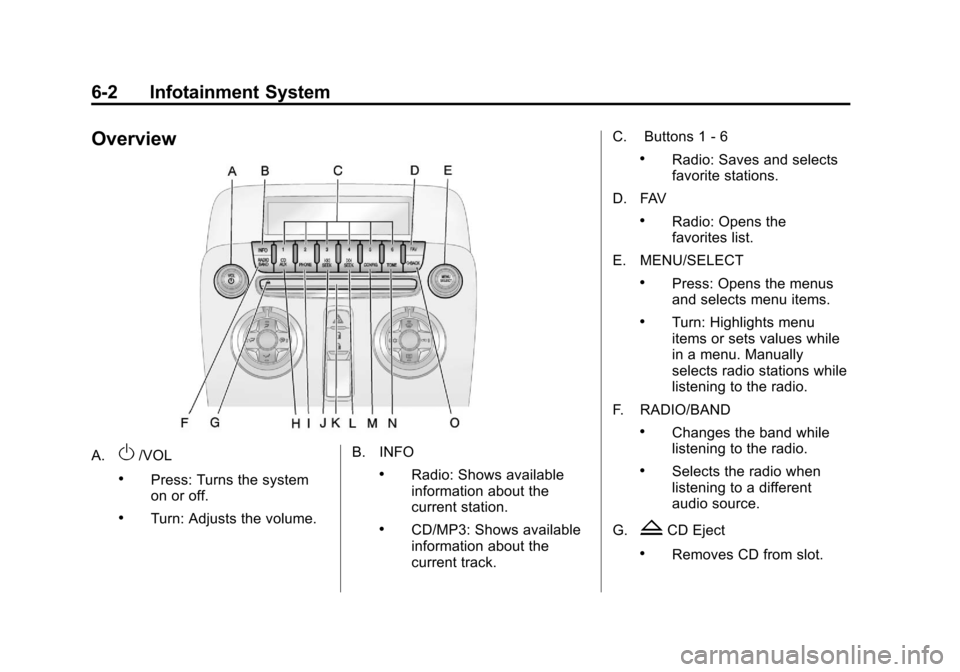
Overview
A.O/VOL
.Press: Turns the system
on or off.
.Turn: Adjusts the volume.B. INFO
.Radio: Shows available
information about the
current station.
.CD/MP3: Shows available
information about the
current track.C. Buttons 1
‐6
.Radio: Saves and selects
favorite stations.
D. FAV
.Radio: Opens the
favorites list.
E. MENU/SELECT
.Press: Opens the menus
and selects menu items.
.Turn: Highlights menu
items or sets values while
in a menu. Manually
selects radio stations while
listening to the radio.
F. RADIO/BAND
.Changes the band while
listening to the radio.
.Selects the radio when
listening to a different
audio source.
G.
ZCD Eject
.Removes CD from slot.