2010 CHEVROLET CAMARO instrument panel
[x] Cancel search: instrument panelPage 48 of 378
Black plate (24,1)Chevrolet Camaro Owner Manual - 2010
2-24 Seats and Restraints
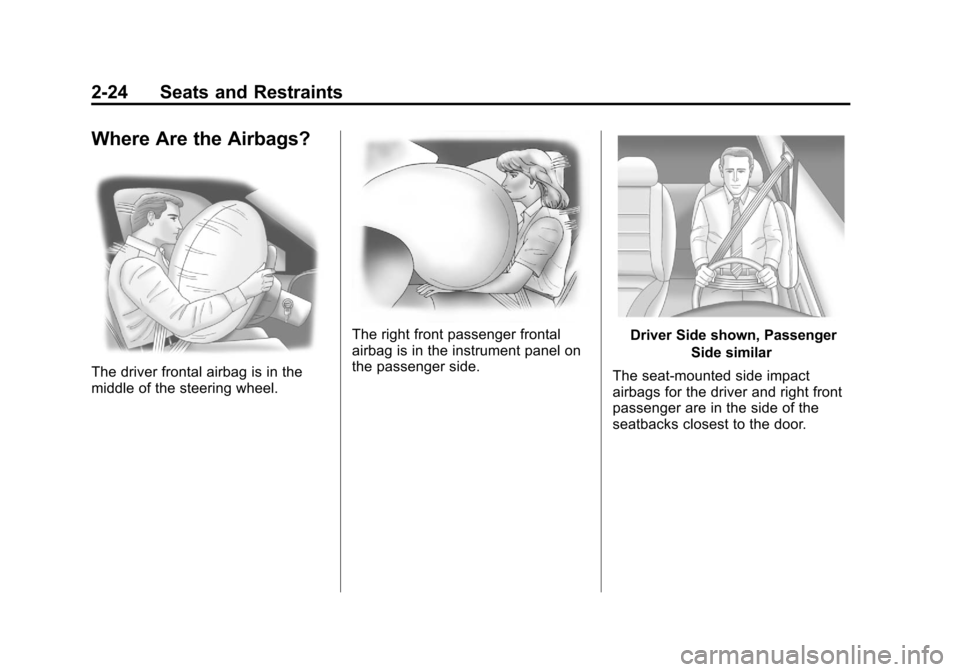
Where Are the Airbags?
The driver frontal airbag is in the
middle of the steering wheel.
The right front passenger frontal
airbag is in the instrument panel on
the passenger side.Driver Side shown, PassengerSide similar
The seat-mounted side impact
airbags for the driver and right front
passenger are in the side of the
seatbacks closest to the door.
Page 51 of 378
Black plate (27,1)Chevrolet Camaro Owner Manual - 2010
Seats and Restraints 2-27
What Makes an Airbag
Inflate?
In a deployment event, the sensing
system sends an electrical signal
triggering a release of gas from the
inflator. Gas from the inflator fills the
airbag causing the bag to break out
of the cover and deploy. The inflator,
the airbag, and related hardware are
all part of the airbag module.
Frontal airbag modules are located
inside the steering wheel and
instrument panel. For vehicles with
seat-mounted side impact airbags,
there are airbag modules in the side
of the front seatbacks closest to the
door. For vehicles with roof-rail
airbags, there are airbag modules in
the ceiling of the vehicle, near the
side windows that have occupant
seating positions.
How Does an Airbag
Restrain?
In moderate to severe frontal or
near frontal collisions, even belted
occupants can contact the steering
wheel or the instrument panel. In
moderate to severe side collisions,
even belted occupants can contact
the inside of the vehicle.
Airbags supplement the protection
provided by safety belts. Frontal
airbags distribute the force of
the impact more evenly over the
occupant's upper body, stopping
the occupant more gradually.
Seat-mounted side impact and
roof-rail airbags distribute the force
of the impact more evenly over the
occupant's upper body.But airbags would not help in
many types of collisions, primarily
because the occupant's motion is
not toward those airbags. See
When
Should an Airbag Inflate?on
page 2‑25for more information.
Airbags should never be regarded
as anything more than a supplement
to safety belts.
Page 58 of 378

Black plate (34,1)Chevrolet Camaro Owner Manual - 2010
2-34 Seats and Restraints
Servicing the
Airbag-Equipped Vehicle
Airbags affect how the vehicle
should be serviced. There are parts
of the airbag system in several
places around the vehicle. Your
dealer and the service manual have
information about servicing the
vehicle and the airbag system.
To purchase a service manual,
seeService Publications Ordering
Information on page 12‑13.
{WARNING
For up to 10 seconds after the
ignition is turned off and the
battery is disconnected, an airbag
can still inflate during improper
service. You can be injured if you
are close to an airbag when it
inflates. Avoid yellow connectors.
They are probably part of the
airbag system. Be sure to follow
proper service procedures, and
make sure the person performing
work for you is qualified to do so.
Adding Equipment to the
Airbag-Equipped Vehicle
Q: Is there anything I might add
to or change about the vehicle
that could keep the airbags
from working properly?
A: Yes. If you add things that
change the vehicle's frame,
bumper system, height, front end
or side sheet metal, they may
keep the airbag system from
working properly. Changing or
moving any parts of the front
seats, safety belts, the airbag
sensing and diagnostic module,
steering wheel, instrument
panel, roof-rail airbag modules,
ceiling headliner or pillar garnish
trim, front sensors, side impact
sensors, or airbag wiring can
affect the operation of the airbag
system.
Page 83 of 378

Black plate (1,1)Chevrolet Camaro Owner Manual - 2010
Instruments and Controls 4-1
Instruments and
Controls
Instrument Panel Overview
Instrument Panel Overview . . . . 4-4
Controls
Steering Wheel Adjustment . . . 4-6
Steering Wheel Controls . . . . . . 4-6
Horn . . . . . . . . . . . . . . . . . . . . . . . . . . 4-7
Windshield Wiper/Washer . . . . . 4-7
Compass . . . . . . . . . . . . . . . . . . . . . 4-8
Clock . . . . . . . . . . . . . . . . . . . . . . . . . 4-8
Power Outlets . . . . . . . . . . . . . . . . . 4-9
Warning Lights, Gauges, and
Indicators
Warning Lights, Gauges, andIndicators . . . . . . . . . . . . . . . . . . 4-10
Instrument Cluster . . . . . . . . . . . 4-11
Speedometer . . . . . . . . . . . . . . . . 4-12
Odometer . . . . . . . . . . . . . . . . . . . . 4-12
Trip Odometer . . . . . . . . . . . . . . . 4-12
Tachometer . . . . . . . . . . . . . . . . . . 4-12
Fuel Gauge . . . . . . . . . . . . . . . . . . 4-12
Engine Oil Pressure Gauge . . . . . . . . . . . . . . . . . . . . . . 4-13 Engine Oil Temperature
Gauge . . . . . . . . . . . . . . . . . . . . . . 4-14
Engine Coolant Temperature Gauge . . . . . . . . . . . . . . . . . . . . . . 4-15
Transmission Temperature
Gauge . . . . . . . . . . . . . . . . . . . . . . 4-16
Voltmeter Gauge . . . . . . . . . . . . . 4-17
Safety Belt Reminders . . . . . . . 4-17
Airbag Readiness Light . . . . . . 4-18
Passenger Airbag Status Indicator . . . . . . . . . . . . . . . . . . . . 4-19
Charging System Light . . . . . . 4-20
Malfunction Indicator Lamp . . . . . . . . . . . . . 4-20
Brake System Warning Light . . . . . . . . . . . . . . . . . . . . . . . 4-23
Antilock Brake System (ABS) Warning Light . . . . . . . . . . . . . . 4-24
Traction Off Light . . . . . . . . . . . . 4-24
Traction Control System (TCS)/StabiliTrak®Light . . . . 4-25
Traction Control System (TCS) OFF/StabiliTrak
®OFF
Light . . . . . . . . . . . . . . . . . . . . . . . 4-25
Tire Pressure Light . . . . . . . . . . 4-26
Engine Oil Pressure Light . . . . 4-26
Immobilizer Light . . . . . . . . . . . . 4-27 Fog Lamp Light . . . . . . . . . . . . . . 4-27
Taillamp Indicator Light . . . . . . 4-27
Cruise Control Light . . . . . . . . . 4-27
Information Displays
Driver Information
Center (DIC) . . . . . . . . . . . . . . . 4-28
Vehicle Messages
Vehicle Messages . . . . . . . . . . . 4-31
Battery Voltage and ChargingMessages . . . . . . . . . . . . . . . . . . 4-31
Brake System Messages . . . . 4-32
Compass Messages . . . . . . . . . 4-32
Cruise Control Messages . . . . 4-32
Door Ajar Messages . . . . . . . . . 4-32
Engine Cooling System Messages . . . . . . . . . . . . . . . . . . 4-33
Engine Oil Messages . . . . . . . . 4-33
Engine Power Messages . . . . 4-34
Fuel System Messages . . . . . . 4-34
Key and Lock Messages . . . . . 4-34
Lamp Messages . . . . . . . . . . . . . 4-34
Object Detection System Messages . . . . . . . . . . . . . . . . . . 4-35
Ride Control System Messages . . . . . . . . . . . . . . . . . . 4-35
Airbag System Messages . . . . 4-36
Safety Belt Messages . . . . . . . 4-36
Page 86 of 378
Black plate (4,1)Chevrolet Camaro Owner Manual - 2010
4-4 Instruments and Controls
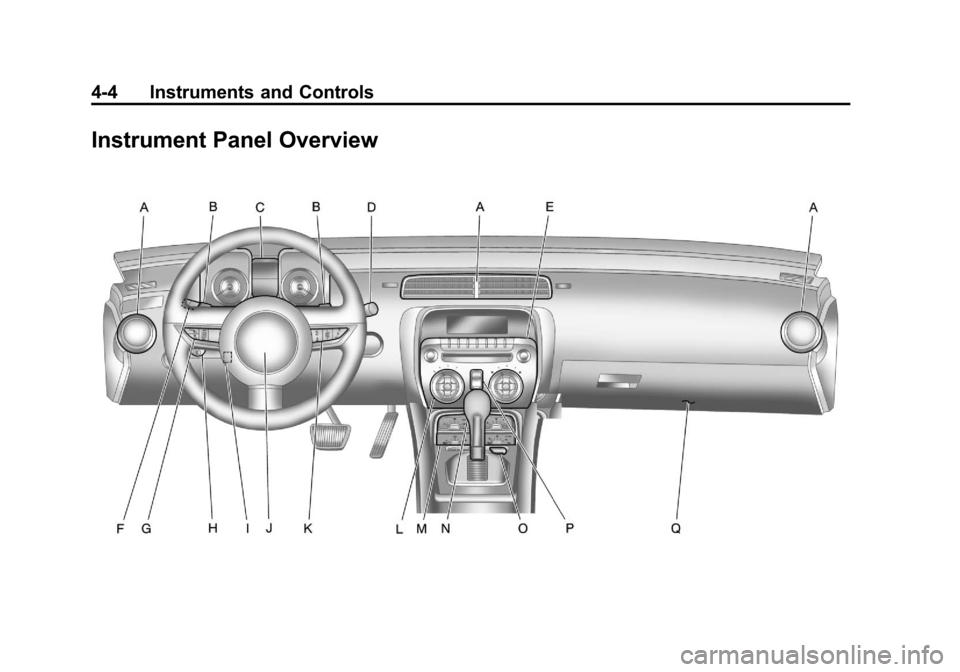
Instrument Panel Overview
Page 87 of 378

Black plate (5,1)Chevrolet Camaro Owner Manual - 2010
Instruments and Controls 4-5
A.Air Vents on page 7‑3.
B. Driver Shift Controls (If Equipped). See Automatic
Transmission on page 8‑26.
C. Instrument Cluster
on
page 4‑11.
D. Windshield Wiper/Washer
on
page 4‑7.
E. AM-FM Radio on page 6‑7.
F. Turn and Lane-Change Signals
on page 5‑5.Headlamp
High/Low-Beam Changeron
page 5‑3. Flash-to-Passon
page 5‑3. Driver Information
Center (DIC)on page 4‑28(If Equipped). G.
Cruise Control
on page 8‑39.
H. Exterior Lamp Controls
on
page 5‑1. Front Fog Lampson page 5‑5(If Equipped).
Instrument Panel Illumination
Control
on page 5‑6.
I. Steering Wheel Adjustment
on
page 4‑6.
J. Horn on page 4‑7.
K. Steering Wheel Controls
on
page 4‑6.
L. Climate Control Systems
on
page 7‑1. M.
Transmission Temperature
Gauge
on page 4‑16.
Voltmeter Gaugeon
page 4‑17. Engine Oil
Temperature Gaugeon
page 4‑14. Engine Oil Pressure
Gauge on page 4‑13.
N. Shift Lever. See Shifting Into
Park on page 8‑22.
O. Power Outlets on page 4‑9.
P. Hazard Warning Flashers
on
page 5‑4. Power Door Lockson page 1‑7.
Q. Glove Box on page 3‑1.
Page 99 of 378
Black plate (17,1)Chevrolet Camaro Owner Manual - 2010
Instruments and Controls 4-17
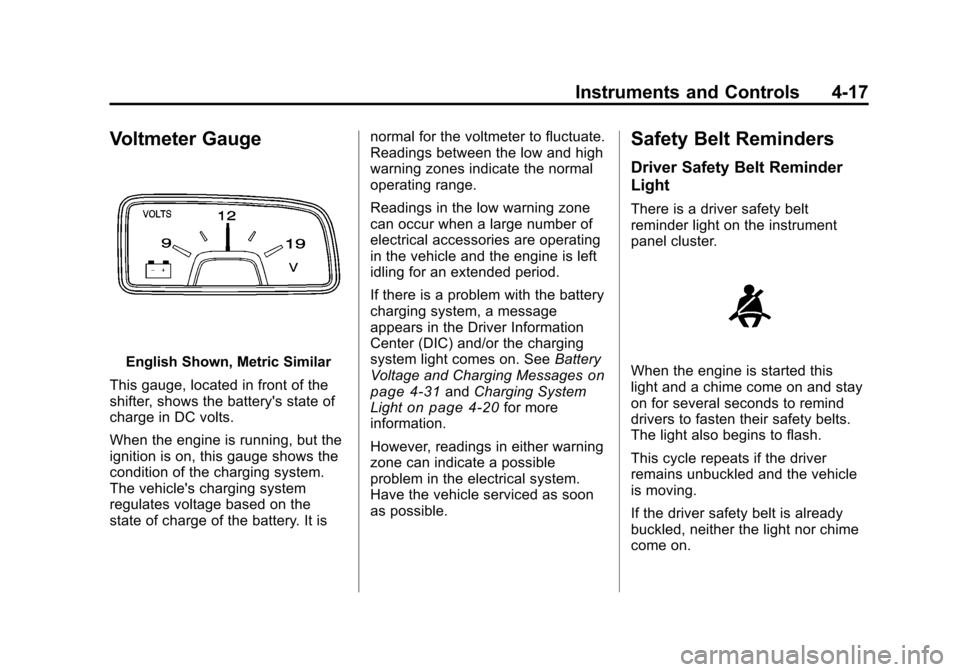
Voltmeter Gauge
English Shown, Metric Similar
This gauge, located in front of the
shifter, shows the battery's state of
charge in DC volts.
When the engine is running, but the
ignition is on, this gauge shows the
condition of the charging system.
The vehicle's charging system
regulates voltage based on the
state of charge of the battery. It is normal for the voltmeter to fluctuate.
Readings between the low and high
warning zones indicate the normal
operating range.
Readings in the low warning zone
can occur when a large number of
electrical accessories are operating
in the vehicle and the engine is left
idling for an extended period.
If there is a problem with the battery
charging system, a message
appears in the Driver Information
Center (DIC) and/or the charging
system light comes on. See
Battery
Voltage and Charging Messageson
page 4‑31and Charging System
Lighton page 4‑20for more
information.
However, readings in either warning
zone can indicate a possible
problem in the electrical system.
Have the vehicle serviced as soon
as possible.
Safety Belt Reminders
Driver Safety Belt Reminder
Light
There is a driver safety belt
reminder light on the instrument
panel cluster.
When the engine is started this
light and a chime come on and stay
on for several seconds to remind
drivers to fasten their safety belts.
The light also begins to flash.
This cycle repeats if the driver
remains unbuckled and the vehicle
is moving.
If the driver safety belt is already
buckled, neither the light nor chime
come on.
Page 110 of 378
Black plate (28,1)Chevrolet Camaro Owner Manual - 2010
4-28 Instruments and Controls
Information Displays
Driver Information
Center (DIC)
The vehicle may have a Driver
Information Center (DIC). The DIC
displays information about your
vehicle. It also displays warning
messages if a system problem is
detected. SeeVehicle Messages
on
page 4‑31for more information.
All messages appear in the DIC
display located in the center of the
instrument panel cluster.
The vehicle may also have features
that can be customized through the
controls on the radio. See Vehicle
Personalization
on page 4‑38for
more information.
DIC Operation and Displays
The DIC has different displays
which can be accessed by using
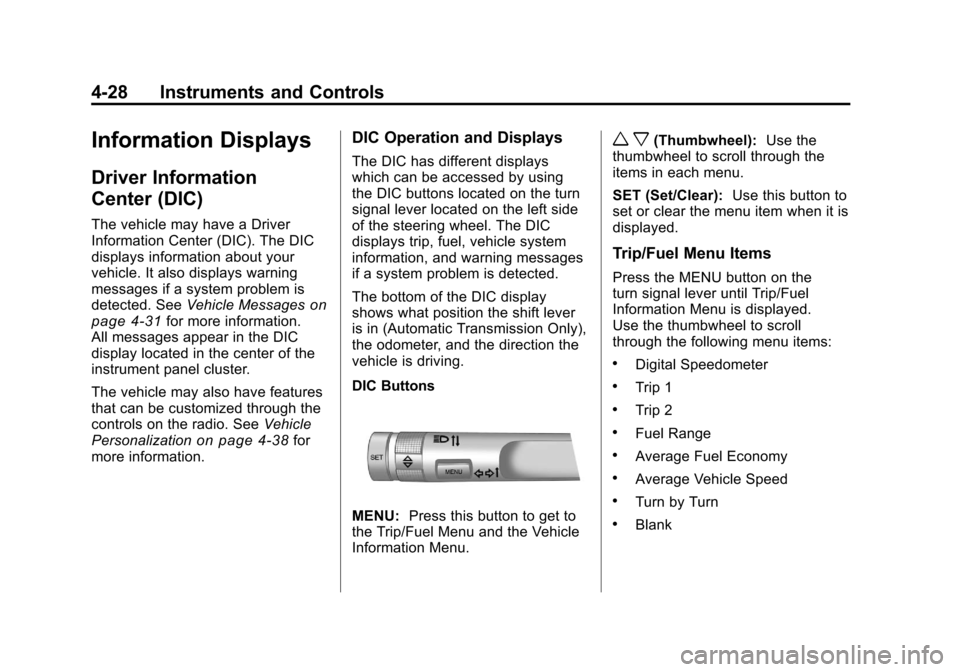
the DIC buttons located on the turn
signal lever located on the left side
of the steering wheel. The DIC
displays trip, fuel, vehicle system
information, and warning messages
if a system problem is detected.
The bottom of the DIC display
shows what position the shift lever
is in (Automatic Transmission Only),
the odometer, and the direction the
vehicle is driving.
DIC Buttons
MENU: Press this button to get to
the Trip/Fuel Menu and the Vehicle
Information Menu.
w x(Thumbwheel): Use the
thumbwheel to scroll through the
items in each menu.
SET (Set/Clear): Use this button to
set or clear the menu item when it is
displayed.
Trip/Fuel Menu Items
Press the MENU button on the
turn signal lever until Trip/Fuel
Information Menu is displayed.
Use the thumbwheel to scroll
through the following menu items:
.Digital Speedometer
.Trip 1
.Trip 2
.Fuel Range
.Average Fuel Economy
.Average Vehicle Speed
.Turn by Turn
.Blank