2010 CADILLAC ESCALADE oil pressure
[x] Cancel search: oil pressurePage 5 of 616
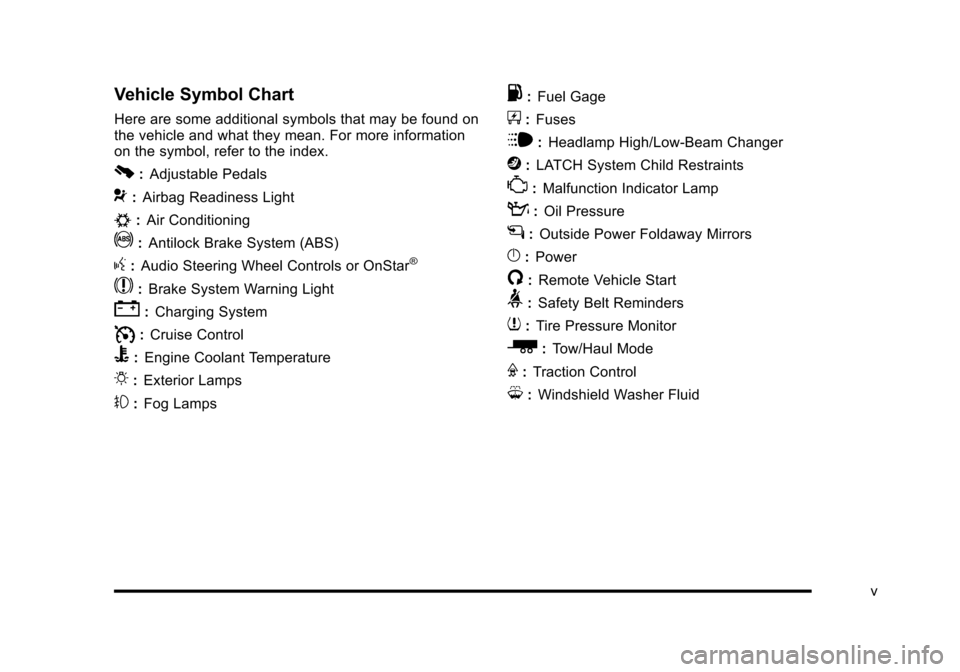
Vehicle Symbol Chart
Here are some additional symbols that may be found onthe vehicle and what they mean. For more informationon the symbol, refer to the index.
0:Adjustable Pedals
9:Airbag Readiness Light
#:Air Conditioning
!:Antilock Brake System (ABS)
g:Audio Steering Wheel Controls or OnStar®
$:Brake System Warning Light
":Charging System
I:Cruise Control
B:Engine Coolant Temperature
O:Exterior Lamps
#:Fog Lamps
.:Fuel Gage
+:Fuses
i:Headlamp High/Low-Beam Changer
j:LATCH System Child Restraints
*:Malfunction Indicator Lamp
::Oil Pressure
g:Outside Power Foldaway Mirrors
}:Power
/:Remote Vehicle Start
>:Safety Belt Reminders
7:Tire Pressure Monitor
_:Tow/Haul Mode
F:Traction Control
M:Windshield Washer Fluid
v
Page 7 of 616

Section 1 In Brief
Instrument Panel. . . . . . . . . . . . . . . . . . . . . . . . . . . . . . . . . . . 1-2
Initial Drive Information. . . . . . . . . . . . . . . . . . . . . . . . . . . 1-4Remote Keyless Entry (RKE) System . . . . . . . . . . . 1-4Remote Vehicle Start . . . . . . . . . . . . . . . . . . . . . . . . . . . 1-4Door Locks . . . . . . . . . . . . . . . . . . . . . . . . . . . . . . . . . . . . . 1-5Liftgate . . . . . . . . . . . . . . . . . . . . . . . . . . . . . . . . . . . . . . . . . . 1-6Windows . . . . . . . . . . . . . . . . . . . . . . . . . . . . . . . . . . . . . . . . 1-7Seat Adjustment . . . . . . . . . . . . . . . . . . . . . . . . . . . . . . . . 1-7Second Row Seats . . . . . . . . . . . . . . . . . . . . . . . . . . . . . 1-9Third Row Seats . . . . . . . . . . . . . . . . . . . . . . . . . . . . . . . . 1-9Heated Seats . . . . . . . . . . . . . . . . . . . . . . . . . . . . . . . . . . 1-10Head Restraint Adjustment . . . . . . . . . . . . . . . . . . . . 1-10Safety Belt . . . . . . . . . . . . . . . . . . . . . . . . . . . . . . . . . . . . . 1-11Sensing System for Passenger Airbag . . . . . . . . . 1-11Mirror Adjustment . . . . . . . . . . . . . . . . . . . . . . . . . . . . . . 1-12Steering Wheel Adjustment . . . . . . . . . . . . . . . . . . . . 1-13Interior Lighting . . . . . . . . . . . . . . . . . . . . . . . . . . . . . . . . 1-13Exterior Lighting . . . . . . . . . . . . . . . . . . . . . . . . . . . . . . . 1-14Windshield Wiper/Washer . . . . . . . . . . . . . . . . . . . . . . 1-15Climate Controls . . . . . . . . . . . . . . . . . . . . . . . . . . . . . . . 1-15Transmission . . . . . . . . . . . . . . . . . . . . . . . . . . . . . . . . . . 1-16
Vehicle Features. . . . . . . . . . . . . . . . . . . . . . . . . . . . . . . . . . 1-16Satellite Radio . . . . . . . . . . . . . . . . . . . . . . . . . . . . . . . . . 1-16Portable Audio Devices . . . . . . . . . . . . . . . . . . . . . . . . 1-17Steering Wheel Controls . . . . . . . . . . . . . . . . . . . . . . . 1-17Bluetooth®. . . . . . . . . . . . . . . . . . . . . . . . . . . . . . . . . . . . . 1-18Navigation System . . . . . . . . . . . . . . . . . . . . . . . . . . . . . 1-18Driver Information Center (DIC) . . . . . . . . . . . . . . . . 1-18Cruise Control . . . . . . . . . . . . . . . . . . . . . . . . . . . . . . . . . 1-20Side Blind Zone Alert (SBZA) . . . . . . . . . . . . . . . . . . 1-20Rear Vision Camera (RVC) . . . . . . . . . . . . . . . . . . . . 1-21Ultrasonic Parking Assist . . . . . . . . . . . . . . . . . . . . . . 1-21Power Outlets . . . . . . . . . . . . . . . . . . . . . . . . . . . . . . . . . 1-21Universal Remote System . . . . . . . . . . . . . . . . . . . . . 1-21
Performance and Maintenance. . . . . . . . . . . . . . . . . . 1-22StabiliTrak®. . . . . . . . . . . . . . . . . . . . . . . . . . . . . . . . . . . . 1-22Tire Pressure Monitor . . . . . . . . . . . . . . . . . . . . . . . . . . 1-22Engine Oil Life System . . . . . . . . . . . . . . . . . . . . . . . . 1-23Fuel E85 (85% Ethanol) . . . . . . . . . . . . . . . . . . . . . . . 1-23Driving for Better Fuel Economy . . . . . . . . . . . . . . . 1-23Roadside Service . . . . . . . . . . . . . . . . . . . . . . . . . . . . . . 1-24OnStar®. . . . . . . . . . . . . . . . . . . . . . . . . . . . . . . . . . . . . . . 1-24
1-1
Page 25 of 616

T(Vehicle Information):Press this button to displaythe oil life, units, side blind zone system on/off, tirepressure readings for vehicles with the Tire PressureMonitor System (TPMS), Remote Keyless Entry (RKE)transmitter programming, compass zone setting, andcompass recalibration.
U(Customization):Press this button to customize thefeature settings on your vehicle. SeeDIC VehicleCustomizationon page 4!57for more information.
V(Set/Reset) :Press this button to set or reset certainfunctions and to turn off or acknowledge messages onthe DIC.
For more information, seeDriver Information Center(DIC) on page 4!41.
Vehicle Customization
Some vehicle features can be programmed byusing the DIC buttons next to the steering wheel.These features include:
.Language
.Door Lock and Unlock Settings
.RKE Lock and Unlock Feedback
.Lighting
.Chime Volume
.Memory Features
.Remote Start
.Digital Speedometer Display
SeeDIC Vehicle Customization on page 4!57.
1-19
Page 29 of 616

Note:The Tire Pressure Monitor can alert you aboutlow tire pressure, but it does not replace normal monthlytire maintenance. It is the driver’s responsibility tomaintain correct tire pressures.
SeeTire Pressure Monitor Systemon page 7!67andTire Pressure Monitor Operation on page 7!68.
Engine Oil Life System
The engine oil life system calculates engine oil lifebased on vehicle use and displays a DIC messagewhen it is necessary to change the engine oil and filter.The oil life system should be reset to 100% onlyfollowing an oil change.
Resetting the Oil Life System
1. Display the OIL LIFE REMAINING on the DIC.
2. Press and hold the SET/RESET button on the DICfor more than five seconds. The oil life will changeto 100%.
SeeEngine Oil Life System on page 7!20.
Fuel E85 (85% Ethanol)
This vehicle has a yellow fuel cap and can use eitherunleaded gasoline or ethanol fuel containing up to85% ethanol (E85). SeeGasoline Octaneo n p a g e 7!8andFuel E85 (85% Ethanol) on page 7!9.
Driving for Better Fuel Economy
Driving habits can affect fuel mileage. Here are somedriving tips to get the best fuel economy possible.
.Avoid fast starts and accelerate smoothly.
.Brake gradually and avoid abrupt stops.
.Avoid idling the engine for long periods of time.
.When road and weather conditions areappropriate, use cruise control, if equipped.
.Always follow posted speed limits or drive moreslowly when conditions require.
.Keep vehicle tires properly inflated.
.Combine several trips into a single trip.
.Replace the vehicle's tires with the same TPCSpec number molded into the tire's sidewall nearthe size.
.Follow recommended scheduled maintenance.
1-23
Page 133 of 616

For example, if the lock button and then the remote startbuttons are pressed again after the vehicle has beenrunning for five minutes, 10 minutes are added, allowingthe engine to run for 15 minutes.
The additional ten minutes are considered a secondremote vehicle start.
After your vehicles engine has been started two timesusing the remote vehicle start button, or a single remotestart with one time extension, the vehicle must bestarted with the key.
After the key is removed from the ignition, the vehiclecan be remote started again.
The vehicle cannot be remote started if the key is inthe ignition, the hood is not closed, or if there is anemission control system malfunction and the checkengine light comes on.
Also, the engine will turn off during a remote vehiclestart if the coolant temperature gets too high or if the oilpressure gets low.
Vehicles that have the remote vehicle start feature areshipped from the factory with the remote vehicle startsystem enabled. The system may be enabled ordisabled through the DIC. See“REMOTE START”underDIC Vehicle Customizationon page 4!57foradditional information.
3-9
Page 194 of 616

Section 4 Instrument Panel
StabiliTrak®Indicator Light . . . . . . . . . . . . . . . . . . . . . 4-34Engine Coolant Temperature Gage . . . . . . . . . . . . 4-35Tire Pressure Light . . . . . . . . . . . . . . . . . . . . . . . . . . . . 4-35Malfunction Indicator Lamp . . . . . . . . . . . . . . . . . . . . 4-36Oil Pressure Light . . . . . . . . . . . . . . . . . . . . . . . . . . . . . 4-38Security Light . . . . . . . . . . . . . . . . . . . . . . . . . . . . . . . . . . 4-39Fog Lamp Light . . . . . . . . . . . . . . . . . . . . . . . . . . . . . . . . 4-39Lights On Reminder . . . . . . . . . . . . . . . . . . . . . . . . . . . 4-39Cruise Control Light . . . . . . . . . . . . . . . . . . . . . . . . . . . 4-39Highbeam On Light . . . . . . . . . . . . . . . . . . . . . . . . . . . . 4-40Tow/Haul Mode Light . . . . . . . . . . . . . . . . . . . . . . . . . . 4-40Fuel Gage . . . . . . . . . . . . . . . . . . . . . . . . . . . . . . . . . . . . . 4-40
Driver Information Center (DIC). . . . . . . . . . . . . . . . . . 4-41DIC Operation and Displays . . . . . . . . . . . . . . . . . . . 4-41DIC Compass . . . . . . . . . . . . . . . . . . . . . . . . . . . . . . . . . . 4-47DIC Warnings and Messages . . . . . . . . . . . . . . . . . . 4-48DIC Vehicle Customization . . . . . . . . . . . . . . . . . . . . 4-57
Audio System(s). . . . . . . . . . . . . . . . . . . . . . . . . . . . . . . . . . 4-67Bluetooth®. . . . . . . . . . . . . . . . . . . . . . . . . . . . . . . . . . . . . 4-67Rear Seat Entertainment (RSE) System(Overhead) . . . . . . . . . . . . . . . . . . . . . . . . . . . . . . . . . . 4-77Rear Seat Entertainment (RSE) System(Headrest DVD) . . . . . . . . . . . . . . . . . . . . . . . . . . . . . 4-86Rear Seat Audio (RSA) . . . . . . . . . . . . . . . . . . . . . . . 4-103Theft-Deterrent Feature . . . . . . . . . . . . . . . . . . . . . . 4-105Audio Steering Wheel Controls . . . . . . . . . . . . . . . 4-105Radio Reception . . . . . . . . . . . . . . . . . . . . . . . . . . . . . . 4-107Rear Side Window Antenna . . . . . . . . . . . . . . . . . . 4-108XM™Satellite Radio Antenna System . . . . . . . . 4-108
4-2
Page 230 of 616

Emissions Inspection and Maintenance
Programs
Some state/provincial and local governments have ormight begin programs to inspect the emission controlequipment on the vehicle. Failure to pass thisinspection could prevent getting a vehicle registration.
Here are some things to know to help the vehicle passan inspection:
.The vehicle will not pass this inspection if thecheck engine light is on with the engine running,or if the key is in ON/RUN and the light is not on.
.The vehicle will not pass this inspection if theOBD II (on-board diagnostic) system determinesthat critical emission control systems have notbeen completely diagnosed by the system.The vehicle would be considered not ready forinspection. This can happen if the battery hasrecently been replaced or if the battery has rundown. The diagnostic system is designed toevaluate critical emission control systems duringnormal driving. This can take several days ofroutine driving. If this has been done and thevehicle still does not pass the inspection for lack ofOBD II system readiness, your dealer/retailer canprepare the vehicle for inspection.
Oil Pressure Light
{WARNING:
Do not keep driving if the oil pressure is low.
The engine can become so hot that it catches fire.
Someone could be burned. Check the oil as soon
as possible and have the vehicle serviced.
Notice:Lack of proper engine oil maintenance candamage the engine. The repairs would not becovered by the vehicle warranty. Always follow themaintenance schedule in this manual for changingengine oil.
This light comes on briefly while starting the engine.If it does not, have the vehicle serviced by yourdealer/retailer. If the system is working normally theindicator light then goes off.
4-38
Page 234 of 616

DIC Buttons
The buttons are the trip/fuel, vehicle information,customization, and set/reset buttons. The buttonfunctions are detailed inthe following pages.
3(Trip/Fuel):Press this button to display theodometer, trip odometer, fuel range, average economy,fuel used, timer, transmission temperature,instantaneous economy, and average vehicle speed.The compass and outside air temperature will also beshown in the display. The temperature will be shownin °F or °C depending on the units selected.
T(Vehicle Information):Press this button to displaythe oil life, units, side blind zone system on/off, tirepressure readings for vehicles with the Tire PressureMonitor System (TPMS), Remote Keyless Entry (RKE)transmitter programming, compass zone setting, andcompass recalibration.
U(Customization):Press this button to customize thefeature settings on your vehicle. SeeDIC VehicleCustomizationon page 4!57for more information.
V(Set/Reset):Press this button to set or reset certainfunctions and to turn off or acknowledge messages onthe DIC.
Trip/Fuel Menu Items
3(Trip/Fuel):Press this button to scroll through thefollowing menu items:
Odometer
Press the trip/fuel button until ODOMETER displays.This display shows the distance the vehicle has beendriven in either miles (mi) or kilometers (km).
To switch between English and metric measurements,see“Units”later in this section.
Trip Odometer
Press the trip/fuel button until TRIP displays. Thisdisplay shows the current distance traveled in eithermiles (mi) or kilometers (km) since the last reset for thetrip odometer.
The trip odometer can be reset to zero by pressing theset/reset button while the trip odometer is displayed.
4-42