2010 CADILLAC ESCALADE steering wheel
[x] Cancel search: steering wheelPage 382 of 616
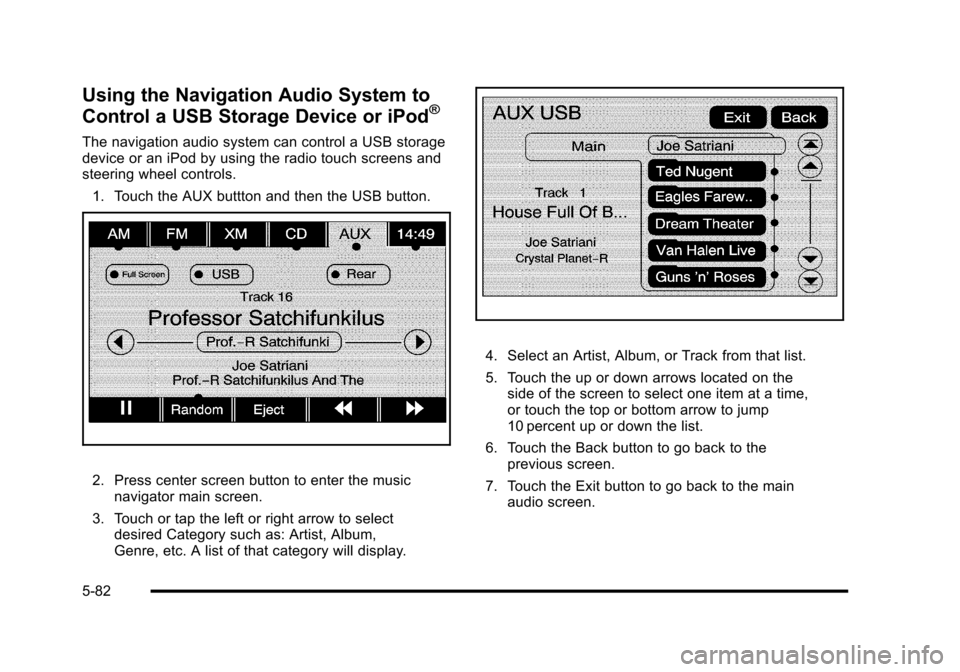
Using the Navigation Audio System to
Control a USB Storage Device or iPod®
The navigation audio system can control a USB storagedevice or an iPod by using the radio touch screens andsteering wheel controls.
1. Touch the AUX buttton and then the USB button.
2. Press center screen button to enter the musicnavigator main screen.
3. Touch or tap the left or right arrow to selectdesired Category such as: Artist, Album,Genre, etc. A list of that category will display.
4. Select an Artist, Album, or Track from that list.
5. Touch the up or down arrows located on theside of the screen to select one item at a time,or touch the top or bottom arrow to jump10 percent up or down the list.
6. Touch the Back button to go back to theprevious screen.
7. Touch the Exit button to go back to the mainaudio screen.
5-82
Page 386 of 616

3. For the second row display select the Rear AUXscreen button next to Rear Display 1 and for thethird row display select the Rear AUX screenbutton next to Rear Display 2. Each screen worksindependently of the other. The second row screencan watch a DVD while the third row screen canuse the auxiliary device.
The rear seat passengers can also use the remotecontrol to change the functions of the RSE. SeeRearSeat Entertainment (RSE) System (Overhead)onpage 4!77orRear Seat Entertainment (RSE) System(Headrest DVD)on page 4!86for more information.
Voice Recognition
The navigation system's voice recognition allowsfor hands-free operation of the navigation system,audio system, and OnStar®features. The DVD mapdisc must be installed in the navigation system for voicerecognition to work. See“Installing the DVD Map Disc”underMapson page 5!14for more information.
Voice recognition can be used when the ignition is onor when Retained Accessory Power (RAP) is active.See“Retained Accessory Power (RAP)”in the Index ofyour vehicle's owner manual for more information.
To use voice recognition, do the following:
1. Push and hold theSRCE button on thesteering wheel untilyou hear a beep. Theaudio system mutes.
2. Clearly state one of the commands listed on thefollowing pages.
Helpful Hints for Stating Commands
.When a multiple command is available, choose thecommand that works best.
.Words that are in brackets are optional. Forexample, for the command Radio [band] [select]FM, stating Radio FM or Radio select FM are bothvalid commands.
5-86
Page 391 of 616

Section 6 Driving Your Vehicle
Your Driving, the Road, and the Vehicle. . . . . . . . . . 6-2Defensive Driving . . . . . . . . . . . . . . . . . . . . . . . . . . . . . . . 6-2Drunk Driving . . . . . . . . . . . . . . . . . . . . . . . . . . . . . . . . . . . 6-2Control of a Vehicle . . . . . . . . . . . . . . . . . . . . . . . . . . . . . 6-3Braking . . . . . . . . . . . . . . . . . . . . . . . . . . . . . . . . . . . . . . . . . 6-4Antilock Brake System (ABS) . . . . . . . . . . . . . . . . . . . 6-5Braking in Emergencies . . . . . . . . . . . . . . . . . . . . . . . . . 6-6StabiliTrak®System . . . . . . . . . . . . . . . . . . . . . . . . . . . . . 6-6Magnetic Ride Control™. . . . . . . . . . . . . . . . . . . . . . . . 6-9Road Sensing Suspension . . . . . . . . . . . . . . . . . . . . . . 6-9Locking Rear Axle . . . . . . . . . . . . . . . . . . . . . . . . . . . . . . 6-9All-Wheel Drive (AWD) System . . . . . . . . . . . . . . . . . 6-9Steering . . . . . . . . . . . . . . . . . . . . . . . . . . . . . . . . . . . . . . . 6-10Off-Road Recovery . . . . . . . . . . . . . . . . . . . . . . . . . . . . . 6-11Passing . . . . . . . . . . . . . . . . . . . . . . . . . . . . . . . . . . . . . . . . 6-12Loss of Control . . . . . . . . . . . . . . . . . . . . . . . . . . . . . . . . 6-12Off-Road Driving . . . . . . . . . . . . . . . . . . . . . . . . . . . . . . . 6-13
Driving at Night . . . . . . . . . . . . . . . . . . . . . . . . . . . . . . . . 6-24Driving in Rain and on Wet Roads . . . . . . . . . . . . . 6-25Before Leaving on a Long Trip . . . . . . . . . . . . . . . . . 6-26Highway Hypnosis . . . . . . . . . . . . . . . . . . . . . . . . . . . . . 6-26Hill and Mountain Roads . . . . . . . . . . . . . . . . . . . . . . . 6-27Winter Driving . . . . . . . . . . . . . . . . . . . . . . . . . . . . . . . . . 6-28If Your Vehicle is Stuck in Sand, Mud, Ice,or Snow . . . . . . . . . . . . . . . . . . . . . . . . . . . . . . . . . . . . . 6-30Rocking Your Vehicle to Get It Out . . . . . . . . . . . . . 6-30Recovery Hooks . . . . . . . . . . . . . . . . . . . . . . . . . . . . . . . 6-31Loading the Vehicle . . . . . . . . . . . . . . . . . . . . . . . . . . . . 6-32
Towing. . . . . . . . . . . . . . . . . . . . . . . . . . . . . . . . . . . . . . . . . . . . 6-38Towing Your Vehicle . . . . . . . . . . . . . . . . . . . . . . . . . . . 6-38Recreational Vehicle Towing . . . . . . . . . . . . . . . . . . . 6-38Level Control . . . . . . . . . . . . . . . . . . . . . . . . . . . . . . . . . . 6-41Autoride®. . . . . . . . . . . . . . . . . . . . . . . . . . . . . . . . . . . . . . 6-42Towing a Trailer . . . . . . . . . . . . . . . . . . . . . . . . . . . . . . . . 6-42Trailer Recommendations . . . . . . . . . . . . . . . . . . . . . . 6-55
6-1
Page 397 of 616

If the system fails to turn on or activate, the StabiliTraklight along with one of the following messages will bedisplayed on the Driver Information Center (DIC):TRACTION CONTROL OFF, SERVICE TRACTIONCONTROL, STABILITRAK OFF, SERVICESTABILITRAK. If these DIC messages appear, makesure the StabiliTrak system has not been turned offusing the StabiliTrak on/off button. Then turn thesteering wheel clockwise from the nine o'clock positionto the three o'clock position. If this clears themessage(s), the vehicle does not need servicing.If this does not clear the message(s), then turn thevehicle off, wait 15 seconds, and then turn it back onagain to reset the system. If any of these messagesstill appear on the Driver Information Center (DIC), thevehicle should be taken in for service. For moreinformation on the DIC messages, seeDriverInformation Center (DIC) on page 4!41.
The StabiliTrak light willflash on the instrumentpanel cluster when thesystem is both onand activated.
The system may be heard or felt while it is working; thisis normal.
The traction controldisable button is locatedon the instrument panelbelow the climatecontrols.
The traction control part of StabiliTrak can be turnedoff by pressing and releasing the StabiliTrak button ifboth systems (traction control and StabiliTrak) werepreviously on. To disable both traction control andStabiliTrak, press and hold the button for five seconds.
Traction control and StabiliTrak can be turned on bypressing and releasing the StabiliTrak button if notautomatically shut off for any other reason.
When the TCS or StabiliTrak system is turned off,the StabiliTrak light and the appropriate TCS off orStabiliTrak off message will be displayed on the DIC towarn the driver. The vehicle will still have brake-tractioncontrol when traction control is off, but will not be ableto use the engine speed management system. See“Traction Control Operation”next for more information.
When the traction control system has been turned off,system noises may still be heard as a result of thebrake-traction control coming on.
6-7
Page 399 of 616

Magnetic Ride Control™
The vehicle may have the MagneRide control system.MagneRide constantly checks speed, wheel position,lift/dive and steering of the vehicle. The damping forcefor each shock absorber and adjustment level is chosenfor the best ride and handling.
MagneRide also works with the tow/haul switch that,when engaged, will provide more firmness from theshock absorbers. This added control gives better rideand handling when carrying heavy loads or towinga trailer. SeeTow/Haul Modeon page 3!36formore information.
Road Sensing Suspension
The Road Sensing Suspension (RSS) feature providessuperior vehicle ride and handling under a variety ofpassenger and loading conditions.
The system is fully automatic and uses a computercontroller to continuously monitor vehicle speed, wheelto body position, lift/dive and steering position of thevehicle. The controller then sends signals to each shockabsorber to independently adjust the damping level toprovide the optimum vehicle ride.
RSS also interacts with the tow/haul mode that, whenengaged, will provide additional control of the shockabsorbers. This additional control results in better rideand handling characteristics when the vehicle is loadedor towing a trailer. See“Tow/Haul Mode”underTowing aTrailer on page 6!42.
Locking Rear Axle
Vehicles with a locking rear axle can give more tractionon snow, mud, ice, sand or gravel. It works like astandard axle most of the time, but when traction is low,this feature will allow the rear wheel with the mosttraction to move the vehicle.
All-Wheel Drive (AWD) System
If the vehicle has this feature, engine power is sent toall four wheels when extra traction is needed. This islike four-wheel drive, but there is no separate lever orswitch to engage or disengage the front axle. It is fullyautomatic, and adjusts itself as needed for roadconditions.
If the vehicle is a Two-mode Hybrid, see“Four-WheelDrive”in the Two-mode Hybrid Supplement.
6-9
Page 400 of 616

Steering
Power Steering
If the vehicle is a Two!mode Hybrid, see the Two!modeHybrid manual for more information.
If power steering assist is lost because the engine stopsor the system is not functioning, the vehicle can besteered but it will take more effort.
Steering Tips
It is important to take curves at a reasonable speed.
Traction in a curve depends on the condition of the tiresand the road surface, the angle at which the curve isbanked, and vehicle speed. While in a curve, speed isthe one factor that can be controlled.
If there is a need to reduce speed, do it before enteringthe curve, while the front wheels are straight.
Try to adjust the speed so you can drive through thecurve. Maintain a reasonable, steady speed. Wait toaccelerate until out of the curve, and then accelerategently into the straightaway.
Steering in Emergencies
There are times when steering can be more effectivethan braking. For example, you come over a hill andfind a truck stopped in your lane, or a car suddenly pullsout from nowhere, or a child darts out from betweenparked cars and stops right in front of you. Theseproblems can be avoided by braking—if you can stopin time. But sometimes you cannot stop in time becausethere is no room. That is the time for evasiveaction—steering around the problem.
The vehicle can perform very well in emergencieslike these. First, apply the brakes. SeeBrakingonp a g e 6!4. It is better to remove as much speed aspossible from a collision. Then steer around theproblem, to the left or right depending on thespace available.
6-10
Page 401 of 616

An emergency like this requires close attention and aquick decision. If holding the steering wheel at therecommended 9 and 3 o'clock positions, it can beturned a full 180 degrees very quickly without removingeither hand. But you have to act fast, steer quickly, andjust as quickly straighten the wheel once you haveavoided the object.
The fact that such emergency situations are alwayspossible is a good reason to practice defensive drivingat all times and wear safety belts properly.
Off-Road Recovery
The vehicle's right wheels can drop off the edge of aroad onto the shoulder while driving.
If the level of the shoulder is only slightly below thepavement, recovery should be fairly easy. Ease off theaccelerator and then, if there is nothing in the way, steerso that the vehicle straddles the edge of the pavement.Turn the steering wheel 8 to 13 cm (3 to 5 inches),about one-eighth turn, until the right front tire contactsthe pavement edge. Then turn the steering wheel to gostraight down the roadway.
6-11
Page 402 of 616

Passing
Passing another vehicle on a two-lane road can bedangerous. To reduce the risk of danger while passing:
.Look down the road, to the sides, and tocrossroads for situations that might affect asuccessful pass. If in doubt, wait.
.Watch for traffic signs, pavement markings, andlines that could indicate a turn or an intersection.Never cross a solid or double!solid line on yourside of the lane.
.Do not get too close to the vehicle you wantto pass. Doing so can reduce your visibility.
.Wait your turn to pass a slow vehicle.
.When you are being passed, ease to the right.
Loss of Control
Let us review what driving experts say about whathappens when the three control systems—brakes,steering, and acceleration—do not have enoughfriction where the tires meet the road to do what thedriver has asked.
In any emergency, do not give up. Keep trying tosteer and constantly seek an escape route or areaof less danger.
Skidding
In a skid, a driver can lose control of the vehicle.Defensive drivers avoid most skids by takingreasonable care suited to existing conditions, andby not overdriving those conditions. But skids arealways possible.
The three types of skids correspond to the vehicle'sthree control systems. In the braking skid, the wheelsare not rolling. In the steering or cornering skid, toomuch speed or steering in a curve causes tires to slipand lose cornering force. And in the acceleration skid,too much throttle causes the driving wheels to spin.
Remember: Any traction control system helps avoidonly the acceleration skid. If the traction control systemis off, then an acceleration skid is best handled byeasing your foot off the accelerator pedal.
If the vehicle starts to slide, ease your foot off theaccelerator pedal and quickly steer the way you wantthe vehicle to go. If you start steering quickly enough,the vehicle may straighten out. Always be ready for asecond skid if it occurs.
Of course, traction is reduced when water, snow, ice,gravel, or other material is on the road. For safety, slowdown and adjust your driving to these conditions. It isimportant to slow down on slippery surfaces becausestopping distance will be longer and vehicle controlmore limited.
6-12