2010 CADILLAC ESCALADE ESV change wheel
[x] Cancel search: change wheelPage 298 of 620
Black plate (106,1)Cadillac Escalade/Escalade ESV Owner Manual - 2010
PROG (Program): Press this button to go to the next
preset radio station or channel set on the main radio.
This function is inactive, with some radios, if the front
seat passengers are listening to the radio.
When a CD or DVD audio disc is playing, press this
button to go to the beginning of the CD or DVD audio.
This function is inactive, with some radios, if the front
seat passengers are listening to the disc.
When a disc is playing in the CD or DVD changer, press
this button to select the next disc, if multiple discs are
loaded. This function is inactive, with some radios, if the
front seat passengers are listening to the disc.
When a DVD video menu is being displayed, press the
PROG button to perform the menu function, enter.
Theft-Deterrent Feature THEFTLOCK ®
is designed to discourage theft of the
vehicle's radio by learning a portion of the Vehicle
Identification Number (VIN). The radio does not operate
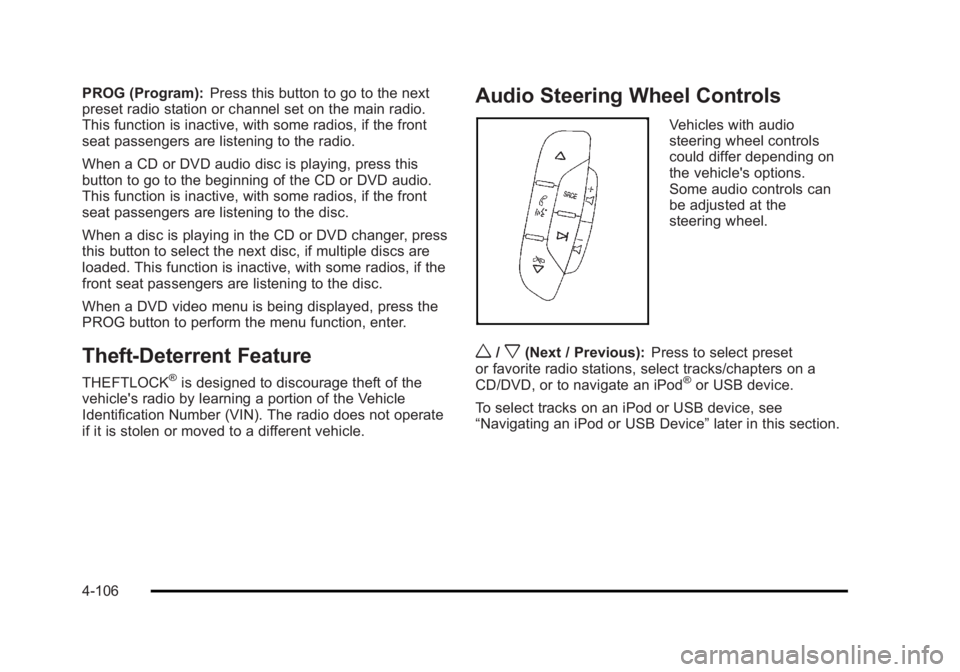
if it is stolen or moved to a different vehicle. Audio Steering Wheel Controls Vehicles with audio
steering wheel controls
could differ depending on
the vehicle's options.
Some audio controls can
be adjusted at the
steering wheel.
w /
x (Next / Previous): Press to select preset
or favorite radio stations, select tracks/chapters on a
CD/DVD, or to navigate an iPod ®
or USB device.
To select tracks on an iPod or USB device, see
“ Navigating an iPod or USB Device ” later in this section.
4-106
Page 388 of 620

Black plate (86,1)Cadillac Escalade/Escalade ESV Owner Manual - 2010
3. For the second row display select the Rear AUX
screen button next to Rear Display 1 and for the
third row display select the Rear AUX screen
button next to Rear Display 2. Each screen works
independently of the other. The second row screen
can watch a DVD while the third row screen can
use the auxiliary device.
The rear seat passengers can also use the remote
control to change the functions of the RSE. See Rear
Seat Entertainment (RSE) System (Overhead)
on
page 4 ‑ 78 or Rear Seat Entertainment (RSE) System
(Headrest DVD) on page 4 ‑ 87 for more information.
Voice Recognition The navigation system's voice recognition allows for
hands-free operation of the navigation system, audio
system, and OnStar ®
features. The DVD map disc
must be installed in the navigation system for voice
recognition to work. See “ Installing the DVD Map Disc ”
under Maps
on page 5 ‑ 14 for more information.
Voice recognition can be used when the ignition is on or
when Retained Accessory Power (RAP) is active. See
“ Retained Accessory Power (RAP) ” in the Index of your
vehicle's owner manual for more information. To use voice recognition, do the following:
1. Push and hold the
SRCE button on the
steering wheel until
you hear a beep. The
audio system mutes.
2. Clearly state one of the commands listed on the
following pages.
Helpful Hints for Stating Commands .
When a multiple command is available, choose the
command that works best. .
Words that are in brackets are optional. For
example, for the command Radio [band] [select]
FM, stating Radio FM or Radio select FM are both
valid commands.
5-86
Page 397 of 620

Black plate (5,1)Cadillac Escalade/Escalade ESV Owner Manual - 2010
Antilock Brake System (ABS) This vehicle has the Antilock Brake System (ABS), an
advanced electronic braking system that helps prevent
a braking skid.
When the engine is started and the vehicle begins to
drive away, ABS checks itself. A momentary motor or
clicking noise might be heard while this test is going on.
This is normal.
If there is a problem with
ABS, this warning light
stays on. See Antilock
Brake System (ABS)
Warning Light on
page 4 ‑ 34 .
Along with ABS, the vehicle has a Dynamic Rear
Proportioning (DRP) system. If there is a DRP problem,
both the brake and ABS warning lights come on
accompanied by a 10 ‐ second chime. The lights and
chime will come on each time the ignition is turned on
until the problem is repaired. See your dealer for
service. Let us say the road is wet and you are driving safely.
Suddenly, an animal jumps out in front of you. You slam
on the brakes and continue braking. Here is what
happens with ABS:
A computer senses that the wheels are slowing down.
If one of the wheels is about to stop rolling, the
computer will separately work the brakes at each front
wheel and at both rear wheels.
ABS can change the brake pressure to each wheel, as
required, faster than any driver could. This can help the
driver steer around the obstacle while braking hard.
As the brakes are applied, the computer keeps
receiving updates on wheel speed and controls braking
pressure accordingly.
Remember: ABS does not change the time needed to
get a foot up to the brake pedal or always decrease
stopping distance. If you get too close to the vehicle in
front of you, there will not be enough time to apply the
brakes if that vehicle suddenly slows or stops. Always
leave enough room up ahead to stop, even with ABS.
6-5
Page 405 of 620

Black plate (13,1)Cadillac Escalade/Escalade ESV Owner Manual - 2010
While driving on a surface with reduced traction, try
your best to avoid sudden steering, acceleration,
or braking, including reducing vehicle speed by shifting
to a lower gear. Any sudden changes could cause the
tires to slide. You may not realize the surface is slippery
until the vehicle is skidding. Learn to recognize warning
clues — such as enough water, ice, or packed snow on
the road to make a mirrored surface — and slow down
when you have any doubt.
Remember: Antilock brakes help avoid only the
braking skid.
Off-Road Driving Vehicles with all ‐ wheel drive can be used for off ‐ road
driving. Vehicles without all ‐ wheel drive and vehicles
with 22 ‐ inch tire/wheel assemblies should not be driven
off-road except on a level, solid surface.
Many of the vehicle design features that help make the
vehicle more responsive on paved roads during poor
weather conditions also help make it better suited for
off ‐ road use than conventional passenger vehicles. The
vehicle does not have features usually thought to be
necessary for extended or severe off ‐ road use such as
special underbody shielding and transfer case low gear
range. The airbag system is designed to work properly under a
wide range of conditions, including off ‐ road usage.
Always wear your safety belt and observe safe driving
speeds, especially on rough terrain.
Drinking and driving can be very dangerous on any
road and this is certainly true for off-road driving. At the
very time you need special alertness and driving skills,
your reflexes, perceptions, and judgment can be
affected by even a small amount of alcohol. You could
have a serious — or even fatal — accident if you drink
and drive or ride with a driver who has been drinking.
Off-roading can be great fun but has some definite
hazards. The greatest of these is the terrain itself. When
off-road driving, traffic lanes are not marked, curves are
not banked, and there are no road signs. Surfaces can
be slippery, rough, uphill, or downhill.
Avoid sharp turns and abrupt maneuvers. Failure to
operate the vehicle correctly off ‐ road could result in loss
of vehicle control or vehicle rollover.
Off-roading involves some new skills. That is why it is
very important that you read these driving tips and
suggestions to help make off-road driving safer and
more enjoyable.
6-13
Page 409 of 620

Black plate (17,1)Cadillac Escalade/Escalade ESV Owner Manual - 2010
{ WARNING: When you are driving off-road, bouncing and
quick changes in direction can easily throw you
out of position. This could cause you to lose
control and crash. So, whether you are driving on
or off the road, you and your passengers should
wear safety belts.
Scanning the Terrain Off-road driving can take you over many different kinds
of terrain. Be familiar with the terrain and its many
different features.
Surface Conditions: Off-roading surfaces can be
hard-packed dirt, gravel, rocks, grass, sand, mud, snow,
or ice. Each of these surfaces affects the vehicle's
steering, acceleration, and braking in different ways.
Depending on the surface, slipping, sliding, wheel
spinning, delayed acceleration, poor traction, and longer
braking distances can occur.
Surface Obstacles: Unseen or hidden obstacles can
be hazardous. A rock, log, hole, rut, or bump can startle
you if you are not prepared for them. Often these
obstacles are hidden by grass, bushes, snow, or even
the rise and fall of the terrain itself. Some things to consider: .
Is the path ahead clear? .
Will the surface texture change abruptly up ahead? .
Does the travel take you uphill or downhill? .
Will you have to stop suddenly or change direction
quickly?
When driving over obstacles or rough terrain, keep a
firm grip on the steering wheel. Ruts, troughs, or other
surface features can jerk the wheel out of your hands.
When driving over bumps, rocks, or other obstacles, the
wheels can leave the ground. If this happens, even with
one or two wheels, you cannot control the vehicle as
well or at all.
Because you will be on an unpaved surface, it is
especially important to avoid sudden acceleration,
sudden turns, or sudden braking.
Off-roading requires a different kind of alertness from
driving on paved roads and highways. There are no
road signs, posted speed limits, or signal lights. Use
good judgment about what is safe and what is not.
6-17
Page 415 of 620

Black plate (23,1)Cadillac Escalade/Escalade ESV Owner Manual - 2010
Stalling on an Incline
{ WARNING: Getting out on the downhill (low) side of a vehicle
stopped across an incline is dangerous. If the
vehicle rolls over, you could be crushed or killed.
Always get out on the uphill (high) side of the
vehicle and stay well clear of the rollover path.
If the vehicle stalls when crossing an incline, be sure
you, and any passengers, get out on the uphill side,
even if the door there is harder to open. If you get out
on the downhill side and the vehicle starts to roll over,
you will be right in its path.
If you have to walk down the slope, stay out of the path
the vehicle will take if it does roll over.
Driving in Mud, Sand, Snow, or Ice When you drive in mud, snow, or sand, the wheels do
not get good traction. Acceleration is not as quick,
turning is more difficult, and braking distances are
longer.
It is best to use a low gear when in mud — the deeper
the mud, the lower the gear. In really deep mud, keep
the vehicle moving so it does not get stuck. When driving on sand, wheel traction changes. On
loosely packed sand, such as on beaches or sand
dunes, the tires will tend to sink into the sand. This
affects steering, accelerating, and braking. Drive at a
reduced speed and avoid sharp turns or abrupt
maneuvers.
Hard packed snow and ice offer the worst tire traction.
On these surfaces, it is very easy to lose control. On
wet ice, for example, the traction is so poor that you will
have difficulty accelerating. And, if the vehicle does get
moving, poor steering and difficult braking can cause it
to slide out of control.
{ WARNING: Driving on frozen lakes, ponds, or rivers can be
dangerous. Underwater springs, currents under
the ice, or sudden thaws can weaken the ice. Your
vehicle could fall through the ice and you and your
passengers could drown. Drive your vehicle on
safe surfaces only.
6-23
Page 520 of 620

Black plate (72,1)Cadillac Escalade/Escalade ESV Owner Manual - 2010
Any time you notice unusual wear, rotate your
tires as soon as possible and check wheel
alignment. Also check for damaged tires or
wheels. See When It Is Time for New Tires
on
page 7 ‑ 73
and Wheel Replacement on page 7 ‑ 77 .
When rotating your vehicle's tires, always use the
correct rotation pattern shown here.
Do not include the spare tire in the tire rotation.
After the tires have been rotated, adjust the front
and rear inflation pressures as shown on the Tire
and Loading Information label. See Inflation - Tire
Pressure
on page 7 ‑ 65 and Loading the Vehicle on
page 6 ‑ 32
. Reset the Tire Pressure Monitor System. See Tire
Pressure Monitor Operation
on page 7 ‑ 68 .
Make certain that all wheel nuts are properly
tightened. See “ Wheel Nut Torque ” under
Capacities and Specifications
on page 7 ‑ 117 .
{ WARNING: Rust or dirt on a wheel, or on the parts to
which it is fastened, can make wheel nuts
become loose after time. The wheel could
come off and cause an accident. When you
change a wheel, remove any rust or dirt
from places where the wheel attaches to
the vehicle. In an emergency, you can use
a cloth or a paper towel to do this; but be
sure to use a scraper or wire brush later,
if needed, to get all the rust or dirt off. See
Changing a Flat Tire
on page 7 ‑ 80 .
Make sure the spare tire is stored securely. Push,
pull, and then try to rotate or turn the tire. If it
moves, tighten the cable. See Storing a Flat or
Spare Tire and Tools
on page 7 ‑ 94 .
7-72
Page 527 of 620

Black plate (79,1)Cadillac Escalade/Escalade ESV Owner Manual - 2010
WARNING: (Continued) vehicle and tire size combination and road
conditions. Follow that manufacturer's
instructions. To help avoid damage to the vehicle,
drive slowly, re ‐ adjust or remove the device if it is
contacting the vehicle, and do not spin the
wheels. If you do find traction devices that will fit,
install them on the rear tires.
If a Tire Goes Flat It is unusual for a tire to blowout while you are driving,
especially if you maintain your vehicle's tires properly.
If air goes out of a tire, it is much more likely to leak out
slowly. But if you should ever have a blowout, here are
a few tips about what to expect and what to do:
If a front tire fails, the flat tire creates a drag that pulls
the vehicle toward that side. Take your foot off the
accelerator pedal and grip the steering wheel firmly.
Steer to maintain lane position, and then gently brake to
a stop well out of the traffic lane. A rear blowout, particularly on a curve, acts much like a
skid and may require the same correction you would
use in a skid. In any rear blowout remove your foot from
the accelerator pedal. Get the vehicle under control by
steering the way you want the vehicle to go. It may be
very bumpy and noisy, but you can still steer. Gently
brake to a stop, well off the road if possible.
{ WARNING: Lifting a vehicle and getting under it to do
maintenance or repairs is dangerous without the
appropriate safety equipment and training. If a
jack is provided with the vehicle, it is designed
only for changing a flat tire. If it is used for
anything else, you or others could be badly
injured or killed if the vehicle slips off the jack. If a
jack is provided with the vehicle, only use it for
changing a flat tire.
If a tire goes flat, the next part shows how to use the
jacking equipment to change a flat tire safely.
7-79