2010 BUICK LUCERNE cruise control
[x] Cancel search: cruise controlPage 170 of 474

Setting Cruise Control
The cruise control light on the instrument panel cluster
comes on after the cruise control has been set to the
desired speed. SeeInstrument Panel Cluster
on
page 4‑30.
{WARNING:
If you leave your cruise control on when you are
not using cruise, you might hit a button and go
into cruise when you do not want to. You could be
startled and even lose control. Keep the cruise
control switch off until you want to use cruise
control.
1. Press the
Tbutton to turn the cruise system on.
2. Get up to the desired speed.
3. Press and release the SET– button located on the
steering wheel.
4. Take your foot off the accelerator.
Resuming a Set Speed
If cruise control is set at a desired speed and then the
brakes are applied, the cruise control is disengaged
without erasing the set speed from memory.
Once the vehicle speed is 40 km/h (25 mph) or greater,
press the +RES button on the steering wheel. The
vehicle returns to the previously selected speed and
stays there.
Increasing Speed While Using Cruise
Control
If the cruise control system is already activated,
.Press and hold the +RES button on the steering
wheel until the desired speed is reached, then
release it.
.To increase vehicle speed in small increments,
press the +RES button. Each time this is done, the
vehicle goes about 1.6 km/h (1 mph) faster.
4-10
Page 171 of 474

Reducing Speed While Using Cruise
Control
If the cruise control system is already activated,
.Press and hold the SET–button on the steering
wheel until the lower speed desired is reached,
then release it.
.To slow down in small amounts, press the SET–
button briefly. Each time this is done, the vehicle
goes about 1.6 km/h (1 mph) slower.
Passing Another Vehicle While Using
Cruise Control
Use the accelerator pedal to increase vehicle speed.
When you take your foot off the pedal, the vehicle will
slow down to the cruise speed you set earlier.
Using Cruise Control on Hills
How well the cruise control will work on hills depends
upon the vehicle speed, load and the steepness of the
hills. When going up steep hills, you might have to step
on the accelerator pedal to maintain your speed. When
going downhill, you might have to brake or shift to a
lower gear to keep your speed down. If the brakes are
applied the cruise control will turn off.
Ending Cruise Control
There are three ways to end cruise control:
.To disengage cruise control, step lightly on the
brake pedal, or
.Press the[button on the steering wheel.
.To turn off the cruise control, press theTbutton
on the steering wheel.
4-11
Page 172 of 474

Erasing Speed Memory
The cruise control set speed memory is erased from
memory by pressing
Tor if the ignition is turned off.
Exterior Lamps
The exterior lamps
control is located on the
instrument panel to the
left of the steering wheel.
It controls the following systems:
.Headlamps
.Taillamps
.Parking Lamps
.License Plate Lamps
.Instrument Panel Lights
.Fog Lamps (If Equipped) The exterior lamps control has four positions:
O(Off):
Turn the control to this position to turn off the
exterior lamps.
AUTO (Automatic): Turn the control to this position
to automatically turn on the headlamps at normal
brightness, together with the following:
.Parking Lamps
.Instrument Panel Lights
; (Parking Lamps): Turn the control to this position to
turn on the parking lamps together with the following:
.Taillamps
.License Plate Lamps
.Instrument Panel Lights
2 (Headlamps): Turn the control to this position to turn
on the headlamps together with the following lamps
listed below. A warning chime sounds if the driver's door
is opened while the ignition switch is off and the
headlamps are on.
.Parking Lamps
.License Plate Lamps
.Instrument Panel Lights
# (Fog Lamps): Push the exterior lamps control in to
turn on the fog lamps.
See Fog Lamps on page 4‑14.
4-12
Page 205 of 474
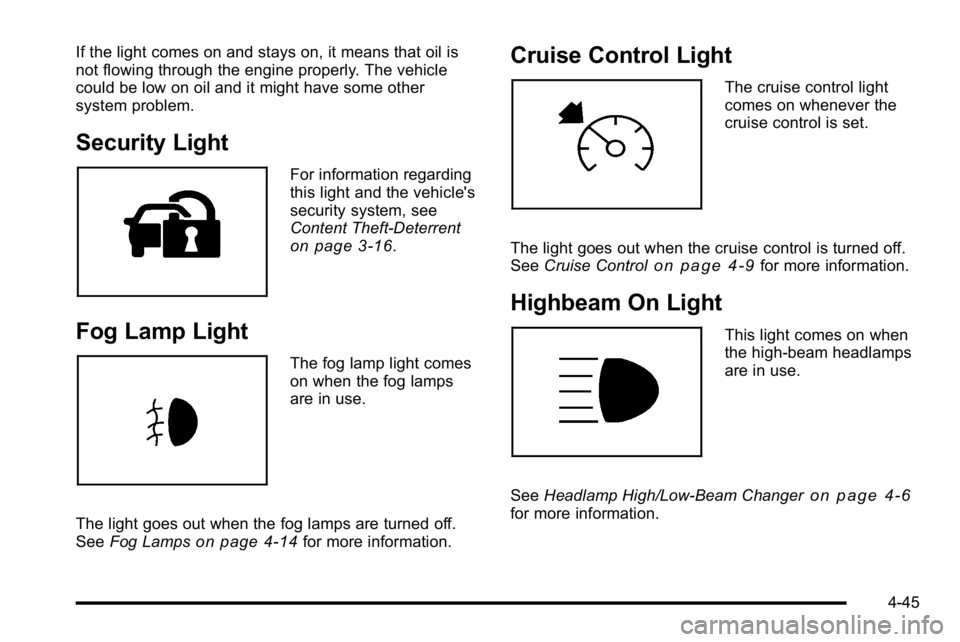
If the light comes on and stays on, it means that oil is
not flowing through the engine properly. The vehicle
could be low on oil and it might have some other
system problem.
Security Light
For information regarding
this light and the vehicle's
security system, see
Content Theft-Deterrent
on page 3‑16.
Fog Lamp Light
The fog lamp light comes
on when the fog lamps
are in use.
The light goes out when the fog lamps are turned off.
See Fog Lamps
on page 4‑14for more information.
Cruise Control Light
The cruise control light
comes on whenever the
cruise control is set.
The light goes out when the cruise control is turned off.
See Cruise Control
on page 4‑9for more information.
Highbeam On Light
This light comes on when
the high-beam headlamps
are in use.
See Headlamp High/Low-Beam Changer
on page 4‑6for more information.
4-45
Page 275 of 474

The TCS and StabiliTrak®
light will flash when the
system is limiting
wheel spin.
The system may be heard or felt while it is working, but
this is normal. See Traction Control System (TCS)
Warning Light
on page 4‑38for more information.
If the vehicle is in cruise control when TCS begins to
limit wheel spin, the cruise control will automatically
disengage. The cruise control may be re-engaged when
road conditions allow. See Cruise Control on page 4‑9.
The SERVICE TRACTION CONTROL message in the
DIC and the TCS/StabiliTrak warning light comes on if
there is a problem with the traction control system. See
DIC Warnings and Messages on page 4‑55.
When this light and the SERVICE TRACTION
CONTROL message are on, the system will not limit
wheel spin. Adjust your driving accordingly.
To turn the system off or
on, press and release this
button located in front of
the shift lever.
TCS automatically comes on whenever the vehicle is
started. To limit wheel spin, especially in slippery road
conditions, always leave the system turned on. TCS
can be turned off if needed.
The system can be turned on or off at any time by
pressing the TCS button. The DIC will display
TRACTION CONTROL OFF when the button is
pressed, and part of the traction control system is
disabled. The vehicle will still have brake-traction
control, but will not be able to use the engine speed
management system. System noises may be heard as
a result of the brake-traction control working. If the
controller detects excessive wheel spin in this mode,
the TCS/StabiliTrak light may blink.
5-7
Page 281 of 474

Hydroplaning
Hydroplaning is dangerous. Water can build up under
your vehicle's tires so they actually ride on the water.
This can happen if the road is wet enough and you are
going fast enough. When your vehicle is hydroplaning, it
has little or no contact with the road.
There is no hard and fast rule about hydroplaning. The
best advice is to slow down when the road is wet.
Other Rainy Weather Tips
Besides slowing down, other wet weather driving tips
include:
.Allow extra following distance.
.Pass with caution.
.Keep windshield wiping equipment in good shape.
.Keep the windshield washer fluid reservoir filled.
.Have good tires with proper tread depth. SeeTireson page 6‑57.
.Turn off cruise control.
Before Leaving on a Long Trip
To prepare your vehicle for a long trip, consider having
it serviced by your dealer before departing.
Things to check on your own include:
.Windshield Washer Fluid:Reservoir full? Windows
clean —inside and outside?
.Wiper Blades: In good shape?
.Fuel, Engine Oil, Other Fluids: All levels checked?
.Lamps:Do they all work and are lenses clean?
.Tires:Are treads good? Are tires inflated to
recommended pressure?
.Weather and Maps: Safe to travel? Have
up-to-date maps?
5-13
Page 284 of 474

TheTraction Control System (TCS)on page 5‑6improves the ability to accelerate on slippery roads,
but slow down and adjust your driving to the road
conditions. When driving through deep snow, turn off
the traction control system to help maintain vehicle
motion at lower speeds.
TheAntilock Brake System (ABS)
on page 5‑4improves vehicle stability during hard stops on a
slippery roads, but apply the brakes sooner than when
on dry pavement.
Allow greater following distance on any slippery road
and watch for slippery spots. Icy patches can occur on
otherwise clear roads in shaded areas. The surface
of a curve or an overpass can remain icy when the
surrounding roads are clear. Avoid sudden steering
maneuvers and braking while on ice.
Turn off cruise control, if equipped, on slippery surfaces.
Blizzard Conditions
Being stuck in snow can be in a serious situation. Stay
with the vehicle unless there is help nearby. If possible,
use the Roadside Assistance Program
on page 8‑8.
To get help and keep everyone in the vehicle safe:
.Turn on the Hazard Warning Flasherson
page 4‑3.
.Tie a red cloth to an outside mirror.
{WARNING:
Snow can trap engine exhaust under the vehicle.
This may cause exhaust gases to get inside.
Engine exhaust contains carbon monoxide (CO)
which cannot be seen or smelled. It can cause
unconsciousness and even death.
If the vehicle is stuck in the snow:
.Clear away snow from around the base of
your vehicle, especially any that is blocking
the exhaust pipe.
.Check again from time to time to be sure
snow does not collect there.
(Continued)
5-16
Page 462 of 474

CoolantEngine . . . . . . . . . . . . . . . . . . . . . . . . . . . . . . . . . . . . . . 6-27, 6-31
Engine Temperature Gauge . . . . . . . . . . . . . . . . . . . . . . 4-40
Engine Temperature Warning Light . . . . . . . . . . . . . . . 4-40
Cooling System . . . . . . . . . . . . . . . . . . . . . . . . . . . . . . . . . . . . 6-26
Cornering Lamps . . . . . . . . . . . . . . . . . . . . . . . . . . . . . . . . . . 4-14
Courtesy Lamps . . . . . . . . . . . . . . . . . . . . . . . . . . . . . . . . . . . 4-15
Courtesy Transportation Program . . . . . . . . . . . . . . . . . . 8-11
Cruise Control . . . . . . . . . . . . . . . . . . . . . . . . . . . . . . . . . . . . . . .4-9 Light . . . . . . . . . . . . . . . . . . . . . . . . . . . . . . . . . . . . . . . . . . . . . . 4-45
Cupholders . . . . . . . . . . . . . . . . . . . . . . . . . . . . . . . . . . . . . . . . 3-51
Customer Assistance . . . . . . . . . . . . . . . . . . . . . . . . . . . . . . . .8-6
Offices . . . . . . . . . . . . . . . . . . . . . . . . . . . . . . . . . . . . . . . . . . . . . 8-6
Text Telephone (TTY) Users . . . . . . . . . . . . . . . . . . . . . . . 8-6
Customer Information Service Publications Ordering Information . . . . . . . . 8-17
Customer Satisfaction Procedure . . . . . . . . . . . . . . . . . . . .8-2
D
Damage Repair, Collision . . . . . . . . . . . . . . . . . . . . . . . . . . 8-13
Data Recorders, Event . . . . . . . . . . . . . . . . . . . . . . . . . . . . 8-19
Daytime Running Lamps (DRL) . . . . . . . . . . . . . . . . . . . . 4-13
Defensive Driving . . . . . . . . . . . . . . . . . . . . . . . . . . . . . . . . . . . .5-2
Delayed Entry Lighting . . . . . . . . . . . . . . . . . . . . . . . . . . . . 4-15
Delayed Exit Lighting . . . . . . . . . . . . . . . . . . . . . . . . . . . . . . 4-15
Delayed Locking . . . . . . . . . . . . . . . . . . . . . . . . . . . . . . . . . . . 3-10
DIC Compass . . . . . . . . . . . . . . . . . . . . . . . . . . . . . . . . . . . . . 4-53 Disc, MP3 . . . . . . . . . . . . . . . . . . . . . . . . . . . . . . . . . . . . . . . . . 4-87
Doing Your Own Service Work . . . . . . . . . . . . . . . . . . . . . . .6-4
Door
Delayed Locking . . . . . . . . . . . . . . . . . . . . . . . . . . . . . . . . . . 3-10
Locks . . . . . . . . . . . . . . . . . . . . . . . . . . . . . . . . . . . . . . . . . . . . . . 3-9
Power Locks . . . . . . . . . . . . . . . . . . . . . . . . . . . . . . . . . . . . . . 3-10
Programmable Automatic Door Locks . . . . . . . . . . . . 3-10
Rear Door Security Locks . . . . . . . . . . . . . . . . . . . . . . . . 3-11
Rear Seat Pass-Through . . . . . . . . . . . . . . . . . . . . . . . . . 2-12
Driver Information Center (DIC) . . . . . . . . . . . . . . . . . . . . 4-47 DIC Operation and Displays . . . . . . . . . . . . . . . . . . . . . . 4-47
DIC Vehicle Customization . . . . . . . . . . . . . . . . . . . . . . . 4-65
DIC Warnings and Messages . . . . . . . . . . . . . . . . . . . . . 4-55
Driving At Night . . . . . . . . . . . . . . . . . . . . . . . . . . . . . . . . . . . . . . . . . . . 5-12
Before a Long Trip . . . . . . . . . . . . . . . . . . . . . . . . . . . . . . . . 5-13
Defensive . . . . . . . . . . . . . . . . . . . . . . . . . . . . . . . . . . . . . . . . . . 5-2
Drunk . . . . . . . . . . . . . . . . . . . . . . . . . . . . . . . . . . . . . . . . . . . . . . 5-2
Highway Hypnosis . . . . . . . . . . . . . . . . . . . . . . . . . . . . . . . . 5-14
Hill and Mountain Roads . . . . . . . . . . . . . . . . . . . . . . . . . . 5-14
In Rain and on Wet Roads . . . . . . . . . . . . . . . . . . . . . . . . 5-12
Loss of Control . . . . . . . . . . . . . . . . . . . . . . . . . . . . . . . . . . . 5-10
Off-Road Recovery . . . . . . . . . . . . . . . . . . . . . . . . . . . . . . . 5-10
Rocking Your Vehicle to Get it Out . . . . . . . . . . . . . . . . 5-18
Winter . . . . . . . . . . . . . . . . . . . . . . . . . . . . . . . . . . . . . . . . . . . . 5-15
Driving for Better Fuel Economy . . . . . . . . . . . . . . . . . . . 1-23
Dual Automatic Climate Control System . . . . . . . . . . . 4-22
i - 4