2010 BUICK LACROSSE light
[x] Cancel search: lightPage 89 of 414

Instruments and Controls 4-1
Instruments and
Controls
Instrument Panel Overview
Instrument Panel Overview . . . . 4-4
Controls
Steering Wheel Adjustment . . . 4-6
Steering Wheel Controls . . . . . . 4-6
Heated Steering Wheel . . . . . . . 4-7
Horn . . . . . . . . . . . . . . . . . . . . . . . . . . 4-7
Windshield Wiper/Washer . . . . . 4-7
Compass . . . . . . . . . . . . . . . . . . . . . 4-8
Clock (Without DateDisplay) . . . . . . . . . . . . . . . . . . . . . 4-9
Clock (With Date Display) . . . . . 4-9
Power Outlets . . . . . . . . . . . . . . . 4-10
Warning Lights, Gages, and
Indicators
Warning Lights, Gages, and Indicators . . . . . . . . . . . . . . 4-12
Instrument Cluster . . . . . . . . . . . 4-13
Speedometer . . . . . . . . . . . . . . . . 4-14
Odometer . . . . . . . . . . . . . . . . . . . . 4-14
Tachometer . . . . . . . . . . . . . . . . . . 4-14
Fuel Gage . . . . . . . . . . . . . . . . . . . 4-14
Engine Coolant Temperature Gage . . . . . . . . . 4-15
Safety Belt Reminders . . . . . . . 4-15
Airbag Readiness Light . . . . . . 4-16
Passenger Airbag Status Indicator . . . . . . . . . . . . . . . . . . . . 4-16
Charging System Light . . . . . . 4-17
Malfunction Indicator Lamp . . . . . . . . . . . . . 4-17
Brake System Warning Light . . . . . . . . . . . . . . . . . . . . . . . 4-20 Electric Parking Brake
Light . . . . . . . . . . . . . . . . . . . . . . . 4-20
Antilock Brake System (ABS) Warning Light . . . . . . . . . . . . . . 4-21
Traction Off Light . . . . . . . . . . . . 4-22
Electronic Stability Control
(ESC) Indicator Light . . . . . . . 4-22
Electronic Stability Control (ESC)/Traction Control
System (TCS) Indicator/
Warning Light . . . . . . . . . . . . . . 4-22
Tire Pressure Light . . . . . . . . . . 4-23
Engine Oil Pressure Light . . . . 4-23
Low Fuel Warning Light . . . . . . 4-24
Security Light . . . . . . . . . . . . . . . . 4-24
High-Beam on Light . . . . . . . . . 4-24
Fog Lamp Light . . . . . . . . . . . . . . 4-24
Taillamp Indicator Light . . . . . . 4-25
Cruise Control Light . . . . . . . . . 4-25
Page 95 of 414

Instruments and Controls 4-7
Heated Steering Wheel
For vehicles with a heated steering
wheel, the button for this feature is
located on the climate control
system.
(:Press to turn the heated
steering wheel on or off. A light on
the button displays when the feature
is turned on.
The steering wheel takes about
three minutes to start heating.
Horn
Press near or on the horn symbols
on the steering wheel pad to sound
the horn.
Windshield Wiper/Washer
The windshield wiper lever is on the
side of the steering column. With
the ignition in ACC/ACCESSORY or
ON/RUN, move the windshield
wiper lever to select the wiper
speed.
2: Fast wipes.
1: Slow wipes.
&(Adjustable Interval Wipes):
Turn the band up for more frequent
wipes or down for less frequent
wipes.
9(Off): Turns the windshield
wipers off.
3(Mist): Single wipe, briefly
move the wiper lever down. Several
wipes, hold the wiper lever down.
Clear ice and snow from the wiper
blades before using them. If frozen
to the windshield, carefully loosen or
thaw them. Damaged wiper blades
should be replaced. See Wiper
Blade Replacement on page 9‑29.
Heavy snow or ice can overload the
wipers. A circuit breaker stops them
until the motor cools.
Page 97 of 414

Instruments and Controls 4-9
Clock (Without Date
Display)
The infotainment system controls
are used to access the time and
date settings through the menu
system. SeeOperation
on
page 6‑7for information about how
to use the menu system.
Setting the Time
1. Press the CONFIG button and select Time Settings, or press
the
Hbutton.
2. Select Set Time.
3. Turn the Menu knob to adjust the highlighted value.
4. Press the SELECT button to select the next value.
5. To save the time and return to the Time Settings menu, press
the
0BACK button at any time
or press the SELECT button
after adjusting the minutes.
Setting the 12/24 Hour Format
1. Press the CONFIG button and select Time Settings, or press
the
Hbutton.
2. Highlight 12/24 Hour Format.
3. Press the SELECT button to select the 12 hour or 24 hour
display format.
Clock (With Date Display)
The infotainment system controls
are used to access the time and
date settings through the menu
system. See Operation
on
page 6‑7for information about how
to use the menu system.
Setting the Time and Date
1. Press the CONFIG button and select Time and Date Settings,
or press the
Hbutton.
2. Select Set Time or Set Date. 3. Turn the Menu knob to adjust
the highlighted value.
4. Press the SELECT button to select the next value.
5. To save the time or date and return to the Time and Date
Settings menu, press
the
0BACK button at any
time or press the SELECT
button after adjusting the
minutes or year.
Setting the 12/24 Hour Format
1. Press the CONFIG button and select Time and Date Settings,
or press the
Hbutton.
2. Highlight Set Time Format.
3. Press the SELECT button to select the 12 hour or 24 hour
display format.
Page 98 of 414

4-10 Instruments and Controls
Setting the Month & Day
Format
1. Press the CONFIG button andselect Time and Date Settings,
or press the
Hbutton.
2. Highlight Set Date Format.
3. Press the SELECT button to select MM/DD/YY (month/day/
year) or DD/MM/YY (day/
month/year).
Setting the Auto Time Adjust
1. Press the CONFIG button andselect Time and Date Settings,
or press the
Hbutton.
2. Highlight Auto Time Adjust.
3. Press the SELECT button to turn Auto Time Adjust on or off.
4. Press the SELECT button to select Time Zone, and then
select the Time Zone.
5. Press the SELECT button to turn Daylight Savings on or off.
Power Outlets
The accessory power outlets can be
used to connect electrical
equipment, such as a cellular
phone.
There are two accessory power
outlets, one is located inside the
center console storage and other on
the rear of the center floor console.
Open the protective cover to use the
accessory power outlet.
Certain electrical accessories may
not be compatible with the
accessory power outlets and could
result in blown vehicle or adapter
fuses. If you experience a problem,
see your dealer/retailer for
additional information on the
accessory power outlet.
Notice: Adding any electrical
equipment to the vehicle can
damage it or keep other
components from working as
they should. The repairs would not be covered by the vehicle
warranty. Do not use equipment
exceeding maximum amperage
rating of 20 amperes. Check with
your dealer/retailer before adding
electrical equipment.
When adding electrical equipment,
be sure to follow the installation
instructions included with the
equipment.
Notice:
Improper use of the
power outlet can cause damage
not covered by the vehicle
warranty. Do not hang any type of
accessory or accessory bracket
from the plug because the power
outlets are designed for
accessory power plugs only.
Power Outlet 120 Volt Alternating
Current
The vehicle may have a power
outlet that can be used to plug in
electrical equipment that uses a
maximum limit of 150 watts.
Page 99 of 414

Instruments and Controls 4-11
The power outlet is located on the
rear of the center console.
An indicator light on the outlet turns
on to show it is in use. The light
comes on when the ignition is in
ON/RUN and equipment requiring
less than 150 watts is plugged into
the outlet, and no system fault is
detected.
The indicator light does not come on
when the ignition is in LOCK/OFF or
if no equipment is plugged into the
outlet.If you try to connect equipment
using more than 150 watts or a
system fault is detected, the
equipment may operate for a short
period and turn itself off.
A protection circuit shuts off the
power supply and the indicator light
turns off. To reset the circuit, unplug
the item and plug it back in or turn
the Remote Accessory Power (RAP)
off and then back on. See
Retained
Accessory Power (RAP)
on
page 8‑20. Prolonged usage of the
power outlet at the maximum load of
150 watts, may cause the outlet to
overheat and automatically
shutdown. The power restarts when
equipment that operates within the
limit is plugged into the outlet and a
system fault is not detected. The power outlet is not designed for
the following electrical equipment
and may not work properly if these
items are plugged into the power
outlet:
.Equipment with high initial peak
wattage such as:
compressor-driven refrigerators
and electric power tools.
.Other equipment requiring an
extremely stable power supply
such as:
microcomputer-controlled
electric blankets, touch sensor
lamps, etc.
Page 100 of 414

4-12 Instruments and Controls
Warning Lights,
Gages, and Indicators
Warning lights come on when there
could be a problem with a vehicle
function. Some warning lights come
on briefly when the engine is started
to indicate they are working.
Gages can indicate when there
could be a problem with a vehicle
function. Often gages and warning
lights work together to indicate a
problem with the vehicle.
When one of the warning lights
comes on and stays on while
driving, or when one of the gages
shows there may be a problem,
check the section that explains what
to do. Follow this manual's advice.
Waiting to do repairs can be costly
and even dangerous.
Page 102 of 414
4-14 Instruments and Controls
Speedometer
The speedometer shows the
vehicle's speed in both kilometers
per hour (km/h) and miles per
hour (mph).
Odometer
The odometer shows how far the
vehicle has been driven, in either
kilometers or miles.
This vehicle has a tamper-resistant
odometer. If the vehicle needs a
new odometer installed, the new
one is set to the mileage of the old
odometer. If this is not possible, it is
set at zero and a label is put on the
driver's door to show the old
mileage reading.
Tachometer
The tachometer displays the engine
speed in revolutions per
minute (rpm).
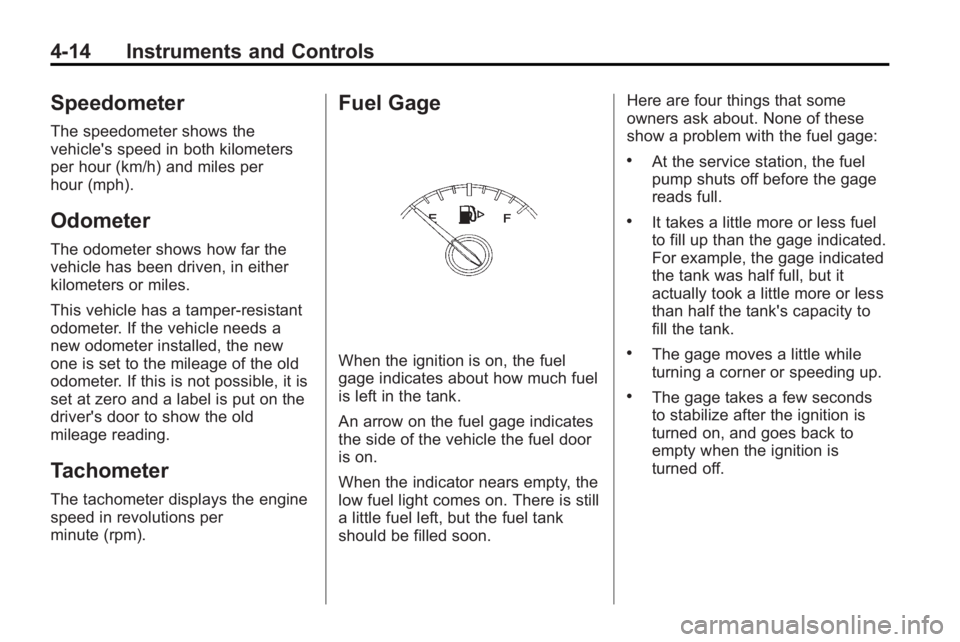
Fuel Gage
When the ignition is on, the fuel
gage indicates about how much fuel
is left in the tank.
An arrow on the fuel gage indicates
the side of the vehicle the fuel door
is on.
When the indicator nears empty, the
low fuel light comes on. There is still
a little fuel left, but the fuel tank
should be filled soon.Here are four things that some
owners ask about. None of these
show a problem with the fuel gage:
.At the service station, the fuel
pump shuts off before the gage
reads full.
.It takes a little more or less fuel
to fill up than the gage indicated.
For example, the gage indicated
the tank was half full, but it
actually took a little more or less
than half the tank's capacity to
fill the tank.
.The gage moves a little while
turning a corner or speeding up.
.The gage takes a few seconds
to stabilize after the ignition is
turned on, and goes back to
empty when the ignition is
turned off.
Page 103 of 414

Instruments and Controls 4-15
Engine Coolant
Temperature Gage
This gage shows the engine coolant
temperature.
If the gage pointer moves towards
the shaded area, the engine is
too hot.
This reading indicates the same
thing as the warning light. It means
that the engine coolant has
overheated. If the vehicle has been
operating under normal driving
conditions, pull off the road, stop thevehicle, and turn off the engine as
soon as possible. See
Engine
Overheating
on page 9‑20for more
information.
Safety Belt Reminders
Driver Safety Belt Reminder
Light
There is a driver safety belt
reminder light on the instrument
panel cluster.
When the vehicle is started this light
flashes and a chime may come on
to remind drivers to fasten their
safety belts. Then the light stays on
solid until the belt is buckled. This
cycle may continue several times if
the driver remains or becomes
unbuckled while the vehicle is
moving. If the driver safety belt is buckled,
neither the light nor chime come on.
Passenger Safety Belt
Reminder Light
When the vehicle is started this light
flashes and a chime comes on to
remind passengers to fasten their
safety belt. Then the light stays on
solid until the belt is buckled. This
cycle continues several times if the
passenger remains or becomes
unbuckled while the vehicle is
moving.
If the passenger safety belt is
buckled, neither the chime nor the
light comes on.
The front passenger safety belt
warning light and chime may turn on
if an object is put on the seat such
as a briefcase, handbag, grocery