2010 BUICK LACROSSE display
[x] Cancel search: displayPage 90 of 414

4-2 Instruments and Controls
Information Displays
Driver InformationCenter (DIC) . . . . . . . . . . . . . . . 4-25
Head-Up Display (HUD) . . . . . 4-28
Vehicle Messages
Vehicle Messages . . . . . . . . . . . 4-32
Battery Voltage and Charging Messages . . . . . . . . 4-33
Brake System Messages . . . . 4-33
Compass Messages . . . . . . . . . 4-33
Cruise Control Messages . . . . 4-34
Door Ajar Messages . . . . . . . . . 4-34
Engine Cooling System Messages . . . . . . . . . . . . . . . . . . 4-34
Engine Oil Messages . . . . . . . . 4-35
Engine Power Messages . . . . 4-35
Fuel System Messages . . . . . . 4-36
Key and Lock Messages . . . . . 4-36
Lamp Messages . . . . . . . . . . . . . 4-36 Ride Control System
Messages . . . . . . . . . . . . . . . . . . 4-36
Anti-Theft Alarm System Messages . . . . . . . . . . . . . . . . . . 4-37
Tire Messages . . . . . . . . . . . . . . . 4-37
Transmission Messages . . . . . 4-37
Window Messages . . . . . . . . . . . 4-38
Vehicle Personalization
Vehicle Personalization . . . . . . 4-38
OnStar System®
OnStar®System . . . . . . . . . . . . . 4-43
Universal Remote System
Universal Remote
System . . . . . . . . . . . . . . . . . . . . . 4-45
Universal Remote System Programming . . . . . . . . . . . . . . . 4-45
Universal Remote System Operation . . . . . . . . . . . . . . . . . . 4-48
Page 93 of 414

Instruments and Controls 4-5
A.Air Vents on page 7‑8.
B. Head-Up Display (HUD)
on
page 4‑28(If Equipped).
C. Turn and Lane-Change Lever. See Turn and Lane-Change
Signals
on page 5‑4. Driver
Information Center Buttons. See
Driver Information Center (DIC)
on page 4‑25.
D. Instrument Cluster
on
page 4‑13. Driver Information
Center Display. See Driver
Information Center (DIC)
on
page 4‑25.
E. Windshield Wiper/Washer
on
page 4‑7.
F. Info-Display.
G. AM-FM Radio on page 6‑12.
H. Exterior Lamp Controls
on
page 5‑1. Fog Lampson
page 5‑5(If Equipped).
Instrument Panel Illumination
Control on page 5‑5. I.
Front Storage on page 3‑1.
J. Cruise Control
on page 8‑37.
Heated Steering Wheelon
page 4‑7.
K. Steering Wheel Adjustment
on
page 4‑6.
L. Horn on page 4‑7.
M. Steering Wheel Controls
on
page 4‑6.
N. Ignition Positions (Key Access)
on page 8‑18orIgnition
Positions (Keyless Access)on
page 8‑19.
O. Heated and Ventilated Front
Seats on page 2‑8.
P. Automatic Climate Control
System
on page 7‑1orDual
Automatic Climate Control
System on page 7‑4.
Q. Power Door Locks
on
page 1‑10. Hazard Warning
Flasherson page 5‑4.
Passenger Sensing Systemon
page 2‑32. R.
Parking Brake on page 8‑32.
S. PRNDL. See Automatic
Transmission on page 8‑27.
T. Shift Lever. See Shifting Into
Park on page 8‑23.
U. Traction Control System (TCS)
on page 8‑34.Electronic
Stability Control (ESC)on
page 8‑35. Ultrasonic Parking
Assiston page 8‑40. Power
Rear Sunshade.
V. Glove Box on page 3‑1.
Page 95 of 414

Instruments and Controls 4-7
Heated Steering Wheel
For vehicles with a heated steering
wheel, the button for this feature is
located on the climate control
system.
(:Press to turn the heated
steering wheel on or off. A light on
the button displays when the feature
is turned on.
The steering wheel takes about
three minutes to start heating.
Horn
Press near or on the horn symbols
on the steering wheel pad to sound
the horn.
Windshield Wiper/Washer
The windshield wiper lever is on the
side of the steering column. With
the ignition in ACC/ACCESSORY or
ON/RUN, move the windshield
wiper lever to select the wiper
speed.
2: Fast wipes.
1: Slow wipes.
&(Adjustable Interval Wipes):
Turn the band up for more frequent
wipes or down for less frequent
wipes.
9(Off): Turns the windshield
wipers off.
3(Mist): Single wipe, briefly
move the wiper lever down. Several
wipes, hold the wiper lever down.
Clear ice and snow from the wiper
blades before using them. If frozen
to the windshield, carefully loosen or
thaw them. Damaged wiper blades
should be replaced. See Wiper
Blade Replacement on page 9‑29.
Heavy snow or ice can overload the
wipers. A circuit breaker stops them
until the motor cools.
Page 96 of 414

4-8 Instruments and Controls
Wipe Parking
If the ignition is turned LOCK/OFF
while the wipers are on 1, 2 or
&,
they will immediately stop.
If the windshield wiper lever is then
moved to OFF before the driver
door is opened or within 10 minutes,
the wipers will restart and move to
the base of the windshield.
If the ignition is turned to LOCK/
OFF while the wipers are performing
wipes due to windshield wash, the
wipers continue to run until they
reach the base of the windshield.
Windshield Washer
Pull the windshield wiper lever to
spray windshield washer fluid and
activate the wipers.
The wipers will continue until the
lever is released or the maximum
wash time is reached. When the windshield wiper lever is
released, additional wipes may
occur depending on how long the
windshield washer had been
activated. See
Washer Fluid
on
page 9‑23for information on filling
the windshield washer fluid
reservoir.
{WARNING
In freezing weather, do not use
your washer until the windshield
is warmed. Otherwise the washer
fluid can form ice on the
windshield, blocking your vision.
Compass
The vehicle may have a compass
display on the Driver Information
Center (DIC). The compass receives
its heading and other information
from Global Positioning
System (GPS) antenna, StabiliTrak,
and vehicle speed information. Avoid covering the GPS antenna for
long periods of time with objects
that may interfere with the antenna's
ability to receive a satellite signal.
See
Backglass Antenna
on
page 6‑19and Satellite Radio
Antennaon page 6‑19for the
location of the vehicle's antennas.
The compass system is designed to
operate for a certain number of
miles or degrees of turn before
needing a signal from the GPS
satellites. When the compass
display shows CAL, drive the
vehicle for a short distance in an
open area where it can receive a
GPS signal. The compass system
will automatically determine when
GPS signal is restored and provide
a heading again. See Compass
Messages
on page 4‑33for more
information on the messages that
may be displayed for the compass.
Page 97 of 414

Instruments and Controls 4-9
Clock (Without Date
Display)
The infotainment system controls
are used to access the time and
date settings through the menu
system. SeeOperation
on
page 6‑7for information about how
to use the menu system.
Setting the Time
1. Press the CONFIG button and select Time Settings, or press
the
Hbutton.
2. Select Set Time.
3. Turn the Menu knob to adjust the highlighted value.
4. Press the SELECT button to select the next value.
5. To save the time and return to the Time Settings menu, press
the
0BACK button at any time
or press the SELECT button
after adjusting the minutes.
Setting the 12/24 Hour Format
1. Press the CONFIG button and select Time Settings, or press
the
Hbutton.
2. Highlight 12/24 Hour Format.
3. Press the SELECT button to select the 12 hour or 24 hour
display format.
Clock (With Date Display)
The infotainment system controls
are used to access the time and
date settings through the menu
system. See Operation
on
page 6‑7for information about how
to use the menu system.
Setting the Time and Date
1. Press the CONFIG button and select Time and Date Settings,
or press the
Hbutton.
2. Select Set Time or Set Date. 3. Turn the Menu knob to adjust
the highlighted value.
4. Press the SELECT button to select the next value.
5. To save the time or date and return to the Time and Date
Settings menu, press
the
0BACK button at any
time or press the SELECT
button after adjusting the
minutes or year.
Setting the 12/24 Hour Format
1. Press the CONFIG button and select Time and Date Settings,
or press the
Hbutton.
2. Highlight Set Time Format.
3. Press the SELECT button to select the 12 hour or 24 hour
display format.
Page 102 of 414
4-14 Instruments and Controls
Speedometer
The speedometer shows the
vehicle's speed in both kilometers
per hour (km/h) and miles per
hour (mph).
Odometer
The odometer shows how far the
vehicle has been driven, in either
kilometers or miles.
This vehicle has a tamper-resistant
odometer. If the vehicle needs a
new odometer installed, the new
one is set to the mileage of the old
odometer. If this is not possible, it is
set at zero and a label is put on the
driver's door to show the old
mileage reading.
Tachometer
The tachometer displays the engine
speed in revolutions per
minute (rpm).
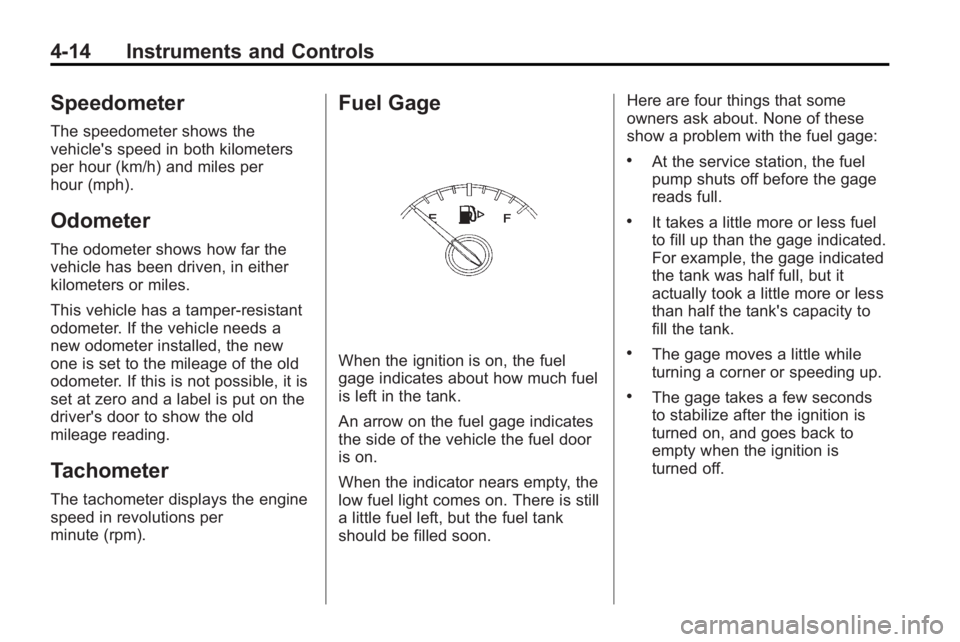
Fuel Gage
When the ignition is on, the fuel
gage indicates about how much fuel
is left in the tank.
An arrow on the fuel gage indicates
the side of the vehicle the fuel door
is on.
When the indicator nears empty, the
low fuel light comes on. There is still
a little fuel left, but the fuel tank
should be filled soon.Here are four things that some
owners ask about. None of these
show a problem with the fuel gage:
.At the service station, the fuel
pump shuts off before the gage
reads full.
.It takes a little more or less fuel
to fill up than the gage indicated.
For example, the gage indicated
the tank was half full, but it
actually took a little more or less
than half the tank's capacity to
fill the tank.
.The gage moves a little while
turning a corner or speeding up.
.The gage takes a few seconds
to stabilize after the ignition is
turned on, and goes back to
empty when the ignition is
turned off.
Page 109 of 414

Instruments and Controls 4-21
released, or while driving, there is a
problem with the Electric Parking
Brake system. A Service Parking
Brake message may also display in
the Driver Information Center (DIC).
SeeBrake System Messages
on
page 4‑33for more information.
If the light does not come on,
or remains flashing, see you dealer/
retailer.
For vehicles with the Electric Park
Brake (EPB), the park brake
warning light should come on briefly
when ignition is placed in ON/RUN.
If it does not come on, then have it
fixed so it will be ready to warn if
there is a problem.
If this light comes on, there is a
problem with a system on the
vehicle that is causing the park
brake system to work at a reduced level. The vehicle can still be driven,
but should be taken to a dealer/
retailer as soon as possible. See
Parking Brake
on page 8‑32for
more information.
For vehicles with the uplevel cluster,
this telltale displays in the Driver
Information Center (DIC) screen.
Antilock Brake System
(ABS) Warning Light
This light comes on briefly when the
engine is started.
If the light does not come on, have it
fixed so it will be ready to warn if
there is a problem.
If the ABS light stays on, turn the
ignition off. If the light comes on while driving,
stop as soon as it is safely possible
and turn off the vehicle. Then start
the engine again to reset the
system. If the ABS light stays on,
or comes on again while driving, the
vehicle needs service. A chime may
also sound when the light comes on
steady.
If the ABS light is the only light on,
the vehicle has regular brakes, but
the antilock brakes are not
functioning.
If both lights are on, the vehicle's
antilock brakes are not functioning
and there is a problem with the
regular brakes. See your dealer/
retailer for service.
See
Brake System Warning Light
on page 4‑20.
See Brake System Messages
on
page 4‑33for all brake related
DIC messages.
Page 112 of 414

4-24 Instruments and Controls
If the light comes on and stays on, it
means that oil is not flowing through
the engine properly. The vehicle
could be low on oil and might have
some other system problem. See
your dealer/retailer.
For vehicles with the uplevel cluster
this telltale displays in the Driver
Information Center (DIC) screen.
Low Fuel Warning Light
This light, below the fuel gage,
comes on briefly when the engine is
started.
If it does not come on have the
vehicle serviced by your dealer/
retailer. If the system is working
normally the indicator light then
goes off.This light also comes on when the
fuel tank is low on fuel. When fuel is
added the light should go off. If it
does not, have your vehicle
serviced.
For vehicles with the uplevel cluster,
this telltale displays in the Driver
Information Center (DIC) screen.
Security Light
This light flashes when the security
system is activated.
For more information, see
Vehicle
Security on page 1‑13.
For vehicles with the uplevel cluster
this telltale displays in the Driver
Information Center (DIC) screen.
High-Beam on Light
This light comes on when the
high-beam headlamps are on.
See Headlamp High/Low-Beam
Changer
on page 5‑2for more
information.
Fog Lamp Light
For vehicles with fog lamps, this
light comes on when the fog lamps
are on.