2010 BMW X5 idrive
[x] Cancel search: idrivePage 149 of 300

Navigation
Driving tips
147Reference
At a glance
Controls
Communications
Entertainment
Mobility
Interactive map
In the interactive map, the scale can be adjusted
and the visible map section can be shifted. In
addition, pressing the controller makes further
functions available:
>Select the symbol: "Start guidance".
>"Exit interactive map"
>Map display
>"Display destination"
The map section around the destination
is displayed.
>"Display current location"
The map section around your current
location is displayed.
>"Find points of interest", refer to
page144.
Entering destination via
voice*
General information
You can enter a desired destination with the
voice activation system. When entering the
destination, it is possible to change between
voice command and iDrive at any time. Reacti-
vate the voice command system for this pur-
pose if necessary.
You can use {Voice commands} to have
the possible commands read aloud to
you.<
Speaking the entry aloud
>Countries, towns/cities, streets, and inter-
sections can be either spoken aloud as an
entire words or spelled in the system lan-
guage, refer to page22.
>Town/city, street, and house number can
also be spoken aloud in one sentence.
>Spell the entry if the language of the area is
different from the system language.
>Speak the letters smoothly and avoid
excessive emphasis and pauses.
Entering an address
1.Press the button on the steering wheel.
3.Wait for the system prompt.
4.Say the desired address in the suggested
form.
5.Continue entering as prompted by the sys-
tem.
6.If necessary, say the parts of the address
individually, e.g. town/city.
Entering a town/city
The town/city can be spelled or entered as an
entire word
*.
The entry possibilities depend on the par-
ticular navigation data as well as the
country and language settings.<
2.Wait for the system prompt for the town/
city.
3.Say the name of the town/city or if neces-
sary, spell at least the first three letters.
Depending on the entry, up to 20 towns/cit-
ies are suggested.
2.{Enter address}
1.{City} or {Spell city}.
4.Select city/town:
>Choose selected city/town: {Yes}
>Select other city/town: {New entry}
>Select an entry, e.g. {Entry 2}
>Spell the entry: {Spell city}
ba8_e70ag.book Seite 147 Freitag, 5. Juni 2009 11:42 11
Page 150 of 300
Destination entry
148 Similar-sounding towns/cities that can-
not be differentiated by the system are
compiled in a separate list and displayed as a
town/city followed by three dots.
If necessary, select this entry with {Yes}. Then
select the desired city/town in this list.<
The town/city can also be selected from the list
using iDrive: turn the controller until the desired
town/city is displayed and press the controller.
Entering a street or intersection
The street or intersection is entered in the same
way as the town/city.
Entering house number
You can enter house numbers up to the
number 999:
Starting destination guidance
Destination guidance starts immediately.
Saving destination
The destination is added to the destination list
and is displayed in the list of last destinations.
Trip planner
The trip planner can be used to plan a trip with
several legs to different destinations.
New trip
Various intermediate destinations can be
entered for a trip.
1."Navigation"
2."Map"
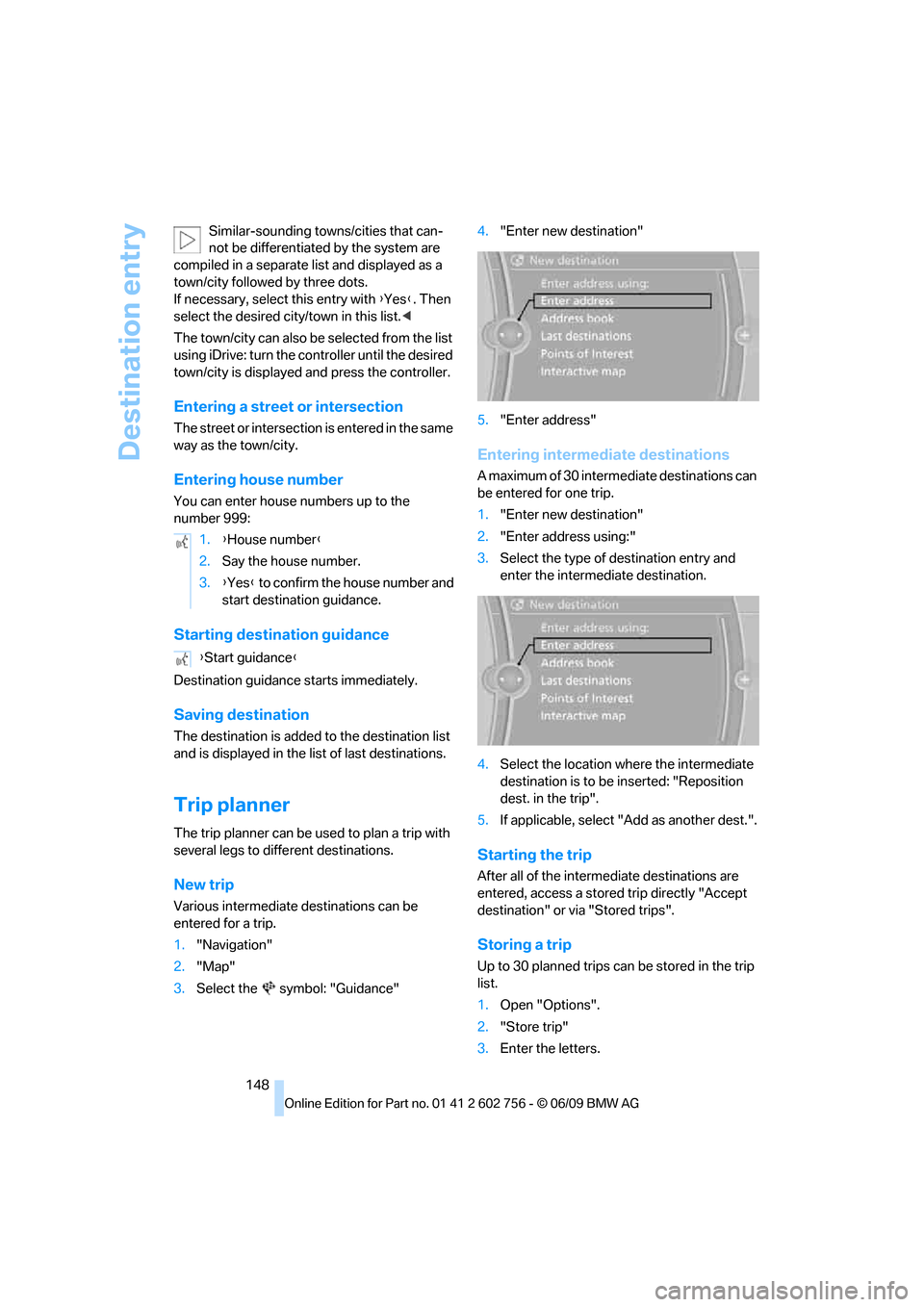
3.Select the symbol: "Guidance"4."Enter new destination"
5."Enter address"
Entering intermediate destinations
A maximum of 30 intermediate destinations can
be entered for one trip.
1."Enter new destination"
2."Enter address using:"
3.Select the type of destination entry and
enter the intermediate destination.
4.Select the location where the intermediate
destination is to be inserted: "Reposition
dest. in the trip".
5.If applicable, select "Add as another dest.".
Starting the trip
After all of the intermediate destinations are
entered, access a stored trip directly "Accept
destination" or via "Stored trips".
Storing a trip
Up to 30 planned trips can be stored in the trip
list.
1.Open "Options".
2."Store trip"
3.Enter the letters. 1.{House number}
2.Say the house number.
3.{Yes} to confirm the house number and
start destination guidance.
{Start guidance}
ba8_e70ag.book Seite 148 Freitag, 5. Juni 2009 11:42 11
Page 155 of 300

Navigation
Driving tips
153Reference
At a glance
Controls
Communications
Entertainment
Mobility
Viewing the map
1.Select the symbol.
2.Select a setting:
>"View facing north"
>"View in dir. of travel"
>"Perspective view"
>"Arrow display"
3.Press the controller.
Changing map scale
Select interactive map.
>Moving map: move the controller in the cor-
responding direction.
>Shifting map diagonally: move the control-
ler in the corresponding direction and turn
the controller.
Changing scale
1.Select the symbol.
2.Turn the controller to change the scale.
Automatic scaling of the map
In the map display facing north, turn the control-
ler in any direction until AUTO is displayed as
the map scale.
The map shows the entire range from your loca-
tion to the destination.
Settings for the map display
The map appears on the Control Display.
1.Open "Options".
2."Settings"
3.Set the optimum map view.
>"Day/night mode"
Select according to lighting conditions
and make adjustments. This setting is
disregarded when the traffic info map is
activated.
>"Satellite images"
Satellite images
* are displayed,
depending on availability and resolution.
>"Perspective view in 3D"
Shows a three-dimensional depiction. Prominent landmarks contained in the
navigation data are displayed on the map
in 3D.
>"Traffic Info map"
Split screen settings
The map settings for the split screen can be
created separately from the main screen.
1.Open "Options".
2."Split screen"
3.Select the settings:
>"Arrow display"
>"View facing north"
>"View in dir. of travel"
>"Perspective view"
>"Exit ramp view"
Changing scale
1.Move the controller to the right until the
split screen is selected.
2.Turn the controller.
Traffic information*
You can display the traffic bulletins from radio
stations that broadcast the TMC (Traffic Mes-
sage Channel) of a traffic information service.
This information from the traffic information
service is continuously updated on the basis of
measurement data from traffic control centers
and information on traffic congestion.
During destination guidance, traffic bulletins
that are relevant to areas along the route are
automatically displayed and taken into account
in the route planning. You can open all traffic
bulletins manually using iDrive.
The traffic bulletins are shown in the map dis-
play.
Real Time Traffic Information End-User
Provisions
Certain BMW models equipped with navigation
have the capability to display real-time traffic
information. If your system has this capability
ba8_e70ag.book Seite 153 Freitag, 5. Juni 2009 11:42 11
Page 162 of 300

On/off and tone
160
On/off and tone
The following audio and video sources share
the same control elements and adjustments:
>Radio
>CD/DVD player
>CD/DVD changer
*
>Video
>External devices, e.g. MP3 player
Controls
The audio and video sources can be controlled
using:
>Buttons near the CD/DVD player
>iDrive
>Buttons on the steering wheel, refer to
page11
>Programmable memory buttons, refer to
page20
>Voice activation system
Buttons near the CD/DVD player
1Sound output for entertainment on/off,
volume
>Press: switch on/off
When you switch on the unit, the last set
radio station or track is played.
>Turn: adjust volume
2 Ejecting CD/DVD
3CD/DVD drive4 Station scan/track search
>Change the radio station
>Select track for CD/DVD player and CD/
DVD changer and certain multimedia
devices
5MODE: change the audio and video
sources
6FM/AM: change the radio station wave-
band
Switching on/off
To switch the Entertainment sound output on
and off:
Press button1 next to the CD/DVD player.
This symbol on the Control Display indicates
that sound output is switched off.
The sound output is available for approx.
20 minutes after the ignition was switched off.
Switch on the sound output again for this pur-
pose.
Adjusting volume
Turn button1 next to the CD/DVD player until
the desired volume is obtained.
You can also adjust the volume with buttons on
the steering wheel, refer to page11.
The setting is stored for the remote control cur-
rently in use.
Tone control
You can alter various tone settings, e.g. treble
and bass or the speed-dependent volume
increase.
The tone settings are set for all audio sources at
once.
The settings are stored for the remote control
currently in use.
ba8_e70ag.book Seite 160 Freitag, 5. Juni 2009 11:42 11
Page 166 of 300

Radio
164
Storing stations
Using iDrive
1."Radio"
2."FM" or "AM"
3.Select the desired station.
4.Press the controller again.
5.Select the desired memory location.
The station is stored.
The stations are stored for the remote control
currently in use.
Using programmable memory buttons
You can store a station on the programmable
memory buttons, refer to page20.
1.Select a station.
2. ... Press the desired button
for a longer period.
Radio Data System RDS*
In the FM frequency range, additional informa-
tion is transmitted via RDS. If the reception con-
ditions are good, the station names are shown
on the Control Display. If the reception is weak
or disrupted, it can take some time before the
station names are displayed.
Switching RDS on/off
1."Radio"
2."FM"
3.Open "Options".4."RDS"
The setting is stored for the remote control cur-
rently in use.
HD Radio*
Many radio stations transmit analog and digital
signals. If a digital radio network is available,
these stations can be received digitally and thus
with improved sound quality.
License conditions
HD Radio™ technology is manufactured under
U.S. and Foreign Patents licensed from iBiquity
Digital Corp. HD Radio™ and the HD and HD
Radio logos are proprietary trademarks of iBiq-
uity Digital Corp.
Activating/deactivating digital radio
reception
1."Radio"
2."FM" or "AM"
3.Open "Options".
4."HD Radio"
The setting is stored for the remote control cur-
rently in use.
This symbol is displayed when a station is
being received digitally.
In areas in which the station is not continuously
received in digital mode, playback switches
between analog and digital reception. Any time
shift between these two broadcasts can lead to
repetitions or interruptions in the output. In this
case, switch off digital radio reception.
ba8_e70ag.book Seite 164 Freitag, 5. Juni 2009 11:42 11
Page 167 of 300

Navigation
Entertainment
Driving tips
165Reference
At a glance
Controls
Communications
Mobility
Displaying additional information
Some stations broadcast additional information
on the current track, such as the name of the
artist.
1.Select the desired station.
2.Open "Options".
3."Station info"
Selecting a substation
1.Select the desired station.
2.Press the controller.
3.Select the substation.
Stored stations
It is possible to store up to 40 stations.
Selecting a station
1."Radio"
2."Presets"
3.Call up the desired station.
Storing a station
The station currently selected is stored.
1."Radio"
2."Presets"
3."Store station"
4.Select the desired memory location.
The list of stored stations is stored for the
remote control currently in use.
You can also store the stations on the program-
mable memory buttons, refer to page20.
Deleting a station
1."Radio"
2."Presets"
3.Select the desired station.
4.Open "Options".
5."Delete entry"
Weather Radio*
Weather Radio is a service of the National Oce-
anic and Atmospheric Administration (NOAA)
of the US Department of Trade. Weather
reports are repeated every 4 to 6 minutes and
are routinely updated every 1 to 3 hours, more
frequently as needed. Most stations operate 24
hours a day. In case of a storm, the National
Weather Service interrupts the routine weather
news and transmits special warning messages
instead. If you have a question about NOAA
Weather Radio, please contact the nearest
office of the National Weather Service. Details
are also provided on the Internet at
www.nws.noaa.gov.
Accessing weather news flashes
Operating via iDrive:
1.Switch on radio.
2."Weather band"
3.Selecting desired channel.
The station for weather news flashes may be
unavailable in some regions.
ba8_e70ag.book Seite 165 Freitag, 5. Juni 2009 11:42 11
Page 169 of 300

Navigation
Entertainment
Driving tips
167Reference
At a glance
Controls
Communications
Mobility
The telephone number and electronic serial
number, ESN, are displayed.
5.Call Sirius to deactivate the channels.
Selecting channels
You can only listen to activated channels.
The selected channel is stored for the remote
control currently in use.
Using iDrive
1."Radio"
2."Satellite radio"
3.Select "All Channels" or the desired cate-
gory.
4.Select desired channel.
Using the button near the CD/DVD
player
Press the button for the corresponding
direction.
The next channel is selected.
Using direct channel entry
1."Radio"
2."Satellite radio"3."Select channel"
4.Turn the controller until the desired channel
is displayed and press the controller.
Storing channel
1."Radio"
2."Satellite radio"
3.Select "All Channels" or the desired cate-
gory.
4.Select desired channel.
5.Press the controller again.
6.Press the controller again in order to con-
firm selection of the highlighted channel.
7.Select the desired memory location.
The channels are stored for the remote control
currently in use.
You can also store the channels on the pro-
grammable memory buttons, refer to page.20.
Change list view
The list view changes each time the first symbol
on the navigation bar is pressed.
Information about the channel is displayed.
SymbolFunction
Channel name
Artist
Track
ba8_e70ag.book Seite 167 Freitag, 5. Juni 2009 11:42 11
Page 173 of 300

Navigation
Entertainment
Driving tips
171Reference
At a glance
Controls
Communications
Mobility
CD/DVD player and CD/DVD changer
CD/DVD playback
Inserting CD/DVD
Push the CD/DVD into the drive with the labeled
side facing upward. The CD/DVD is automati-
cally pulled in.
Playback starts automatically if the sound out-
put is on. CDs/DVDs with compressed audio
files can take a few minutes to read, depending
on their directory structure.
Playable formats
CD/DVD player
>DVD: DVD-ROM, DVD-R, DVD+R, DVD-
RW, DVD+RW, DVD-R DL, DVD+R DL, DVD
audio (video part only), DVD video
>CD: CD-ROM, CD-R, CD-RW, CD-DA,
VCD, SVCD
>Compressed audio files: MP3, WMA, AAC
CD changer
*
>CD: CD-ROM, CD-R, CD-RW, CD-DA
DVD changer
*
>DVD: DVD-ROM, DVD-R, DVD+R, DVD-
RW, DVD+RW, DVD-R DL, DVD+R DL, DVD
audio (video part only), DVD video, CD: CD-
ROM, CD-R, CD-RW, CD-DA, VCD, SVCD
Starting playback
Using iDrive
Fill and insert CD/DVD magazine, refer to
page175.
To start playback if a CD is already located in
the player or changer:
1."CD/Multimedia"
2."CD/DVD"
3.Select the desired CD or DVD:
Ejecting CD/DVD
Press the button next to the CD/DVD player.
The CD/DVD emerges slightly from the drive.
*
SymbolFunction
CD/DVD player
CD/DVD changer
ba8_e70ag.book Seite 171 Freitag, 5. Juni 2009 11:42 11