2010 AUDI S6 light
[x] Cancel search: lightPage 34 of 368

Driver information display
Applies to veh icles : w ith eng ine s peed limitat ion
Engine speed limitation .?i
11'1 Do not exceed max. engine speed of XXXX rpm
The -symbol illuminates when there is an engine control malfunc
tion. The indicator light in the instrument cluster also illuminates.
The engine speed is limited to the speed displayed in the driver infor
mation system. Keep in mind that the engine speed will not exceed
the value d isp layed in the drive r informat ion system, for example
when downshifting.
Please go to an authorized Audi dealer or other qualified workshop to
have the malfunction repaired.•
Applies to vehicles: wi th Adap tive Light
Adaptive Light defective
adaptive light defective • r
When this symbol illuminates, it means that Adaptive Light is
defective. Go to an authorized dealership to have the headlights or
the control unit for the Adaptive Light repaired. •
Ignition lock malfunction ..e
If the symbol in the display comes on, there is a malfunc-
t ion in the electronic ignition lock. An additional driver
message can be displayed by pressing the [CHECK] button:
Defective ignition switch
-Drive to an aut horized service facility at your earliest
convenience to have the malfunction corrected.•
Windshield wipers faulty , . .>
.... Windshield wiper malfunction
When this symbol . illuminates, it means that the electronics for
the windshield wipers are defective . Please go to an authorized deal
ership to have the windshield wiper system repaired. •
Speed warning system
Overview
The speed warning system helps you to keep your driving
speed below a set speed limit.
Th e speed warning system warns the driver if he exceeds a previously
stored maximum speed. A warning tone will sound as soon as the
vehicle speed exceeds the set speed by about 3 mph (3 km/h). At the
same time, a warning symbol appears in the display.
The speed warning system has
two warning thresholds that function
independently of each other and that have somewhat different
purposes :
Speed warning 1
You can use speed warning 1 to set the maximum speed while you are
driving. This setting w ill remain in effect until you turn off the igni
tion, assum ing that you have not changed or reset the setting .
Th e speed warning symbo l
'8 (USA models)/ 8 (Canada mode ls) in
the warning 1 display appears when you exceed the maximum speed.
It goes out when the speed falls be low the stored maximum speed.
Th e speed warning symbol will also go out if the speed
exceeds the
stored maximum speed by more than about 25 mph (40 km/h) for at
least 10 seconds. The stored maximum speed is deleted.
Sett ing speed warn ing 1
=> page 33. ~
Page 40 of 368

Opening and closing
• For security reasons, replacement keys are only available from
Audi dealers. •
Master key with remote control
The remote control allows you to lock or unlock the
vehicle electronically.
Fig. 24 Fold-up
master key with
remote control
-To fold the key out and back in place, press the release
button~ fig. 24.
The transmitter and battery are located in the head of the remote
control. The receiver is located inside the vehicle. The maximum
effective range depends on several things . Remember, if the battery
is weak, the effective range decreases.
If you need to replace the remote contro l, or if you need to have it
repaired, you must see your authorized Audi dealer. Only then can you
use the key again.
Personalizing the master key
When the ignition is turned off or when the veh icle is locked, various
convenience settings are stored automatically and assigned to the
key that was used. The settings that are ass igned to the master key
are recalled automatically when the vehicle is un locked, when the
door is opened o r when the ignition is sw itched on. Settings are saved for the following systems:
•
Climate control
• Central locking
• Ambient lighting
• Windows
• Park ing System*
• Seat memory*
The
Remote control key function must be activated in the MMI
=> page 80, so that the settings for the driver's seat (including the
sett ings for the steering column and exterior mirrors) a re saved on
the master key through the seat memory when the vehicle is locked,
and are set automat ically when the vehicle is unlocked.
[ i ] Tips
• If the ignit ion is switched on, the remote control system is deacti
vated.
• The remote control system can be affected by other systems oper
ating in the same frequency range close to the vehicle, such as mobile
telephones, telev isio n broadcasting s tations, etc.
• For Declaration of Compliance to United States FCC and Industry
Canada regulations:=>
page 347. •
Page 41 of 368
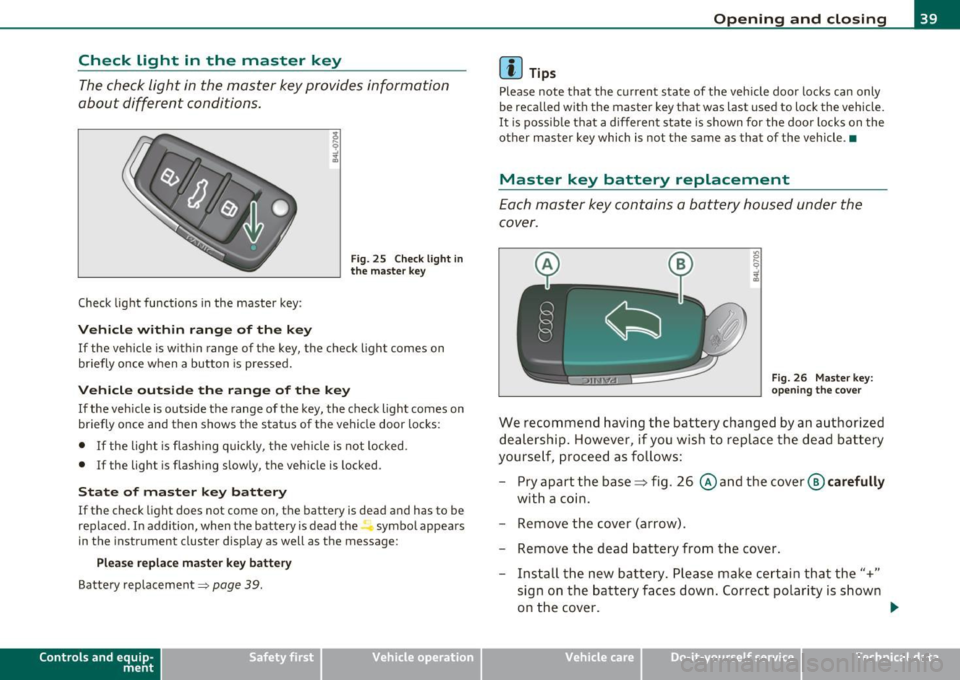
Check Light in the master key
The check light in the master key provides information
about different conditions.
Check light functions in the master key :
Vehicle within range of the key
Fig . 25 C heck lig ht in
the m aster k ey
If the vehicle is w ith in range of the key, the check light comes on
briefly once w hen a button is pressed.
Vehicle outside the range of the key
If the veh icle is outside t he range of the key, the c hec k light comes on
briefly once and then shows the status of the vehicle door locks:
• If the light is fl as hi ng q uickly, the veh icle is not locked.
• If the light is f lashing slow ly, the vehicle is locked .
State of master key battery
If the check light does not come on, the battery is dea d and has to be
replaced . I n addition, when the battery is dead the symbol appea rs
i n the instrument cluste r display as well as the message :
Please replace ma ster ke y battery
Battery replacement~ page 39.
Con tro ls a nd e quip
m en t Vehicle
OP-eration
Opening and closing
(I) Tips
Please note that the c urrent state of the vehicle doo r locks can only
be recalled wit h the master key t hat was last used to lock the vehicle.
It is poss ib le tha t a d ifferen t state is shown fo r the door lo cks on the
other master key which is not the same as that of the vehicle .•
Master key battery replacement
Each mas ter key contains a battery hous ed under th e
cover.
Fi g. 26 Master key:
o pe ning the c ove r
We reco mmend having the ba ttery chang ed by an au thori zed
dealer ship . However , if you wi sh to replace th e dead b atte ry
yourse lf, proc eed as follows :
- Pry apart the base~ fig. 26 @and the
cover @carefully
with a c oin.
- Remove the cover (arrow).
- Remove the dead battery from the cover .
- Install th e new ba ttery . Please make c ertain that the"+"
sign on t he ba ttery faces down . Correct po lar ity is shown
o n the cover. .,,.
Vehicle care Do-it-yourselt service iTechnical data
Page 42 of 368
Open ing and closing
- Place the cover w ith the new battery on the key base and
press both parts together.
c£> For the s ake of the environment
Dispose of dead batteries proper ly so as not to po llute the envi ron
me nt.
00 Tips
The replacement battery must be the same specification as the
orig inal. •
Electronic immobilizer
The immobilizer helps to prevent unauthorized use of
your vehicle.
A compu ter chip inside you r key au tomatically deactivates the e lec
tron ic immob ilizer when you insert the key in the ignition lock, or on
vehicles with Convenience key*, when the key is inside the vehicle.
When you remove the key from the ign ition lock, or on veh icles with
Conven ience key, when you remove the key from the vehicle, the elec
tron ic immobil izer is a utomat ica lly activated once again.
& WARNING
A lw ays ta ke the k ey with you when you l ea ve the vehicle . Th e key
c an di sa rm the e lect roni c engine immobilizer and pe rmit an u nau
tho riz ed p erso n t o start the eng ine a nd enable operati on of the
ve hicle sys tems su ch as p owe r w indo w or powe r su nroof* l eading
to serious perso nal injur y.
00 Tips
• The immobilizer prevents una uthorized use of the vehicle . The
vehicle cannot be started if an unauthorized key is used . The vehicle may not start if another rad
io device such as a key for another vehicle
or a transponde r is located on the key r ing.
• For Declaration of Compliance to United States FCC and Industry
Canada regulations =>
page 347. •
Valet key function
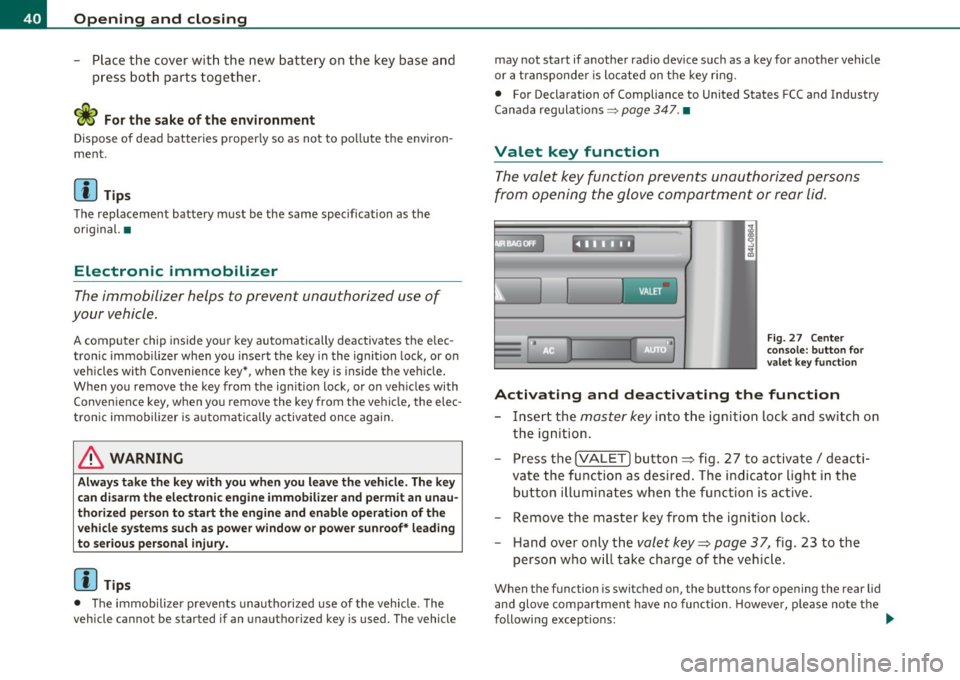
The valet key function prevents unauthorized persons
from opening the glove compartment or rear lid.
Fi g. 27 Ce nter
co n sole: but ton for
valet key functio n
Activating and deactivating th e function
- Insert the master key into the ignition lock and switch on
the ignition.
- Press the
!VALET] bu tton ~ fig . 27 to activate/ deacti
va te the func tion as desired . The indicator light in the
butto n illuminates when the function is active.
- Remove the master key from the ignition lock.
- Hand over only the
valet key~ page 37, fig . 23 to the
person who will take charge of the vehicle .
When the function is switched on, the buttons for opening the rear lid
and glove compartment have no function. However, p lease no te the
following except ions: ._
Page 43 of 368
Exceptions
If the ign ition has been switched on usi ng the master key, yo u can
st ill open the g love compartment .
As long as the ign it ion is switched off, you can st ill open the rear lid
using the rear lid butto n on t he
master key c::5 . The same holds tr ue
fo r using the rear lid re lease hand le in conjunction w ith the Conve
nience key *.
For this reason, be sure to only ha nd over the
valet key to the perso n
who w ill take charge of your veh icle.
[ i ] Tips
Be sure to activate the funct ion before han ding over the va let key to
someone e lse. The va let key o nly fi ts the lock in the d river's door and
the ignition lock. •
Power locking system
General description
The po wer lockin g sys tem l ocks or un locks all d oors an d
the r ear lid sim ulta neously.
The power loc king system in your vehicle incorpora tes the fo llowing
fu nction s:
• Centra l locking function
• Selective unloc k fe ature =>
page 44
• Remote cont rol featu re => page 38
• Conven ience key*=> page 47
• Anti -theft ala rm system => page 49
All the doors and the rea r lid are locked by the centra l loc king system
when you loc k the vehicle. You can set whether generally on ly the
dr ive r's door o r all doo rs and t he rea r lid sho uld be unlocked when yo u
Controls and equip
ment Safety first
Opening and closing
open the vehicle in
the MMI men u Central locking to suit you r indi
vidu al d esires =>
page 44.
Unlocking the vehicle
Yo u can unloc k the vehi cle from o utside eithe r by using the remote
control
or by inse rting and turning the key in the driver 's door lock .
Whe n you
unlock yo ur vehi cle:
• T he anti-theft alarm system is deactivated briefly .
• T he vehicle interior lights illumina te for approximate ly 30
seconds.
• All tur n sign al ligh ts will flash twice whe n the c ar is un lo cked.
• After un locking the ve hicle, you have 60 seconds to open a doo r or
t he rear lid. Afte r 60 seco nds , th e veh icle automati cally loc ks and the
anti-theft alarm system activates again.
Th e rear lid can be loc ked or unlo cked eit h e r b y using the remote
cont rol
or by inserting and t urnin g the key in the dr ive r's door lock .
U nlocking the vehicle wi th the remote con trol will on ly
unlock the
rea r lid, to
open it, t he lid hand le needs to be pressed .
Locking the vehicle
You can lock the vehicle from o utside either by using the remote
cont rol
or by inse rting and t urning the key in the drivers 's doo r lock .
Whe n you
lock the ve hicle:
• All doors and the rear lid are locked.
• All tur n signal ligh ts will flash once when t he car is locked.
• Th e anti-theft alarm system is activated. The hor n of the anti
t heft a la rm system w ill sound and t he anti-theft a larm system readi
ness lig ht, located in the upper part of the driver's door pane l, w ill
st art to blink.
• T he vehicle interior lights tu rn off.
Unlocking and locking with Convenience key*
O n vehicles wh ich are equippe d wi th the Convenience key* au th ori za
tion system, the doors are unloc ked
without a key by means of a prox-
im ity senso r in th e door h andle. T he do or s ar e sim ila rly locked ...
Vehicle care Technical data
Page 45 of 368

To lock the vehicle CT'.!
- Press button®=> & in "General description" on
page 41.
-Watch that all turn signal lights flash once.
To unlock r ear lid only c::;
- Press but ton @ for approximately one second.
PANIC Button
Push the red button @ to activate the panic function. The
horn sounds and the turn signals flash .
- Push the button @ aga in to deactivate the panic function .
On vehicles with Convenience key*, the se lector lever must be in the P
position, otherwise the vehicle cannot be locked .
& WARNING
Read and follo w all W ARNIN GS~ & in "Ge ner al d escripti on " o n
page 41 .
[ i ] Tips
• In order to make sure the locking function is working, you should
always keep your eye on the vehicle to make sure it is properly locked .
• Do not use the remote co ntro l if yo u are inside the car, otherwise
you may un intent ionally lock the veh icle, and then you would set off
the anti-theft alarm when you try to start the engine or open a door.
I n case th is happens anyhow, push the unlock button
0.
• Use the panic function on ly if you are in an emergency situation. •
Controls and equip
ment Safety first
Op
ening and closing
Op era ting lo cks with th e key
To lock and unlock the vehicle from the outside, turn the
key in the lock of the driver's door .
,,~
fl-=- -==-- OO~j @
To unlock the vehicle
Fig. 29 Key turn s fo r
opening and clos ing .
- Insert the key into the lock of the driver's door.
- Turn the key
one time to position @ to unlock the driver's
door .
- Turn the key
two times to posit ion @ => fig . 29 to unlock
all doors and the rear lid.
To lock the vehicle
- Close a ll windows and doors properly.
- Turn the key in the lock of the driver's door to the loc k
position ®=>
& in "General description" on page 41.
& WARNING
Read and foll ow all WARNING S~ & in "Gene ral de scription " on
pag e 41 . •
Vehicle care Technical data
Page 47 of 368
How to unlock each door separately using the
door handle (front doors)
- Pull the handle to open t he door .
How to unlock each door separately using the
door handle (rear doors)
- Pull the door handle once to release the loc k.
- Pull t he handl e
twice to open th e door.
You will find a power locking sw itch in ea ch door. You c an lock and
unlock the vehicle using the switches in the dr iver's or passenger's
door =>
page 44, fig. 30. Yo u can only lock the vehicle using the
switches in the rear doors =>
page 44, fig. 31. If you lock the vehicle
using t he
power locking switch , please note the following :
• You can not op en the doors or the rea r lid from the
outside
(increased secur ity, for example when you are sto pped at a red light).
• The d iodes in the power lock ing switches illuminate whe n all the
doors and the rear lid are closed and loc ked .
• All d iodes turn dark as soon as one of the doors has bee n
unlocked .
• You can unlock and open the doors from the inside by pulling on
t he doo r handle .
• If the driver's door is opened (after you have locked the vehicle
from the inside using the power locking switch), the door will rema in
unlocked to preve nt you from locking yourself out of your vehicle .
After you close t he door, you have to lo ck the drive r's door ag ain.
• If you have a crash and the airbag is activated, the doors automat
i c ally unlo ck.
& WARNING
• If you use the power locking switch with the doors closed,
remember th at all the vehicle doo rs will lock.
Con tro ls a nd e quip
m en t Vehicle
OP-eration
Opening and closing
& WARNI NG (continued )
• Locking doors from the inside can help p revent inadvertent
door opening during an accident and can also prevent unwanted
entry from the outside. Locked doo rs can, however , delay assis
tance to vehicle occupants and hold up rescue efforts from the outside in an accident or other emergency .•
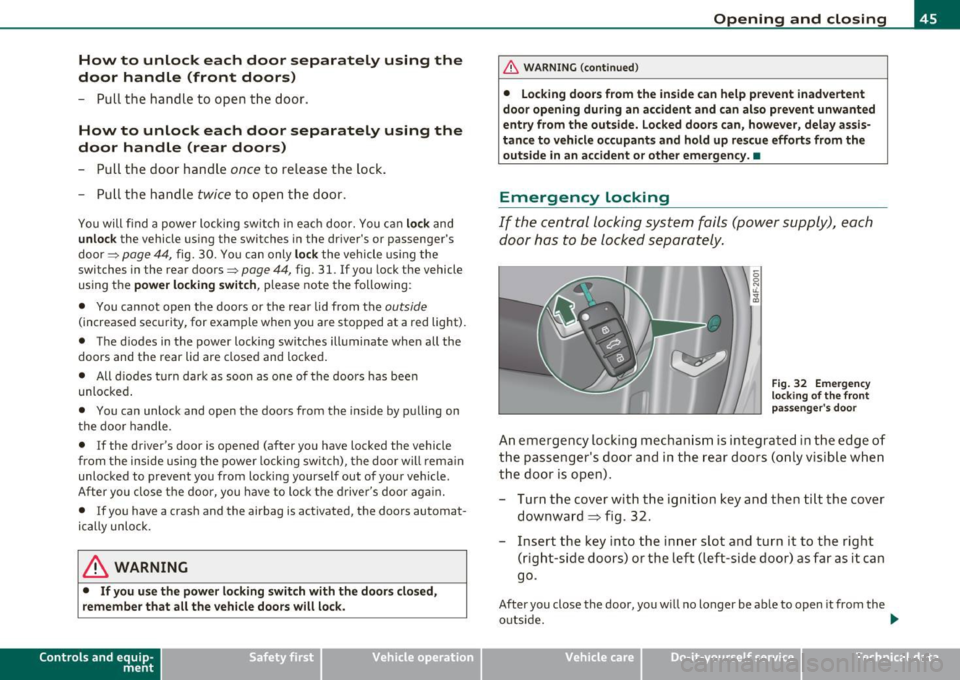
Emergency Locking
If the central locking system fails (power sup ply), each
d oor has to be locked separately .
5 0 N tL ;g
Fig. 32 E mergen cy
l o ck ing o f the front
p ass eng er's door
An e mergency lock ing mechan is m is i nte gra ted i n the edg e of
th e pass enge r's door a nd in the rear doo rs ( on ly v isibl e wh en
t h e door is open) .
- Turn the cover with t he ignit ion key and then ti lt the cover
downward=> fig. 32.
- Insert the key into the inner slot and tur n it to the right
( r ight-side doors) or the left (left-side door) as far as it can
g o.
After you close the door, you w ill no longer be ab le to open it from the
o uts ide. _.,
Vehicle care Do-it-yourselt service iTechnical data
Page 49 of 368

• If the central locking system fails (power supply), you can also
open the rear lid using the trunk escape handle from the inside
=>
page 316. •
Child safety lock
Power child safety lock for the rear doors t
The power child safety lock prevents the rear doors from
being opened from the inside.
Fig. 35 Section from
driver's door: controls
The rear doors are equipped with a power child safety lock. It
is operated with the two safety buttons(!) in the driver's door
~ fig. 35.
- Press the left and/or right safety button to disable the
rear power window(s) and prevent the respective rear door
from being opened from the inside. The LED in the button
will light up when the child safety lock is turned
on.
- Press the illuminated button again to turn the child safety
features
off.
When the child safety lock is activated, the interior door opening
lever is inope rative; the door can only be opened from the outside. In
Contro ls a nd e quip
m en t Vehicle
OP-eration
Opening and closing
addition, the window regulator for that door is also inoperative when
the child safety lock is activated.
[ i] Tips
• In order to activate the child safety lock on the left and the right
side, you have to press the two safety buttons in succession.
• Make certain that the check light comes on in the corresponding
safety switch when the child safety lock is activated. •
Convenience key
Applies to veh icles: w ith Con ven ience key
Description
Access and vehicle operation based on: Master key
remains in driver's pocket.
Th e Convenience key vehicle authorization system allows keyless
unlocking, locking and starting of the vehicle . You only have to carry
the master key on your person.
It makes nod ifference whether the master key is in your jacket pocket
or in your brief case. As soon as you approach your vehicle, the Conve
nience key recognizes the request for access , checks for authorization
and enables the following functions:
• Unlocking the vehicle=>
page 48.
• Locking the vehicle=> page 49.
• Switching on ignition and starting the engine by pressing the
[START ) button; the master key does not have to be in the ignition
switch =>
page 110.
& WARNING
• When you lock your vehicle from outside, nobody -especially
children -should remain inside the vehicle. Remember, when you .,_
Vehicle care Do-it-yourselt service iTechnical data