2010 AUDI S6 fuel
[x] Cancel search: fuelPage 116 of 368
![AUDI S6 2010 Owners Manual 1111....__0_ n_ t_h_ e_ r_ o_ a _ d _________________________________________________ _
(I] Tips
• You can apply the parking brake at any time -even with the igni
tion turned off. T](/manual-img/6/57594/w960_57594-115.png "AUDI S6 2010 Owners Manual 1111....__0_ n_ t_h_ e_ r_ o_ a _ d _________________________________________________ _
(I] Tips
• You can apply the parking brake at any time -even with the igni
tion turned off. T")
1111....__0_ n_ t_h_ e_ r_ o_ a _ d _________________________________________________ _
(I] Tips
• You can apply the parking brake at any time -even with the igni
tion turned off. The ignition must be turned on in order to release the
parking brake.
• Occasional noises when the parking brake is applied and released
are normal and are not a cause for concern.
• Th e parking brake goes through a se lf-test cycle at regular inter
vals -when the vehicle is parked. Any associated noises are normal. •
Parking
To prevent a parked vehicle from rolling away, there are
a few things you should do.
When you park your vehicle, do the following
- Stop the vehicle using the brake pedal.
- Pull the switch to apply the electromechanical parking
brake.
- Move the selector lever into the
P position==> &.
- Switch off the engine and remove the ignition key from
the ignition lock .
When you park your vehicle on hills, do the
following
- Stop the vehicle using the brake pedal.
- Pull the switch to apply the electromechanical parking
brake.
- If you are parking headed
downhill, turn the front wheels
toward the curb. -
If you are parking headed
uphill, turn the front wheels
away from the curb.
- Move the selector lever into the
P position.
- Switch off the engine and remove the ignition key from
the ignition lock.
& WARNING
This is how you can reduce the risk of injury when leaving your
vehicle.
• Never park the vehicle where it can come in contact with dry
grass, spilled fuel or any other flammable materials.
• When parking on hills, always turn the wheels so that the front
wheels will first roll into the curb, if the vehicle should start to
roll.
• Never allow anyone -especially small children -to remain in
the vehicle when it is locked. Locked doors make it more difficult
for rescuers to access the passenger compartment in the event of
an emergency. Danger to life!
• Never leave children unsupervised in the vehicle. Children
could release the parking brake or move the gearshift lever out of
gear. The vehicle could start to roll away and cause an accident.
• No matter what the season is, the temperature in a parked
vehicle can reach dangerous levels.
0 Note
• Please exercise care when you park your vehicle in parking areas
with parking barriers or curbs. Parking barriers and curbs vary in
height and could damage your bumper and related components as
the front of your vehicle moves over a barrier or curb that is too high,
as you park or as you back out of a parking spot. In order to be sure
that no such damage can occur, you may wish to stop short of having
the front tires of your car touch the parking barrier or curb. .._
Page 151 of 368
______________________________________________ A_ u_ t_ o _ m_ a_ t_ ic_ t_r_a _ n_ s_m_ i_ s _s_ i_ o _ n __ _
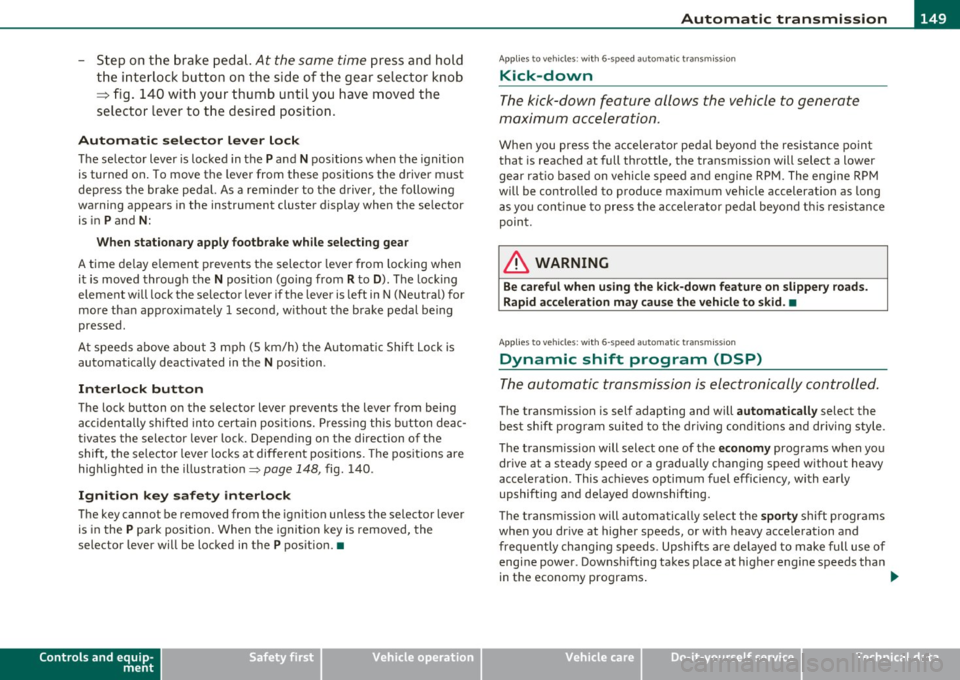
-Step on the brake pedal. At the same time press and hold
the interlock button on the side of the gear selector knob
=:> fig. 140 with your thumb until you have moved the
selector lever to the desired position.
Automatic selector lever lock
The selector lever is locked in the P and N positions when the ignition
is turned on. To move the lever from these positions the driver must
depress the brake pedal. As a reminder to the driver, the following
warning appears in the instrument cluster display when the se lector
is in
P and N:
When stationary apply footbrake while selecting gear
A time delay element prevents the selector lever from locking when
it is moved through the
N position (going from R to D). The locking
element will lock the selector lever if the lever is left in N (Neutra l) for
more than approximately 1 second, without the brake pedal being
pressed.
A t speeds above about 3 mph (5 km/h) the Automatic Shift Lock is
automatically deactivated in the
N position .
Interlock button
The lock button on the selector lever prevents the lever from being
accidentally shifted into certain posi tions . Pressing this button deac
tivates the selector lever lock. Depending on the direction of the
shift, the selector lever locks at different positions. The positions are
highlighted in the illustration=>
page 148, fig. 140.
Ignition key safety interlock
The key cannot be removed from the ignition unless the selector lever
is in the
P pa rk position. When the ignition key is removed, the
selector lever will be locked in the
P position. •
Controls and equip
ment Safety first
A
pp lies to vehicles : w ith 6-s p eed a utomati c transm ission
Kick-down
The kick-down feature allows the vehicle to generate
maximum acceleration .
When you press the accelerator pedal beyond the resistance point
that is reached at full throttle, the transmission will select a lower
gear ratio based on vehicle speed and engine RPM. The engine RPM
will be controlled to produce maximum vehicle acceleration as long
as you continue to press the accelerator pedal beyond this resistance
point .
& WARNING
Be careful when using the kick-down feature on slippery roads.
Rapid acceleration may cause the vehicle to skid. •
Applies to v ehicles: with 6 -speed auto mat ic trans miss ion
Dynamic shift program (DSP)
The automatic transmission is electronically controlled.
The transmission is self adapting and will automatically select the
best sh ift p rogram suited to the driv in g conditions and driving style.
The transmission will select one of the
economy programs when you
drive at a steady speed or a gradually changing speed without heavy
acceleration . This ach ieves optimum fuel efficiency, with early
upshifting and de layed downshifting.
Th e transmission will automatically select the
sporty shift programs
when you dr ive at higher speeds, or w ith heavy acceleration and
frequently changing speeds . Upshifts are delayed to make full use of
engine power . Downsh ifting takes place at higher engine speeds than
in the economy programs . _.,
Vehicle care Technical data
Page 152 of 368
ffl..__A_ u_ t_ o_ m_ a_ t _ ic_ t_r_a _ n_ s_m _ i_ s _s_ i_ o _ n _____________________________________________ _
The selection of the most suitable shift program is a continuous,
automatic process. The driver can also make the transmission switch
to a sporty program by
quickly pressing down the gas pedal.
This causes the transmission to shift down to a lower gear to achieve
rap id acceleration, e.g . for quic kly passing another vehicle. You do
not need to press the gas peda l into the kick-down range. After the
transmission has upshifted, the original program is selected
according to your driving style.
An additional shift program allows the automatic transmission to
select the proper gear for uph ill and downh ill gradients .
This keeps the transmission from shifting up and down unnecessarily
on hills . T he transmission will shift down to a lower gea r when the
driver presses the brake pedal on a downhill gradient. This makes use
of the braking effect of the engine without the need to shift down
manually. •
App lies to ve hicles : with 6-s p eed automatic t ransm iss ion
Manual shift program
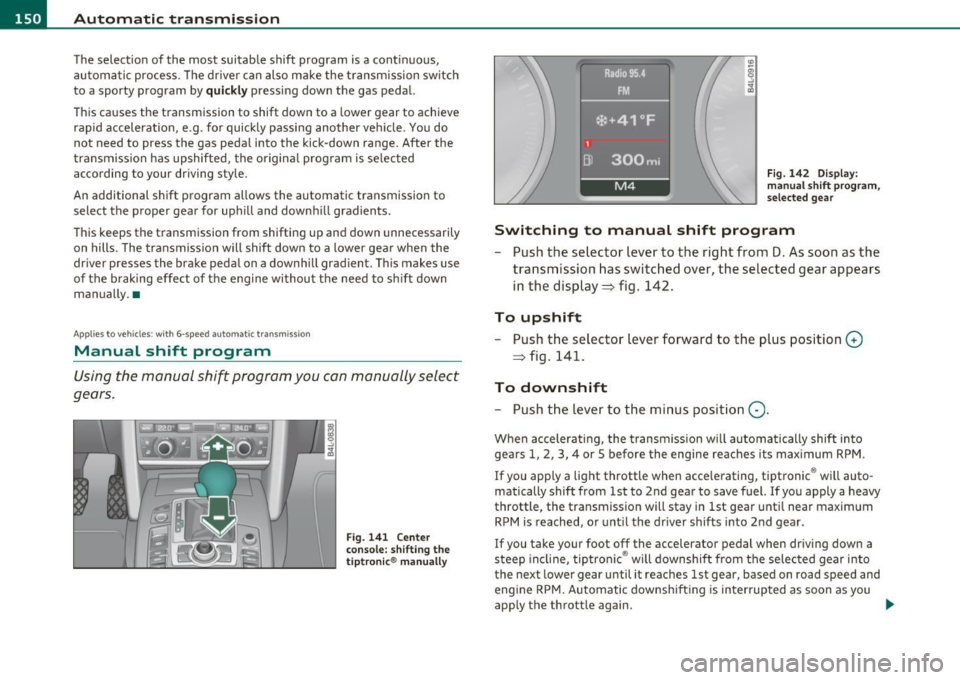
Using the manual shift program you con manually select
gears.
Fig . 141 Center
console: shifting the
tiptronic ® manually Fig
. 142 Display :
manual shift program,
selected gear
Switching to manual shift program
- Push the selector lever to the right from D. As soon as the
transmission has switched over, the selected gear appears
in the display => fig. 142.
To upshift
-Push the selector lever forward to the plus position 0
=> fig. 141.
To downshift
- Push the lever to the minus position Q.
When accelerating, the transmission will automatically shift into
gears 1, 2, 3, 4 or 5 before the engine reaches its maximum RPM.
If you apply a light throttle when acce lerating, tiptronic ® wi ll auto
matically shift from 1st to 2nd gear to save fuel. If you apply a heavy
throttle , the transmission will stay in 1st gear until near maximum
RPM is reached, or until the driver shifts into 2nd gear.
If you take your foot off the accelerator pedal when driving down a
steep incline , tiptronic ® will downshift from the selected gear into
the next lower gear until it reaches 1st gear, based on road speed and
engine RPM. Automatic downshift ing is interrupted as soon as you
apply the throttle again . _.
Page 154 of 368
-Automatic transmission .n,..__ ______________ _
Appli es to veh icles : wi th 6-spe ed a utomatic t ransm iss ion
Emergency release for selector Lever
If the vehicle's power supply fails, the selector lever can
be released in an emergency.
Fig. 144 Remove the
ashtray insert
Fig. 145 Emergency
release for selector
lever
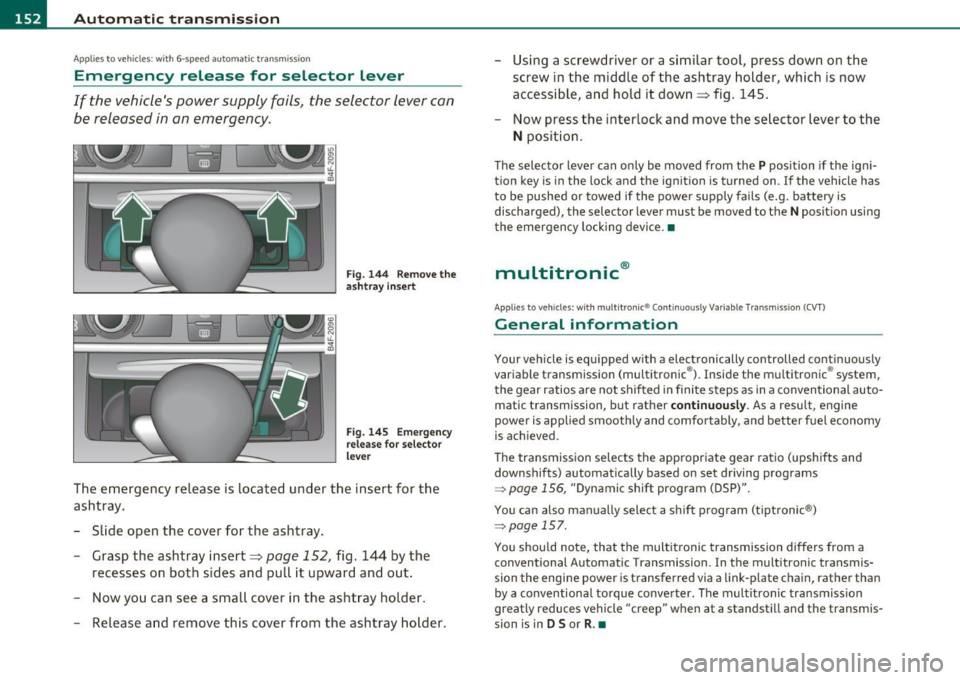
The emergency release is located under the insert for the
ashtray.
- Slide open the cover for the ashtray.
- Grasp the ashtray insert=>
page 152, fig. 144 by the
recesses on both sides and pull it upward and out.
- Now you can see a small cover in the ashtray holder.
- Release and remove this cover from the ashtray holder. -
Using a screwdriver or a similar tool, press down on the
screw in the middle of the ashtray holder, which is now
accessible, and hold it down=> fig. 145.
- Now press the interlock and move the selector lever to the
N position.
The selector lever can only be moved from the P position if the igni
tion key is in the lock and the ignition is turned on . If the vehicle has
to be pushed or towed if the power supply fails (e.g. battery is
discharged), the selector lever must be
moved to the N position using
the emergency locking device.•
multitronic ®
Appli es to vehi cles: w ith mul tit ron ic® Co ntin uous ly Var ia ble Tra nsm iss ion ( CVT)
General information
Your vehicle is equipped with a electronically controlled continuously
variable transmiss ion (multitronic ®). Inside the multitronic ® system,
the gear ratios are not shifted in finite steps as in a conventional auto
matic transmission, but rath er
continuously. As a result, engine
power is applied smoothly and comfortably, and better fuel economy
is achieved .
The transm ission selects the appropriate gear ratio (upshifts and
downshifts) automatically based on set driving programs
~ page 156, "Dynamic shift program (DSP)".
You can also manually select a shift program (tiptronic ®)
~ page 157.
You should note, that the multitronic transmission differs from a
conventional Autom ati c Transmission . In the multitronic transmis
sion the engine power is transferred via a link-plate chain, rather than
by a conventional torque converter. The multitronic transmission
greatly reduces vehicle "creep" when at a standstill and the transmis
sion is in
D Sor R . •
Page 158 of 368
1111....__A_ u_ t_o _m_ a_ t_ic _ t_ r_ a_ n_s _m_ i _s_ s_ i_ o_ n ____________________________________________ _
warning appears in the instrument cluster display when the selector
is in
P and N:
When stationary apply footbrake while selecting gear
A time delay element prevents the selector lever from locking when
it is moved through the
N position (going from R to D). The locking
element will lock the selector lever if the lever is left in N (Neutral) for
more than approximately 1 second, without the brake pedal be ing
pressed .
At speeds above about 3 mph (5 km/h) the Automatic Shift Lock is
automatically deactivated in the
N position.
Interlock button
The lock button on the selector lever prevents the lever from being
accidentally shifted into certain positions. Pressing this button deac
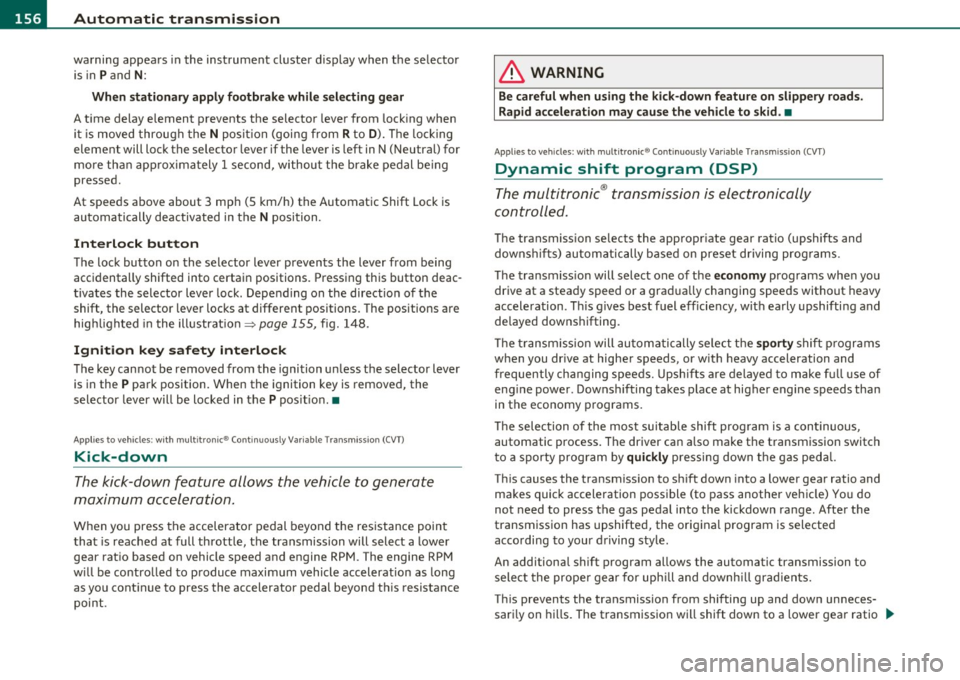
tivates the selector lever lock. Depending on the direction of the
shift, the selector lever locks at different positions. The positions are
high light ed in the illustrat ion~
page 155 , fig. 148.
Ignition key safety interlock
The key cannot be removed from the ignition unless the selector lever
is in the
P park position. When the ignition key is removed, the
selector lever w ill be locked in the
P pos it ion .•
Ap plies to v ehicles : w ith mult itronic ® Contin uously Var iable Transm issio n (C VT)
Kick-down
The kick-down feature allows the vehicle to generate
maximum acceleration.
When you press the accelerator pedal beyond the resistance point
that is reached at full throttle, the transmission will select a lower
gear ratio based on vehicle speed and engine RPM . The engine RPM
w ill be contro lled to produce maximum vehicle acceleration as long
as you continue to press the accelerato r pedal beyond th is resistance
point .
& WARNING
Be careful when using the kick-down feature on slippery roads.
Rapid acceleration may cause the vehicle to skid. •
Applies to veh icl es: w it h mul tit ro nic® Con tin uous ly Va ria bl e Tran smis s io n ( CVT)
Dynamic shift program (DSP)
The multitronic ® transmission is electronically
controlled .
The transmission selects the appropriate gear ratio (upshifts and
downshifts) automatically based on preset d riving programs.
The transmission will select one of the
economy programs when you
drive at a steady speed or a gradua lly changing speeds without heavy
acceleration . Th is gives best fuel eff iciency, with early upshifting and
delayed downshifting.
Th e transmission will automatically select the
sporty shift programs
when you dr ive at higher speeds, or w ith heavy acceleration and
frequently changing speeds. Upshifts are delayed to make full use of
engine power . Downshifting takes place at higher engine speeds than
in the economy programs.
Th e selection of the most suitab le shift program is a continuous,
automatic process. The driver can a lso make the transmission switch
to a sporty program by
quickly pressing down the gas pedal.
This causes the transmiss ion to shift down into a lower gear ratio and
makes quick acceleration possible (to pass another vehicle) You do
not need to press the gas pedal into the kickdown range. After the
transmission has upshifted, the original program is selected
according to your driving style.
An additional shift prog ram allows the automatic t ransmission to
select the proper gear for uph ill and downh ill grad ients.
This prevents the transmiss ion from shifting up and down unneces
sari ly on hills. The transmission will shift down to a lower gear ratio _,,,
Page 159 of 368
______________________________________________ A_ u_ t_ o_ m_ a_ t_ ic_ t_r _a _n_ s_m _ i_s _s_ i_o _n _ ___.ftlll
when the driver presses the brake pedal on a downhill gradient . This
makes use of the braking effect of the engine w ithout the need to
shift down manually .
If you are driving in hills and mounta ins, the transmission will contin
uously adjust the gear ratio to the road grade. If you press the brake
pedal when driving downhill, the transmission will downshift auto
matically. This increases the brak ing effect of the engine.
If the cruise control is on when you are traveling downhill, the trans
mission will automatica lly select a lower gear ratio in order to main
tain the set vehicle speed. Th is will cause the engine speed to
increase. •
Applies to vehi cles : wit h mul tit ro nic ® Co nt in uous ly Variabl e Tra ns missi on (CVT )
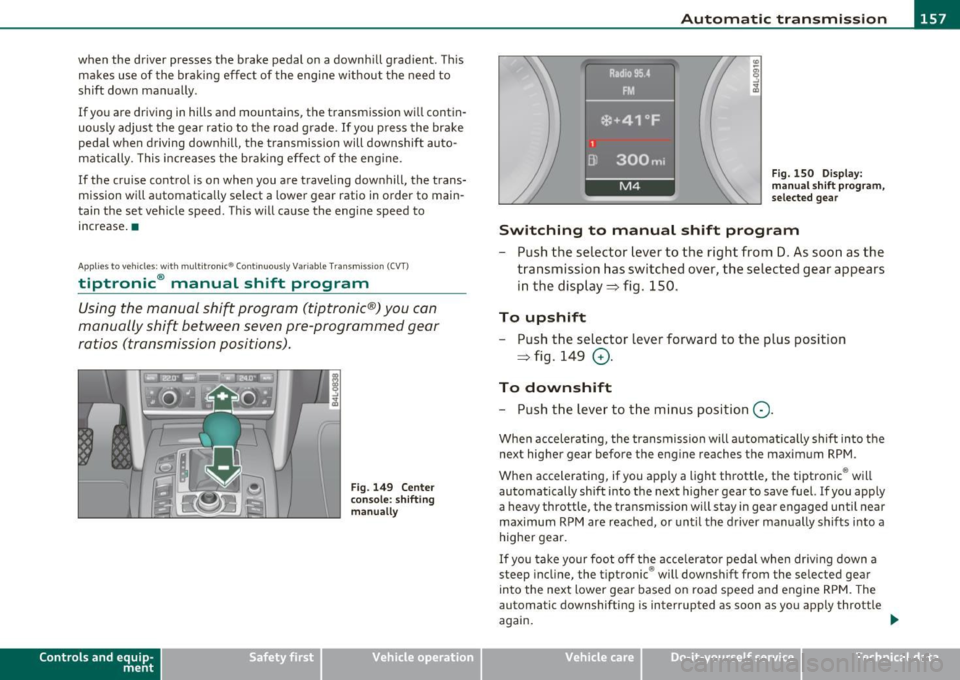
tiptronic ® manual shift program
Using the manual shi~ program (tiptronic®) you can
manually shift between seven pre-programmed gear
ratios (transmission positions) .
Contro ls a nd e quip
m en t
Fig . 149 Center
console : shifting
manually
Vehicle OP-eration
I I
I
1
Dl
1 Radio 95.4 .
FM.
*•41°F
300mi
M4
Fig. 150 Display:
man ual shift program,
selected gear
Switching to manual shift program
- Push the selector lever to the right from D. As soon as the
transmission has switched over, the selected gear appears
in the display ~ fig . 150.
To upshift
- Push the selector lever forward to the plus position
~ fig . 149
0 -
To downshift
- Push the lev er to the minus position Q.
When accelerating, the transmission will automatically shift into the
next higher gear before the engine reaches the maximum RPM .
When accelerating, if you apply a light throttle, the tiptronic ® will
automatically shift into the next higher gear to save fuel. If you apply
a heavy throttle, the transmiss ion wi ll stay in gear engaged until near
maximum RPM are reached, or until the driver manually shifts into a
higher gear.
If you take your foot off the accelerator pedal when driv ing down a
steep incline, the tiptronic ® will downshift from the selected gear
into the next lower gear based on road speed and engine RPM. The
automatic downshifting is interrupted as soon as you apply throttle
again.
Vehicle care Do-it-yourselt service iTechnical data
Page 169 of 368
__________________________________________ A _d_ a __,_ p_t_ i_v _e _ A_i_ r _ S_ u_s __,_p _ e_ n_s _ i_ o _n _ __.fflll
A pplie s to veh icles : with Ad aptive Air Su spen sion
Chassis controls
Four different driving modes can be set by the driver.
The automatic control processes are speed- and time-dependent. For
example, it is not possible to raise the suspension to the lift mode
above certain speeds.
Level adjustment
Automatic
Comfort
Dynam ic
Lift
Automatic Ground clearance
about 4
. 7 -4.1 inches
(120 -105 mm)
about 4. 7 inches (120 mm)
about 4.1 inches (105 mm)
about 5.3 inches (135 mm)
Select the automatic mode if you prefer suspens ion and damping
sett ings emphasizing comfort .
• Lowering : When a speed of about 75 mph (120 km/h) is exceeded
for more than 30 seconds, the vehicle is automatically lowered by
about 0 .6 inch (15 mm) to the dynamic level which is more suitable
for highway speeds. Road holding is optimized as a result of the lower
center of gravity and fuel consumption is reduced as a result of
reduced wind resistance.
• Raising: The vehicle is automatically raised again if the speed falls
below about 44 mph (70 km/h) for a period of 2 minutes. The veh icle
is raised immediately when speed falls below about 22 mph (35
km/h).
Comfort
Select the comfort mode if you desire a suspension setting with a
special emphasis on comfort. In the standard mode there is
no
lowering of the suspension. Even at high speeds, the vehicle stays at
the same level. Damping characteristics with a decided emphasis on
comfort are se lected in this mode .
Contro ls a nd e quip
m en t Vehicle
OP-eration
Dynamic
Select the dynamic mode if you prefer a sporty suspension setting . In
this mode, the vehicle is lowered while it is st ill stationary and sporty
damping characteristics are se lected. The wa rning light
cw in the
instrument cluster will come on for a few seconds just to remind you
of the reduced ground clearance.
If you switch off the engine wh ile the vehicle is in the dynamic mode
and then switch on the ignition once again, the
cw warning light will
also come on again for a few seconds as a reminder.
Lift
Select the lift mode when you have to travel over poor sections of
road (e.g. trails) . In the lift mode, the vehicle is raised by 0.6 inch (15
mm) compared to normal level w hile it is still stationary and damping
characteristics are adjusted to emphasize comfort.
Th e lift mode can be activated only at speeds below 50 mph (80
km/h) . When a speed of about 62 mph (100 km/h) is exceeded, the
system automatically leaves lift mode and the mode set previously
(standard, automatic, dynamic) is activated again.•
App lies to veh icles: w ith Adaptive Air Suspens ion
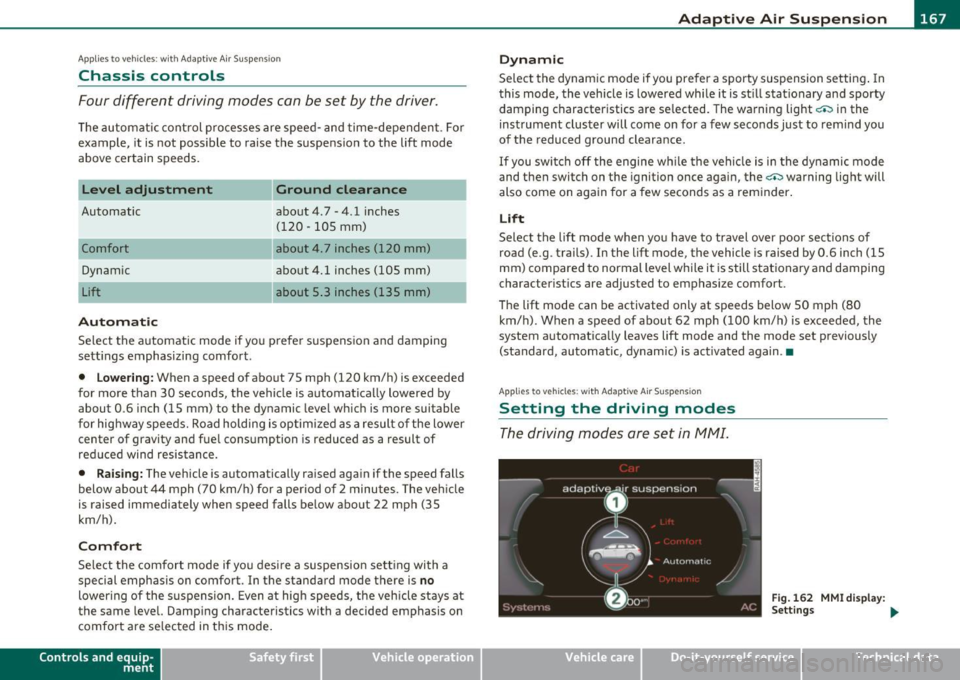
Setting the driving modes
The driving modes are set in fv1fv1I.
Fig. 162 MMI display :
Settings ...
Vehicle care Do-it-yourselt service iTechnical data
Page 184 of 368
• ....__D_ r_iv _i_ n_, g=-- S_ a _ f_e _,Ly _ ______________________________________________ _
in. WARNING
Improperly stored luggage or other items can fly through the
vehicle causing serious personal injury in the event of hard braking
or an accident. To help reduce the risk of serious personal injury:
• Always put objects, for example, luggage or other heavy items
in the luggage compartment .
• Always secure objects in the luggage compartment using the
tie-down eyelets and suitable straps.
& WARNING
Heavy loads will influence the way your vehicle handles. To help
reduce the risk of a loss of control leading to serious personal
injury:
• Always keep in mind when transporting heavy objects, that a
change in the center of gravity can also cause changes in vehicle
handling:
-Always distribute the load as evenly as possible.
- Place heavy objects as far forward in the luggage compart-
ment as possible.
• Never exceed the Gross Axle Weight Rating or the Gross Vehicle
Weight Rating specified on the safety compliance sticker on the
left door jamb . Exceeding permissible weight standards can cause
the vehicle to slide and handle differently.
• Please observe information on safe driving=>
page 174.
in. WARNING
To help prevent poisonous exhaust gas from being drawn into the
vehicle, always keep the rear lid closed while driving.
• Never transport objects larger than those fitting completely
into the luggage area because the rear lid cannot be fully closed.
& WARNING (continued)
• If you absolutely must drive with the rear lid open , observe the
following notes to reduce the risk of poisoning:
-Close all windows,
- Close the power roof*,
- Open all air outlets in the instrument panel,
- Switch off the air recirculation,
- Set the fresh air fan to the highest speed.
in. WARNING
Always make sure that the doors, all windows, the power roof*
and the rear lid are securely closed and locked to reduce the risk of
injury when the vehicle is not being used.
• After closing the rear lid, always make sure that it is properly
closed and locked.
• Never leave your vehicle unattended especially with the rear lid
left open. A child could crawl into the vehicle through the luggage
compartment and close the rear lid becoming trapped and unable
to get out. Being trapped in a vehicle can lead to serious personal
injury.
• Never let children play in or around the vehicle.
• Never let passengers ride in the luggage compartment. Vehicle
occupants must always be properly restrained in one of the
vehicle's seating positions .
(I) Tips
• Air circulation helps to re du ce win dow fogging. Stale air escap es
to the outside through vents in the trim panel, on the left s ide of the
lugg age compartment . B e sur e to k eep these slots free and open.
• Th e tire p ress ure must cor respond to the load -see the tire pres
sure sticker on the fuel filler door. •