2010 AUDI S6 wheel
[x] Cancel search: wheelPage 77 of 368

Seats and storage
General recommendations
Why is your seat adjustment so important?
The safety belts and the airbag system can only provide
maximum protection if the front seats are correctly
adju sted.
Th ere a re various ways of adjusting t he front seats to provide safe and
comfortable support for the driver and the front passenger . Ad just
your seat properly so that :
• you can easily and quickly reach a ll the switc hes and contro ls in the
ins trumen t pa nel
• your body is properly supported thus reducing phys ica l stress and
fatigue
• the safety be lts and airbag system can offer maximum protection
=>
page 195 .
In the following sections, you w ill see exact ly how you can best ad just
your sea ts .
Th ere are special regulations a nd instr uctions for install ing a child
safety seat on the front passenger's sea t. Always follow the informa
tion regarding child safety p rovided in=>
page 217, "Child Safety ".
& WARNING
Incorrect seating posit ion of the dri ver and all other passengers
can result in seriou s personal injury.
• Always keep your feet on the floor when the vehicle is in
motion -never put your feet on top of the instrument panel, out
of the window o r on top of the seat cush ion. This applies especially
to the passengers.
If your seating po sition is incorrect, you
increase the ri sk of injury in the case of sudden braking or an acci-
Controls and equip
ment Safety first
Seats and storage
& WARNING
(con tinu ed)
dent . If the airbag inflates and the seating position is incorrect ,
this could result in per sonal injury or even death .
• It is important for both the dri ver and front passenger to keep
a distan ce of at least 10 inche s (25 cm) between themselves and
the steering wheel and /or instrument panel. If you 're sitting any
closer than this , the airbag system cannot protect you properly. In
addition, the front seats and head restraints must be adjusted to
your body height so that they can give you maximum protection .
• Always try to keep as much distance as possible between your
self and the steering wheel or instrument panel.
• Do not adjust the driver's or front passenger 's seat while the
vehicle is moving. You r seat may move unexpectedly , causing
sudden loss of vehicle control and personal injury . If you adjust
your seat while the vehicle is moving , you are out of position. •
Driver's seat
The correct seat position is important for saf e and
re lax ed driving.
W e recomme nd that you a djust the drive r's sea t in the
f ollowing man ner :
- Ad just the seat in fore and aft direction so that you can
easily pus h the pedals to the floor w hile keeping your
knees slightly bent=>
& in "Why is yo ur seat a djus tme nt
so importa nt?" .
- Adjust the seatback so that when yo u sit with yo ur back
agai nst t he seatback , you can st ill grasp t he top of the
steering w heel. ..,
Vehicle care Technical data
Page 103 of 368
_________________________________________________ W_ a_ r_m _ a_ n_d_ c_ o_ ld _ ___._
• in a traff ic jam.
& WARNING
Do not use this setting for extended periods of time. The windows
could fog up since no fresh air can enter the vehicle. If the
windows fog up, press the air recirculation button again immedi
ately to switch off the air recirculation function or select defrost.•
Rear window defogger [Qiil ]
The rear window defogger clears the rear window of
condensation.
- Press the QW button to turn the rear window defogger on
and
off.
Th e rear window defogger works only when the engine is running. The
light in the switch will illuminate when the defogge r is on .
The rear window defogger will switch off automatically after a short time. The time the rea r window defogger remains on will vary
depending on the outside temperature.
At very low outside temperatures, the rear window defogger can be
switched on continuously by push ing the QliJ button for more tha n 2
seconds . This remains stored until the ign ition is switched off.
A rear window defogger that was switched on also remains stored for
15 minu tes after the ignition is switched off . If the engine is
restarted w it hin these 15 minu tes, the rear window defogger is also
activated, depending on outside temperature. With a vehicle that is
parked for a short time, the rear w indow defogger does not need to
be manually activated aga in .
c£> For the sake of the environment
Turn the defogger off when the rear window is clear. When you save
electricity, you save fuel. •
Contro ls a nd e quip
m en t Vehicle
OP-eration
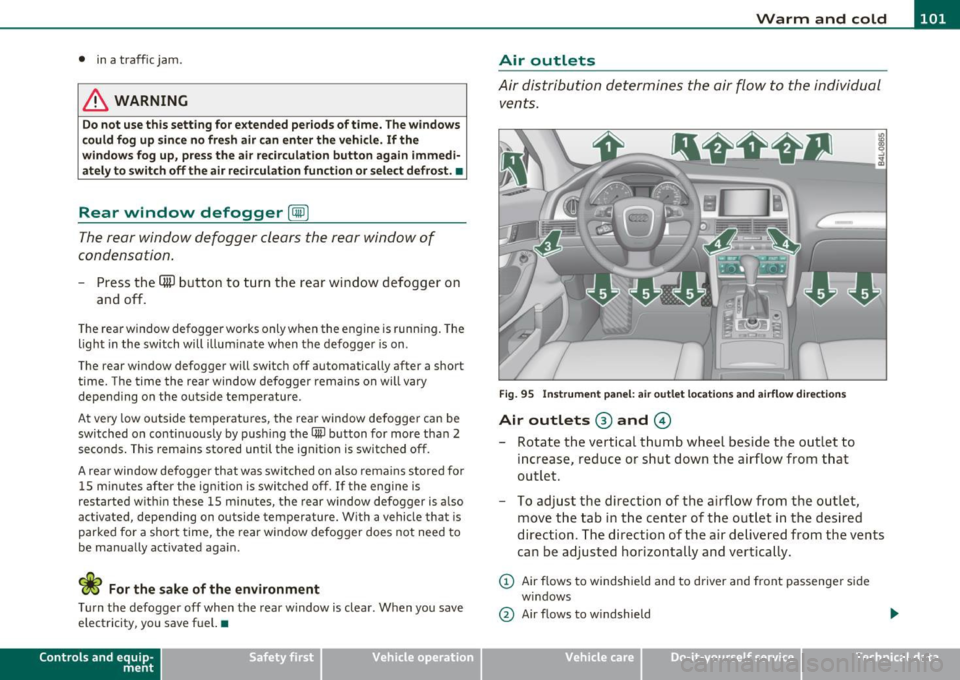
Air outlets
Air distribution determines the air flow to the individual
vents.
Fig. 95 Instrument panel: air outlet locations and airfl ow directions
Air outlets ® and ©
- Rotate the vertical thumb wheel beside the outlet to
increase, reduce or shut down the airflow from that
outlet .
- To adjust the direction of the a irflow from the outlet,
move the tab in the center of the outlet in the desired
direction. The direction of the air delivered from the vents
can be adjusted horizontally and vertically.
@ Air flows to windshield and to driver and front passenger side
windows
@ Air flows to w indshield
Vehicle care Do-it-yourselt service iTechnical data
Page 104 of 368
1111....__w __ a _r_ m __ a_n_ d_ c_ o _ l_d _______________________________________________ _
@ Air flows to driver/front passenger
© Air flows to driver/front passenger
© Air flows to footwell
T he ai r outlets are actuated either automatically or manually
depending on the operating mode selected.
[I] Tips
• When climate control is working, cooled air will flow primarily
from out lets @ and @. To assure adequate cooling, outlets @ and
© should never be completely closed.
• T he air flow coming from the vents © can be adjusted to be colder
or warmer than the selected set temperature. •
Air outlets in the rear
Outlets in the center console
- Rotate the thumb wheel located next to the outlet to open
or close it.
- To adjust the direction of the airflow from the outlet, move the tab in the center of the outlet in the desired
direction . T he direction of the air delivered from the vents
can be adjusted horizontally and vertically.
Outlets in the door pillars
- Rotate the thumb wheel located next to the outlet to open
or close it .
- To adjust the direction of the airflow from the outlet,
mov e the tab in the center of the o utlet in the desired
direction. The direction of the air delivered from the vents
can be adjusted horizontally and vertically.
The air outlets are actuated either automatically or manually
depending on the operating mode selected. Heated or unheated
fresh air, or cooled air flows from the vents.
T he air outlets to heat the rear footwell are located under the front
seats.
[I] Tips
If the climate control sys tem is operating in cooling mode, air flows
primarily from the outlets in the center console and in the door
pillars. To ach ieve adequate cooling, you sho uld never close the
outlets completely. •
Using climate control economically
Using the climate controls prudently can help save fuel.
When you use the air conditioner, engine power is reduced
and fuel consumption increases . To save fuel, you should use
the air conditioner only when necessary . Also please note the
following points:
To save fuel, turn off cooling mode by pressing the
[AC)
butto n (indicator ligh t goes out).
- In addit ion, if you open the window or the sunroof* while
driving, turn
off cooling mode by pressing the [AC] button
(indicator light goes out).
If the vehicle is extremely hot due to the heat of the sun,
briefly ope n doors and windows.
ffi For the sake of the environment
By reducing the amount of fue l you use, you also reduce the amount
of pollutants emitted into the air.•
Page 105 of 368
_________________________________________________ W_ a_ r_m _ a_ n_d_ c_ o_ ld _ ___.lfll
A pp lies to vehicl es: wi th ele ctr ically heated s eats
Heated front seats Q)
The seat cushion and the seat back of the front seats can
be heated electrically.
- Press the~ button.
- Rotate the regulator to the desired setting.
In position O the heating for the seats is turned off. The range of
adjustment is between
1 and 6.
The setting will appear for a few seconds in the MMI display.
(D Note
To avoid damage to the heating elements in the seats, do not kneel
on the seats or place heavy loads on a small area of the seat .•
Ap plies to vehicl es: with he ated r ea r se ats
Heated rear seats
The seat cushions and seat backs of the two outer rear
seats can be heated electrically .
Contro ls a nd e quip
m en t
Fig . 96 Center console
rear: Heated seats
Vehicle OP-eration
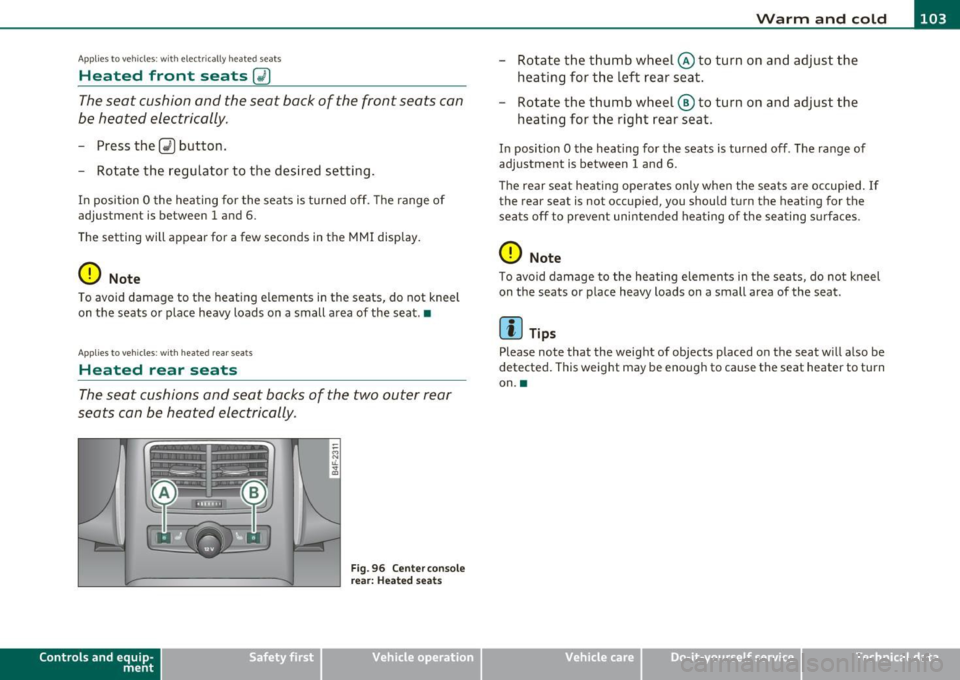
-Rotate the thumb wheel @to turn on and adjust the
heating for the left rear seat .
- Rotate the thumb wheel@ to turn on and adjust the
heating for the right rear seat.
In position O the heating for the seats is turned off . The range of
adjustment is between
1 and 6 .
Th e rear seat heating opera tes only when the seats are occupied. If
the rear seat is not occupied, you should turn the heating for the
seats off to prevent unintended heating of the seating surfaces .
(D Note
To avoid damage to the heating elements in the seats, do not kneel
on the seats or place heavy loads on a small area of the seat .
[I) Tips
Please note that the weight of objects placed on the seat will also be
detected. This weight may be enough to cause the seat h eater to turn
on .•
Vehicle care Do-it-yourselt service iTechnical data
Page 106 of 368

llll..__w __ a _r _m __ a_n _ d_ c_ o_ ld ________________________________________________ _
Applie s to veh icles : wi th s teering w heel he atin g
Steering wheel heating~
The steering wheel can be heated electrically.
Fig. 97 Multifunction
steer ing wheel : B utton
f or steering wheel
heat ing
- Press the(~] button to turn the steering wheel heating on
and off =>fig. 97. The message
Steering whee l heat ing on ! or
S teer ing whee l heat ing off! appears in the instrument
cluster display .
When the steer ing wheel heat ing is switched on, the steering wheel
is heated to about 82 °F (28 °() and held there.
T he last setting selected for the steering wheel heating (on or off) is
automatically saved when the vehicle is shut off and is assigned to the
remote key. •
Basic settings
General
The basic climate control settings can be adjusted in the
MMI.
- Select: Function button (CAR]> Control button AC.
The following functions can be selected:
• Auto recirculat .
~ page 104
• Synchronizat ion~ page 105
• Center vents~ page 105 •
Automatic recirculation mode
An air quality sensor detects increased concentrations of
pollutants in the outside air and automatically switches
to recirculation mode.
We recommend that you always keep automatic air recirculation ON
to prevent polluted outside air from entering the vehicle interior.
If the air qualit y sen sor located in the air conditioning system detects
polluted outside air, the sensor decides whether the air pollution can
be reduced by the factory -installed pollutant filter or whethe r it is
necessary to switch to air recirculation. With heavy concentrations of
poll utants, the a ir condit ion ing system is switched automatically to
recirculation mode and the supply of outside air is blocked . As soon
as the concen tration of pollutants in the o utside air drops, fresh air is
supplied to the vehicle in terior again .
In the event that the windows fog up during automatic air recircula
tion, you must press the® button immed iate ly.
Under certain operating conditions, automatic a ir recirculation is
switched off automa tically. With o utside temperat ures below about
SO °F ( +10 °(), automatic air recirculation is limited to 30 seconds.
With outside temperatures below about 30 °F (-1 °C) and the cooling
system is switched off, the automatic air recirculation is limited to 15
seconds. •
Page 108 of 368
1111....__0_ n_ t_h_ e_ r_ o_ a _ d _________________________________________________ _
On the road
Steering
Applies to vehicles : w ith manua lly ad justab le stee ring whee l
Manually adjustable steering wheel
The height and reach o f the steering wheel can be
adjusted.
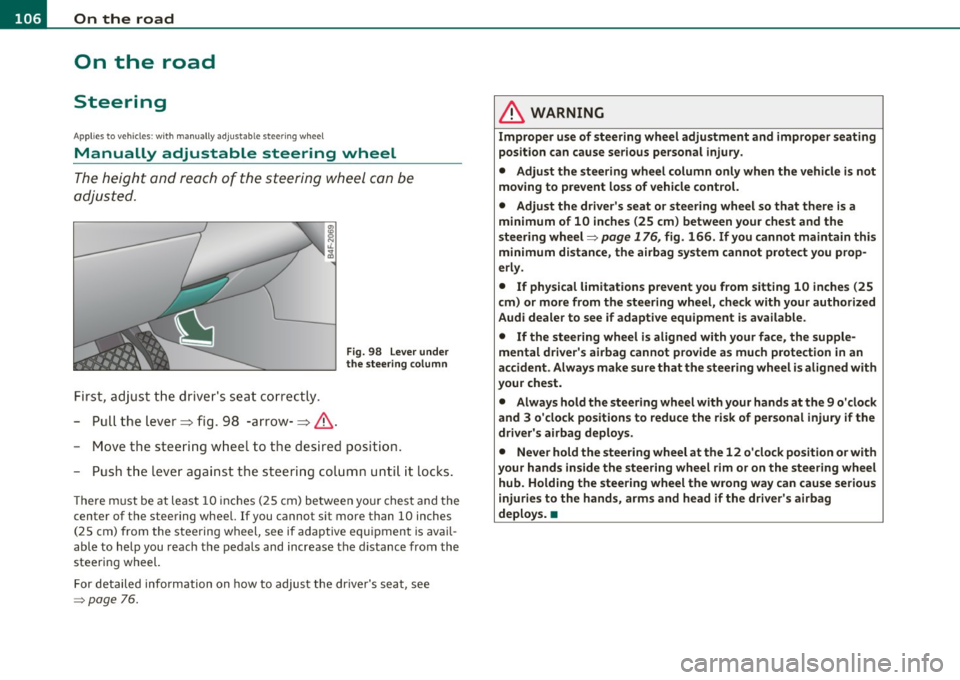
First, adjust t he driv er's seat correctly.
- Pull the lever~ fig. 98 -arrow-~ &.
Fig. 98 L ever under
the stee ring colum n
-Move the steering w heel to t he desired position.
- Push t he leve r against the s teering colum n unti l it locks .
The re m ust be at leas t 10 inc hes (25 cm) be tween yo ur chest and the
center of the steering wheel. If you cannot sit more than 10 inches
(25 cm) from the steering wheel, see if adaptive equ ipment is avail
able to help you reach the pedals and increase the d istance from the
steering wheel.
For detailed info rmation on how to adjust the dr ive r's seat, see
=> page 76.
& WARNING
Improp er use of steering wh eel adjustment and improper seating
position can cause serious personal injury .
• Adjust th e steering wheel column only when the v ehicle i s not
moving to p revent loss of vehicle control.
• Adjust the driver's seat or steering wheel so that th ere is a
minimum of 10 inches (25 cm ) between your chest and the
steering wheel=>
page 176 , fig. 166 . If you cannot maintain this
minimum distance , the airbag sy stem cannot protect you prop
erl y.
• If physical limitat ions p revent you from sitting 10 in ches (25
cm ) or more from the steering wheel, check with your authorized
Audi dealer to see if adaptive equipment is available.
• If the steering wheel is aligned with your face , the supple
mental driver' s airbag cannot provide a s much p rote ction in an
accident . Always make sure that the steer ing wheel i s aligned with
your che st.
• Always hold the ste ering wheel with your hands at th e 9 o'clock
and 3 o 'clock positions to reduce the risk of per sonal injury if the
driver' s airbag deploy s.
• Never hold the steering wheel at the 12 o 'clock position o r w ith
your hands inside the steering wh eel rim or on the steering wh eel
hub. Holding the stee ring wheel the wrong way can cause seriou s
injuries to the hands, arms and head if the driver' s airbag
deploy s. •
Page 109 of 368
_________________________________________________ O_ n_ t_ h_ e_ r _o_ a_d _ __.fflll
App lies to veh icles : w ith electrically adju stab le steer ing wheel
Electrically adjustable steering wheel
The height and reach of the stee ring wheel ca n be ele ctri
c ally adj usted to sui t th e d river.
Firs t, a djust t he dr iver's se at correct ly.
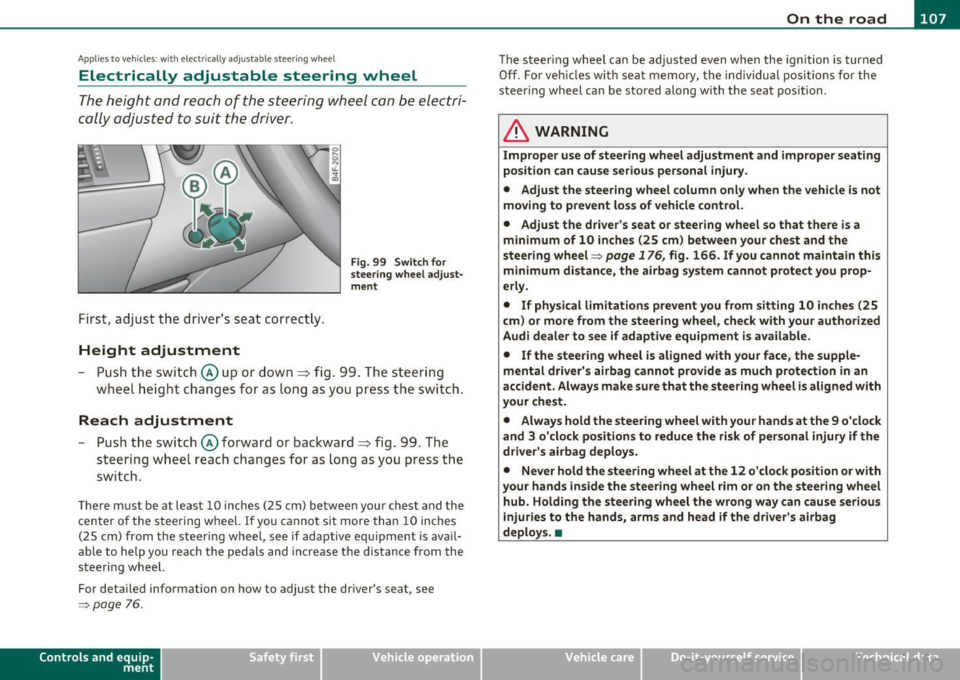
Height adjustment
Fig . 99 Switch for
s teering whee l ad ju st
ment
- Push t he s witch © up or down=> fig. 99 . T he st ee rin g
w he el heig ht chang es f or as long as you press t he swi tch .
Reach adjustment
- Push t he switc h© forward or backward=> fig. 99 . T he
ste ering w hee l reac h changes for as long as yo u press the
swi tch .
The re m ust be at leas t 10 inches (25 cm) between you r chest and the
cen ter of the steering whee l. If you cannot sit more than 10 inches
(25 cm) from the steer ing wheel, see if adapt ive equ ipment is ava il
able to h elp you reach the pedals and increase the distance from the
steeri ng wheel.
For detailed information on how to adjust the dr iver 's seat , see
~ page 76.
Cont rols a nd e quip
m en t Vehicle
OP-eration
The steering wheel ca n be adjusted even when the ign ition is turned
O ff. For veh icles with sea t memory, the individu al pos it io ns for the
steer ing wheel can be sto red along with t he seat pos it ion.
& WARNING
Improper use of steering wheel adjustment and imprope r seating
position can cau se seriou s per sonal injury.
• Adjust the steering wheel column only when the vehicle i s not
moving to prevent loss of vehicle control.
• Adjust the driver 's seat or steering wheel so that there is a
minimum of 10 in ches (25 cm) between your chest and the
steering wheel~
page 176, fig. 166. If you cannot maintain this
minimum distance , the airbag system cannot prote ct you prop
erly.
• If phy sical limitations prevent you from sitting 10 inches (25
cm ) or more from the steering wheel, check with you r authorized
Audi dealer to see if adaptive equipment is available .
• If the steering wheel is aligned with your face , the supple·
mental driver 's airbag cannot provide as much protection in an
accident. Always make sure that the steering wheel is aligned with
your che st.
• Always hold the steering wheel with your hands at the 9 o'clock
and 3 o'clock po sition s to reduce the risk of personal injury if the
drive r's airbag deploys.
• Never hold the steering wheel at the 12 o'clock po sition or with
your hands inside the steering wheel rim or on the steering wheel
hub. Holding the steering wheel the wrong way can cause serious
injuries to the hands, arms and head if the driver's airbag
deploy s.•
Vehicle care Do-it-yourselt service iTechnical data
Page 110 of 368
ffl..__O_ n_ t_h _e_ r_o _ a_ d _________________________________________________ _
Easy entry feature
The easy entry feature makes it easier to enter and e xit
the vehicle by automatically adjusting the steering
wheel.
Press the button®~ page 107, fig. 99 to turn the easy
entry feature on or off .
When the easy entry feature is turned on (button depressed), the
steering wheel moves up to the parked position when the ignition is
t urned off . After you enter the vehicle, the steer ing wheel moves to
the stored pos ition as soon as you t urn on the ig nition .
Easy entry feature on vehi cles with memory seat *
For the stored steering whee l position to be recalled, t he driver's seat
memory must be switched on
( I ON O FF] sw itch in depressed posi
tion) .
If the easy e ntry feature i s sw itched off, the s teer ing wheel mov es to
the stored pos ition as soon as you press the seat memory button. •
Ignition Lock and ignition switch
Ignition key positions
The engine can be st arted or turned off with the ign ition
key .
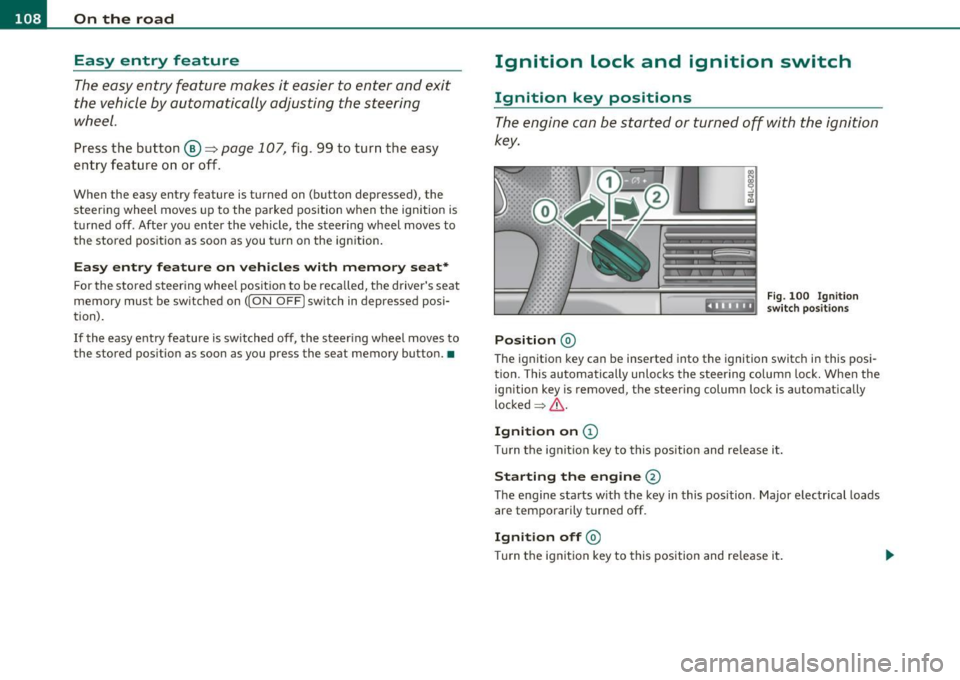
Position @
Fig. 100 Ig n ition
sw itch position s
The ig nition key can be inserted into the ignition switch i n this posi
tion. This automatically unlo cks the steering co lumn lo ck. When the
ign ition key is removed, the steer ing colum n lock is automat ically
lo ck ed
~ & .
Ignition on (D
Tu rn the ignit ion key to this position and re lease i t.
Starting the engine@
The engine starts w ith the key in this position . Major electrical loads
are temporarily tur ned off.
Ignit ion off @
Turn t he ignit ion key to thi s position and re le ase i t.