2010 AUDI S6 warning
[x] Cancel search: warningPage 165 of 368
___________________________________________________ P_ a _ r_k :...:.; a..::s ...:s...: i..::s ...:t _ ___,J_
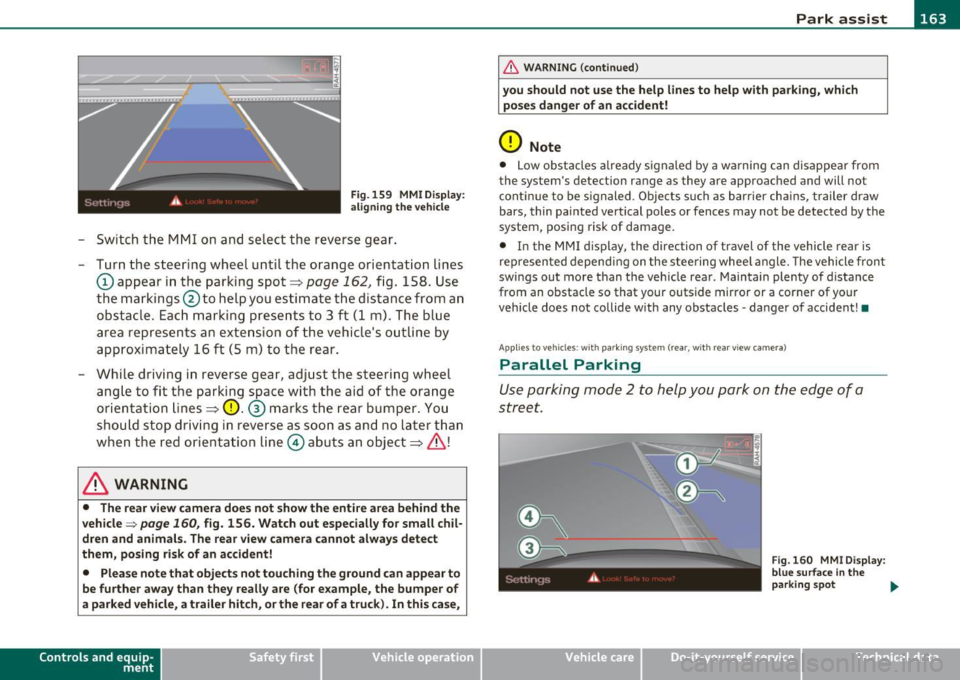
Fig. 159 MMI D isplay:
al igni ng the veh icle
- Switch the MMI on and se lect the reverse gear .
- Turn the steering wheel until the orange orientation lines
(D appear in the parking spot=> page 162, fig. 158 . Use
the markings @to help you estimate the distance from an
obstacle. Each marking presents to 3 f t (1 m) . The blue
area represen ts a n extension of the vehi cle's o utline by
approximately 16 ft (5 m) to the rear .
- While driving in reverse gear, adjust the steering wheel ang le to fit the parking space with the aid of the orange
orientation lines =>
0. ® marks the rear bumper . You
should stop driving in reverse as soon as and no la ter than
when the red orientation line© abuts an object=>& !
& WARNING
• The rear view came ra does not show the enti re area beh ind the
v ehicle =>
page 160, fig. 156. Watch out e spe cially fo r s mall chil ·
dren and animal s. The rear v iew cam era cannot alwa ys dete ct
them , posing ri sk of an accident!
• Plea se note that obje ct s not tou ching the groun d can appear to
be further awa y than th ey reall y are (for example , th e bumpe r of
a parked vehi cle, a trailer hit ch , or the r ear of a truck) . In thi s case ,
Con tro ls a nd e quip ·
m en t Vehicle
OP-eration
& WARNING (con tin ued)
you sh o uld not use the help lin es to help with p arking , whic h
po se s dang er of an accident!
0 Note
• Low obstacles a lready signaled by a wa rning c an disappear from
the sys tem's de te ct ion range as they are app roached and will no t
conti nue to be signaled . Objects such as barrier cha ins, trailer draw
bars, thin painted ve rtica l poles or fences may not be detected by the
system , posing risk of damage.
• In the MMI display , the direc tion o f travel o f the vehicle rear is
represen ted depend ing on the steering whee l angle. The vehicle front
swings out more than the veh icle rear . Maintain plenty of distance
from an obstacle so that your outside mirror or a corner of your
vehicle does not collide with any obstacles -danger of accident !•
Ap plie s to veh icle s: with pa rk ing syst e m (r ea r, wi th rear vie w cam era)
Parallel P arking
Use parking mode 2 to help you park on the edge of a
street.
Vehicle care
Fig. 160 MM I Displ ay :
blue surface In the
p arking s pot
~
Do-it-yourselt service iTechnical data
Page 166 of 368

1111....__P_ a_r_ k_ a_s_ s_ i_ s _t __________________________________________________ _
Fig.161 MMI Display:
Blue curve on the curb
The following steps apply only when there is no obstacle
(such as a wall) near the parking spot. Otherwise, please read
the "Tips on Parking Next to Obstacles".
- Activate the turn signal.
- Switch the MMI on and select the reverse gear. The
parking aid turns on and parking mode 1 appea rs on the
display.
- Position your vehicle parallel to the edge of the street,
approximately 3 ft (1 m) from a parked vehicle.
- Press the control button
(D => page 163, fig. 160 on the
MMI control console. Parking mode 2 appears.
- Back up in reverse gear and align your vehicle so that the
blue area ® borders on the rear end of the vehicle or on
the parking spot line. The blue area represents an exten
sion of the vehicle's outline by approximately 16 ft (5 m)
to the rear. The long side of the blue area should be on the
curb. The entire blue area must fit into the parking spot.
- While the vehicle is stationary, turn the steering wheel to
the right as far as it will go. -
Back into the parking spot until the blue curve touches the
curb => fig. 161. Stop the vehicle.
- While the vehicle is stationary , turn the steering wheel to
the left as far as it will go .
- Continue to back up into the parking spot until the vehicle
is parked parallel to the curb .® marks the rear bumper .
You should stop driving in reverse as soon as and no later
than when the red orientation line© abuts an object
=> & !Keep an eye on the front of your vehicle while doing
this =>
0.
Parking next to obstacles
When there is an obstacle (such as a wall) next to the parking spot,
choose a spot with more space on the sides. Position the long side of
the blue a rea so that the re is sufficient space from the curb. The area
must not be on the curb. You will also need to start turning the
steering wheel much earlier. There should be a sufficient amount of
space between the curb and the blue curve, and the blue curve
=> fig . 161 must not touch the curb.
& WARNING
• The rear view camera does not show the entire area behind the
vehicle => page
160, fig. 156. Watch out especially for small chil
dren and animals. The rear view camera cannot always detect
them, posing risk of an accident!
• Please note that objects not touching the ground can appear to
be further away than they really are (for example, the bumper of
a parked vehicle, a trailer hitch, or the rear of a truck). In this case,
you should not use the help lines to help with parking, which
poses danger of an accident! _,,,
Page 167 of 368

Park assist IIJII _________________________________ _____;.....:;_;_.:..:,____;;_ ____ _
0 Note
In the MMI display, the d irect ion of t ravel of the vehicle rear is rep re
sented depend ing on the steering wheel angle. The vehicle front
swi ngs ou t mo re t han t he ve hicle re ar. M ain tain ple nty of dist ance
from an obstacle so t hat your outs ide mirror or a corner of your
vehicle d oes no t collide with any o bstacles - dange r of accide nt!
[ i ) Tips
Th e left or right or ientat ion lines and s urfaces will be displ aye d,
depending on the tu rn signal being used. •
App lies to veh icles : with park ing syst em (rear, wit h rea r view cam era)
Adjusting the display and warning tones
Th e display and warning tones can be adjusted in the
MM I.
-Select: Funct ion button !CA R]> Systems *> Parking
system .
Display
• Off -when the parking system is switche d off, only audible sig na ls
are given.
• On -when t he pa rking system is swi tched on, the pic ture from the
rear view camera is displayed.
Warning tones (Canada models)
• Rear volume -rear sensor vo lume
• Rear frequency -rear sensor frequency
• In-car entertainment fader -w hen the p ark in g sys tem is switche d
on, t he volume of the active audio source is lowered.
Th e newly adj uste d value is briefly hear d from the signal generator .
Th e set tings are automat ically stored and assigned to the master key
with remote control.
Controls and equip
ment Safety first
& WARNING
•
Canada models: always make sure that the volume and
frequency of the chimes is adjusted so that you can easily hear the
acoustic distance signal even if the radio is playing, the air-condi
tioner blower is on High or there is a high level of outside noise.
• Check the settings whenever someone else has driven the
vehicle before you.
[I] Tips
• Cana da mo dels: the warning tones can a lso be adjusted directly
from t he rear -view came ra image* . Simply press the
!Settings)
control button.
• Cha nged settings are activated w hen parking assist is switched on
again. •
Appli es to ve hicle s: wit h pa rk ing system (rea r, wi th r ear vie w c amer a)
Error messages
If a wa rni ng tone* is aud ible for abo ut five seconds w he n you t urn on
the ignition , the re is a ma lfunction in the system. Have the prob lem
co rrected by yo ur aut ho rized Audi dea ler.
Keep the sensors in the rear b umper clean and free from ice so that
t he a cousti c p ark assis t* sys tem c an fun ction pro perly .•
Vehicle care Technical data
Page 168 of 368
lffll.___A_ d_ a_,_ p_t _i_ v _e _ A_i_ r_ S_ u_ s ... p,_ e_n_ s_ io_ n __________________________________________ _
Adaptive Air Suspension
Adaptive Air Suspension and
Damping
Ap plies to veh icles: w ith Ad aptive Ai r Suspens ion
Description
Adaptive Air Suspension and damping can be regula ted
and they adapt automatically to a request from the
driver and the driving situation at the time .
Adaptive Air Suspension is an e lectron ically controlled springing and
damping system . This chass is system makes it eas ie r on the driver by
adapting to the particular situation th rough impe rceptible contro l
processes .
The
Adaptive Air Suspension component regu lates ground clearance
depending on ve hicl e speed, load cond ition and driver input .
W hen the system is in a utomatic mode, accelerat ing to a speed above
a predete rm ined limit will make the vehicle lower itsel f. On t he othe r
hand, driv ing more slowly res ults in the vehicle ra is ing again at
specific speeds.
Th e
damping component provides individua l control of the damping
forces. For example, with damp ing characterist ics set to provide
greater com fort, damp ing is se t somewhat harder for a br ief period
only as required, for example, whe n going around a curve or over
rough road sur faces as we ll as when braking .
Settings
Adaptive Air Suspension prov ides the drive r wi th t he opportu nity to
set the chass is characterist ics also to their individual preference.
W ith the driving modes
Comfort, Automatic an d Dynamic the dr ive r
has three chassis sett ings available, ranging from comfort to sporty.
In addit ion,
Lift p rovides a fourth mode which can be selecting fo r
dr iving over poor stretches of road =>
page 167, "Chass is controls" . The modes are set
in MM I =>
page 167.
& WARNING
The height of the parked vehicle can change due to temperature
fluctuation s or changes in load .
0 Note
• Whenever you park yo ur vehicle, always make sure there is
adeq uate clearance above and below the ve hicle . T he heig ht of the
parked vehicle can change as the res ult of temperature fluctuations,
changes in load condition and changes in the dr iv ing mode (ground
clearance).
• If the veh icle is be ing transported (e .g. by tow truck, train, ship,
etc.) , mount the tie-down cha ins/cables over the r unning s urface
(c ircumfere nce) of the tir es. Never sec ure the ve hicle by the ax le, the
suspension struts or the front or rea r tow line eye. For technical
reaso ns, the p ressure in t he suspension st ru ts m ay change dur ing the
transport, w hic h could result in the vehicle no longer being secured
pro perly .
• To prevent damage to the vehicle underbody, remember that your
veh icle is no t an off-roa d veh icle, even in the "lift" mo de. Th e ground
clearance is insufficient for this type of operation.
• If you are go ing to tow a trai ler, you mus t activate the trai ler ope r
ation mode =>
page 168.
[ i ] Tips
Before you raising your vehicle us ing the veh icle jack (for example,
w hen c hanging a flat tire) you must acti va te the j ack ing mode
=>page 168 . •
Page 169 of 368
__________________________________________ A _d_ a __,_ p_t_ i_v _e _ A_i_ r _ S_ u_s __,_p _ e_ n_s _ i_ o _n _ __.fflll
A pplie s to veh icles : with Ad aptive Air Su spen sion
Chassis controls
Four different driving modes can be set by the driver.
The automatic control processes are speed- and time-dependent. For
example, it is not possible to raise the suspension to the lift mode
above certain speeds.
Level adjustment
Automatic
Comfort
Dynam ic
Lift
Automatic Ground clearance
about 4
. 7 -4.1 inches
(120 -105 mm)
about 4. 7 inches (120 mm)
about 4.1 inches (105 mm)
about 5.3 inches (135 mm)
Select the automatic mode if you prefer suspens ion and damping
sett ings emphasizing comfort .
• Lowering : When a speed of about 75 mph (120 km/h) is exceeded
for more than 30 seconds, the vehicle is automatically lowered by
about 0 .6 inch (15 mm) to the dynamic level which is more suitable
for highway speeds. Road holding is optimized as a result of the lower
center of gravity and fuel consumption is reduced as a result of
reduced wind resistance.
• Raising: The vehicle is automatically raised again if the speed falls
below about 44 mph (70 km/h) for a period of 2 minutes. The veh icle
is raised immediately when speed falls below about 22 mph (35
km/h).
Comfort
Select the comfort mode if you desire a suspension setting with a
special emphasis on comfort. In the standard mode there is
no
lowering of the suspension. Even at high speeds, the vehicle stays at
the same level. Damping characteristics with a decided emphasis on
comfort are se lected in this mode .
Contro ls a nd e quip
m en t Vehicle
OP-eration
Dynamic
Select the dynamic mode if you prefer a sporty suspension setting . In
this mode, the vehicle is lowered while it is st ill stationary and sporty
damping characteristics are se lected. The wa rning light
cw in the
instrument cluster will come on for a few seconds just to remind you
of the reduced ground clearance.
If you switch off the engine wh ile the vehicle is in the dynamic mode
and then switch on the ignition once again, the
cw warning light will
also come on again for a few seconds as a reminder.
Lift
Select the lift mode when you have to travel over poor sections of
road (e.g. trails) . In the lift mode, the vehicle is raised by 0.6 inch (15
mm) compared to normal level w hile it is still stationary and damping
characteristics are adjusted to emphasize comfort.
Th e lift mode can be activated only at speeds below 50 mph (80
km/h) . When a speed of about 62 mph (100 km/h) is exceeded, the
system automatically leaves lift mode and the mode set previously
(standard, automatic, dynamic) is activated again.•
App lies to veh icles: w ith Adaptive Air Suspens ion
Setting the driving modes
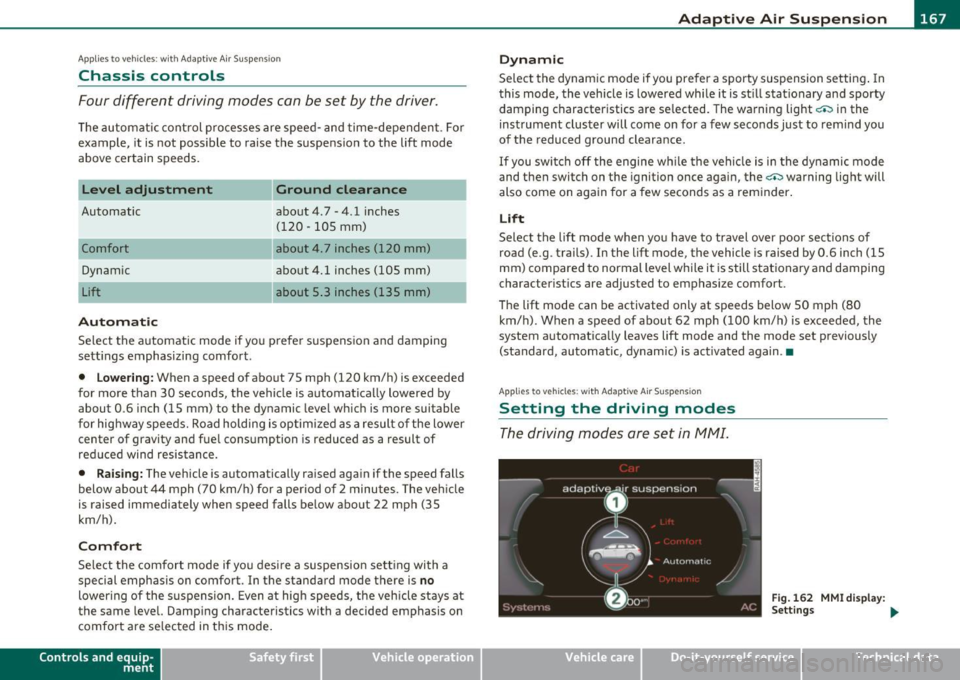
The driving modes are set in fv1fv1I.
Fig. 162 MMI display :
Settings ...
Vehicle care Do-it-yourselt service iTechnical data
Page 171 of 368

___________________________________________________ H_o_ m_ e_L_ i_ n _ k_ ® __ _
Homelink ®
Universal remote control
Applies to veh icles: w ith Hom eli nk ® universal remote control
General information
The Homelink ® feature can learn the up to three radio
frequency codes for most current transmitters used for
operating garage doors, estate gates, home or outdoor
lighting systems, and other devices.
You must first program the Homelink ® transm itter before you can
use the system=>
page 170, "Programming the Home link® trans
mitter".
I n order to program the Homelink ® transmitter for devices utilizing
rolling code, a second person on a ladder who can safe ly reach the
garage door opener motor is recommended. It is also necessary to
locate the "learn" button on your garage door opener motor. Refer to
the operating instructions for the opener, as the location and color of
this button may vary by manufacturer.
You can still use the original remote control for the device at any
time.
& WARNING
• Never use the Homelink'"' transmitter with any garage door
opener that does have not the safety stop and reverse feature as
required by federal safety standards. This includes any garage
door opener model manufactured before Aprill, 1982.
• A garage door opener which cannot detect an object, signaling
the door to stop and reverse does not meet current federal safety
standards. Using a garage door opener without these features
increases risk of serious injury or death.
Controls and equip
ment Safety first
& WARNING
(continued)
• For safety reasons never release the parking brake or start the
engine while anyone is standing in front of the vehicle.
• A garage door or an estate gate may sometimes be set in
motion when the Homelink ® remote control is being
programmed. If the device is repeatedly activated, this can over
strain motor and damage its electrical components -an over
heated motor is a fire hazard!
• To avoid possible injuries or property damage, please always
make absolutely certain that no persons or objects are located in
the range of motion of any equipment being operated.
rn Tips
• If you would like more informat ion on Homelink ®, where to
purchase the Homelink ® compatible products, or would like to
purchase the Homelink ® Home Lighting Package, please call toll
free: 1-800-355-3515.
• For Declaration of Compliance to United States FCC and Industry
Canada regulations=>
page 347 . •
Vehicle care Technical data
Page 176 of 368
1111....__D_ r_iv _i_ n_, g=-- S_ a _ f_e _,Ly _ ______________________________________________ _
Driving Safely
General notes
Safe driving habits
Please remember -safety first!
Th is chapter contains important information, t ips, instructions and
warnings that you need to read an d observe fo r you r own safe ty, the
safety of you r passengers and others . We have summarized here
w hat you need to know about sa fety belts, airbags, child restra ints as
we ll as child safety . You r safety is for us
priority number 1. Always
observe the information and warnings in this section -for your own
safety as well as t hat of your passengers.
The informat ion in this section applies to all mode l versions of yo ur
veh icle . Some of the fe atures des cribed in this se ctions m ay be st an
dard equ ipment on some models, or may be optional eq uipment on
others. If you a re not sure, ask your a uth o rized Audi dealer.
& WARNING
• Always make sure that you follow the instructions and heed
the WARNINGS in th is Manual. It is in your interest and in the
intere st of your passengers.
• Always keep the complete Owner's Literatu re in your Audi
when you lend or sell your vehicle so that this important informa
tion will always be available to the driver and passengers .
• Always keep the Owner's literature handy so that you can find
it easily if you have questions . •
Safety equipment
The safety features are part of the occupant restraint
s y stem and wor k together to he lp reduce the ris k of injury
in a wide variety of accident situations.
Your sa fety and t he safety o f yo ur passenge rs shou ld no t be left to
chance . Adva nces in technology have made a variety of features avai l
a b le to help re duce the risk of injury in an a cc ident . The fo llow ing is a
list of jus t a few of the safety features in your Audi:
• sophisticated safety belts for driver and a ll passenger seating
p osi tion s,
• safety belt pretensioners,
• safety belt fo rce lim iters for the fro nt sea ts,
• safety belt he igh t adju stmen t sys tems for the fro nt sea ts,
• automatic safety be lt height adjustment for the rear seats,
• front ai rbags,
• side air bags in the front sea ts a nd ou ter rear seats*,
• side curtain airbags,
• special LATCH an chorages fo r ch ild restra in ts,
• head restraints fo r eac h seating position,
• adjustable steering co lumn .
These individual safety feat ures, can work together as a system to
he lp protect you and yo ur passengers in a wide range of accide nts .
T hese feat ures ca nnot work as a system if they are not a lways
c o rre ctly adjusted and co rre ct ly u sed .
Safety is everybody's responsibility! •
Page 177 of 368
Driving Safely ---------------------"~'---
Important things to do before driving
Safety is everybody's job! Vehicle and occupant safety
always depends on the informed and careful driver.
For your safety and the safety of your passengers, before
driving always:
- Make sure that all lights and signals are operating
correctly.
- Make sure that the tire pressure is correct.
- Make sure that all windows are clean and afford good visi-
bility to the outside.
- Secure all luggage and other items carefully::::>
page 93.
-Make sure that nothing can interfere with the pedals.
- Adjust front seat, head restraint and mirrors correctly for your height .
- Instruct passengers to adjust the head restraints according to their height.
- Make sure to use the right child restraint correctly to
protect children ::::,
page 217, "Child Safety".
- Sit properly in your seat and make sure that your passen gers do the same::::,
page 75, "General recommenda
tions".
- Fasten your safety belt and wear it properly. Also instruct
your passengers to fasten their safety belts properly
=:> page 185. •
Controls and equip
ment Safety first Vehicle operation
What impairs driving safety?
Safe driving is directly related to the condition of the
vehicle, the driver as well as the driver's ability to concen
trate on the road without being distracted .
The driver is responsible for the safety of the vehicle and all
of its occupants. If your ability to drive is impaired, safety
risks for everybody in the vehicle increase and you also
become a hazard to everyone else on the road::::,,& . There
fore:
Do not let yourself be distracted by passengers or by using
a cellular telephone.
NEVER drive when your driving ability is impaired (by
medications, alcohol, drugs, etc.).
- Observe all traffic laws, rules of the road and speed limits
and plain common sense .
- ALWAYS adjust your speed to road, traffic and weather
conditions.
- Take frequent breaks on long trips. Do not drive for more than two hours at a stretch.
- Do NOT drive when you are tired, under pressure or when
you are stressed .
& WARNING
Impaired driving safety increases the risk of serious personal
injury and death whenever a vehicle is being used.•
Vehicle care Do-it-yourself service Technical data