2010 AUDI A5 CABRIOLET wheel
[x] Cancel search: wheelPage 134 of 364

IIIIL_!_A~u~d~i~l!:!a~n~e '...:a~s~s:!:is~t ~--------------------------------------------
Aud i Lane assist
Lane assist
Applies to veh icles : w ith lane assist
Description
Lane assist helps you keep your vehicle in your lane.
Lane assist uses a camera to detect lane boundary lines. If the system
detects that your vehicle is about to leave a lane boundary line, the
steering wheel
vibrates to alert the driver. If lane assist detects
boundary lines on both sides o f the veh icle's lane, the system enters
act ive standby mode, which is indicated by t he gree n indicator light
/ : on the instrument cluster .
If the system is in active standby mode and the turn signal is acti
vated before driving over the boundary line , the warning does not
occur sinc e th e system allows for in tention al lane changes.
The system is designed for driving on freeways and expanded high
ways and th us works only at speeds of 40 mph (65 km/h) or more.
& WARNING
• Lane assist will not keep your vehicle in your lane. The system
only warns the driver when the vehicle is leaving the lane. The
driver is always responsible for keeping the vehicle in the lane.
• The camera is not able to detect all lane boundary lines and in
some cases might also detect lane structures or objects as
boundary lines. This can lead to incorrect warnings or warnings
that fail to go off at all.
• The camera's visibility can be impaired by vehicles ahead of
you, for instance, or by rain, snow, heavy spray or light shining
into the camera lens. This can cause lane assist to fail to detect
boundary lines. •
Applies to veh icles: wit h lane assist
Activating and deactivating
•
Fig. 133 Turn signal
lever: Lane assist
button
Fig. 134 Windshield:
Lane assist camera
viewing window
-Press the=> fig . 133 button to act ivate or deactivate the
system. The/: ind icator light o n the instrument cluster
will illumi nate or go out.
Instrument cluster indicator light
/:\Ready: The green indicator light shows that the system is ready to
use. A warning alerts the driver when the vehicle drives over detected
lane boundary lines . -.,
Page 137 of 364
Audi lane assist -_______________________________ lff'II
Applie s to vehicles: w ith lane assist
Setting the warning time and steering
wheel vibration
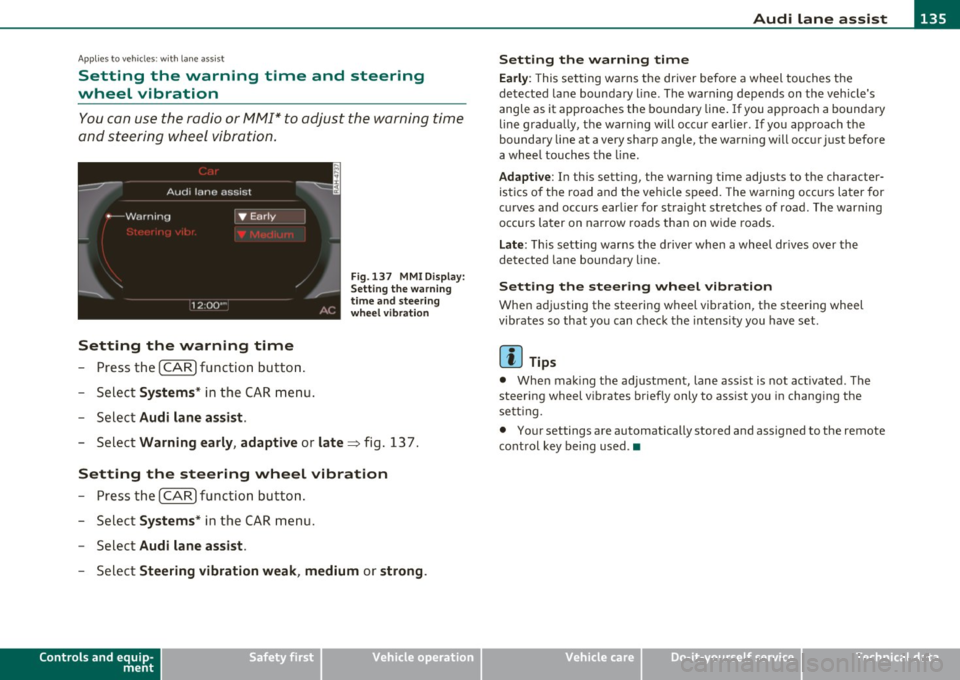
You c an use the radio or MM I* to adjust the warning time
and steerin g wheel vibration.
Setting the warning time
- Press the [ CA R] function button .
- Selec t
Systems * in the CAR men u.
- Selec t
Audi lane assist .
Fig. 13 7 MMI D isplay:
S ettin g the w arning
time an d stee ring
w he el vibr ation
- Select Warning early , adaptive or late => fig. 13 7.
Setting the steering wheel vibration
- Press th e [ CAR] function bu tt o n.
- Select
Systems * in the CAR men u.
- Select
Audi lane assist .
-Selec t Steering vibration weak , medium or strong .
Controls and equip
ment Safety first
Setting the warning time
Earl
y: This setting wa rns the driver before a wheel touches the
de tected la ne bounda ry l ine. The warn ing depends on the vehicle's
angle as it approaches the bo undary line . If you app roach a bounda ry
line gradua lly, t he war ning will occ ur earlier. If you app roach the
boundary line at a very sharp angle, the warning will occur just before
a whee l touches the line.
Adapti ve : In this setting, the warning time adjusts to the character
ist ics o f th e road and the veh icle speed . The wa rning occurs later for
c u rves and occurs ear lier for straight stretches of road. The warn ing
occurs later on narrow roads t han on w ide roads .
Late: This setti ng warns the d river when a whee l dr ives over the
detected lane boundary line.
Setting the steer ing wheel vibration
When ad justing the steering wheel vib ration, the steer ing wheel
vibrates so that yo u can c hec k t he intens ity you have set.
(I) Tips
• Whe n mak ing t he ad justment, lane ass ist is not act ivated. The
steering wheel v ibrates briefly only to assist you in chang ing the
se tt ing.
• Your settings are automatically stored and assigned to the remote
cont rol key being used. •
Vehicle care Technical data
Page 151 of 364

____________________________________________________ T_r_a _ n_ s_m_ i_ s _s_ i_ o _ n __ _
The selector lever must be in Nor P . If one o f the dr iv in g positions is
e n gag ed a saf ety s witch will preven t the engin e from b eing sta rt e d.
S ee also=>
page 106.
Be fore you move t he se lecto r lever from t he P position, yo u m ust
a lw ay s a ppl y the b rake pedal before and while depr ess ing the bu tton
in t he handle of the selector lever.
_& WARNING
• Unintended vehicle movement can cause serious injury.
- When the selector lever is
in a driving position, the vehicle
may creep, even at idle speed. Therefore do not release the
parking brake
or foot brake until you are ready to move,
because power is transmitted to the wheels as soon as a driving
position is engaged.
- Do not accelerate while selecting a driving position . At this
time the engine must be at idle speed so that undue stress is
not placed on the clutches in the transmission.
- Remember : · even when stopped briefly with the automatic
transmission
in " D", "S" or "R", engine power is being trans
mitted to the wheels. Your vehicle could "creep " forward or
backward. When stopped, keep the brake pedal fully
depressed and use the parking brake if necessary to keep the
vehicle from rolling .
• If the selector lever is unintentionally moved into N while you
are driving, take your foot off the accelerator pedal and wait for
the engine to return to idle speed before selecting a driving posi
tion.
• Never shift into "R" or "P " when the vehicle is in motion .
• Never get out of the d river's seat when the engine is running.
• If you must get out of the vehicle , move the selector lever
securely into the P position and apply the parking brake firmly .
• If the engine must remain running, never have any driving
position engaged when checking under the hood. Make sure the
selector lever has securely engaged and is locked in "P " with the
Controls and equip
ment Safety first
& WARNING (
cont inued)
parking brake firmly set=> page 272, "Engine compartment ".
Otherwise, any increase in engine speed may set the vehicle in
motion, even with the parking brake applied. •
App lies to vehicles : w it h auto mat ic t ransmiss ion
Selector lever positions
T his s ection d escrib es the s ele ct or l eve r posi tions and
drivin g ran ges.
Fig. 152 Di splay in
the instrum ent cluster:
selector lever In posi
tio n P
Th e sele ctor lever posi tion engaged appe ars ne xt to the se le ct or lever
as well as in the instr umen t cluster display .
P -Park
In this selector lev er position the transmiss ion is mecha nica lly
l oc ked. Engage
P only when the vehi cle is comple tely sto pp ed=> &
in " Driving t he automatic transmiss io n" on page 148.
T o sh ift in o r o ut of position P , yo u must first press an d hold the brake
peda l
and th en press t he r elease b utton in t he se lec to r l eve r hand le
wh ile moving the selector lever to or from
P. Yo u can s hif t out of thi s
posit ion on ly with t he ignit ion on . .,,
Vehicle care Technical data
Page 155 of 364
![AUDI A5 CABRIOLET 2010 Owners Manual Transmission Ill _______________ ___.
(]] Tips
• When you shift into the next lower gear, the transmission w ill
downshift only when there is no possibility of over-revving the](/manual-img/6/57573/w960_57573-154.png "AUDI A5 CABRIOLET 2010 Owners Manual Transmission Ill _______________ ___.
(]] Tips
• When you shift into the next lower gear, the transmission w ill
downshift only when there is no possibility of over-revving the")
Transmission Ill _______________ ___.
(]] Tips
• When you shift into the next lower gear, the transmission w ill
downshift only when there is no possibility of over-revving the
eng ine.
• When the kick-down comes on, the transmission will shift down to
a lower gear, depending on vehicle and engine speeds.
• tiptronic ® is inoperative when the transmission is in the fai l-safe
mode. •
Applies to veh icles: wit h tip tro nic -steer ing w hee l
Steering wheel with tiptronic ®
The shift buttons on the steering wheel allow the driver to
shift gears manually.
Fig. 156 Steering
wheel: Shift buttons
-To downshift, touch the button on the left 0-
- To upshift, touch the button on the right G).
The shift buttons are activated when the selector lever is in D, Sor in
the manual shift program (tiptronic).
Of course, you can cont inue to use the manual shift program with the
selector lever on the center console.•
Contro ls a nd e quip
m en t Vehicle
OP-eration
App lies to vehicles : wit h auto mat ic t ransmiss ion
Fail-safe mode
If tiptronic® suffers a malfunction, the fail-safe mode
maintains minimum drivability.
In the event of particular system malfunctions, the automatic trans
mission switches to the fail-safe mode. This is signaled by all the
segments in the display illum inating or going out.
You can cont inue to move the selector lever to all positions . The
manual shift program (tiptronic) is switched off in the fail-safe mode.
In selector leve r positions D and Sand in the manual shift program,
the transmission remains in 3rd gear if 1st, 2nd or 3rd gear was
engaged previously. The transmission remains in 5th gear, if 4th, 5th
or 6th gear was engaged previously .
The next time you drive off or start the engine, 3rd gear is engaged.
You can continue to use reverse gear. But the electronic lockout fo r
reverse gear is turned off.
0 Note
If the transmission switches to fail-safe mode, you should take the
veh icle to an authorized Audi dealership as soon as possible to have
the condition corrected. •
App lies to vehicles: with auto mat ic t ransmiss ion
Automatic transmission malfunction ©
In the event of a system malfunction, the automatic transmission
switches to emergency operation mode .
Gearbox malfunction : you can continue driving ~
Vehicle care Do-it-yourselt service iTechnical data
Page 158 of 364

1111....__T_ r_a _n_ s_m _ i_s _s _ i_o _n ___________________________________________________ _
Stopping
- Press a nd hold the brake pedal un til the vehicle has come
to a com plet e stop.
- Keep the brake pedal depressed so that the vehicle cannot
roll forward or backward w hile it is idli ng => & .
- Once sto pped,
do not depress t he accelerator pedal to rev
up the engine=> &.
Parking
- Press a nd hold th e br ake pedal u ntil th e v ehicle has com e
to a comp lete stop .
- S et the parki ng brakefir mly=>page
111, "Pa rking".
- Press an d hold the re lease button i n th e selector lever
handle, move the selector lever into
P and then let go of
the re lease button ~ & .
Your vehicle is equipped with a starting assist that a llows for eas ier
s t arting on in clines. The sys tem is activa ted w hen the brake ped al is
depressed for a
few seconds . After releasing the brake pedal, the
bra ke powe r is he ld for a moment to prevent the vehicle from ro lli ng
back when starting .
T he selector lever must be in Nor
P. If one of the driving positions is
engaged a safety switch will p reven t the eng ine from be ing started .
See also =>
page 106.
Before you move the selecto r lever from t he P posi tio n, yo u m ust
always app ly the brake peda l befo re and whi le depressing the button
in the handle of the selecto r lever .
& WARNING
• Unintended vehicle movement can cau se serious injury.
& WARNING (c on tinued )
-When the selecto r lever is in a dri ving pos ition, the vehicle
may creep , even at idle speed. Therefore do not relea se the
parking brake or foot brake until you are ready to move ,
becau se power is transmitted to the wheels a s soon as a driving
position i s engaged.
- Do not a ccelerate while selecting a driving p osition. At this
time the engine must be at idle sp eed so that undue stress is
not placed on the clutche s in the transmi ssion.
- Remembe r: • even when stopped briefly with the automatic
transmi ssion in "D ", "S " or "R ", engine power i s being trans·
mitted to the wheels . Your vehicle could "creep " forward or
backward . When stopped, keep the brake pedal fully
depressed and use the parking brake if necessary to keep the
vehicle from rolling .
- If the selector le ver is unintentionally moved into N while
y ou are driving , take your foot off the accelerator pedal and
wait for the engine to return to idle sp eed before selecting a
driving position.
- Never shift into "R " or "P " when the vehicle i s in motion .
- Never get out of the driver 's seat when the engine i s running .
- If you must get out of the vehicle , move the selector le ver
s ecurely into the P position and apply the parking brake firmly.
- If the engine must remain running , never have any driving
position engag ed when checking under the hood. Make sure
the selector lever has securely eng aged and is locked in "P"
with the parking brake firmly set=>
page 272, "Engin e
compartment ". Otherwise, any increase in engine speed may
s et the vehicle in motion, even with the parking brake
applied. •
Page 162 of 364

ffl..__T_ r_a _n_ s_ m_ is_ s_io _ n ___________________________________________________ _
Fig. 163 Display:
manual shift progra m,
selec ted gear
Switching to manual shift program
- Push the selector lever to the right from D. As soon as the
transmission has switched over, the selected gear appears
in the display~ fig. 163.
To upshift
-Push the selector lever forward to the plus position
~ page 159, fig. 162 G).
To down shift
- Push the lever to the minus position Q.
When accelerating , the transmission will automatically shift into the
next higher gear before the engine reaches the maximum RPM.
Wh en accelerating, if you apply a light thrott le, the tiptronic ® will
automatically shift into the next higher gear to save fuel. If you apply
a heavy throttle, the transmission will stay in gear engaged until near
maximum RPM are reached, or until the driver manua lly shifts into a
higher gear.
If you take your foot off the accelerato r pedal when driving down a
steep incline , the tiptronic ® will downshift from the selected gear
into the next lower gear based on road speed and engine RPM. The
automatic downshifting is interrupted as soon as you apply throttle
again .
[I] Tips
• When you shift into the next lower gear, the engine w ill downshift
only when there is no possibility of over-revving .
• When the kick-down comes on, the transmission will sh ift down to
a lower gear depending on vehicle and engine speeds.
• The tiptronic ® is inoperative when the transmiss ion is in the fail
safe mode .•
Applies to vehicles: with mult itron ic ® Cont inuously Variable Transm ission (CV T)
Steering wheel with tiptronic ®
The shift buttons on the steering wheel allow the driver to
shift gears manually.
Fig . 164 Steering
w hee l: Shift buttons
- To downshift, touch the button on the left Q.
- To upshift, touch the button on the right G).
The shift buttons are activated when the selector lever is in D, Sor in
the manual shift program (tiptronic).
Of course, you can continue to use the manual shift program with the
selector lever on the center console . •
Page 170 of 364

ffl..__P_ a_r_ k_ a_ s_ s_ is_t ____________________________________________________ _
If the warning message appears in the display but not the rear-view
camera picture, read and confirm the warn ing message. The acous tic
distance s ignal is always active .
If you press a function button on the MMI control console, the rear
view camera picture disappears. T he rear-view camera picture reap
pears the next time you park .
Further information on the wa rning message and the MM I control
console can be found in the MMI instruction booklet.
(I) Tips
• The rear -view camera picture is available as soon as the MM I
Display or the MMI is switched on, or the start-up phase is completed.
• Keep the sensors in the rear bumper and the rear-view camera lens
clean and free of snow and ice, so that the parking system can work
properly . Please follow the additional notes on~
page 171. •
Applie s to veh icl es : wi th park ing syst em (r e a r) an d rear-vi ew cam era
Reverse Parking
Parking mode 1 can be used when parking in a garage or
parking space.
Fig.171 MMI D ispl ay :
Aimin g at a park in g
spot F
ig .172 MMI D isplay:
Ali gni ng the vehi cle
-Switch the MMI on and select the r everse gear .
- Turn the steering wheel until the orange orientation lines
(D appear in the parking spot=> fig . 171. Use the mark
ings @to help you estimate the distance from an
obstacle. Each marking corresponds to 3 ft (1 m). The blue area re presents an extension of the vehicle's outline
by approx imately 16 ft (5 m) to the rear.
- While driving in reverse gear, adjust the steering whee l
angle to fit the parking space with the aid of the orange
orie ntation lines=>
0. ® marks the rear b umper . You
should stop driving in reverse as soon as and no later than
when the red orientation line© abuts an object=>&!
& WARNING
• The r ear -view cam era d oes not show th e entire are a behind th e
v eh icle ~
page 166, fig. 169. Watch out especia lly f or sm all c hil
d ren and an imal s. The rear -view camera cannot alwa ys detect
them, posing risk o f an acc ident !
• Plea se not e that object s not tou ching the gro un d c an app ear to
be furthe r away than th ey re a lly are (for exampl e, th e bumpe r of
a parked vehi cle, a traile r hitch , or the rea r of a truck ). In thi s ca se, .,
Page 172 of 364

lffl!IL____:P:....::a:.:r..:k:..:::a::s:.:s::.:i~s:.:t :..._ _________________________________________________ _
- Back into the parking space until the blue curve touches
the curb~
page 169, fig . 174. Stop the vehic le .
- While the ve hicle is stationa ry, turn the steering whee l to
the left as far as i t will go.
- Continue to back up into the parking spot until the ve hicle
is parked parallel to the curb. ® mar ks the rear bumper.
You shou ld stop dr iving i n reverse as soon as and no later
than when the red orientation line
0 abuts a n object
~ & !Kee p an eye on the front of your vehicle wh ile doing
this ~0.
Parking next to obs tacles
When there is an obstacle (such as a wall) next to the parking spot,
c hoose a spo t w it h more space on the sides. Position the long side of
the blue area so that there is sufficient space from the curb. The area
must not be on the curb . You will a lso need to star t turning the
steering wheel much earlier. There should be a suff icie nt amount of
space between the c urb and the b lue c urve, and the b lue c urve
=> page 169, fig. 17 4 must not touch the curb .
& WARNING
• The rea r-v iew camera does not show the entire area behind the
vehicle =>
page 166, fig. 169 . Watch out e spe cially for small chil
dr en and animal s. The rear-view camera cannot alway s det ect
them, posing risk of an accident!
• Please note that objects not touch ing the ground can appear to
be further away than they really are (for example, the bumper of
a park ed vehicle, a trailer hit ch , or the rear of a truck) . In this case ,
you should not use the help lines to help with parking , which
po ses danger of an accid ent!
0 Note
In the MMI display, the d irection of t ravel of the vehicle rear is rep re
sented depending o n the steering wheel angle . The ve hicle front
swi ngs ou t mo re than the ve hicl e rea r. M aintain plenty of d istance
from an obstacle so that your outside mirror or a corner of your
veh icle does not collide w ith any obstacles - d anger of a ccident!
[ i ] Tips
Th e left or rig ht or ientation lines and surfaces w ill be displayed,
depending on the tur n signa l being used .•
A pp lies to veh icles: with par king system (rear) and r ear-view camera
Adjusting the display and warning tones
The display* and warning tones can be adjusted in the
radio or in the MM!*.
-Select : [CAR)> Parking system.
Display
• Off -when the parking system is switched off, only aud ible sig nals
are g iven.
• On -when the pa rking system is switched on , eithe r the visua l
display or the p ictu re from the rearview camera is displayed.
Warn ing tones
• Front volume -front sensor vo lume
• Front frequency -front sensor frequency
• Rear volume -rear senso r vo lume
• Rear frequency -rear sensor freq uency
• In-car ent ertainment fader -when the park ing system is sw itched
on, the volume of the active audio source is lowere d.
Th e newly adju ste d val ue is briefly he ard from the signal generato r . ..