2010 Alfa Romeo Brera/Spider door lock
[x] Cancel search: door lockPage 28 of 271

26
SAFETY
DEVICES
WARNING
LIGHTS AND
MESSAGES
IN AN
EMERGENCY
CAR
MAINTENANCE
TECHNICAL
SPECIFICATIONS
INDEX
DASHBOARD
AND
CONTROLS
CORRECT USE
OF THE CARThe date Cin the middle of the display
will stay on until another display info is
activated (e.g. “Light dimmer”) or oth-
er information on car conditions.
With ignition key removed (when open-
ing a door) the display will turn on and
indicate for a few seconds time, km (or
mi) covered and external temperature .
INFORMATION ABOUT CAR
CONDITIONS (at event)
❒Scheduled servicing;
❒Trip computer;
❒Instrument panel light dimmer;
❒Engine oil level;
IMPORTANTWhen opening a door
the display will show for a few seconds
the time, the km covered and the ex-
ternal temperature.
RECONFIGURABLE
MULTIFUNCTION
DISPLAY
The “Reconfigurable multifunction dis-
play” shows all the useful information
necessary when driving, more particu-
larly:
INFORMATION ON
STANDARD SCREEN
❒ClockA-fig. 20;
❒External temperature B;
❒DateC;
❒Partial km (or miles) covered D;
❒Total km (or miles) covered E;
❒Indications on car conditions F(e.g.:
doors open, or possible ice on road,
etc. ...).
A0F0015mfig. 20
Page 31 of 271

29
SAFETY
DEVICES
WARNING
LIGHTS AND
MESSAGES
IN AN
EMERGENCY
CAR
MAINTENANCE
TECHNICAL
SPECIFICATIONS
INDEX
DASHBOARD
AND
CONTROLS
CORRECT USE
OF THE CAR
Briefly press button MENUto access navigation from the standard screen. To surf the menu press buttons +or–. For safety rea-
sons, when the car is running, it is possible to access only the reduced menu (for setting “Speed limit”). When the car is stationary
access to the whole menu is enabled. On cars fitted with radionavigation system, only the following functions can be set: “Speed
limit”, “Daylight sensor”
(for versions/markets, where provided)e “S.B.R. buzzer reactivation”. The other functions are displayed
and can be set/adjusted on the radionavigation system display.
fig. 22
BEEP VOL.SERVICEQUIT SETUPLIGHT SENS.RESET TRIP B
CLOCK
MODE 12/24
DATE
AUDIO RPT.
INDEP. BOOT
UNLOCK FDA
DOOR LOCK
UNITS KEYS VOL.
LANGUAGESPEED LIMIT
A0F0218g
Page 35 of 271

33
SAFETY
DEVICES
WARNING
LIGHTS AND
MESSAGES
IN AN
EMERGENCY
CAR
MAINTENANCE
TECHNICAL
SPECIFICATIONS
INDEX
DASHBOARD
AND
CONTROLS
CORRECT USE
OF THE CAR
Driver’s door unlocking
(Unlock Fda)
With this function it is possible to unlock
only the driver’s door by pressing the
electronic key button
Ë.
With this function active (ON) it is how-
ever possible to unlock the other doors
by pressing the door unlock button on
central console.
To activate/deactivate (ON/OFF) this
function proceed as follows:
❒briefly press button MENU: the dis-
play will show ONorOFF(ac-
cording to previous setting);
❒press button +or–for setting as re-
quired;
❒briefly press button MENUto go
back to the menu screen or press the
button for long to go back to the
standard screen.Automatic central door locking
(Door lock)
When activated (ON), this function
locks automatically the doors when the
car speed exceeds 20 km/h.
To activate/deactivate (ON/OFF) this
function proceed as follows:
❒briefly press buttonMENU: the dis-
play will show ONorOFF(ac-
cording to previous setting);
❒press button +or–for setting as re-
quired;
❒briefly press buttonMENUto go
back to the menu screen or press the
button for long to go back to the
standard screen.
When the function is on, the button
round led is on
q. Independent boot unlocking
(Indep. Boot)
Opening the boot with the remote con-
trol (press button
`is always pos-
sible. The option “Independent boot” en-
ables or disables the button set on the
armrest. More particularly: with “Indep.
Boot ON” the button is always off. With
“Indep. Boot OFF” the button is always
on and pressing it will unlock the boot if
doors are unlocked.
To activate independent boot function (by
deactivating the armrest button) (ON)
or to deactivate it (OFF), proceed as fol-
lows:
❒briefly press button MENU: the dis-
play will show ONorOFF(ac-
cording to previous setting);
❒press button +or–for setting as re-
quired;
❒briefly press button MENUto go
back to the menu screen or press the
button for long to go back to the
standard screen.
Page 44 of 271

Lumbar adjustment
(for versions/markets,
where provided)
Turn the knob Duntil obtaining the re-
quired position.
Back rest angle adjustment
(for versions/markets,
where provided)
Use lever E. Pulling the lever upwards
the seat will bend back by one position.
Pushing the lever downwards the seat
will bend forward.
Tilting the back rest
To get to the rear seats, pull handle F:
the back rest will tilt and the seat can
slide forward.
Bringing back the back rest the seat will
return automatically to its original posi-
tion (mechanical memory).
After bringing the back rest to its origi-
nal position check tat it firmly locked.
Check also that the seat is firmly locked
in the runners by trying to move it back
and forth.
42
SAFETY
DEVICES
WARNING
LIGHTS AND
MESSAGES
IN AN
EMERGENCY
CAR
MAINTENANCE
TECHNICAL
SPECIFICATIONS
INDEX
DASHBOARD
AND
CONTROLS
CORRECT USE
OF THE CAR
ELECTRICALLY ADJUSTABLE
FRONT SEATS fig. 27
(for versions/markets,
where provided)Seat controls are the
following:
Multifunction control A:
❒front seat height adjustment;
❒rear seat height adjustment;
❒vertical seat movement;
❒longitudinal seat movement;
B:Back rest angle adjustment;
C:Driver’s seat positions store buttons;
D:Lumbar adjustment;
E:Back rest tipping.
IMPORTANTSeat can only be ad-
justed when the electronic key is fitted
into the ignition device and for about 1
minute from removing it or after press-
ing button START/STOP. After open-
ing the door the seat can be adjusted for
about 3 minutes or until closing the
door.
Only make adjustments
when the car is station-
ary.
WARNING
A0F0254mfig. 27
Page 45 of 271
43
SAFETY
DEVICES
WARNING
LIGHTS AND
MESSAGES
IN AN
EMERGENCY
CAR
MAINTENANCE
TECHNICAL
SPECIFICATIONS
INDEX
DASHBOARD
AND
CONTROLS
CORRECT USE
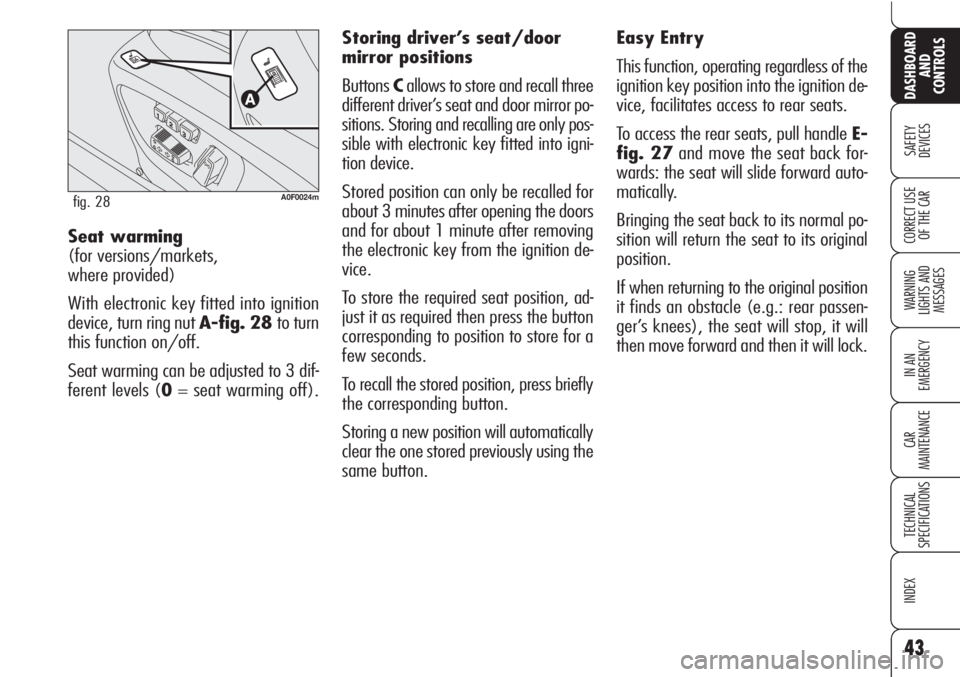
OF THE CARSeat warming
(for versions/markets,
where provided)
With electronic key fitted into ignition
device, turn ring nut A-fig. 28 to turn
this function on/off.
Seat warming can be adjusted to 3 dif-
ferent levels (0= seat warming off).
A0F0024mfig. 28
Easy Entry
This function, operating regardless of the
ignition key position into the ignition de-
vice, facilitates access to rear seats.
To access the rear seats, pull handle E-
fig. 27and move the seat back for-
wards: the seat will slide forward auto-
matically.
Bringing the seat back to its normal po-
sition will return the seat to its original
position.
If when returning to the original position
it finds an obstacle (e.g.: rear passen-
ger’s knees), the seat will stop, it will
then move forward and then it will lock. Storing driver’s seat/door
mirror positions
ButtonsCallows to store and recall three
different driver’s seat and door mirror po-
sitions. Storing and recalling are only pos-
sible with electronic key fitted into igni-
tion device.
Stored position can only be recalled for
about 3 minutes after opening the doors
and for about 1 minute after removing
the electronic key from the ignition de-
vice.
To store the required seat position, ad-
just it as required then press the button
corresponding to position to store for a
few seconds.
To recall the stored position, press briefly
the corresponding button.
Storing a new position will automatically
clear the one stored previously using the
same button.
Page 48 of 271
46
SAFETY
DEVICES
WARNING
LIGHTS AND
MESSAGES
IN AN
EMERGENCY
CAR
MAINTENANCE
TECHNICAL
SPECIFICATIONS
INDEX
DASHBOARD
AND
CONTROLS
CORRECT USE
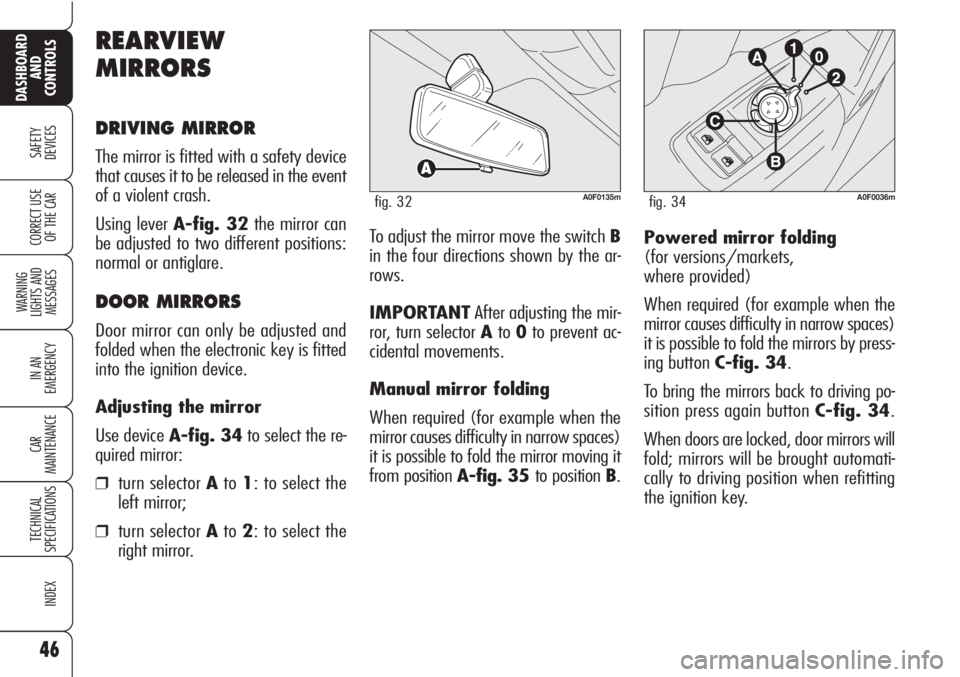
OF THE CARPowered mirror folding
(for versions/markets,
where provided)
When required (for example when the
mirror causes difficulty in narrow spaces)
it is possible to fold the mirrors by press-
ing button C-fig. 34.
To bring the mirrors back to driving po-
sition press again button C-fig. 34.
When doors are locked, door mirrors will
fold; mirrors will be brought automati-
cally to driving position when refitting
the ignition key. To adjust the mirror move the switch B
in the four directions shown by the ar-
rows.
IMPORTANTAfter adjusting the mir-
ror, turn selector Ato0to prevent ac-
cidental movements.
Manual mirror folding
When required (for example when the
mirror causes difficulty in narrow spaces)
it is possible to fold the mirror moving it
from position A-fig. 35 to position B.
A0F0135mfig. 32
REARVIEW
MIRRORS
DRIVING MIRROR
The mirror is fitted with a safety device
that causes it to be released in the event
of a violent crash.
Using lever A-fig. 32the mirror can
be adjusted to two different positions:
normal or antiglare.
DOOR MIRRORS
Door mirror can only be adjusted and
folded when the electronic key is fitted
into the ignition device.
Adjusting the mirror
Use device A-fig. 34to select the re-
quired mirror:
❒turn selector Ato1: to select the
left mirror;
❒turn selector Ato2: to select the
right mirror.
A0F0036mfig. 34
Page 78 of 271

76
SAFETY
DEVICES
WARNING
LIGHTS AND
MESSAGES
IN AN
EMERGENCY
CAR
MAINTENANCE
TECHNICAL
SPECIFICATIONS
INDEX
DASHBOARD
AND
CONTROLS
CORRECT USE
OF THE CAR
In the following table are summarised the causes that make front/rear ceiling lights turn on/off and their turning on/off
mode:
Cause
Opening one of the doors
Closing all the doors
Removing the electronic key from the ignition device
Locking the doors
Unlocking the doors
Cutting in of the fuel cut-off switch
Ceiling lights turning on/off mode
Light turning on for a few minutes. This timed operation will be
reactivated each time a door is opened
With electronic key removed from ignition device:
ceiling lights will stay on for other 10 seconds.
This timed operation is stopped when refitting
the electronic key into the ignition device
Starting the engine: light will turn off
Light turning on for about 10 seconds
Light turning off
Light turning on for about 10 seconds
Light turning on for a few minutes. Reactivating the
fuel cut-off switch will turn off the ceiling light.
In all the cases tabulated above, lights turning on/off is gradual, for 2 seconds.
Page 80 of 271

78
SAFETY
DEVICES
WARNING
LIGHTS AND
MESSAGES
IN AN
EMERGENCY
CAR
MAINTENANCE
TECHNICAL
SPECIFICATIONS
INDEX
DASHBOARD
AND
CONTROLS
CORRECT USE
OF THE CAR
If central door locking
has been activated
from inside the car and after a
crash the fuel cut-off switch
cannot activate automatic door
unlocking, it will not be pos-
sible to get into the car. In any
case, door opening from the
outside depends on door con-
ditions after the crash: if a
door is badly damaged it will
be impossible to open it. In this
event try to open one of the
other doors.
WARNINGDoor unlocking in the event of
a crash
In the event of a crash that triggers the
fuel cut-off switch, the doors will unlock
automatically to enable getting into the
car and at the same time the passen-
ger’s compartment light will turn on. It
is however always possible to open the
doors from the passenger’s compart-
ment by means of the internal door han-
dles. If, after a crash no fuel leaks or
damages to the electric devices (e.g.
headlights) are found and the car can
be started again, reset the fuel cut-off
switch and the power supply cut-off
switch (for versions/markets, where
provided). Follow the instructions given
below.Resetting the fuel cut-off
switch
Before resetting the fu-
el cut-off switch care-
fully inspect the car for fuel
leaks or damages to electric
devices (e.g. headlights).
WARNING
To reset the fuel cut-off switch, press but-
tonA-fig. 53.
A0F0221mfig. 53