Page 215 of 235
201
AUDIO SYSTEM
Your Audio system is coded in such a way that it will only operate in your vehicle. If it is to be installed in another vehicle, contact your CITROËN dealer for only operate in your vehicle. If it is to be installed in only operate in your vehicle. If it is to be installed in
confi guration of the system.
For safety reasons, the driver must carry out operations which require prolonged attention while the vehicle is stationary.
When the engine is switched off and to prevent discharging of the battery, the audio equipment may switch off after a few minutes.
AUDIO SYSTEM/BLUETOOTH 01 First steps
02 Steering mounted controls
03 Main menu
04 Audio
05 USB Box
06 Bluetooth functions
07 Configuration
08 Trip computer
09 Screen menu map p.
p.
p.
p.
p.
p.
p.
p.
p.
202
203
204
205
208
211
213
214
215
CONTENTS
Frequently asked questions
p. 220
Page 216 of 235
202
01
1
22
10101111
131314141515
33445566778899
1212
FIRST STEPS
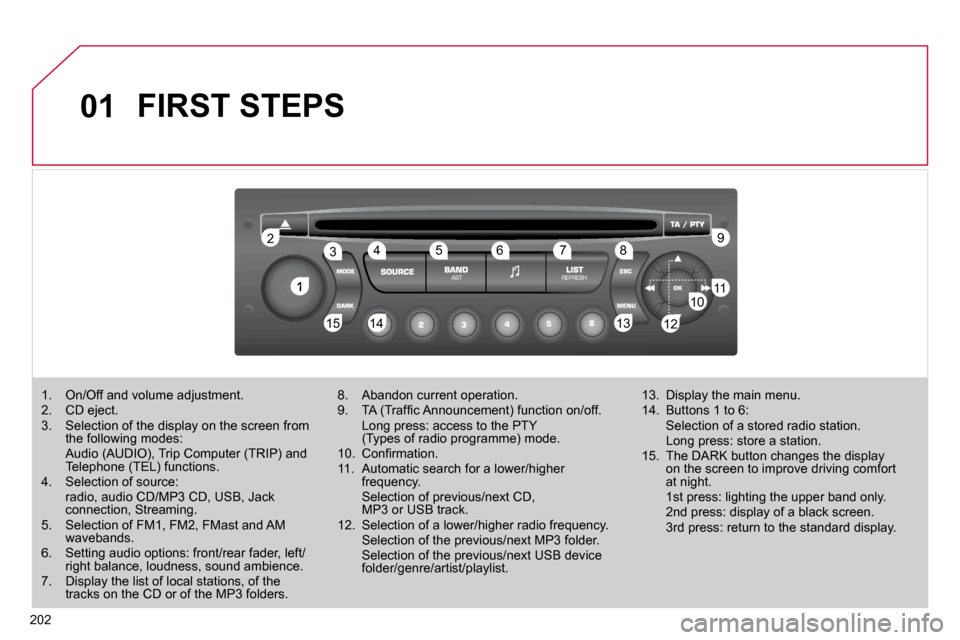
1. On/Off and volume adjustment. 2. CD eject. 3. Selection of the display on the screen from the following modes: Audio (AUDIO), Trip Computer (TRIP) and Telephone (TEL) functions. 4. Selection of source: radio, audio CD/MP3 CD, USB, Jack connection, Streaming. 5. Selection of FM1, FM2, FMast and AM wavebands. 6. Setting audio options: front/rear fader, left/right balance, loudness, sound ambience. 7. Display the list of local stations, of the tracks on the CD or of the MP3 folders.
8. Abandon current operation. 9. TA (Traffi c Announcement) function on/off. Long press: access to the PTY (Types of radio programme) mode. 10. Confi rmation. 11. Automatic search for a lower/higher frequency. Selection of previous/next CD, MP3 or USB track. 12. Selection of a lower/higher radio frequency. Selection of the previous/next MP3 folder. Selection of the previous/next USB device folder/genre/artist/playlist.
13. Display the main menu. 14. Buttons 1 to 6: Selection of a stored radio station. Long press: store a station. 15. The DARK button changes the display on the screen to improve driving comfort at night. 1st press: lighting the upper band only. 2nd press: display of a black screen. 3rd press: return to the standard display.
Page 218 of 235
204
03 MAIN MENU
AUDIO FUNCTIONS : radio, CD, USB, options.
> MONOCHROME SCREEN C
For a detailed global view of the menus available, refer to the "Screen menu map" section.
TELEPHONE : Bluetooth hands-free, pairing, management of a call.
PERSONALISATION-CONFIGURATION : vehicle parameters, display, languages.
TRIP COMPUTER : entering of distances, alerts, status of functions.
> MONOCHROME SCREEN A
Page 222 of 235

208
05
1
1
2
3
USB BOX
The system puts together playlists (temporary memory) created over a period which depends on the capacity of the USB device.
The other sources are available during this time.
The playlists are updated each time the ignition is switched off or each time a USB memory stick is connected.
When connecting for the fi rst time, the classifi cation suggest ed is by folder. When you reconnect, the classifi cation selected previously is retained.
Connect the memory stick to the port, directly or using a lead. If the audio equipment is switched on, the USB source is detected as soon as it is connected. Play begins automatically after a delay which depends on the capacity of the USB memory stick.
The fi le formats recognised are .mp3 (mpeg1 layer 3 only), .wma (standard 9 only, 128 kbits/sec compression), .wav and .ogg.
The playlists types accepted are m3u, .pls, .wpl.
This unit consists of a USB port and an auxiliary Jack socket * . The audio fi les are transmitted from portable equipment such as a digital player or a USB memory stick to your Audio system to be listened to via the vehicle's speakers.
USB memory stick (1.1, 1.2 and 2.0) or iPod ® of generation 5 or later:
- USB memory sticks should be formatted FAT or FAT 32 (NTFS not supported),
- the iPod ® lead is essential, ®
- navigation through the fi le database is by means of the steering mounted controls,
- the iPod ® software should be regularly ®
updated for the best connection.
The list of compatible equipment and the compression rates su pported are available from CITROËN dealers. The list of compatible equipment and the compression rates supported The list of compatible equipment and the compression rates supp orted USING THE USB BOX
CONNECTING A USB MEMORY STICK
Other iPod ® players of earlier generations and ®
players using the MTP protocol * :
- play via Jack-Jack lead only (not supplied),
- navigation through the fi le database is from the portable device.
* According to vehicle.
Page 223 of 235

209
05
42
3
1
5
USB BOX
USING THE USB PORT
Press LIST briefl y to display the previously selected classifi cation.
Navigate through the list using the left/right and up/down buttons.
Confi rm the selection by pressing OK.
The lists available are Artist, Genre and Playlist (as defi ned on the iPod ® ). ®
Selection and Navigation are described in steps 1 to 5 above .
Do not connect a hard disk or USB devices other than audio equipment to the USB port. This could damage your installatio n.
CONNECTING AN iPOD ®AN iPOD AN iPOD VIA THE USB PORT ®
Press one of these buttons to gain access to the previous/next track on the classifi cation list currently being played.
Press and hold one of the buttons for fast forward or backward play.
Press one of these buttons to gain access to the previous/next Genre, Folder, Artist or Playlist on the classifi cation list currently being played.
Press and hold LIST to displaythe different classifi cations.
Select by Folder/Artist/Genre/Playlist, press OK to select the classifi cation required, then press OK again to confi rm.
- by Folder: all folders containing audio fi les recognised on the peripheral device, classifi ed in alphabetical order without following the fl ow chart.
- by Artist: all of the artist names defi ned in the ID3 Tags, classifi ed in alphabetical order.
- by Genre: all of the genres defi ned in the ID3 Tags.
- by Playlist: in accordance with the playlists recorded on the USB device.
Page 224 of 235
210
05
1
21
2
The display and control is via the portable device.
First adjust the volume of your portable device.
Then adjust the volume of your Audio system.
USING THE AUXILIARY INPUT (AUX)
JACK SOCKET OR USB PORT
(according to vehicle) ADJUSTING THE VOLUME OF
THE AUXILIARY SOURCE
USB BOX
The auxiliary input, JACK or USB, allows the connection of portable equipment (MP3 player...).
Do not connect a single piece of equipment via the JACK socke
t and the USB port at the same time.
Connect the portable equipment (MP3 player…) to the JACK socket or to the USB port, using a suitable cable (not supplied).
Press the SOURCE button several times in succession and select AUX.
Page 231 of 235
217
09 SCREEN MENU MAP
Press the OK dial for access to short-cut menus according to the display on the screen: MONOCHROME C
activate/deactivate RDS
activate/deactivate REG mode
activate/deactivate radiotext
RADIO
activate/deactivate Intro
CD/MP3 CD
activate/deactivate track repeat (the entire current CD for CD, the entire current folder for MP3 CD)
activate/deactivate random play (the entire current CD for CD, the entire current folder for MP3 CD)
activate/deactivate track repeat (of the current folder/artist/genre/playlist)
USB
activate/deactivate random play (of the current folder/artist/genre/playlist)
1
1
1
1
1
1
1
1


