2009 VOLVO XC90 ECU
[x] Cancel search: ECUPage 86 of 282

02 Instruments and controlsHomeLink® Wireless Control System (option)
0286
NOTE
Some devices may require you to replace
this Programming Step 2 with procedures
noted in the “Gate Operator / Canadian Pro-
gramming” section. If the HomeLink indica-
tor light does not change to a rapidly
blinking light after performing these steps,
contact HomeLink at www.homelink.com.3.
Firmlypress, hold for five seconds and
release the programmed HomeLink but-
ton up to two separate times to activate the
door. If the door does not activate, press
and hold the just-trained HomeLink button
and observe the indicator light.
•If the indicator light stays on con-
stantly, programming is complete
and your device should activate when
the HomeLink button is pressed and
released.•If the indicator light blinks rapidly for
two seconds and then turns to a con-
stant light continue with “Program-
ming” steps 4-6 to complete the pro-
gramming of a rolling code equipped
device (most commonly a garage door
opener).
4. At the garage door opener receiver (motor-
head unit) in the garage, locate the “learn”
or “smart” button. This can usually befound where the hanging antenna wire is
attached to the motor-head unit.
5. Firmly press and release the “learn” or
“smart” button. (The name and color of the
button may vary by manufacturer.) There
are 30 seconds to initiate step 6.
6. Return to the vehicle and firmly press, hold
for two seconds and release the pro-
grammed HomeLink button. Repeat the
“press/hold/release” sequence a second
time, and, depending on the brand of the
garage door opener (or other rolling code
equipped device), repeat this sequence a
third time to complete the programming
process.
HomeLink should now activate your rolling
code equipped device.
Gate Operator/Canadian ProgrammingCanadian radio-frequency laws require trans-
mitter signals to “time-out” (or quit) after sev-
eral seconds of transmission – which may not
be long enough for HomeLink to pick up the
signal during programming. Similar to this
Canadian law, some U.S. gate operators are
designed to “time-out” in the same manner.
If you live in Canada or you are having difficul-
ties programming a gate operator or garage
door opener by using the “Programming” pro-cedures,replace “Programming HomeLink”
step 2 with the following:
•
Continue to press and hold the HomeLink
button while you press and release -
every two seconds (“cycle”) your hand-
held transmitter until the HomeLink indica-
tor light changes from a slow to a rapidly
blinking light. Now you may release both
the HomeLink and hand-held transmitter
buttons.
Proceed with “Programming” step 3 to com-
plete.
Using HomeLinkTo operate, simply press and release the pro-
grammed HomeLink button. Activation will
now occur for the trained device (i.e., garage
door opener, gate operator, security system,
entry door lock, home/office lighting, etc.). For
convenience, the hand-held transmitter of the
device may also be used at any time. In the
event that there are still programming difficul-
ties or questions, contact HomeLink at:
www.homelink.com.
Page 98 of 282
G020908
98
Front seats............................................................................................ 100
Rear seats............................................................................................. 103
Interior lighting...................................................................................... 106
Storage compartments......................................................................... 108
Securing cargo...................................................................................... 112
Page 100 of 282

04 InteriorFront seats
04100
Manually adjusted front seats
G027214
Front-rear adjustment: lift the bar and
move the seat to the position of your
choice.Raise/lower the front edge of the seat
cushion (option): use the control to pump
the front edge of the cushion up or down.Raise/lower seat height: pump the seat up
or down.Lumbar support: turn the control for firmer
or softer lumbar support.Backrest tilt: turn the control to adjust the
angle of the backrest.Control panel for optional power seat (see
page 100 for more information).
WARNING
•
Do not adjust the seat while driving. The
seat should be adjusted so that the
brake pedal can be depressed fully. In
addition, position the seat as far rear-
ward as comfort and control allow.
•
Check that the seat is securely locked
into position after adjusting.
Folding the backrests in the front seat
G014805
The front passenger seat backrest can be
folded to a horizontal position to make room for
a long load. Fold the backrest as follows:1. Move the seat as far back as possible.
2. Adjust the backrest to the upright position.
3. Lift the catches on the rear of the backrest.
4. Without releasing the catches, push the
backrest forward.
5. Move the seat as far forward as possible
so that the head restraint slides under the
glove compartment.
WARNING
Cover sharp edges on the load to help pre-
vent injury to occupants. Secure the load to
help prevent shifting during sudden stops.Power seat – (option on certain
models)OperationDriver's seat: The seat can be adjusted if the
ignition key is in position I, II or if the engine is
running. It can also be adjusted as follows with
the ignition off:
Page 112 of 282

04 InteriorSecuring cargo
04112
G027031
As a safety precaution, all cargo in your vehicle
should be securely anchored to keep it from
being thrown forward in the event of sudden
braking, etc. The vehicle is equipped with eye-
lets in the cargo space to which straps or other
cargo restraints can be attached.
WARNING
The eyelets are not to be used as passenger
restraints or as anchorages for child
restraints.Consult your Volvo retailer about suitable
accessories for this purpose.Remember that an object weighing 44 lbs
(20 kg) produces a force of 2,200 lbs
(1,000 kg) in a head-on collision at 30 mph
(50 km/h)!
Keep the following in mind when loading the
vehicle:
•
The load carrying capacity of your vehicle
is determined by factors such as the num-
ber of passengers, the amount of cargo,
the weight of any accessories that may be
installed, etc. See the section "Vehicle
loading" in the chapter "Wheel and tires"
for more detailed information.
•
Load the cargo against the backrest.
•
Load heavy cargo as low as possible.
•
If no one is sitting in the outboard rear
seat(s), reinforce the backrest by fastening
the seat belts.
•
Never load cargo above the backrest with-
out a cargo net.WARNING
When the rear backrest(s) are folded down,
the vehicle should not be loaded to a level
higher than 2 in. (5 cm) below the upper
edge of the rear side windows. Objects
placed higher than this level could impede
the function of the inflatable curtain.
G027058
Attachment bracketNylon cargo net (accessory)The Volvo XC90 can be equipped with a cargo
net made of strong nylon fabric.
This net can be installed in two places:•
Behind the rear seat backrests (the second
row of seats in seven-seat models)
•
Behind the front seat backrests if the rear
seat backrests (the second row of seats in
seven-seat models) have been folded
down.
Page 113 of 282
04 InteriorSecuring cargo
04``113
G027059
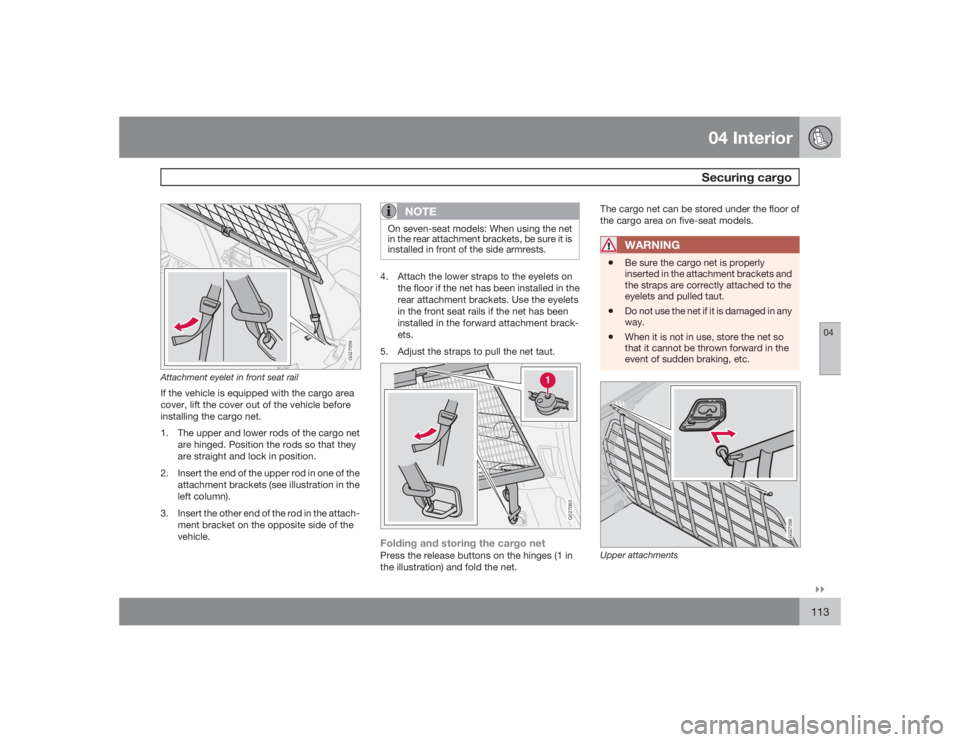
Attachment eyelet in front seat railIf the vehicle is equipped with the cargo area
cover, lift the cover out of the vehicle before
installing the cargo net.
1. The upper and lower rods of the cargo net
are hinged. Position the rods so that they
are straight and lock in position.
2. Insert the end of the upper rod in one of the
attachment brackets (see illustration in the
left column).
3. Insert the other end of the rod in the attach-
ment bracket on the opposite side of the
vehicle.
NOTE
On seven-seat models: When using the net
in the rear attachment brackets, be sure it is
installed in front of the side armrests.4. Attach the lower straps to the eyelets on
the floor if the net has been installed in the
rear attachment brackets. Use the eyelets
in the front seat rails if the net has been
installed in the forward attachment brack-
ets.
5. Adjust the straps to pull the net taut.
G027060
Folding and storing the cargo netPress the release buttons on the hinges (1 in
the illustration) and fold the net.The cargo net can be stored under the floor of
the cargo area on five-seat models.
WARNING
•
Be sure the cargo net is properly
inserted in the attachment brackets and
the straps are correctly attached to the
eyelets and pulled taut.
•
Do not use the net if it is damaged in any
way.
•
When it is not in use, store the net so
that it cannot be thrown forward in the
event of sudden braking, etc.
G027056
Upper attachments
Page 114 of 282

04 InteriorSecuring cargo
04114
Steel grid (accessory)
Installing the grid, upper attachments1. Lift in the grid through the tailgate or
through one of the rear passenger doors (in
this case, fold down the rear seat backr-
ests/backrests in second row of seats in
seven-seat models).
2. Insert one of the grid's upper attachments
into an attachment bracket above one of
the rear passenger doors (see illustration
above).
3. Push the grid's attachment into the forward
position in the attachment bracket (see
inset illustration above) to lock the attach-
ment in place.
G027057
Lower attachments4. Insert the grid's other upper attachment in
the attachment bracket above the oppo-
site rear passenger door, and press the
attachment into the forward position in the
attachment bracket to lock it in place.Installing the grid, lower attachments1. Insert the lower attachment bracket
through the steel grid's lower mount from
underneath.
2. Install the spring on the attachment
bracket and tighten the knob.
3. Secure the attachment bracket hook in the
lower cargo eyelet. Turn the knob to ten-sion the attachment bracket in the cargo
eyelet.
4. Repeat the operation on the opposite side.
5. Tighten both attachment brackets alterna-
tively.
6. Place the protective caps on the threads
above the knobs.
WARNING
Seven-seat models:•
The backrests of the optional third row
seats must be folded down when instal-
ling the steel grid.
•
The steel grid is installed behind the
second row of seats in seven-seat mod-
els. To avoid the risk of injury, no one
should be allowed to sit in the third row
of seats when the steel grid is in place
in the vehicle.
Page 115 of 282

04 InteriorSecuring cargo
04
115
G027055
Cargo area cover (option)
Installing the cargo area cover:1. Press the end pieces of the cargo area
cover down in the holders.
2. Pull out the cargo area cover and hook it in
the holes in the rear cargo area pillars (see
illustration above).Removing the cargo area cover:1. Press the end pieces of the cover inward.
2. Pull up and lift out.
G027066
Grocery bag holder1. Fold down the lower section of the tailgate.
2. Fold up the rear section of the cargo com-
partment floor.
3. Hang or secure your grocery bags by
means of the straps or holders.
Page 149 of 282

06 Starting and driving
Towing
06``149
G027042
Positions for attaching towing eyeletsEmergency towingThe towing eyelet is located in the tool bag,
under the floor of the cargo area. This eyelet
must be screwed into the positions provided
on the right sides of either the front or rear
bumper (see illustrations).To attach the towing eyelet:1. Use a coin to pry open the lower edge of
the cover (A)
2. Screw the towing eyelet (C) in place (B),
first by hand and then using the tire iron
until it is securely in place.After the vehicle has been towed, the eyelet
should be removed and returned to the tool
bag. Press the cover back into position.
WARNING
Do not use the towing eyelets to pull the
vehicle up onto a flat bed tow truck.Precautions when the vehicle is in tow•
The steering wheel must be unlocked. Turn
the ignition key to position I or II.
•
The gear selector must be in position N.
•
Maximum speed: 50 mph (80 km/h). Do not
exceed the maximum allowable towing
speed.
•
Maximum distance with front wheels on
ground: 50 miles (80 km).
•
While the vehicle is being towed, try to
keep the tow rope taut at all times.
•
The vehicle should only be towed in the
forward direction.