Page 220 of 282

09 Maintenance and servicingReplacing bulbs
09220
2. Press in the bulb slightly and pull it out of
the holder.
3. Align the guide lugs on the side of the base
of the new bulb in the grooves in the holder.
Press it in and turn it slightly clockwise.
4. Press the lamp holder into the place in the
headlight housing and turn it approxi-
mately 1/4 turn clockwise.Front fog lights
G027078
NOTE
Avoid touching the glass on the bulb with
your fingers.
1. Switch off the ignition.
2. Turn the bulb holder slightly counterclock-
wise to release it.
3. Replace the bulb. The shape of the foot of
the bulb corresponds to the shape of the
bulb holder.
4. Reinstall the bulb holder by turning it
slightly clockwise. The side of the holder
markedTOP should face upward.Location of tail light bulbs
G027094
Parking lightTurn signal
Back-up lightParking lightBrake lightNOTE
If the message indicating a burned out bulb
remains in the information display after a
bulb has been replaced, consult a trained
and qualified Volvo service technician.
Page 221 of 282

09 Maintenance and servicing
Replacing bulbs
09``221 Replacing bulbs in the taillight cluster
G027077
1. Switch off all lights and turn ignition key to
position0.
2. Fold down the lower section of the tailgate,
and fold up the rear section of the cargo
area floor.
3. If the vehicle is equipped with the optional
grocery bag holder, detach the holder's
bands.
4. Remove the corner panel (A in the illustra-
tion above).
5. Open the cover (B) in the side panel by
pulling the tab (C) upward/outward.
6. Loosen the bolts (D).7. Pull the entire tail light housing straight out.
8. Disconnect the wiring.
9. Place the tail light housing on a soft cloth
to avoid scratching the lens.
10. Turn the lamp holder(s) counterclockwise
and pull out.
11. Turn signal, back-up light, brake light
bulbs: Turn the bulb counterclockwise and
remove it.
12. Parking light bulbs: Pull the bulb straight
out.
13. Insert a new bulb.14. Place the lamp holder in the groove and
turn clockwise.
15. Press wiring back into place.
16. Align the tail light housing with the holes for
the retaining bolts and press it into place.
17. Tighten the retaining bolts.
18. Reinsert the side and corner panels.
Page 222 of 282
09 Maintenance and servicingReplacing bulbs
09222
Rear fog light
G027093
1. Switch off the ignition.
2. Carefully insert a small screwdriver (see
illustration above).
3. Pry out the lamp housing.
4. Turn the bulb holder counterclockwise and
remove it.
5. Turn the bulb counterclockwise and
remove it.
6. Insert a new bulb and press the lamp hous-
ing back into place.
Door step courtesy lights
G027079
The door step courtesy lights are located under
the dashboard on the driver's and passenger's
sides.
To replace a bulb:
1. Carefully insert a screwdriver and pry out
the lens.
2. Replace the defective bulb.
3. Reinstall the lens.
Cargo compartment light
G027084
1. Carefully insert a screwdriver and pry out
the lens.
2. Pry out the bulb and replace it.
3. Press the lens back into place.
Page 223 of 282
09 Maintenance and servicing
Replacing bulbs
09
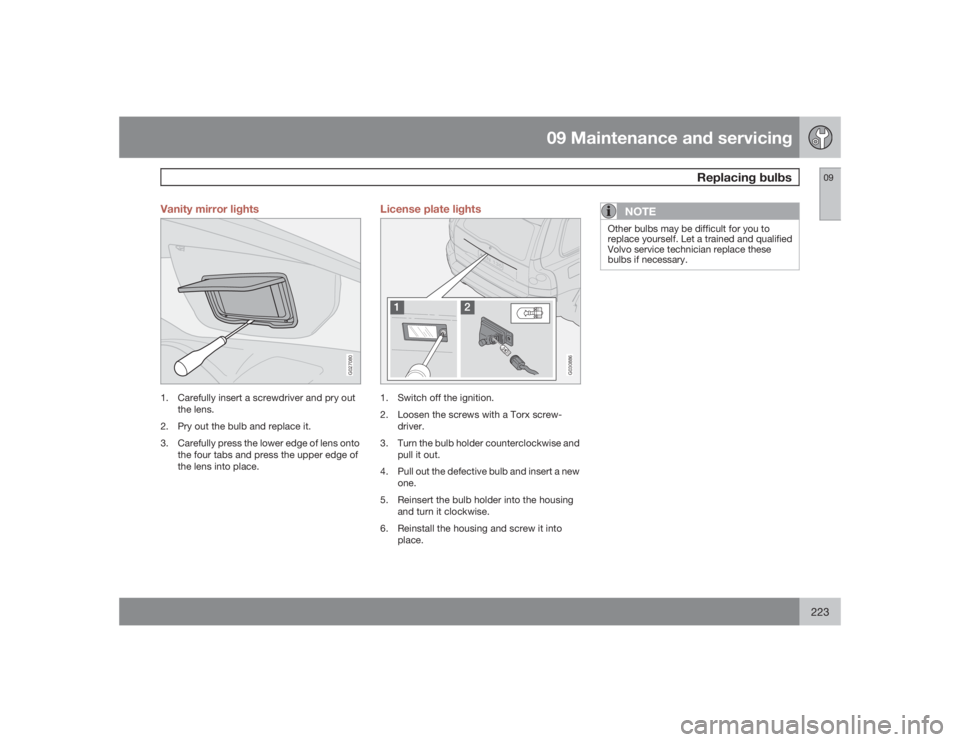
223 Vanity mirror lights
G027080
1. Carefully insert a screwdriver and pry out
the lens.
2. Pry out the bulb and replace it.
3. Carefully press the lower edge of lens onto
the four tabs and press the upper edge of
the lens into place.
License plate lights
G030886
1. Switch off the ignition.
2. Loosen the screws with a Torx screw-
driver.
3. Turn the bulb holder counterclockwise and
pull it out.
4. Pull out the defective bulb and insert a new
one.
5. Reinsert the bulb holder into the housing
and turn it clockwise.
6. Reinstall the housing and screw it into
place.
NOTE
Other bulbs may be difficult for you to
replace yourself. Let a trained and qualified
Volvo service technician replace these
bulbs if necessary.
Page 227 of 282
09 Maintenance and servicing
Fuses
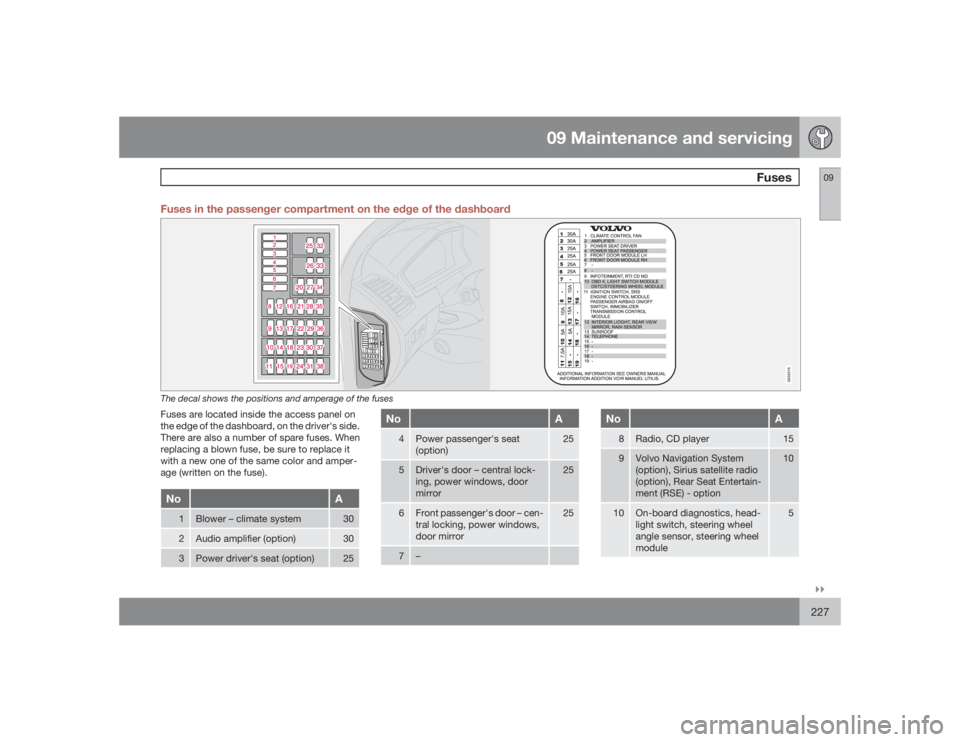
09``227 Fuses in the passenger compartment on the edge of the dashboard
G032316
The decal shows the positions and amperage of the fusesFuses are located inside the access panel on
the edge of the dashboard, on the driver's side.
There are also a number of spare fuses. When
replacing a blown fuse, be sure to replace it
with a new one of the same color and amper-
age (written on the fuse).No
A
1
Blower – climate system
30
2
Audio amplifier (option)
30
3
Power driver's seat (option)
25
No
A
4
Power passenger's seat
(option)
25
5
Driver's door – central lock-
ing, power windows, door
mirror
25
6
Front passenger's door – cen-
tral locking, power windows,
door mirror
25
7
–
No
A
8
Radio, CD player
15
9
Volvo Navigation System
(option), Sirius satellite radio
(option), Rear Seat Entertain-
ment (RSE) - option
10
10
On-board diagnostics, head-
light switch, steering wheel
angle sensor, steering wheel
module
5
Page 232 of 282
09 Maintenance and servicingFuses
09232
No
A
14
Subwoofer (option), rear air
conditioning system (option)
15
15
–
16
–
17
Accessory audio
5
18
–
19
Rear window wiper
15
20
Trailer wiring (15-feed) - option
20
21
–
22
–
23
Park assist
7,5
24
–
25
–
26
Park assist (option)
5
27
Main fuse: trailer wiring, park
assist, All Wheel Drive
30
28
Central locking system
15
No
A
29
Driver's side trailer lighting:
parking lights, turn signal
(option)
25
30
Passenger's side trailer light-
ing: brake light, fog light, turn
signal (option)
25
31
Main fuse: fuses 37 and 38
40
32
–
33
–
34
–
35
–
36
–
37
Heated rear window
20
38
Heated rear window
20
Page 239 of 282

10 Audio
Audio system controls
10``239 On/Off button
G027146
To activate the system:
1.
Turn the ignition key to position I.
NOTE
If you switch off the ignition while the audio
system is on, the system will be on when the
ignition is switched on again.2.
Press the POWER button
to switch the
audio system on or off.
Volume controlTurn the knob
clockwise or counterclock-
wise to raise or lower the volume. The volume
control is electronic and has no end position.
Volume can also be raised (+) or lowered (–)
using the steering wheel keypad.
Pause modeIf the volume is turned off, the CD player will go
into pause mode. Re-activate the player by
turning up the volume.Selecting a sound source•
PressAM/FM
repeatedly to toggle
between FM1, FM2, and AM
•
Press the CD button
to change to the
CD player or optional CD changer
•
Turn the SELECTOR control
to choose
FM1, FM2, AM, CD, CD changer (option),
AUX (option), or the optional Sirius satellite
radio.
The selected sound source will be shown in the
display.
Sound settings
G027147
1.
Press the SOUND button
repeatedly
until you come to the setting that you wish
to change. Choose
BASS, TREBLE,
FADER, BALANCE, SUBWOOFER
(option),
CENTER
(option) or
SURROUND
(option).
2.
Use the SELECTOR control
to adjust
the level of the setting you have selected.
The display shows a scale from min. to
max. position. The center indicates the
normal position.
Page 245 of 282

10 Audio
Sirius satellite radio
10``245
1.
PressMENU and scroll to
Direct channel
entry
.
2. Use the numerical keypad to enter the
channel's number. Press EXIT if necessary
to erase a digit.
3.
PressENTER. The radio will tune to this
channel, even if it belongs to a category
other than the currently selected one.
NOTE
The numbers of skipped or locked channels
will not be displayed.•
If a channel is locked, the access code
must be entered before the channel can
be selected. See "Unlocking a channel"
on page 246.
ScanningSCAN automatically searches through the list
of satellite channels. see page 242 for more
detailed information.
Storing a channelA total of 20 satellite channels can be stored;
10 channels each for Sirius 1 and 2. See page
242 for detailed information on storing chan-
nels.•
Along press on one of the number keys
stores the currently tuned channel on that
key.
•
Ashort press on a number key while the
radio is in Sirius 1 or 2 mode will tune to the
preset satellite channel stored on that but-
ton, regardless of the currently selected
channel category.
Song Seek and Song MemoryThe Song Seek
and
Song Memory
functions
provide both audio and visual notification when
Sirius is broadcasting your favorite songs.
Song Seek enables you to store the name of
the song for future advance notification when
that song is being played. The
Song Memory
feature makes it possible to view all of the cur-
rent songs that are stored in memory.Song memoryUp to ten songs can be saved in the system's
memory.
1.
PressMENU.2.
Scroll to "
Add song to song mem.
" and
follow the instructions shown in the dis-
play.
If a new song is selected when the memory is
full, you will be prompted to press ENTER to
delete the last song on the list.
The remaining songs in the list will move down
one position, and the newly added song will be
placed at the top of the list.
Song seekWhen a satellite radio channel plays one of the
songs stored in the song memory, the listener
will be alerted by a text message and an audi-
ble signal.
PressENTER to listen to the song or EXIT to
cancel.
To activate/deactivate the song seek function:
1.
PressMENU
2.
Scroll to "
Song seek
"
3.
PressENTER to activate or deactivate the
function.
NOTE
When the song has ended, the radio will
remain tuned to the channel on which the
song was played.