2009 VOLVO XC60 lights
[x] Cancel search: lightsPage 196 of 297

04 Comfort and driving pleasureBlind Spot Information System* 04
194
* Option/accessory, for more information, see Introduction.
When does BLIS function
The system functions when your vehicle is
moving at speeds above 6 mph (10 km/h).
When you pass another vehicle:The system reacts when you pass another
vehicle at a speed of up to 6 mph (10 km/h)
faster than that vehicle.
When you are passed by another vehicle:The system reacts if your vehicle is passed by
another vehicle at a speed of up to 43 mph
(70 km/h) faster than your vehicle.
WARNING
\b
BLIS does not function in sharp curves.
\b BLIS does not function when your vehi-
cle is backing up.
\b If you are towing a wide trailer, this may
prevent the BLIS cameras from detect-
ing other vehicles in adjacent lanes.
How BLIS functions in daylight and
darkness
Daylight
BLIS reacts to the shape of surrounding vehi-
cles. The system is designed to help detect
motor vehicles such as cars, trucks, buses,
motorcycles, etc.
DarknessBLIS reacts to the headlights of surrounding
vehicles. In order to be detected by BLIS, a
vehicle in the blind area must have its head-
lights on. This means, for example, that the
system will not detect a trailer without head-
lights that is being towed behind a car or truck.WARNING \b
BLIS does not react to cyclists or
mopeds.
\b BLIS does not react to vehicles that are
standing still.
\b The function of the BLIS cameras may
be affected by intense light, or when
driving at night in areas where there are
no external sources of light (e.g., street
lights, other vehicles, etc.). In such
cases, the system may react as if the
cameras were obscured.
\b In both of the above mentioned condi-
tions, a message will appear in the infor-
mation display.
\b When driving in such conditions, the
system\fs function will be limited or it
may be temporarily switched off, see
page 195 for instructions.
\b When the message is no longer dis-
played, BLIS will return to normal func-
tion.
\b The BLIS cameras have the same limi-
tation as the human eye. In other words,
their "vision is impaired" by adverse
weather conditions such as heavy
snowfall, dense fog, etc.
Page 197 of 297
04 Comfort and driving pleasure
Blind Spot Information System*04
}}
* Option/accessory, for more information, see Introduction. 195
LimitationsIn certain situations, the BLIS indicator light(s)
may illuminate even when there are no other
vehicles in the area monitored by the system.
NOTEIf the BLIS indicator lights illuminate occa-
sionally even when there are no other vehi-
cles in the blind area, this does not indicate
a fault in the system.
In the event of a fault, Blind spot syst.
service required will be displayed.
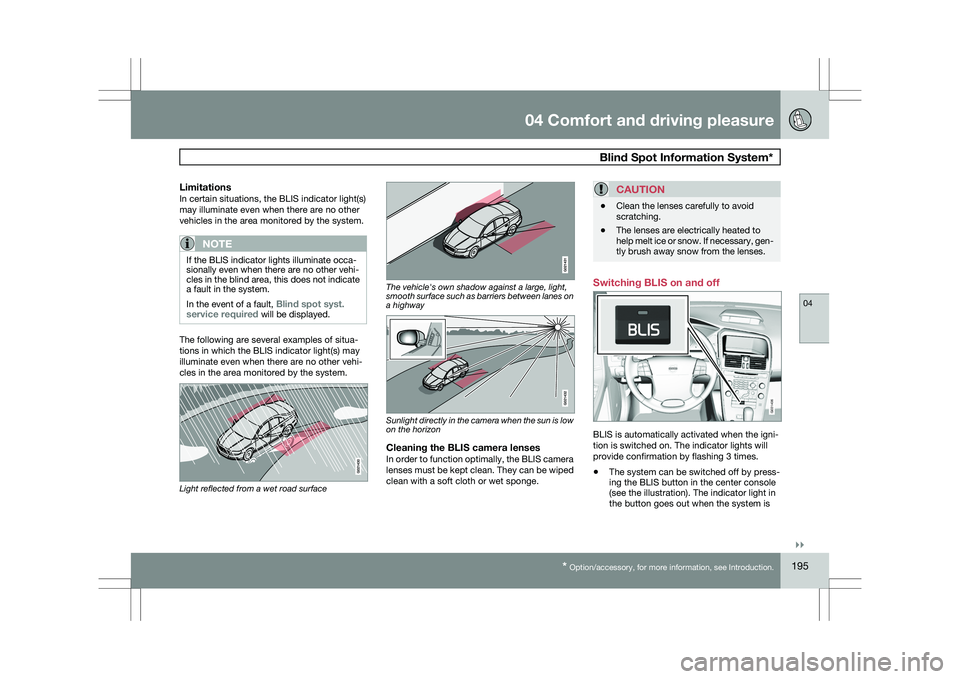
The following are several examples of situa-
tions in which the BLIS indicator light(s) may
illuminate even when there are no other vehi-
cles in the area monitored by the system.
Light reflected from a wet road surface The vehicle's own shadow against a large, light,
smooth surface such as barriers between lanes on
a highway
Sunlight directly in the camera when the sun is low
on the horizon
Cleaning the BLIS camera lensesIn order to function optimally, the BLIS camera
lenses must be kept clean. They can be wiped
clean with a soft cloth or wet sponge.
CAUTION \b
Clean the lenses carefully to avoid
scratching.
\b The lenses are electrically heated to
help melt ice or snow. If necessary, gen-
tly brush away snow from the lenses. Switching BLIS on and off
BLIS is automatically activated when the igni-
tion is switched on. The indicator lights will
provide confirmation by flashing 3 times.
\b
The system can be switched off by press-
ing the BLIS button in the center console
(see the illustration). The indicator light in
the button goes out when the system is BLIS
G031406
Page 205 of 297

05 During your trip
Driving recommendations05
}}
203
Driving through water
\b
The vehicle can be driven through water up
to a depth of approximately 10 in. (25 cm),
at a maximum speed of 6 mph (10 km/h).
\b Take particular care when driving through
flowing water.
\b Clean the electrical connections for trailer
wiring after driving in mud or water.
\b When driving through water, maintain low
speed and do not stop in the water.
WARNING After driving through water, press lightly on
the brake pedal to ensure that the brakes
are functioning normally. Water or mud can
make the brake linings slippery, resulting in
delayed braking effect.
CAUTION \b
Engine damage will occur if water is
drawn into the air cleaner.
\b If the vehicle is driven through water
deeper than 10 in (25 cm), water may
enter the differential and the transmis-
sion. This reduces the oil\fs lubricating
capacity and may shorten the service
life of these components.
\b Do not allow the vehicle to stand in
water up to the door sills longer than
absolutely necessary. This could result
in electrical malfunctions.
\b If the engine has been stopped while the
vehicle is in water, do not attempt to
restart it. Have the vehicle towed out of
the water.
Engine and cooling systemUnder special conditions, for example when
driving in hilly terrain, extreme heat or with
heavy loads, there is a risk that the engine and
cooling system will overheat. Proceed as fol-
lows to avoid overheating the engine.
\b
Maintain a low speed when driving with a
trailer up long, steep hills.
\b Do not turn the engine off immediately
when stopping after a hard drive.
WARNING The cooling fan may start or continue to
operate (for up to 6 minutes) after the engine
has been switched off.
\b
Remove any auxiliary lights from in front of
the grille when driving in hot weather con-
ditions.
\b Do not exceed engine speeds of 4500 rpm
if driving with a trailer in hilly terrain. The oil
temperature could become too high.
Conserving electrical currentKeep the following in mind to help minimize
battery drain:
\bWhen the engine is not running, avoid
using ignition mode
II. Many electrical sys-
tems (the audio system, the optional navi-
gation system, power windows, etc) will
function in ignition modes 0 and I. These
modes reduce drain on the battery.
\b Please keep in mind that using systems,
accessories, etc., that consume a great
deal of current when the engine is not run-
ning could result in the battery being com-
pletely drained.
\b The optional 12 volt socket in the cargo
area provides electrical current even with
the ignition switched off, which drains the
battery.
Page 206 of 297

05 During your tripDriving recommendations 05
204
Before a long distance tripIt is always worthwhile to have your vehicle
checked by a trained and qualified Volvo serv-
ice technician before driving long distances.
Your retailer will also be able to supply you with
bulbs, fuses, spark plugs and wiper blades for
your use in the event that problems occur.
As a minimum, the following items should be
checked before any long trip:
\b
Check that engine runs smoothly and that
fuel consumption is normal.
\b Check for fuel, oil, and fluid leakage
\b Have the transmission oil level checked.
\b Check condition of drive belts.
\b Check state of the battery\fs charge.
\b Examine tires carefully (the spare tire as
well), and replace those that are worn.
Check tire pressures.
\b The brakes, front wheel alignment, and
steering gear should be checked by a
trained and qualified Volvo service techni-
cian only.
\b Check all lights, including high beams.
\b Reflective warning triangles are legally
required in some states/provinces.
\b Have a word with a trained and qualified
Volvo service technician if you intend to
drive in countries where it may be difficult
to obtain the correct fuel. \b
Consider your destination. If you will be
driving through an area where snow or ice
are likely to occur, consider snow tires.
Cold weather precautionsIf you wish to check your vehicle before the
approach of cold weather, the following advice
is worth noting:
\bMake sure that the engine coolant contains
50 percent antifreeze. Any other mixture
will reduce freeze protection. This gives
protection against freezing down to
–31 °F (–35 °C). The use of "recycled" anti-
freeze is not approved by Volvo. Different
types of antifreeze must not be mixed.
\b Volvo recommends using only genuine
Volvo antifreeze in your vehicle\fs radiator.
\b Try to keep the fuel tank well filled – this
helps prevent the formation of condensa-
tion in the tank. In addition, in extremely
cold weather conditions it is worthwhile to
add fuel line de-icer before refueling.
\b The viscosity of the engine oil is important.
Oil with low viscosity (thinner oil) improves
cold-weather starting as well as decreas-
ing fuel consumption while the engine is
warming up. For winter use, 5W-30 oil, par-
ticularly the synthetic type, is recom-
mended. Be sure to use good quality oil but
do not use cold-weather oil for hard driving
or in warm weather, see page 283 for more
information on engine oil.
NOTE Synthetic oil is not used when the oil is
changed at the normal maintenance inter-
vals except at owner request and at addi-
tional charge.
\b
The load placed on the battery is greater
during the winter since the windshield wip-
ers, lighting, etc. are used more often.
Moreover, the capacity of the battery
decreases as the temperature drops. In
very cold weather, a poorly charged bat-
tery can freeze and be damaged. It is there-
fore advisable to check the state of charge
more frequently and spray an anti-rust oil
on the battery posts.
\b Volvo recommends the use of snow tires
on all four wheels for winter driving, see
page 262.
\b To prevent the washer fluid reservoir from
freezing, add washer solvents containing
antifreeze. This is important since dirt is
often splashed on the windshield during
winter driving, requiring the frequent use of
the washers and wipers. Volvo Washer
Solvent should be diluted as follows: Down
to 14 °F (–10 °C): 1 part washer solvent and
4 parts water Down to 5 °F (–15 °C): 1 part
washer solvent and 3 parts water Down to
0 °F (–18 °C): 1 part washer solvent and
Page 227 of 297

06 Maintenance and specifications
Maintaining your car06
}}
225
Owner maintenance
Periodic maintenance requirements and inter-
vals are described in your vehicle\fs Warranty
and Service Records Information booklet.
The following points can be carried out
between the normally scheduled maintenance
services.
Each time the car is refueled:
\b
Check the engine oil level.
\b Clean the windshield, windshield wipers,
headlights, and tail lights.
Monthly:
\bCheck cold tire pressure in all tires. Inspect
the tires for wear.
\b Check that engine coolant and other fluid
levels are between the indicated "min" and
"max" markings.
\b Clean interior glass surfaces with a glass
cleaner and soft paper towels.
\b Wipe driver information displays with a soft
cloth.
\b Visually inspect battery terminals for cor-
rosion. Corrosion may indicate a loose ter-
minal connector, or a battery near the end
of its useful service life. Consult your Volvo
retailer for additional information.
As needed:Wash the car, including the undercarriage, to
reduce wear that can be caused by a buildup
of dirt, and corrosion that can be caused by salt
residues.
Clean leaves and twigs from air intake vents at
the base of the windshield, and from other pla-
ces where they may collect.
NOTE Complete service information for qualified
technicians is available online for purchase
or subscription at www.volvotechinfo.com.
Hoisting the vehicle
If a garage jack is used to lift the vehicle, the
two jack attachments points should be used.They are specially reinforced to bear the weight
of the vehicle. A garage jack can also be placed
under the front of the engine support frame.
Take care not to damage the splash guard
under the engine. Ensure that the jack is posi-
tioned so that the vehicle cannot slide off it.
Always use axle stands or similar structures.
If a two-post hoist is used to lift the vehicle, the
front and rear lift arm pads should be centered
under the reinforced lift plates on the inboard
edge of the sill rail (see illustration).
Emission inspection readiness
What is an Onboard Diagnostic System
(OBD II)?
OBD II is part of your vehicle\fs computerized
engine management system. It stores diagnos-
tic information about your vehicle\fs emission
controls. It can light the Check Engine light
(MIL) if it detects an emission control "fault." A
"fault" is a component or system that is not
performing within an expected range. A fault
may be permanent or temporary. OBD II will
store a message about any fault.
How do states use OBD II for emission
inspections?
Many states connect a computer directly to a
vehicle\fs OBD II system. The inspector can
then read "faults." In some states, this type of
Page 234 of 297

06 Maintenance and specificationsReplacing bulbs 06
232
* Option/accessory, for more information, see Introduction.
Introduction
All bulb specifications are listed on page 238.
The following bulbs should only be replaced by
a trained and qualified Volvo service techni-
cian:
\b
Dome lighting
\b Reading lights
\b Glove compartment lighting
\b Turn signals in the door mirrors
\b Approach lighting in the door mirror
\b Parking lights
\b Rear side parking lights
\b Active Dual Xenon and LED bulbs
NOTE For information regarding any other bulbs
not mentioned in this section, please con-
tact your Volvo retailer or a trained and
authorized Volvo service technician.
WARNING \b
Active Dual Xenon headlights* – due to
the high voltage used by these head-
lights, these bulbs should only be
replaced by a trained and qualified
Volvo service technician.
\b Turn off the lights and remove the
remote key from the ignition before
changing any bulbs. Headlight housing
WARNING
\b
The engine should not be running when
changing bulbs.
\b When changing in the headlight hous-
ing, if the engine has been running just
prior to replacing bulbs, please be
aware that components in the engine
compartment will be hot. The entire headlight housing must be lifted out
when replacing all front bulbs (except for the
fog lights). G031935 G031936
Page 235 of 297

06 Maintenance and specifications
Replacing bulbs06
}}
233
CAUTIONNever touch the glass of bulbs with your fin-
gers. Grease and oils from your fingers
vaporize in the heat and will leave a deposit
on the reflector, which will damage it.
NOTE
\b
Always switch off the ignition before
starting to replace a bulb.
\b The optional Active Dual Xenon head-
light bulbs contain trace amounts of
mercury. These bulbs should always be
disposed of by a trained and qualified
Volvo service technician.
Removing the headlight housing1. Switch off the ignition by pressing quickly
on the START/STOP ENGINE button and
remove the remote key from the ignition
slot1
.
2. (Upper illustration under "Headlight hous- ing") Withdraw the headlight housing\fs lock-
ing pins. Pull the headlight housing straight out .
CAUTION When disconnecting the connector, pull on
the connector itself and not on the wiring.
3. (Lower illustration under "Headlight hous-
ing") Unplug the wiring connector by holding
down the clip with your thumb. Pull out the connector with the other
hand.
4. Lift out the housing and place it on a soft surface to avoid scratching the lens.
5. Replace the defective bulb(s).
Reinserting the headlight housing When reinserting the housing, be sure that the
long locking pin (to the left in the illustration) is
securely in place in both of its retaining clamps.
1. Plug in the connector until it clicks into
place.
2. Reinstall the headlight housing and locking
pins. Check that they are correctly
inserted. The headlight housing must be
properly inserted and secured in place
before the lighting is switched on or the
remote key is inserted into the ignition slot.
3. Check that the lights function properly.
The headlight wiring must be connected and
the housing must be securely in place before
the ignition is switched on. 1
Does not apply to vehicles with the optional keyless drive. G032356
Page 236 of 297
06 Maintenance and specificationsReplacing bulbs 06
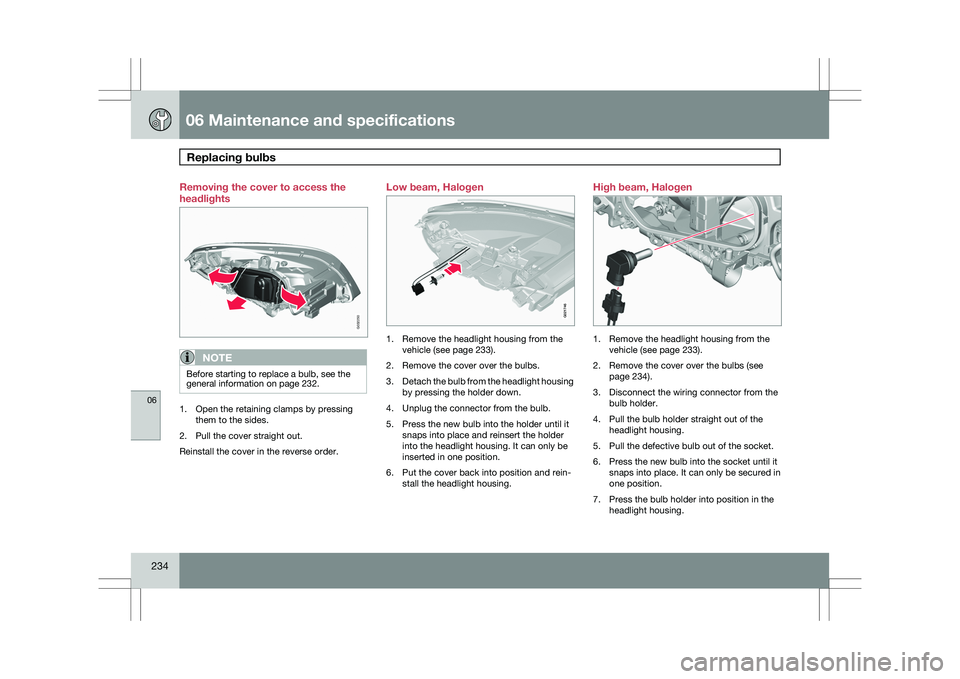
234 Removing the cover to access the
headlights
NOTE
Before starting to replace a bulb, see the
general information on page 232.
1. Open the retaining clamps by pressing
them to the sides.
2. Pull the cover straight out.
Reinstall the cover in the reverse order. Low beam, Halogen
1. Remove the headlight housing from the
vehicle (see page 233).
2. Remove the cover over the bulbs.
3. Detach the bulb from the headlight housing
by pressing the holder down.
4. Unplug the connector from the bulb.
5. Press the new bulb into the holder until it snaps into place and reinsert the holder
into the headlight housing. It can only be
inserted in one position.
6. Put the cover back into position and rein- stall the headlight housing. High beam, Halogen
1. Remove the headlight housing from the
vehicle (see page 233).
2. Remove the cover over the bulbs (see page 234).
3. Disconnect the wiring connector from the bulb holder.
4. Pull the bulb holder straight out of the headlight housing.
5. Pull the defective bulb out of the socket.
6. Press the new bulb into the socket until it snaps into place. It can only be secured in
one position.
7. Press the bulb holder into position in the headlight housing. G032250 G021746 G032252