2009 VOLVO XC60 warning light
[x] Cancel search: warning lightPage 92 of 297
03 Your driving environmentLighting 03
90
NOTE \b
Regulations regarding the use of the
hazard warning flasher may vary,
depending on where you live.
\b The hazard warning flashers will be acti-
vated automatically if an airbag
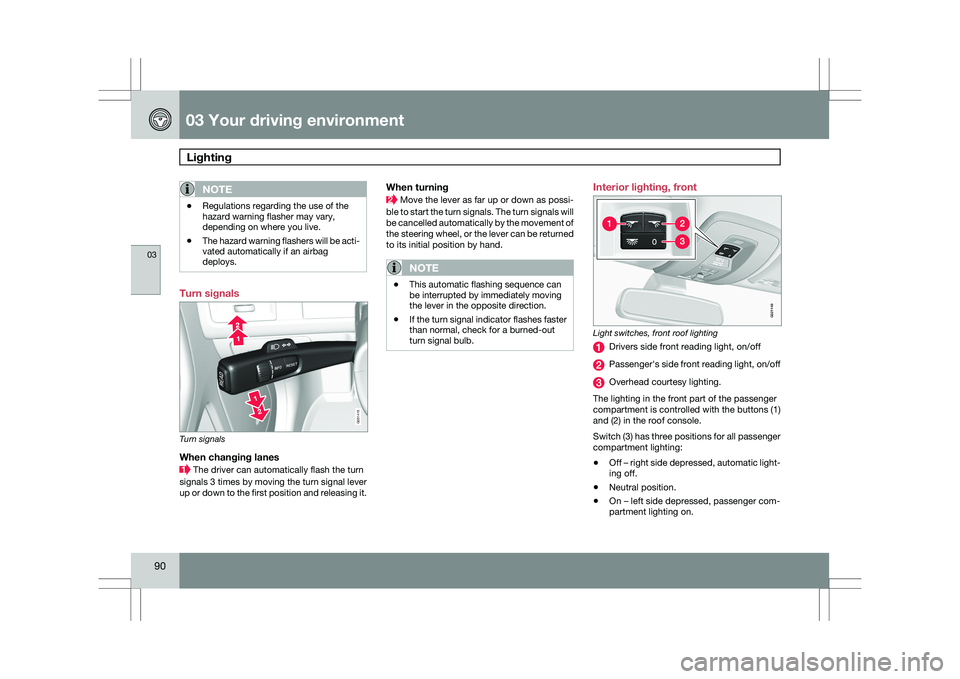
deploys. Turn signals
Turn signals
When changing lanes
The driver can automatically flash the turn
signals 3 times by moving the turn signal lever
up or down to the first position and releasing it.
When turning Move the lever as far up or down as possi-
ble to start the turn signals. The turn signals will
be cancelled automatically by the movement of
the steering wheel, or the lever can be returned
to its initial position by hand.
NOTE \b
This automatic flashing sequence can
be interrupted by immediately moving
the lever in the opposite direction.
\b If the turn signal indicator flashes faster
than normal, check for a burned-out
turn signal bulb. Interior lighting, front
Light switches, front roof lighting
Drivers side front reading light, on/off
Passenger\fs side front reading light, on/off
Overhead courtesy lighting.
The lighting in the front part of the passenger
compartment is controlled with the buttons (1)
and (2) in the roof console.
Switch (3) has three positions for all passenger
compartment lighting:
\b Off – right side depressed, automatic light-
ing off.
\b Neutral position.
\b On – left side depressed, passenger com-
partment lighting on. G031415 G02114
9
Page 98 of 297

03 Your driving environmentPower windows 03
96
* Option/accessory, for more information, see Introduction.
Power windows
Driver's door control panel
Switch for power child safety locks* and
disengaging rear power window buttons,
see page 65
Rear window controls
Front window controls.
WARNING
\b
Always remove the ignition key when
the vehicle is unattended.
\b Never leave children unattended in the
vehicle.
\b Make sure that the windows are com-
pletely unobstructed before they are
operated.
Operating Operating the power windows
Manual up/down
Auto up/down.
All power windows can be operated using the
control panel in the driver\fs door. The control
panels in the other doors only operate the win-
dow in the respective doors.
For the power windows to function, the ignition
must be in at least mode I. When the vehicle
has been running, the power windows can be
operated for several minutes after the remote
key has been removed from the ignition slot, or
until a door has been opened.NOTE \b
Movement of the windows will stop if
they are obstructed in any way.
\b To reduce buffeting wind noise if the
rear windows are opened, also open the
front windows slightly.
Manual up/down–
Move one of the controls up/down slightly.
> The power windows move up/down as
long as the control is held in position.
Auto up/down– Move one of the controls up/down as far
as possible and release it.
> The window will open or close com-
pletely.
ResettingIf the battery has been disconnected, the auto
open function must be reset so that it will work
properly.
1. Gently raise the front section of the button
to close the window and hold it for one
second.
2. Release the button briefly.
3. Raise the front section of the button again for one second. G031423 G031424
Page 100 of 297

03 Your driving environmentMirrors 03
98
* Option/accessory, for more information, see Introduction.
Power door mirrors
Door mirror controls
Adjusting1.
Press the L button for the left door mirror
or the R button for the right door mirror.
The light in the button comes on.
2. Adjust the position with the joystick in the center.
3. Press the L or R button again. The light
should no longer be on.
WARNING Objects seen in the mirrors may appear fur-
ther away than they actually are.
Retractable power door mirrors*The mirrors can be retracted for parking/driving
in narrow spaces:
1.
Press down the L and R buttons at the
same time.
2. Release them after approximately one sec-
ond. The mirrors automatically stop in the
fully retracted position.
Fold out the mirrors by pressing down the L
and R buttons at the same time. The mirrors
automatically stop in the fully extended posi-
tion.
Storing the position*The mirror positions are stored in the key mem-
ory when the vehicle has been locked with the
remote key. When the vehicle is unlocked with
the same remote control the mirrors and the
driver\fs seat adopt the stored positions when
the driver\fs door is opened.
The function can be activated/deactivated
under Car key memory Seat & mirror
positions. For a description of the menu sys-
tem, see page 122.
Tilting the door mirror when parking*The door mirrors can be tilted down to help
give the driver a better view along the sides of
the vehicle, for example when parallel parking. To acitvate this function, select reverse gear
and press the L or R mirror control button to tilt
the mirror down.
The door mirror will reset to its normal position:
\b
after 10 seconds when reverse is disen-
gaged and the car remains stopped.
\b immediately when reverse is disengaged
and the vehicle\fs forward speed exceeds
approximately 6 mph (10 km/h).
\b immediately if you press the correspond-
ing L or R button again.
\b when the engine is turned off.
\b when the side mirrors are folded in.
NOTE Only one mirror can be tilted down at a time.
Automatic retraction when lockingWhen the vehicle is locked/unlocked with the
remote key the door mirrors are automatically
retracted/extended.
The function can be activated/deactivated
under Car settings
Retract mirrors when
locking. For a description of the menu system,
see page 122.
Resetting to neutralMirrors that have been moved out of position
by an external force must be electrically reset G031425
Page 102 of 297
03 Your driving environmentPower panorama moonroof* 03
100
* Option/accessory, for more information, see Introduction.
Introduction
The panorama moonroof is divided into two
sections.
\b
The rear glass section is fixed in place and
cannot be moved.
\b The front glass section can be slid hori-
zontally to the open or closed positions or
its rear edge can be raised and lowered to
allow ventilation.
All references in this section to opening or clos-
ing the panorama moonroof pertain to the front
glass section.
The panorama moonroof also has a sun shade
made of perforated fabric that is located below
the sections of glass. This shade can be
opened or closed, for example when driving in
bright sunlight.
Both the panorama moonroof and the sun
shade are operated by the controls in the ceil-
ing console, near the rear-view mirror. The
vehicle\fs ignition must be in mode I or II before
the moonroof/sun shade can be operated.
CAUTION \b
Remove ice and snow before opening
the moonroof.
\b Do not operate the moonroof if it is fro-
zen closed.
\b Never place heavy objects on the
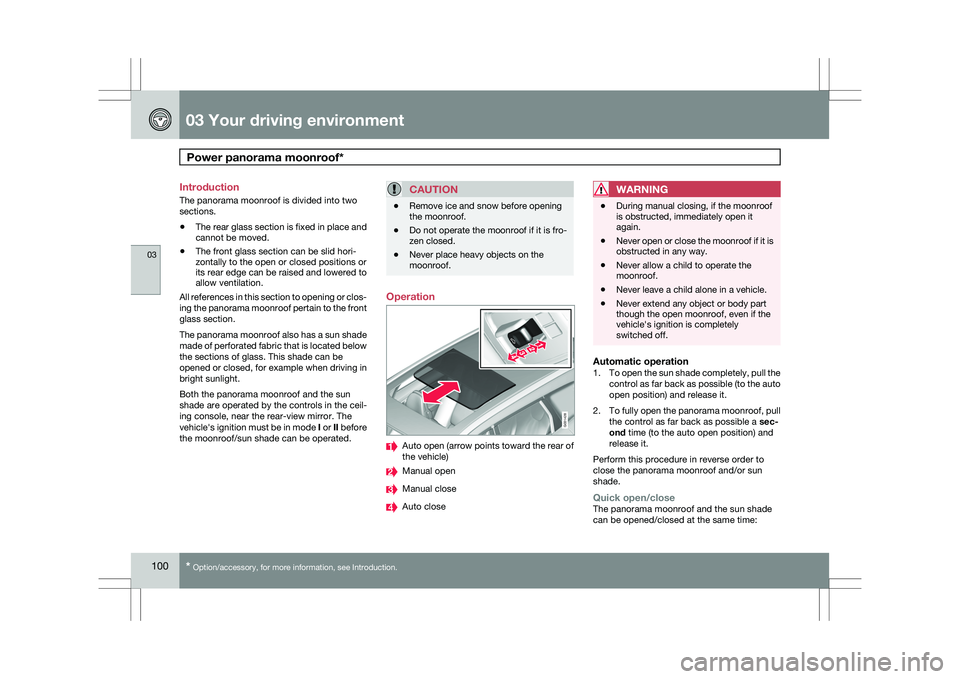
moonroof. Operation
Auto open (arrow points toward the rear of
the vehicle)
Manual open
Manual close
Auto closeWARNING \b
During manual closing, if the moonroof
is obstructed, immediately open it
again.
\b Never open or close the moonroof if it is
obstructed in any way.
\b Never allow a child to operate the
moonroof.
\b Never leave a child alone in a vehicle.
\b Never extend any object or body part
though the open moonroof, even if the
vehicle\fs ignition is completely
switched off.
Automatic operation1.
To open the sun shade completely, pull the
control as far back as possible (to the auto
open position) and release it.
2. To fully open the panorama moonroof, pull
the control as far back as possible a sec-
ond time (to the auto open position) and
release it.
Perform this procedure in reverse order to
close the panorama moonroof and/or sun
shade.
Quick open/closeThe panorama moonroof and the sun shade
can be opened/closed at the same time: G031428
Page 104 of 297
03 Your driving environmentHomeLink® Wireless Control System* 03
102
* Option/accessory, for more information, see Introduction.
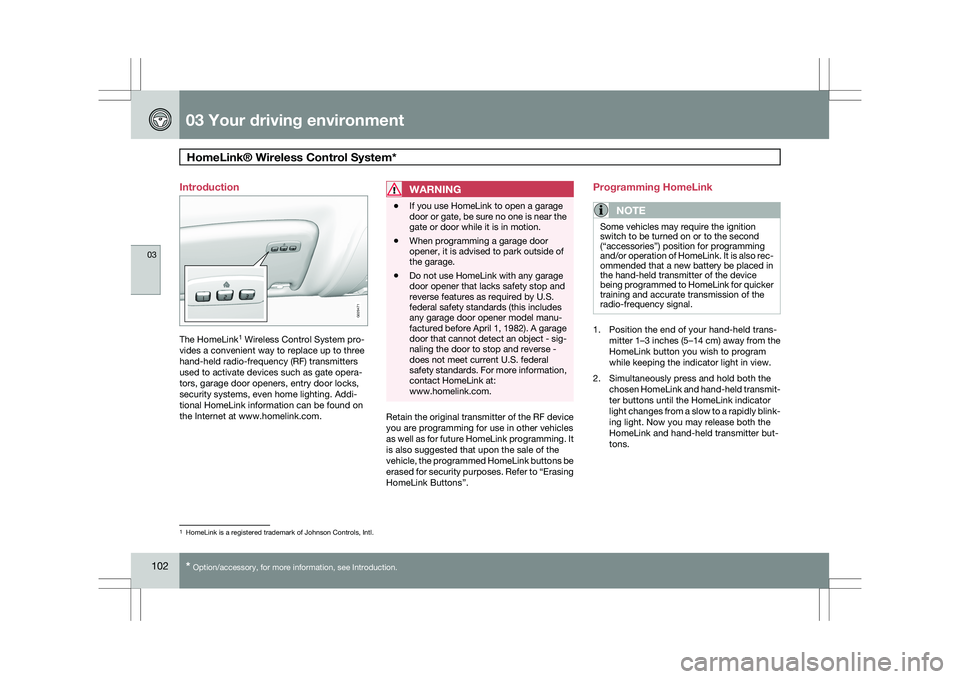
Introduction
The HomeLink
1
Wireless Control System pro-
vides a convenient way to replace up to three
hand-held radio-frequency (RF) transmitters
used to activate devices such as gate opera-
tors, garage door openers, entry door locks,
security systems, even home lighting. Addi-
tional HomeLink information can be found on
the Internet at www.homelink.com.
WARNING \b
If you use HomeLink to open a garage
door or gate, be sure no one is near the
gate or door while it is in motion.
\b When programming a garage door
opener, it is advised to park outside of
the garage.
\b Do not use HomeLink with any garage
door opener that lacks safety stop and
reverse features as required by U.S.
federal safety standards (this includes
any garage door opener model manu-
factured before April 1, 1982). A garage
door that cannot detect an object - sig-
naling the door to stop and reverse -
does not meet current U.S. federal
safety standards. For more information,
contact HomeLink at:
www.homelink.com. Retain the original transmitter of the RF device
you are programming for use in other vehicles
as well as for future HomeLink programming. It
is also suggested that upon the sale of the
vehicle, the programmed HomeLink buttons be
erased for security purposes. Refer to “Erasing
HomeLink Buttons”.Programming HomeLink
NOTE Some vehicles may require the ignition
switch to be turned on or to the second
(“accessories”) position for programming
and/or operation of HomeLink. It is also rec-
ommended that a new battery be placed in
the hand-held transmitter of the device
being programmed to HomeLink for quicker
training and accurate transmission of the
radio-frequency signal.
1. Position the end of your hand-held trans-
mitter 1–3 inches (5–14 cm) away from the
HomeLink button you wish to program
while keeping the indicator light in view.
2. Simultaneously press and hold both the chosen HomeLink and hand-held transmit-
ter buttons until the HomeLink indicator
light changes from a slow to a rapidly blink-
ing light. Now you may release both the
HomeLink and hand-held transmitter but-
tons. 1
HomeLink is a registered trademark of Johnson Controls, Intl. G029471
Page 107 of 297

03 Your driving environment
Starting the engine03
}}
105
Starting the engine
Ignition switch with remote key inserted ( see
page 79for more information on ignition modes)
WARNING
Before starting the engine:
\b
Fasten the seat belt.
\b Check that the seat, steering wheel and
mirrors are adjusted properly.
\b Make sure the brake pedal can be
depressed completely. Adjust the seat
if necessary. 1. Insert the remote key into the ignition slot
with the buttons upward and the metallic
key blade pointing outward (not inserted
into the slot) 1
. 2. Push lightly on the remote key. It will be
automatically drawn into the ignition slot in
the correct position. 3.
Depress the brake pedal 2
. Press and
release the START/STOP ENGINE button.
The autostart function will operate the
starter motor until the engine starts.
The starter motor operates for a maximum
of 10 seconds. If the engine has not
started, repeat the procedure.
WARNING An extra mat on the driver\fs floor can cause
the accelerator and/or brake pedal to catch.
Check that the movement of these pedals is
not impeded. Not more than one protective
floor covering may be used at one time.
1
On vehicles with the optional keyless drive, it is only necessary to hav\
e a remote key in the passenger’s compartment.
2 If the vehicle is moving, it is only necessary to press the START/STOP E\
NGINE button to start the vehicle.
Page 108 of 297

03 Your driving environmentStarting the engine 03
106
* Option/accessory, for more information, see Introduction.
WARNING \b
Always remove the remote key from the
ignition slot when leaving the vehicle,
especially if there are children in the
vehicle.
\b Never remove the remote key from the
ignition slot while driving or when the
vehicle is being towed. The steering
lock could otherwise be activated, mak-
ing it impossible to steer the vehicle. On
vehicles with the optional keyless drive,
never remove the remote key from the
vehicle while driving or during towing.
\b Always place the gear selector in Park
and apply the parking brake before
leaving the vehicle. Never leave the
vehicle unattended with the engine run-
ning.
\b Always open garage doors fully before
starting the engine inside a garage to
ensure adequate ventilation. The
exhaust gases contain carbon monox-
ide, which is invisible and odorless but
very poisonous.NOTE \b
The idling speed can be noticeably
higher than normal during cold starts.
This is to enable emission control sys-
tem can reach normal operating tem-
perature as quickly as possible, which
helps reduce exhaust emissions 3
.
\b Keylock: Your vehicle is equipped with
a keylock system. When the engine is
switched off, the gear selector must be
in the Park position before the key can
be removed 4
from the ignition slot.CAUTION \b
When starting in cold weather, the auto-
matic transmission may shift up at
slightly higher engine speeds than nor-
mal until the automatic transmission
fluid reaches normal operating tem-
perature.
\b Do not race a cold engine immediately
after starting. Oil flow may not reach
some lubrication points fast enough to
prevent engine damage.
\b The engine should be idling when you
move the gear selector. Never acceler-
ate until after you feel the transmission
engage. Accelerating immediately after
selecting a gear will cause harsh
engagement and premature transmis-
sion wear.
\b Selecting
P or N when idling at a stand-
still for prolonged periods of time will
help prevent overheating of the auto-
matic transmission fluid.
Keyless drive*Follow steps 3 – 4 for starting the engine. 3
If the gear selector is in the D or R positions and the car is not moving, engine speed (rpm) will be lower\
and it will take longer for the engine to reach normal operating temper\
ature.
4 Does not apply to vehicles with the optional keyless drive.
Page 113 of 297

03 Your driving environment
Transmission03
111
All Wheel Drive – AWD
4Your Volvo can be equipped with permanent
All Wheel Drive, which means that power is
distributed automatically between the front
and rear wheels. Under normal driving condi-
tions, most of the engine\fs power is directed to
the front wheels. However, if there is any ten-
dency for the front wheels to spin, an electron-
ically controlled coupling distributes power to
the wheels that have the best traction.
NOTEThe message
AWD disabled Service
required will be appear in the information
display if an electrical fault should occur in
the AWD system. A warning light will also
illuminate in the instrument panel. If this
occurs, have the system checked by a
trained and qualified Volvo service techni-
cian.
4 Standard on certain models.