2009 VOLVO XC60 steering wheel
[x] Cancel search: steering wheelPage 89 of 297

03 Your driving environment
Lighting03
}}
87
Lighting panel
Overview, light switches
Thumb wheel for adjusting display and
instrument lighting
Rear fog light
Front fog lights
Headlights/parking lights
Instrument lightingIllumination of the display and instrument lights
will vary, depending on ignition mode.
The display lighting is automatically subdued
in darkness and the sensitivity is set with the
thumb wheel.
The intensity of the instrument lighting is
adjusted with the thumb wheel. High/low beam headlights
Headlight switch and lever
Daytime running lights/no
high beams
Parking lights
Low beamsLow beamsWhen the engine is started, the low beams are
activated automatically (daytime running lights)
if the headlight control is in position
0 or .Daytime running lights can be deactivated by
a trained and qualified Volvo service techni-
cian.
NOTE \b
The use of daytime running lights is
mandatory in Canada.
\b Continuous high beams cannot be acti-
vated when the headlight switch is in
position or 0. High beam flash will
function in these positions.
High beam flash– Move the lever toward the steering wheel
to position . The high beams come on
until the lever is released.
High/low beam headlights
Continuous high beams
1. Set the ignition to mode II.
2. With the light switch in position ,
pull the turn signal lever toward the steer-
ing wheel to position to toggle between
high and low beams (this also applies on
models equipped with the optional Dual
Xenon headlights).
Page 90 of 297

03 Your driving environmentLighting 03
88
* Option/accessory, for more information, see Introduction.>
The symbol illuminates in the
instrument panel to indicate that the
high beams are on.
Dual Xenon Lights* Headlight pattern with the Active Dual Xenon func-
tion deactivated (left) and activated (right)
When this function is activated, the headlight
beams adjust laterally to help light up a curve
according to movements of the steering wheel
(see the right-pointing beam in the illustration).
This function is activated automatically when
the engine is started and can be deactivated/
reactivated by pressing the
button in
the center console. This button lights up when
the function is activated, and will flash if there
is a fault in the system.
NOTE This function is only active in twilight or dark
conditions, and only when the vehicle is in
motion.
Parking lights
Headlight control in position for parking lights
The front and rear parking lights can be turned
on even when the ignition is switched off.
Turn the headlight control to the center posi-
tion (the license plate lighting comes on at the
same time).
The lighting also comes on when the tailgate is
opened in order to alert anyone traveling
behind your vehicle.Brake lights
The brake lights come on automatically when
the brakes are applied.
Emergency brake lights (EBL)Emergency Brake Lights, EBL, activate in the
event of sudden braking or if the ABS system
is activated. This function causes an additional
taillight on each side of the vehicle to illuminate
to help alert vehicles traveling behind.
The EBL function activates if:
\b
The ABS system activates for more than
approximately a half second
\b In the event of sudden braking while the
vehicle is moving at speeds above approx-
imately 6 mph (10 km/h)
When the vehicle has come to a stop, the brake
lights and additional taillights remain on for as
long as the brake pedal is depressed or until
braking force on the vehicle is reduced. G021143
Page 92 of 297
03 Your driving environmentLighting 03
90
NOTE \b
Regulations regarding the use of the
hazard warning flasher may vary,
depending on where you live.
\b The hazard warning flashers will be acti-
vated automatically if an airbag
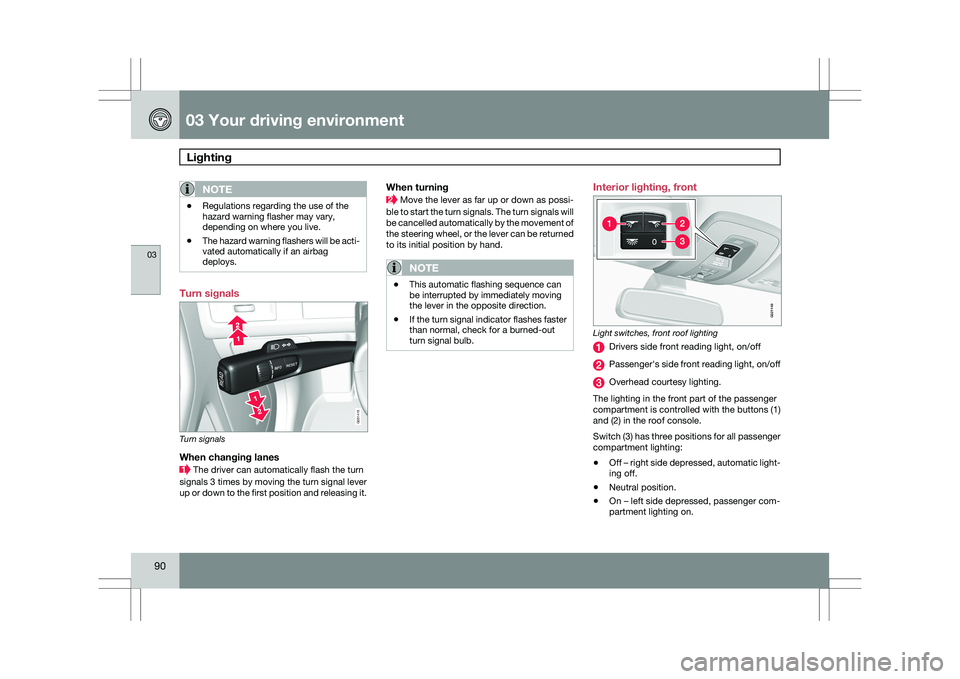
deploys. Turn signals
Turn signals
When changing lanes
The driver can automatically flash the turn
signals 3 times by moving the turn signal lever
up or down to the first position and releasing it.
When turning Move the lever as far up or down as possi-
ble to start the turn signals. The turn signals will
be cancelled automatically by the movement of
the steering wheel, or the lever can be returned
to its initial position by hand.
NOTE \b
This automatic flashing sequence can
be interrupted by immediately moving
the lever in the opposite direction.
\b If the turn signal indicator flashes faster
than normal, check for a burned-out
turn signal bulb. Interior lighting, front
Light switches, front roof lighting
Drivers side front reading light, on/off
Passenger\fs side front reading light, on/off
Overhead courtesy lighting.
The lighting in the front part of the passenger
compartment is controlled with the buttons (1)
and (2) in the roof console.
Switch (3) has three positions for all passenger
compartment lighting:
\b Off – right side depressed, automatic light-
ing off.
\b Neutral position.
\b On – left side depressed, passenger com-
partment lighting on. G031415 G02114
9
Page 93 of 297

03 Your driving environment
Lighting03
}}
* Option/accessory, for more information, see Introduction. 91
Interior lighting, rear
Rear reading lights (models with the optional pan-
orama moonroof)
Rear reading lights (models without the panorama
moonroof) The lights are switched on or off by pressing
each respective button.
Courtesy lights/door step lighting*The courtesy lights/door step lighting switch
on/off automatically when one of the front
doors is opened/closed.
Glove compartment lightingThe glove compartment lighting switches on/
off automatically when the lid is opened/
closed.
Overhead courtesy lightingThe passenger compartment lighting is
switched on and off automatically when button
(3) is in the neutral position.
The lighting comes on and remains on for
30 seconds if:
\b
the vehicle is unlocked from the outside
with the key or remote control
\b the engine is switched off and the ignition
is in mode 0.
The lighting switches off when:
\b the engine is started
\b the vehicle is locked from the outside.
The lighting comes on and remains on for two
minutes if one of the doors is open. The passenger compartment lighting can be
switched on and off manually within 30 minutes
after the vehicle has been unlocked.
If the lighting is switched on manually and the
vehicle is locked, the courtesy lighting will
switch off automatically after one minute.
Home safe lighting
When you leave your vehicle at night, you can
make use of the home safe lighting function to
illuminate the area in front of the vehicle.
1. Remove the key from the ignition slot.
2. Pull the direction indicator lever as far as
possible towards the steering wheel and
release it.
3. Exit the vehicle and lock the doors.
The headlights, parking lights, turn signals,
lights in the door mirrors, license plate lights,
and footwell lighting will illuminate and remain
on for 30 1
, 60 or 90 seconds. The time interval
can be set under Car settings Light
settings Home safe lighting. For a
description of the menu system, see
page 122. 1
Factory setting G031416 G021150
Page 96 of 297

03 Your driving environmentWipers and washers 03
94
* Option/accessory, for more information, see Introduction.
CAUTION The rain sensor should be deactivated when
washing the car in an automatic car wash,
etc. If the rain sensor function is left on, the
wipers will start inadvertently in the car
wash and could be damaged.
Windshield washing
Washing function
Move the lever toward the steering wheel to
start the windshield and headlight washers.
After the lever is released the wipers make sev-
eral extra sweeps.
Heated washer nozzles*The washer nozzles are heated automatically
in cold weather to help prevent the washer fluid
from freezing.
High-pressure headlight washing*High-pressure headlight washing consumes a
large quantity of washer fluid. To save fluid, the
headlights are washed using two alternatives:
\b
Low/high beam headlights on. The head-
lights will be washed the first time the wind-
shield is washed. Thereafter, the head-
lights will only be washed once for every
five times the windshield is washed within
a 10-minute period.
\b Parking lights on. Optional Active Dual
Xenon headlights will be washed once for
every five times the windshield is washed.
Normal halogen headlights will not be
washed.
CAUTION Use ample washer fluid when washing the
windshield. The windshield should be thor-
oughly wet when the wipers are in opera-
tion.
NOTE One headlight is washed at a time.
Tailgate wiper/washer
1. Intermittent wiping
2. Normal (continuous) wiping
Move the lever forward (see the arrow in the
illustration) to start the tailgate washer.
Tailgate wiper and reverse gearIf the windshield wipers are on and the trans-
mission is put into reverse gear, the tailgate
wiper will go into intermittent wiping function
1
. 1
Consult your Volvo retailer if you would like to have this function deac\
tivated. G031420G031421 G031420G031422
Page 107 of 297

03 Your driving environment
Starting the engine03
}}
105
Starting the engine
Ignition switch with remote key inserted ( see
page 79for more information on ignition modes)
WARNING
Before starting the engine:
\b
Fasten the seat belt.
\b Check that the seat, steering wheel and
mirrors are adjusted properly.
\b Make sure the brake pedal can be
depressed completely. Adjust the seat
if necessary. 1. Insert the remote key into the ignition slot
with the buttons upward and the metallic
key blade pointing outward (not inserted
into the slot) 1
. 2. Push lightly on the remote key. It will be
automatically drawn into the ignition slot in
the correct position. 3.
Depress the brake pedal 2
. Press and
release the START/STOP ENGINE button.
The autostart function will operate the
starter motor until the engine starts.
The starter motor operates for a maximum
of 10 seconds. If the engine has not
started, repeat the procedure.
WARNING An extra mat on the driver\fs floor can cause
the accelerator and/or brake pedal to catch.
Check that the movement of these pedals is
not impeded. Not more than one protective
floor covering may be used at one time.
1
On vehicles with the optional keyless drive, it is only necessary to hav\
e a remote key in the passenger’s compartment.
2 If the vehicle is moving, it is only necessary to press the START/STOP E\
NGINE button to start the vehicle.
Page 124 of 297

04 Comfort and driving pleasureMenus and messages 04
122
* Option/accessory, for more information, see Introduction.
Center console
Certain functions are controlled from the cen-
ter console via the menu system or from the
optional keypad in the steering wheel. Each
function is described under its respective sec-
tion.
The current menu level is shown at the top right
of display in the center console.
Center console controls
Center console with information display and con-
trols for menus
Menu navigation button – scrolls and
selects among menu options
MENU – selects menu options
EXIT – accesses the menu system ENTER – leads back one step in the menu
structure. A long press exits the menu sys-
tem.
Numerical keypad 1–9
Steering wheel keypad
ENTER
EXIT
Navigation buttons.
If the steering wheel keypad has ENTER and
EXIT, the buttons to have the same
function as those in the center console.
Search pathsAccess to some functions is provided directly
via the function buttons and others are access
through the menu system. Search paths to the menu system functions are
listed as follows: Car settings Lock
settings, if the following steps have been taken
first:
1. Press MENU.
2. Scroll to Menu and press ENTER.
3. Scroll to Submenu and press ENTER.
The navigation button can be used instead of
ENTER and EXIT when navigating the menu
hierarchy. The right arrow is equal to ENTER
and the left arrow to EXIT.
The menu options are numbered and can also
be selected directly with the numerical keypad
(1 – 9 only).
Menu overview
NOTE Menu selections will not be available (will be
"grayed out") when the vehicle is moving.
Car key memory
Seat & mirror positions
Car settings Fold mirr. when locking*
Collision warning settings*
Page 125 of 297

04 Comfort and driving pleasure
Menus and messages04
}}
* Option/accessory, for more information, see Introduction. 123
City Safety
Light settings
Lock settings
Reduced guard
1
Parking camera settings*
Steering force level*
Information
Climate settings Automatic blower adjust
Recirculation timer
Auto. rear defroster
Reset climate settings
Main menu AM
Audio settings 2
Sound stage
Equalizer, front
Equalizer, rear
Auto. volume control
Resets all audio settings.
Main menu FMFM settings Radio text
Advanced radio settings
Audio settings
Main menu CDRandom Off
Folder
Disc
Single disc
All discs
CD settings Disc text*
Audio settings
Main menu AUXVolume, AUX input
Audio settings Main instrument panel
Information display and menu controls
READ – access to the list of messages and
message confirmation.
Thumbwheel – browse among menus and
options in the list of functions.
RESET – reset the active function. Used in
certain cases to select/activate a function,
see the explanation under each respective
function.
The menus shown on the information displays
in the instrument panel are controlled with the
left lever. The menus shown depend on ignition
mode. Press READ to erase a message and
return to the menus. 1
Certain models
2 The menu option for audio settings is available in all audio sources. G022908