2009 VOLVO XC60 warning
[x] Cancel search: warningPage 185 of 297

04 Comfort and driving pleasure
Driver Alert System*04
}}
* Option/accessory, for more information, see Introduction. 183
Operating DAC
Certain settings can be made from the menu
system controlled from the center instrument
panel, see page 122 for more information on
the menu system.
The current system status can be checked on
the trip computer’s display by using the but-
tons on the left steering wheel lever. Thumb wheel. Turn this wheel until
Driver
Alert is displayed. The second line shows
the alternative Off, Unavailable, or
[-----], i.e., the number of bars. READbutton. Confirms and erases a mes-
sage in the display.
Activating DACIn the center instrument panel, go to
Car
settings Driver Alert and select On.
The function is activated when the
vehicle exceeds a speed of 40 mph
(65 km/h). The display will show level
markings of 1–5 bars, where a low
number of bars indicates erratic driving. A high
number of bars indicates stable driving. If the vehicle is being driven erratically, the
driver will be alerted by an audible signal and
the message Driver Alert, Time for a break is
displayed. The warning will be repeated after a
short time if the driving pattern remains the
same.WARNING
\b
An alert should be taken seriously since
it is sometimes difficult for a driver to
realize that he/she is fatigued.
\b In the event of a warning or if the driver
feels fatigued, stop as soon as possible
in a safe place and rest. G01732
9
Page 187 of 297

04 Comfort and driving pleasure
Driver Alert System*04
}}
* Option/accessory, for more information, see Introduction. 185
Lane Departure Warning (LDW)–
general information
This function is designed to help reduce the
risk of accidents in situations where the vehicle
leaves its lane and there is a risk of driving off
the road or into the opposite lane. LDW con-
sists of a camera that monitors the lane’s side
marker lines. The driver is alerted by an audible
signal if the vehicle crosses a side marker line
or the road’s center dividing line. Operation and function
LDW can be switched on or off by pressing the
button on the center console. A light in the but-
ton illuminates when the function is on.
The trip computer display shows Lane Depart
Warn Unavailable when the function is in
standby mode.
When LDW is in standby mode, the function is
activated automatically after the camera has
monitored the road’s side marker lines and the
vehicle’s speed exceeds 40 mph (65 km/h).
Lane Depart Warn Available will be dis-
played.If the camera can no longer monitor the road’s
side marker lines, or if the vehicle’s speed falls
below 37 mph (60 km/h), LDW will return to
standby mode and
Lane Depart Warn
Unavailable will be displayed.
If the vehicle unexpectedly crosses the lane’s
left or right side marker lines, the driver will be
alerted by an audible signal.
No warning signal will be given in the follow-
ing situations:
\b The turn signal is being used
\b The driver’s foot is on the brake pedal 1
\b The throttle pedal is pressed quickly
\b If the steering wheel is moved quickly
\b In sharp turns that cause the vehicle’s
body to sway.
See page 162 for information on the camera’s
limitations.
WARNING The driver will only be warned once for each
time the wheels cross a marker line. No
alarm will be given if a marker line is
between the wheels.
1
A warning will be given even when Increased sensitivity has been selected. G032699 G032014
Page 188 of 297
04 Comfort and driving pleasureDriver Alert System* 04
186
* Option/accessory, for more information, see Introduction.
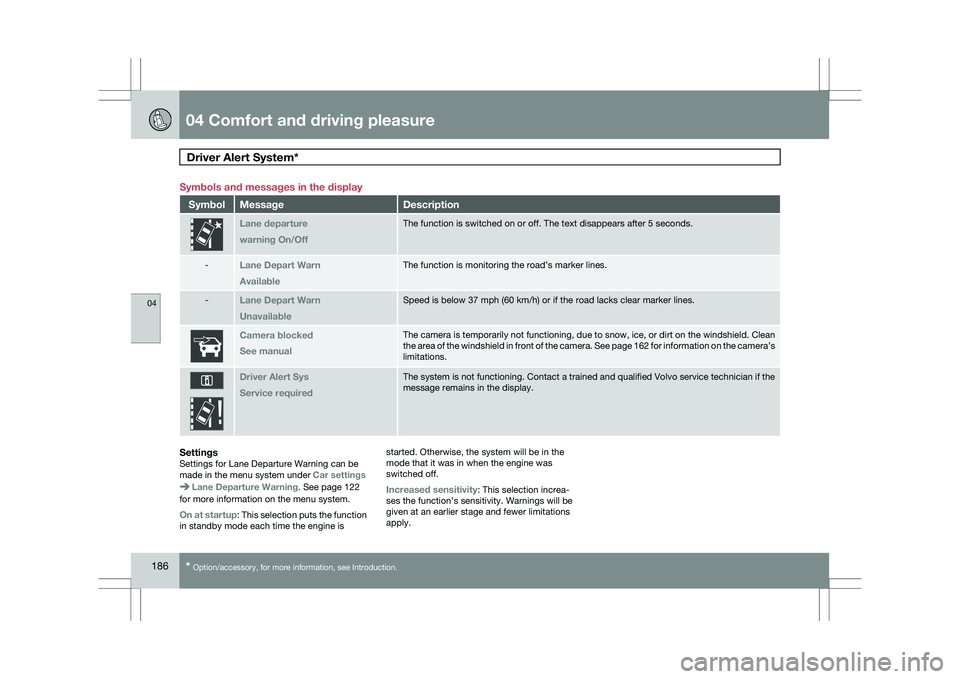
Symbols and messages in the display
Symbol Message Description
Lane departure
warning On/Off The function is switched on or off. The text disappears after 5 seconds.\
-
Lane Depart Warn
Available The function is monitoring the road’s marker lines.
-
Lane Depart Warn
Unavailable Speed is below 37 mph (60 km/h) or if the road lacks clear marker line\
s.
Camera blocked
See manual The camera is temporarily not functioning, due to snow, ice, or dirt on \
the windshield. Clean
the area of the windshield in front of the camera. See page
162 for information on the camera’s
limitations. Driver Alert Sys
Service required The system is not functioning. Contact a trained and qualified Volvo ser\
vice technician if the
message remains in the display.
SettingsSettings for Lane Departure Warning can be
made in the menu system under
Car settingsLane Departure Warning. See page 122
for more information on the menu system.
On at startup: This selection puts the function
in standby mode each time the engine is started. Otherwise, the system will be in the
mode that it was in when the engine was
switched off.
Increased sensitivity: This selection increa-
ses the function’s sensitivity. Warnings will be
given at an earlier stage and fewer limitations
apply.
Page 189 of 297

04 Comfort and driving pleasure
Park assist*04
}}
* Option/accessory, for more information, see Introduction. 187
Introduction
The park assist system is designed to assist
you when driving into parking spaces, garages,
etc. It utilizes four ultrasound sensors located
in one or both bumpers to measure the dis-
tance to a vehicle, object, or a person who may
be close to the front or rear of your vehicle.
This system is available in the rear bumper
only, or in both the front and rear bumpers.
Park assist utilizes four ultrasound sensors in
the bumper(s) to measure the distance to a
vehicle, object, or a person who may be close
to the front or rear of your vehicle. An audible
signal and symbols in the audio system’s dis-
play indicate the distance to the object
WARNING
Park Assist is an information system, NOT a
safety system. This system is designed to
be a supplementary aid when parking the
vehicle. It is not, however, intended to
replace the driver\fs attention and judge-
ment. Function
Park assist button
The system is activated automatically when the
vehicle is started. The indicator light in the but-
ton in the center console illuminates when the
system is on.
\b
The front park assist system is active from
the time the engine is started until the vehi-
cle exceeds a speed of approximately
10 mph (15 km/h). It is also active when the
vehicle is backing up.
\b Rear park assist is active when the engine
is running and reverse gear has been
selected.
Activating/deactivatingThe system is activated automatically when the
vehicle is started.
–
Press the Park assist button on the center
console to temporarily deactivate the sys-
tem(s).
> The indicator light in the button will go
out when the system has been deacti-
vated.
Park assist will be automatically reactivated the
next time the engine is started, or if the button
is pressed (the indicator light in the button will
illuminate).
NOTE \b
Front park assist is disengaged auto-
matically when the parking brake is
applied.
\b If the vehicle is equipped with front and
rear park assist, both systems will be
deactivated by pressing the button. G031399
Page 191 of 297

04 Comfort and driving pleasure
Park assist*04
* Option/accessory, for more information, see Introduction. 189
Front park assistThe distance monitored in front of the vehicle
is approximately 2.5 ft (0.8 m). The audible sig-
nal comes from the audio system\fs front
speakers.
It may not be possible to combine auxiliary
headlights and front park assist since these
lights could trigger the system\fs sensors.
Faults in the system
If the information symbol illuminates and
Park
Assist syst Service required is shown on the
information display, this indicates that the sys-
tem is not functioning properly and has been
disengaged. Consult a trained and qualified
Volvo service technician.CAUTION In certain circumstances, the park assist
system may give unexpected warning sig-
nals that can be caused by external sound
sources that use the same ultrasound fre-
quencies as the system. This may include
such things as the horns of other vehicles,
wet tires on asphalt, pneumatic brakes,
motorcycle exhaust pipes, etc. This does
not indicate a fault in the system.
Cleaning the sensors
Location of the front sensors Location of the rear sensors
The sensors must be cleaned regularly to
ensure that they work properly. Clean them
with water and a suitable car washing deter-
gent.
Ice and snow covering the sensors may cause
incorrect warning signals.
NOTE
If the sensors are obstructed by e.g., dirt,
snow, or ice, this could result in false warn-
ing signals from the park assist system. G031401 G031402 G031403
Page 192 of 297

04 Comfort and driving pleasurePark Assist Camera (PAC)* 04
190
* Option/accessory, for more information, see Introduction.
Introduction
The Park Assist Camera uses the display on the
dashboard to show the area behind the car
while you are backing up.
PAC also shows guiding lines in the on-screen
image to indicate the direction that the vehicle
will take as it moves rearward, which helps
simplify parallel parking, backing into a tight
space or when attaching a trailer to the vehicle.
NOTE
PAC can only be installed on vehicles equip-
ped with the Volvo’s own navigation system
VNS.
WARNING
\b
PAC is designed to be a supplementary
aid when parking the vehicle. It is not,
however, intended to replace the
driver’s attention and judgment.
\b The camera has blind spots where it
cannot detect objects or people behind
the vehicle.
\b Pay particular attention to people or ani-
mals that are close to the vehicle. Function
The driver sees what is behind the vehicle and
if a person or animal should suddenly appear
from the side.
PAC is mounted on the tailgate, near the open-
ing handle.
The camera has built-in electronics that help
reduce the “fish-eye” effect so that the image
shown on the screen is as natural as possible.
This may cause some objects on the screen to
“lean,” which is normal.
WARNING
Objects seen on the screen may be closer
than they appear to be.
Ambient lighting conditionsThe camera automatically monitors the ambi-
ent lighting conditions behind the vehicle and
constantly adjusts sensitivity to light. This may
cause the brightness and quality of the image
on the screen to vary slightly. Sensitivity to light
is increased in dark conditions or in bad
weather, which may affect image quality.
If the image on the screen seems too dark,
brightness can be increased with the thumb
wheel, (no. 1 in the illustration on page 93).
NOTE In order to function properly, the camera
lens should always be kept clean. This is
particularly important in bad weather. Keep
the lens free of dirt, ice or snow.
Using PAC
ActivationPAC is activated when the gear selector is
moved to R if the system is set to Automatic
under Parking camera settings in the menu
system, see page 122.
If the Volvo Navigation System (VNS) is in use,
PAC will automatically override the navigation
system to show the camera\fs image on the
screen instead of navigation information, for as
long as reverse gear is selected. G031930
Page 193 of 297

04 Comfort and driving pleasure
Park Assist Camera (PAC)*04
}}
* Option/accessory, for more information, see Introduction. 191
DeactivationMove the gear selector from
R to another posi-
tion. There is a slight delay in the PAC system,
which means that the view from behind the
vehicle will remain on the screen for approxi-
mately 15 seconds after the gear selector has
been moved from the R position or until the
vehicle reaches a forward speed of 6 mph
(10 km/h). The screen will then revert to the
mode that it was in before R was selected and
will, for example, display navigation system
information.
Guiding lines The lines on the screen are projected as if they
were a path on the ground behind the vehicle
and are affected by the way in which the steer-
ing wheel is turned. This enables the driver to see path the vehicle will take, even if he/she
turns the steering wheel while backing up.
NOTE When backing up with a trailer, the guiding
lines show the path that the vehicle will
take, not the trailer.
WARNING
Keep in mind that the image on the screen
only shows the area behind the vehicle. The
driver must always watch for people, ani-
mals, other vehicles, etc., near the sides of
the vehicle when turning while backing up.
Sidelines The sidelines indicate approximately 4 inches
(10 cm) of free space from the outer edge of the
door mirrors to the inside of the sideline.
These sidelines extend 6.5 ft (2 meters) behind
the vehicle.
Intersecting linesThe short lines that intersect the sidelines show
the distance rearward from the bumper.
\b
Red line: the distance is 1 ft (0.3 meters)
\b Yellow line: the distance is 5 ft (1.5 meters)
Vehicles equipped with Park Assist If the vehicle is equipped with the optional Park
Assist system (see page 187), the colored
markers in the display indicate the distance to
an object, for example, when parallel parking. G000000 G031931
Page 195 of 297

04 Comfort and driving pleasure
Blind Spot Information System*04
}}
* Option/accessory, for more information, see Introduction. 193
Introduction
BLIS camera
Indicator light
BLIS symbol
The Blind Spot Information System (BLIS) is an
information system that indicates the presence
of another vehicle moving in the same direction
as your vehicle in the side-view mirror\fs "blind
area."
CAUTION The BLIS system should only be repaired by
a trained and qualified Volvo service tech-
nician.
WARNING \b
BLIS is an information system, NOT a
warning or safety system.
\b BLIS does not eliminate the need for
you to visually confirm the conditions
around you, and the need for you to turn
your head and shoulders to make sure
that you can safely change lanes.
\b As the driver, you have full responsibility
for changing lanes in a safe manner. The system is based on digital camera tech-
nology. The cameras are located beneath the
side-view mirrors.
When one (or both) of the cameras have
detected a vehicle in the blind area (up to
approximately 10 ft. (3 meters) from the side of
your vehicle, and up to approximately 31 ft.
(9.5 meters) behind the side-view mirror), see
the illustration, the indicator light in the door
panel illuminates. The light will glow continu-
ously to alert the driver of the vehicle in the
blind area.NOTE The door panel indicator light illuminates on
the side of the vehicle where the system has
detected another vehicle. If your vehicle is
passed on both sides at the same time, both
lights will illuminate.
BLIS has an integrated function that alerts the
driver if a fault should occur with the system.
For example, if one or both of the system\fs
cameras are obscured, a message (see the
table on page 196) will appear in the informa-
tion display in the instrument panel. If this
occurs, clean the camera lenses. If necessary,
the system can be temporarily switched off (for
instructions, see page 195).
Areas monitored by BLIS Distance A = approx.
31 ft. (9.5 meters), Distance B = approx. 10 ft.
(3 meters) G031404 G01783
4